
1. Introduction
This manual provides detailed instructions for the installation, operation, and maintenance of the XIBEIKE Instrument Cluster LCD Screen Display. This product is designed as a direct replacement part for specific BMW models to address common issues such as pixel loss or display malfunction in the instrument cluster.
Please read this manual thoroughly before attempting installation or use to ensure proper function and longevity of the product.
2. Product Overview
The XIBEIKE Instrument Cluster LCD Screen Display is a high-quality replacement component manufactured to precise specifications. It is designed to restore clear and functional display capabilities to your vehicle's instrument cluster.

Figure 2.1: Front view of the LCD screen display, showing the main display area.
Key Features:
- Newly manufactured and rigorously tested for stable performance.
- Constructed from environmentally friendly materials, ensuring safety and reliability.
- Designed for perfect compatibility with original equipment, enhancing user experience.
- Simple installation procedure and convenient operation.

Figure 2.2: Rear view of the LCD screen display, illustrating the flexible circuit board (FPC) connections.
3. Compatibility
This LCD screen display is specifically designed for direct installation in the following BMW models manufactured up to the year 2003:
- BMW E53 (X5 Series)
- BMW E38 (7-series)
- BMW E39 (5-series)
Please verify your vehicle's model and manufacturing year to ensure compatibility before proceeding with installation.
4. Setup and Installation
Installation of the XIBEIKE Instrument Cluster LCD Screen Display requires careful handling and familiarity with automotive electronics. It is recommended that installation be performed by a qualified professional to prevent damage to the product or your vehicle.
Required Tools (Not Included):
- Torx screwdrivers (various sizes)
- Plastic trim removal tools
- Soldering iron and solder (for some applications, depending on the specific cluster design)
- Anti-static wrist strap
General Installation Steps (Consult a service manual for your specific vehicle model for detailed instructions):
- Disconnect Battery: Before beginning any work, disconnect the vehicle's battery to prevent electrical shorts or damage.
- Remove Instrument Cluster: Carefully remove the instrument cluster from the dashboard. This typically involves removing trim pieces and screws.
- Disassemble Cluster: Disassemble the instrument cluster housing to access the existing LCD screen. Note the position of all components and connectors.
- Remove Old LCD: Gently detach the old LCD screen. Be extremely careful with the flexible circuit board (FPC) connections, as they are delicate.
- Install New LCD: Align the new XIBEIKE LCD screen display with the connectors and carefully attach it. Ensure the flexible circuit board is properly seated and secured. Avoid applying excessive force.
- Reassemble Cluster: Reassemble the instrument cluster in reverse order of disassembly. Ensure all screws and clips are securely fastened.
- Reinstall Cluster: Reinstall the instrument cluster into the dashboard.
- Reconnect Battery: Reconnect the vehicle's battery.
- Test Functionality: Turn on the ignition and verify that the new LCD screen display functions correctly and all pixels are clear.

Figure 4.1: Angled view highlighting the flexible circuit board (FPC) which connects the display to the instrument cluster's main board.
Warning: Improper installation can lead to damage to the product or vehicle electronics. If you are unsure about any step, seek professional assistance.
5. Operation
The XIBEIKE Instrument Cluster LCD Screen Display operates as an integral part of your vehicle's instrument cluster. Once correctly installed, it will automatically display information such as speed, RPM, fuel level, temperature, and other vehicle status indicators, as controlled by the vehicle's onboard computer system.
No direct user interaction with the LCD screen itself is required for its operation. All display functions are managed through the vehicle's existing controls and sensors.
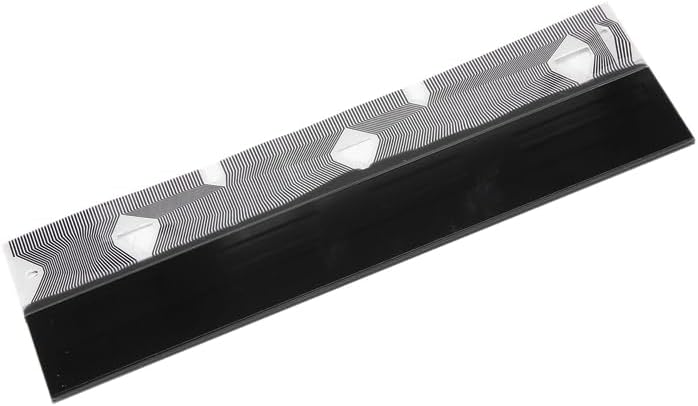
Figure 5.1: Side profile of the LCD screen display, showing its slim design.
6. Maintenance
The XIBEIKE Instrument Cluster LCD Screen Display is designed for long-term, maintenance-free operation. To ensure its longevity and clear visibility, follow these general guidelines:
- Cleaning: If the display surface becomes dusty or smudged, gently wipe it with a soft, lint-free cloth. For stubborn marks, slightly dampen the cloth with water or a mild, non-abrasive glass cleaner. Avoid harsh chemicals or abrasive materials.
- Avoid Impact: Protect the instrument cluster area from direct impact or excessive pressure, which could damage the LCD screen.
- Temperature Extremes: While designed for automotive environments, prolonged exposure to extreme temperatures (very hot or very cold) outside of normal operating conditions can affect display performance.
7. Troubleshooting
If you experience issues with your XIBEIKE Instrument Cluster LCD Screen Display after installation, consider the following troubleshooting steps:
| Problem | Possible Cause | Solution |
|---|---|---|
| Display is blank or partially blank |
|
|
| Distorted or flickering display |
|
|
| No power to instrument cluster |
|
|
If these steps do not resolve the issue, please contact XIBEIKE customer support or a qualified automotive technician.
8. Specifications
| Feature | Detail |
|---|---|
| Model Number | XIBEIKE1019 |
| Fitment Type | Direct Install |
| Compatible Vehicles | BMW E53 (X5), E38 (7-series), E39 (5-series) (up to 2003 models) |
| Material | Glass + FPC (Flexible Printed Circuit) |
| Package Contents | 1 X LCD Screen Display |
| Package Dimensions | 1.18 x 0.79 x 0.39 inches |
| Item Weight | 1.76 ounces |
| Assembly Required | No (refers to the display itself, not the vehicle installation) |
9. Warranty and Support
For information regarding the product warranty, please refer to the warranty documentation provided with your purchase or contact XIBEIKE customer support directly. Warranty terms and conditions may vary.
If you require technical assistance or have questions not covered in this manual, please contact XIBEIKE customer support through their official channels. When contacting support, please have your product model number (XIBEIKE1019) and purchase details available.