
Introduction

Image: The Z-hom Twin Bed Frame featuring an upholstered headboard with integrated LED lighting and a charging station.
Thank you for choosing the Z-hom Twin Bed Frame. This manual provides detailed instructions for the assembly, operation, and maintenance of your new bed frame. Featuring an upholstered headboard, integrated LED lighting, a convenient USB charging station, and two-tier storage, this bed frame is designed for both comfort and functionality. Please read this manual thoroughly before assembly and use to ensure proper setup and safe operation.
Important Safety Information
Always follow the assembly instructions carefully to prevent instability or collapse. Be careful around sharp edges to avoid injury. Be cautious when handling electrical components and follow the manufacturer's guidelines for safe use. Do not overload the bed frame with more weight than it can safely support.
Package Contents
Before beginning assembly, please verify that all parts are present and undamaged. If any parts are missing or damaged, contact customer support immediately.
- Headboard (Upholstered with 2-tier storage, LED lights, and charging station)
- Metal Frame Components
- Wood Footboard
- Metal Slats
- Assembly Hardware (screws, bolts, washers, Allen wrench)
- Wireless Remote Control for LED Lights
- Instruction Manual
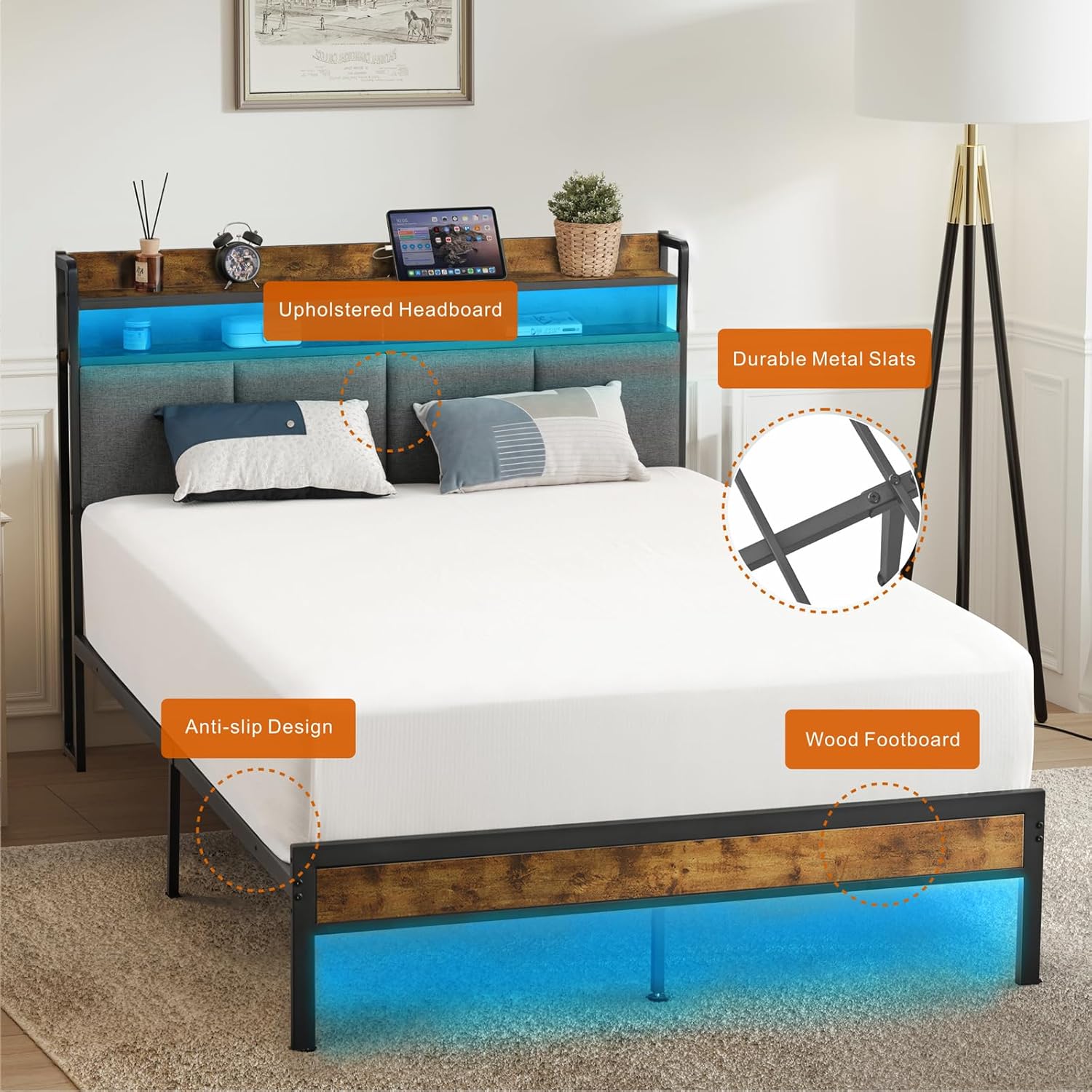
Image: Overview of the Z-hom Twin Bed Frame components, highlighting the upholstered headboard, durable metal slats, anti-slip design, and wood footboard.

Image: Detail of the headboard's 2-tier storage shelf, showing its dimensions and capacity for small items.
Setup and Assembly
The Z-hom Twin Bed Frame is designed for easy assembly. All necessary parts, tools, and instructions are included in one box. Follow these steps carefully:
- Unpack and Identify Parts: Open the package and lay out all components. Refer to the parts list in the included instruction booklet to identify each piece. Ensure no parts are missing or damaged.
- Assemble the Headboard: Attach the upholstered headboard sections to the main headboard frame. Secure the 2-tier storage shelf to the top of the headboard.
- Install Charging Station and LED Lights: Integrate the charging station module into the designated slot on the headboard. Carefully attach the LED light strip to the underside of the headboard shelf, ensuring it is securely in place. Connect the power cables as instructed.
- Construct the Side Rails: Connect the side rails to the headboard and footboard using the provided hardware. Ensure all connections are tight and secure.
- Install Metal Slats: Place the metal slats across the bed frame. Secure them to the side rails according to the instructions to ensure a stable mattress foundation.
- Final Checks: Double-check all screws and bolts to ensure they are fully tightened. Confirm the frame is stable and level.

Image: The charging station module, showing its AC outlets and USB ports, ready for installation into the headboard.

Image: The LED light strip, which is to be attached to the headboard for ambient lighting.

Image: Detail of the robust metal slats providing strong support for the mattress.
Operating Instructions
LED Lighting System
The integrated RGB LED lights can be controlled using the provided wireless remote control. Ensure the LED strip is properly connected to its power source.
- Power On/Off: Press the Power button on the remote to turn the lights on or off.
- Color Selection: Use the color buttons to select from multiple static color options.
- Dynamic Modes: Cycle through 20 dynamic lighting modes using the MODE button.
- Brightness Adjustment: Adjust the light intensity using the BRIGHT buttons (up/down). There are 5 brightness settings.
- Speed Adjustment: For dynamic modes, adjust the speed of the effects using the SPEED buttons (up/down). There are 10 speed levels.

Image: The wireless RF remote control used to operate the LED lighting system, showing various buttons for color, mode, speed, and brightness adjustments.

Image: Visual representation of the LED light features, including various modes, brightness, speed, and color options.
USB Charging Station
The headboard includes a built-in charging station with 2 USB-A ports (5V/2.4A) and 1 USB-C port (5V/3A). This station is powered by a 6.5 ft long cord and features a UL certified transformer for safety.
- Connect to Power: Plug the bed frame's power cord into a standard wall outlet.
- Charge Devices: Connect your mobile phones, tablets, or other compatible devices to the USB-A or USB-C ports for convenient charging.
Maintenance
- Cleaning the Frame: Wipe metal and wood surfaces with a soft, damp cloth. Avoid abrasive cleaners.
- Cleaning the Upholstery: For the upholstered headboard, spot clean with a mild fabric cleaner as needed. Test on an inconspicuous area first.
- Checking Connections: Periodically check all bolts and screws to ensure they remain tight. Re-tighten if necessary to maintain stability and prevent noise.
- Cable Management: Ensure all power cords for the LED lights and charging station are neatly tucked away and not pinched or damaged.
- Under-Bed Cleaning: The 10.3-inch clearance allows for easy cleaning underneath the bed, including access for robotic vacuums.

Image: Illustration of the 10.3-inch under-bed clearance, demonstrating space for storage or robotic vacuum access.
Troubleshooting
- Bed Frame is Wobbly/Noisy:
Ensure all bolts and screws are securely tightened. Check that the metal slats are properly seated and secured to the frame. Uneven flooring can also cause wobbling; consider using furniture pads.
- LED Lights Not Working:
Verify that the LED strip is correctly connected to its power source and that the power cord is plugged into a functional wall outlet. Check the remote control battery. Ensure the LED strip itself is not damaged.
- Charging Station Not Functioning:
Confirm the bed frame's main power cord is plugged into a live electrical outlet. Test the charging ports with different devices and cables to rule out device-specific issues. Ensure the charging station module is properly seated in its slot and its internal connections are secure.
- Missing or Damaged Parts:
If you discover any missing or damaged parts upon unboxing, do not proceed with assembly. Contact Z-hom customer service immediately for assistance.
Specifications
| Brand | Z-hom |
| Model Number | BOC4-023 |
| Size | Twin |
| Product Dimensions | 74.99"L x 39"W x 10.3"H |
| Color | Vintage Brown |
| Material | Metal, Wood, Padded Fabric |
| Special Features | Upholstered Headboard, 2-Tier Storage, LED Lights (RGB, 25 constant, 20 dynamic modes, 5 brightness, 10 speed), USB Charging Station (2 USB-A, 1 USB-C), No Box Spring Needed, No Noise Design |
| Charging Station Output | USB-A: 5V/2.4A, USB-C: 5V/3A |
| Power Cord Length | 6.5 ft |
| Under-Bed Clearance | 10.3 inches |
| Assembly Required | Yes |
| Item Weight | 45.9 pounds |
Warranty and Support
For warranty information or technical support, please refer to the contact details provided with your purchase documentation or visit the official Z-hom website. If you encounter any issues, such as damage, scratches, or missing parts, please contact customer service for the most appropriate solution within 24 hours.