1. Safety Information
Please read all instructions carefully before installation and use. Retain this manual for future reference.
- Electrical Safety: This product contains electrical components. Installation must be performed by a qualified electrician in accordance with local electrical codes. Ensure power is disconnected at the main circuit breaker before any installation or maintenance.
- Water Exposure: While the cabinet is designed with waterproof materials, avoid direct water spray onto electrical components.
- Mounting: The cabinet must be securely mounted to a structurally sound wall. Do not mount on drywall alone without proper anchors or studs.
- Recessing: This cabinet is designed for surface wall mounting only. It cannot be recessed into the wall.
- Children: Keep children away from the installation area. Do not allow children to operate the cabinet without supervision.
2. Product Overview
The Generic 20x28 Inch Wall Mounted Mirror Cabinet is a functional and aesthetic addition to your bathroom. It combines a vanity mirror with integrated LED lighting, an intelligent defogger, and internal storage with an adjustable shelf.
Key Features:
- LED Lighting: Features three color modes (cool, natural, warm) and adjustable brightness.
- Intelligent Defogger: A 750cm² heating panel provides clear reflection by preventing fogging. Automatically turns off after 1 hour.
- Touch Sensors: Two integrated touch sensors control the lighting and defogger functions.
- Adjustable Storage: One adjustable shelf behind the mirrored door offers flexible storage space.
- Durable Construction: Made of quality engineered board with waterproof material.

Image: Front view of the 20x28 inch wall-mounted mirror cabinet, showcasing its sleek design and integrated LED lighting.
3. Setup and Installation
Professional installation is recommended for this product due to electrical connections and wall mounting requirements.
3.1 Pre-Installation Checklist:
- Verify all components are present and undamaged.
- Ensure the wall mounting location is suitable and can support the weight of the cabinet.
- Confirm access to a dedicated electrical circuit for the cabinet.
- Gather necessary tools: drill, level, measuring tape, screwdriver, wire strippers, safety glasses.
3.2 Mounting the Cabinet:
- Mark the desired mounting height and position on the wall using a level.
- Drill pilot holes for the mounting hardware according to the cabinet's mounting points.
- Secure the mounting brackets or anchors firmly into the wall.
- Carefully lift and attach the cabinet to the installed mounting hardware. Ensure it is level and stable.
3.3 Electrical Connection:
- Ensure power is OFF at the circuit breaker.
- Connect the cabinet's electrical wiring to the household electrical supply, following local electrical codes and the provided wiring diagram (if applicable). Typically, this involves connecting live, neutral, and ground wires.
- Secure all connections with appropriate wire connectors.
- Carefully tuck wires into the junction box or wall cavity.
- Restore power at the circuit breaker and test the functions.

Image: The interior of the mirror cabinet, showing the adjustable shelf for organized storage of toiletries and other items.
4. Operating Instructions
The mirror cabinet features two touch sensors located on the mirror surface for controlling the LED lights and defogger.
4.1 LED Light Operation:
- Power On/Off: Tap the light touch sensor once to turn the LED lights on or off.
- Change Color Mode: With the lights on, short press the light touch sensor repeatedly to cycle through the three color modes: Cool Light, Natural Light, and Warm Light.
- Adjust Brightness (Dimmer): With the lights on, long press the light touch sensor to activate the dimmer function. The brightness will gradually increase or decrease. Release the sensor when the desired brightness is reached.

Image: Demonstrates the three color temperature modes (cold, natural, warm) and the long-press dimmer function for adjusting brightness.
4.2 Defogger Operation:
- Activate Defogger: Tap the defogger touch sensor once to turn the defogger function on or off.
- Automatic Shut-off: The defogger will automatically turn off after approximately 1 hour of continuous operation to prevent overheating and save energy.
- Heating Time: The 750cm² heating panel typically takes about 15 minutes to reach its optimal demisting temperature.

Image: A woman using the mirror cabinet, illustrating the intelligent defogging function keeping the mirror clear despite steam.
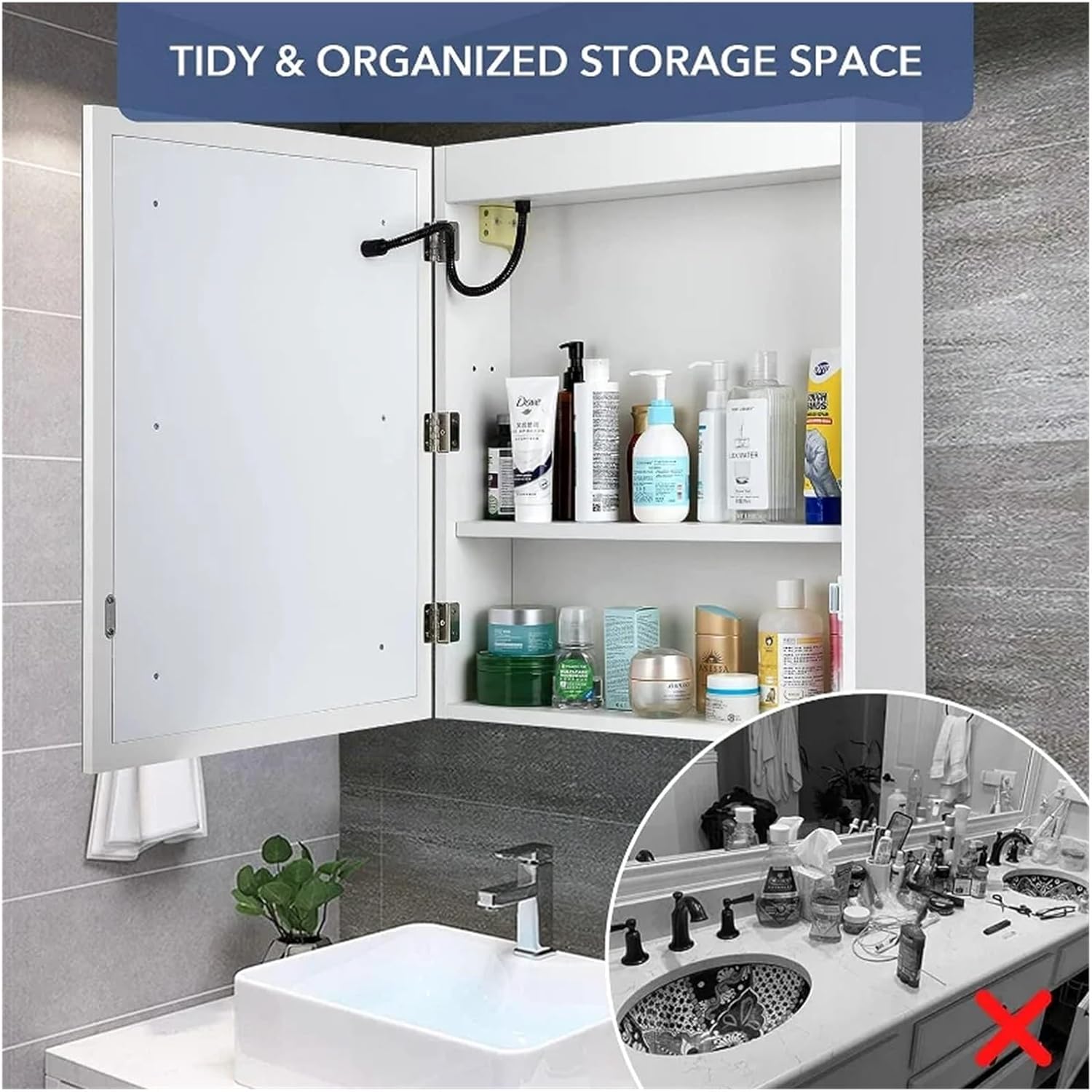
Image: A visual comparison showing the mirror surface before and after the defogging function has cleared away condensation.
5. Maintenance
Regular maintenance ensures the longevity and optimal performance of your mirror cabinet.
- Cleaning the Mirror: Use a soft, lint-free cloth and a non-abrasive glass cleaner. Spray cleaner onto the cloth, not directly onto the mirror, to prevent liquid from seeping into electrical components.
- Cleaning the Cabinet: Wipe the exterior and interior surfaces with a soft, damp cloth and mild soap. Avoid harsh chemicals or abrasive cleaners.
- Electrical Components: Ensure the power is off before cleaning near any electrical parts. Do not attempt to clean or repair internal electrical components yourself.
- Inspection: Periodically check mounting hardware for tightness and ensure all electrical connections are secure.
6. Troubleshooting
If you encounter issues with your mirror cabinet, refer to the following troubleshooting guide:
- LED Lights Not Working:
- Check if the main power supply to the cabinet is on.
- Ensure the light touch sensor is being pressed correctly.
- Verify electrical connections are secure (consult a qualified electrician if unsure).
- Defogger Not Activating:
- Confirm the defogger touch sensor is being pressed.
- Allow up to 15 minutes for the heating panel to reach operating temperature.
- Check power supply and electrical connections.
- Mirror Still Fogs Up:
- Ensure the defogger is active and has had sufficient time to heat up.
- The defogger covers a specific area (750cm²); areas outside this may still fog.
- Cabinet Feels Loose on Wall:
- Immediately secure the cabinet.
- Check all mounting hardware and ensure they are properly anchored into the wall studs or appropriate wall anchors.
7. Specifications
- Model Number: GTNWTADBR
- Brand: Generic
- Dimensions: Approximately 20 inches (Width) x 28 inches (Height)
- Mounting Type: Wall-Mounted (Surface only, not for recessing)
- Light Features: LED, 3 Color Modes (Cool, Natural, Warm), Dimmable
- Defogger Features: 750cm² Heating Panel, 15-minute warm-up, 1-hour auto-off
- Storage: 1 Adjustable Shelf
- Material: Quality engineered board with waterproof finish
8. Warranty and Support
For warranty information or technical support, please refer to the retailer or your purchase documentation. If you have questions regarding installation, operation, or maintenance that are not covered in this manual, please contact customer service.
Customer Support: Please refer to your purchase receipt or the seller's contact information for support.