Product Overview
The Westgate TC-RDPS6-13W-RGBW-WIFI is a 6-inch round LED trim downlight designed for modern lighting solutions. This versatile fixture offers color-changing capabilities, adjustable color temperature from 2700K to 5000K, and over 15 million color options. It is compatible with smart home systems such as Amazon Alexa and Google Assistant, allowing for convenient control via the Westgate Smart App or voice commands.
This LED downlight is energy-efficient, consuming only 13 watts while providing 850 lumens of brightness, and boasts a long lifespan of 50,000 hours. Its durable design makes it suitable for both indoor and outdoor wet locations, including bathrooms, kitchens, and covered patios. The canless design and included E26 adaptor ensure easy installation in both retrofit and new construction applications.
Setup and Installation
Before beginning installation, ensure the power supply to the fixture location is turned off at the circuit breaker. This product is designed for easy installation in standard 4-inch recessed housings.
Physical Installation
- Prepare the Housing: Ensure the existing recessed housing is clean and free of debris.
- Connect the Adapter: Screw the included E26 adaptor into the existing light bulb socket within the recessed housing.
- Wire Connection: Connect the wires from the downlight to the E26 adaptor's connector. Ensure a secure connection.
- Insert the Downlight: Gently push the downlight into the recessed housing. The spring clips on the side of the downlight will secure it in place.
- Secure in Place: Ensure the trim is flush with the ceiling surface.

Figure 1: Side view of the downlight showing the E26 adapter for easy connection.
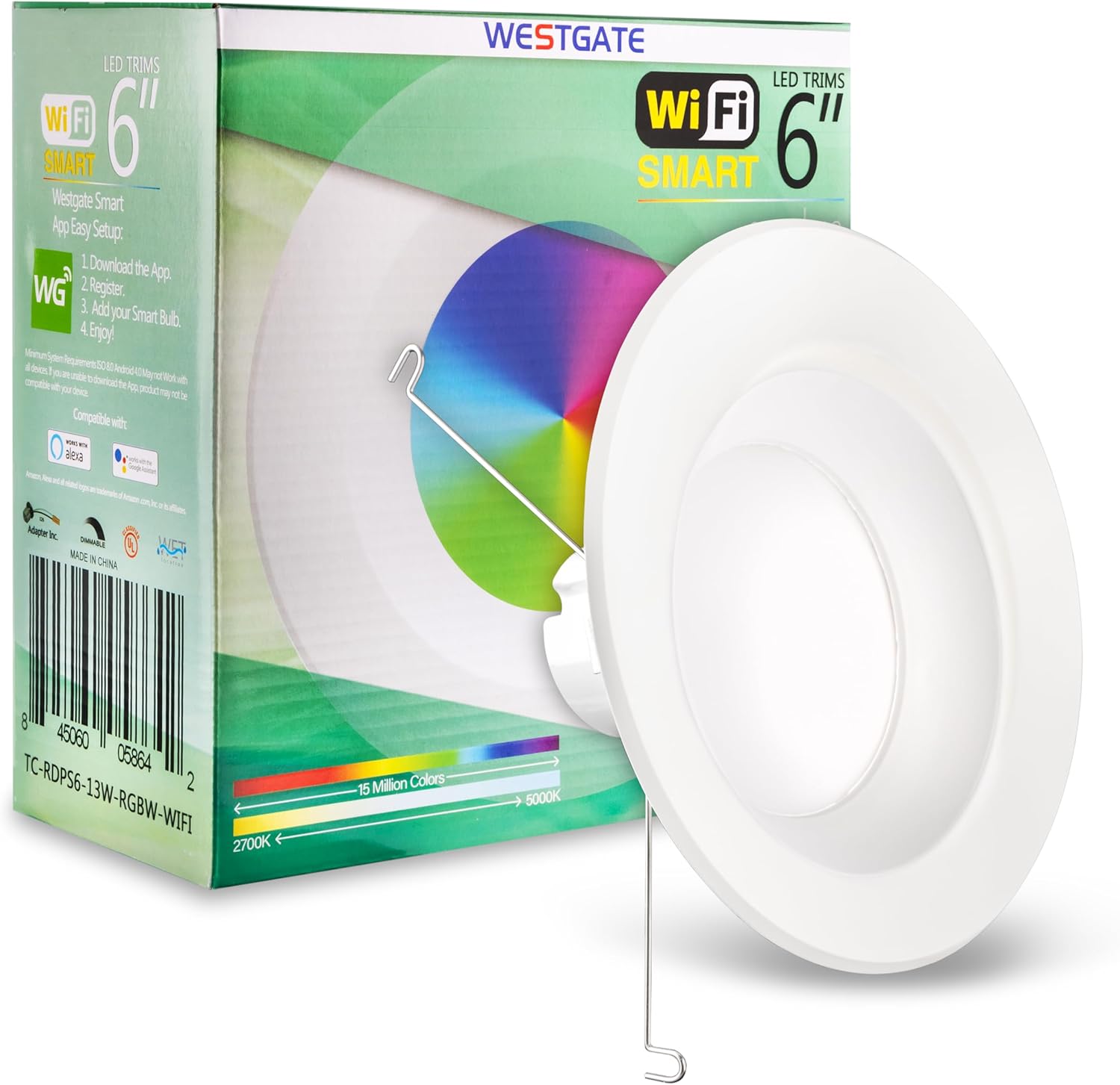
Figure 2: Product packaging highlighting the simple WiFi setup process.
Smart Home Integration (Westgate Smart App)
For full functionality, including color changing and smart control, connect your downlight to the Westgate Smart App.
- Download the App: Search for "Westgate Smart" in your mobile device's app store (iOS or Android) and download the application.
- Register an Account: Open the app and follow the prompts to register a new user account.
- Add Your Smart Bulb: Power on the downlight. Within the app, select the option to add a new device. Follow the in-app instructions to connect the downlight to your 2.5GHz Wi-Fi network. The app will guide you through the pairing process.
- Enjoy Control: Once connected, you can control the light's color, brightness, and schedule from your smartphone or tablet.
The downlight works with Google WiFi and supports a Wi-Fi connection range of up to 150 feet indoors and 300 feet outdoors.
Operating Instructions
The Westgate LED Trim Downlight offers various ways to control its lighting features.
Color and Brightness Adjustment
- Color Temperature: Adjust the white light from warm (2700K) to cool (5000K) to suit your preference or time of day.
- RGB Colors: Access over 15 million vibrant colors to create custom ambiances for any occasion.
- Dimming: The light is dimmable, allowing you to adjust the brightness level from 1% to 100% via the app or connected smart assistant.

Figure 3: The downlight's ability to display a wide range of colors.

Figure 4: The downlight set to a warm white color temperature.
Control Methods
- Westgate Smart App: The primary control method for full feature access, including scene creation, scheduling, and advanced settings.
- Amazon Alexa: Integrate the downlight with your Alexa-enabled devices for voice control. Enable the Westgate skill in the Alexa app.
- Google Assistant: Link the downlight to your Google Home or Google Assistant devices for voice commands.
- Physical Switch: A standard wall switch can turn the light on/off. Note that advanced features require app or voice control.
Maintenance
The Westgate LED Trim Downlight is designed for minimal maintenance due to its long-lasting LED technology.
- Cleaning: To clean the fixture, ensure power is off. Use a soft, damp cloth to wipe the surface. Avoid abrasive cleaners or solvents that could damage the finish.
- Durability: The fixture is suitable for wet locations, meaning it can withstand moisture and humidity. However, avoid direct water jets or submersion.
- LED Lifespan: The integrated LED has a rated lifespan of 50,000 hours, meaning no bulb replacement is necessary under normal use.
Troubleshooting
If you encounter issues with your Westgate LED Trim Downlight, refer to the following common troubleshooting steps:
| Problem | Possible Cause | Solution |
|---|---|---|
| Light does not turn on. | No power, loose connection, or faulty fixture. | Check circuit breaker. Ensure E26 adapter and fixture connections are secure. If problem persists, contact support. |
| Cannot connect to Wi-Fi/App. | Incorrect Wi-Fi password, 5GHz network, or too far from router. | Ensure you are connecting to a 2.5GHz Wi-Fi network. Verify Wi-Fi password. Move closer to the router during setup. Restart the light by cycling power. |
| Light is unresponsive to app/voice commands. | Wi-Fi disconnected, app issue, or smart assistant integration problem. | Check Wi-Fi connection. Restart the Westgate Smart App. Re-link with Alexa/Google Assistant if necessary. |
| Colors or brightness not changing correctly. | App synchronization issue or temporary glitch. | Close and reopen the Westgate Smart App. Cycle power to the light fixture. Ensure the app is updated to the latest version. |
For further assistance, refer to the Westgate Smart App's help section or contact Westgate customer support.
Specifications
Detailed technical specifications for the Westgate TC-RDPS6-13W-RGBW-WIFI LED Trim Downlight:
| Attribute | Value |
|---|---|
| Model Name | 6 Inch Smart Recessed LED Trim |
| Part Number | TC-RDPS6-13W-RGBW-WIFI |
| Brand | Westgate |
| Color | White |
| Material | Plastic |
| Style | Contemporary |
| Light Fixture Form | Ceiling |
| Product Dimensions | 7.5"L x 7.5"W x 3.2"H |
| Indoor/Outdoor Usage | Outdoor, Indoor |
| Power Source | Corded Electric |
| Installation Type | Flush Mount |
| Special Features | Energy Efficient, Adjustable Color Temperature, Dimmable, Color Changing |
| Control Method | App |
| Light Source Type | LED |
| Voltage | 120 Volts |
| Light Color | White (and RGB) |
| Included Components | Mounting Hardware |
| Wattage | 13 watts |
| Bulb Base | E26 Medium (adaptor) |
| Water Resistance Level | Water Resistant |
| Brightness | 850 lumen |
| Wi-Fi Bandwidth | 2.5GHz |
| Wi-Fi Connection Range | Up to 150 ft (46 m) indoors, 300 ft (92 m) outdoors |
| CRI | 90 |
| Lifespan | 50,000 hours |
| UPC | 845060058642 |

Figure 5: Technical drawing showing dimensions and key features of the downlight.
Warranty and Support
The Westgate TC-RDPS6-13W-RGBW-WIFI LED Trim Downlight comes with a 5-Year Warranty, ensuring reliability and peace of mind.
For warranty claims, technical support, or any inquiries regarding your product, please contact Westgate customer service. Refer to the official Westgate website for the most current contact information and support resources.
You can visit the official Westgate store on Amazon for more product information: Westgate Amazon Store.


