
1. Introduction
This instruction manual provides essential information for the proper installation, operation, and maintenance of the SBJKBVMF MC-2100 REV B / MC2100-WA Treadmill Controller. This high-quality replacement circuit board is designed to ensure reliable operation of compatible treadmills. Please read this manual thoroughly before attempting any installation or repair to ensure safety and optimal performance.

Figure 1.1: Top view of the MC-2100 REV B Treadmill Controller, showing various electronic components and heat sink.

Figure 1.2: Angled perspective of the MC-2100 REV B controller, highlighting the side heat sink and component layout.
2. Product Compatibility
The MC-2100 REV B / MC2100-WA Treadmill Controller is compatible with various treadmill models, including those from ICON PROFORM and Nordic Track C2300. It is designed for 110V power systems. Always verify the part model number (MC2100-WA / MC2100 REV B) to ensure compatibility with your specific treadmill before installation.

Figure 2: Comparison image showing the "Original New version" (top) and "Original Old version" (bottom) of the MC-2100 controller. Note the subtle differences in component layout and labeling.
3. Installation and Setup
Installation of a treadmill controller requires technical knowledge and should ideally be performed by a qualified technician. Incorrect installation can lead to damage to the controller, treadmill, or pose a safety risk. Ensure the treadmill is unplugged from the power source before beginning any installation work.
3.1 Safety Precautions
- Disconnect Power: Always unplug the treadmill from the wall outlet before servicing.
- Static Discharge: Take precautions against electrostatic discharge (ESD) when handling the circuit board. Use an anti-static wrist strap if available.
- Component Handling: Handle the circuit board by its edges to avoid touching sensitive components.
3.2 Installation Steps (General Guidance)
- Access the Controller: Locate and open the motor hood or access panel of your treadmill to expose the existing controller.
- Document Connections: Before disconnecting anything, take clear photos or make a diagram of all wire connections to the old controller. Note the color and position of each wire.
- Disconnect Old Controller: Carefully disconnect all wires and mounting screws from the old controller.
- Install New Controller: Mount the new MC-2100 REV B / MC2100-WA controller in the same position as the old one.
- Reconnect Wires: Refer to your documented connections and carefully reconnect all wires to the new controller. Ensure all connections are secure and correctly seated.
- Secure and Test: Close the motor hood/access panel. Plug the treadmill back into the power outlet and perform a test run to ensure proper functionality.
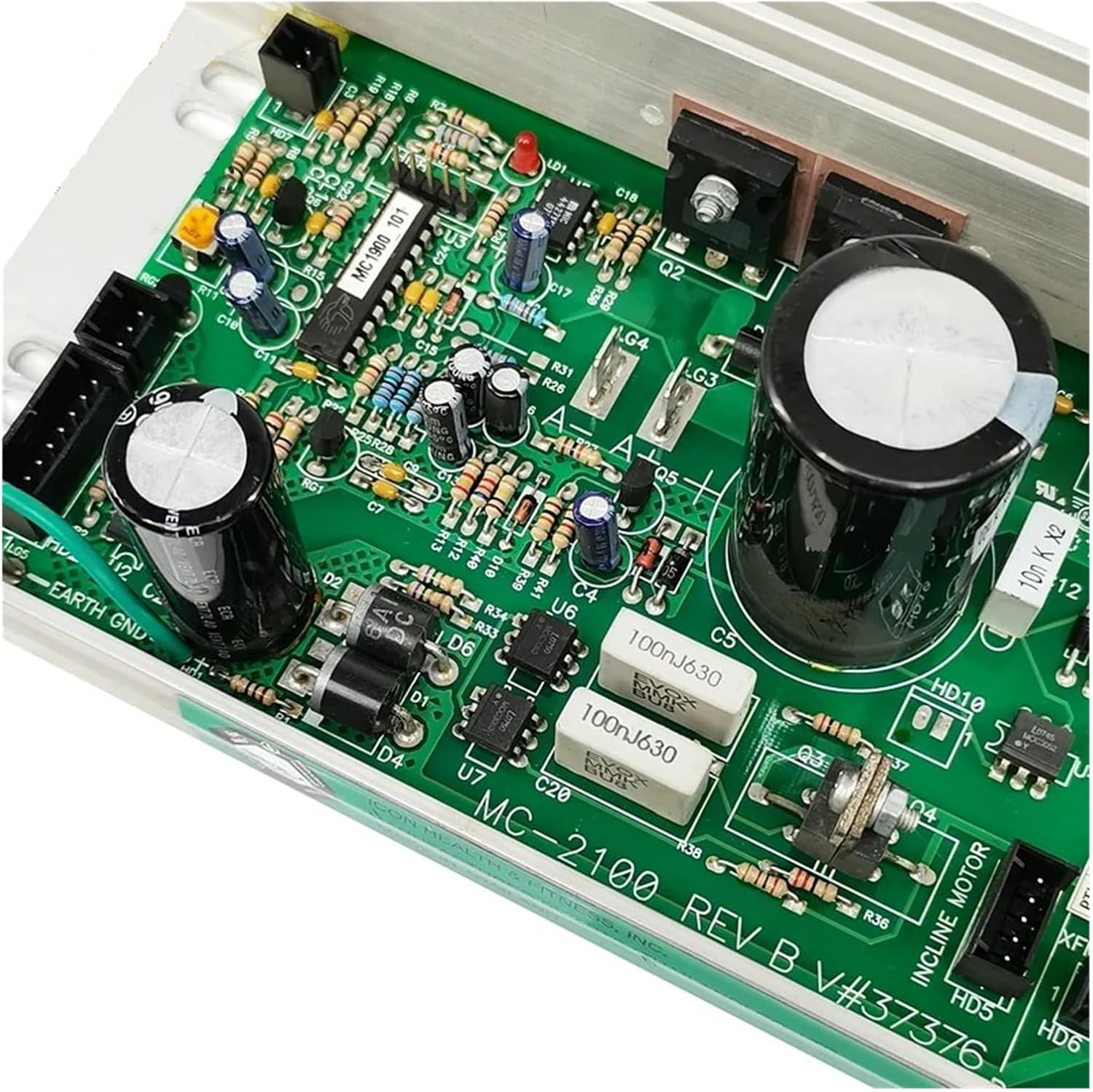
Figure 3: Detailed view of the MC-2100 REV B circuit board, highlighting various integrated circuits, capacitors, and resistors. Proper connection points for motor, AC input, and other signals are visible.
4. Operating Principles
The MC-2100 REV B / MC2100-WA is a motor control board responsible for regulating the speed and operation of your treadmill's drive motor. It receives signals from the treadmill's console (e.g., speed commands, incline commands) and translates them into appropriate power output to the motor. It also incorporates safety features to protect the motor and other components from overcurrent or overheating.
Once correctly installed, the controller operates automatically as part of the treadmill's system. There are no user-adjustable settings directly on the board itself.
5. Maintenance
The MC-2100 REV B / MC2100-WA controller is a sealed electronic component and does not require routine user maintenance. However, to ensure its longevity and optimal performance, consider the following general guidelines for your treadmill environment:
- Keep Dry: Ensure the treadmill area is dry and free from moisture, which can damage electronic components.
- Cleanliness: Periodically clean the area around the controller (with the treadmill unplugged) to prevent dust and debris buildup, which can impede cooling. Use a soft brush or compressed air.
- Inspect Connections: During other treadmill maintenance (e.g., belt lubrication), visually inspect the wiring connections to the controller for any signs of looseness or corrosion.
6. Troubleshooting
If your treadmill experiences issues after controller replacement or during normal operation, consider the following troubleshooting steps. Note that diagnosing complex electronic issues often requires specialized tools and expertise.
| Symptom | Possible Cause | Action |
|---|---|---|
| Treadmill does not start or motor does not respond. | No power to controller, loose connections, faulty motor, or faulty controller. |
|
| Erratic speed or sudden stops. | Loose motor connections, motor sensor issue, or controller malfunction. |
|
| Burning smell or visible smoke. | Immediate electrical fault. | Immediately unplug the treadmill. Do not use. Contact a qualified technician. |
For issues that cannot be resolved with these steps, it is recommended to seek assistance from a certified treadmill repair technician.
7. Specifications
| Attribute | Detail |
|---|---|
| Part Model: | MC2100-WA / MC2100 REV B |
| Quantity: | 1 piece (Motor Controller) |
| Voltage Compatibility: | 110V systems |
| Item Weight: | 50 Grams |
| Package Dimensions (L x W x H): | 1.18 x 0.79 x 0.39 inches |
| Brand Name: | SBJKBVMF |
| Manufacturer: | zqingmaoyi |
| Compatible Brands: | ICON PROFORM, Nordic Track C2300 |
| First Available Date: | February 27, 2025 |
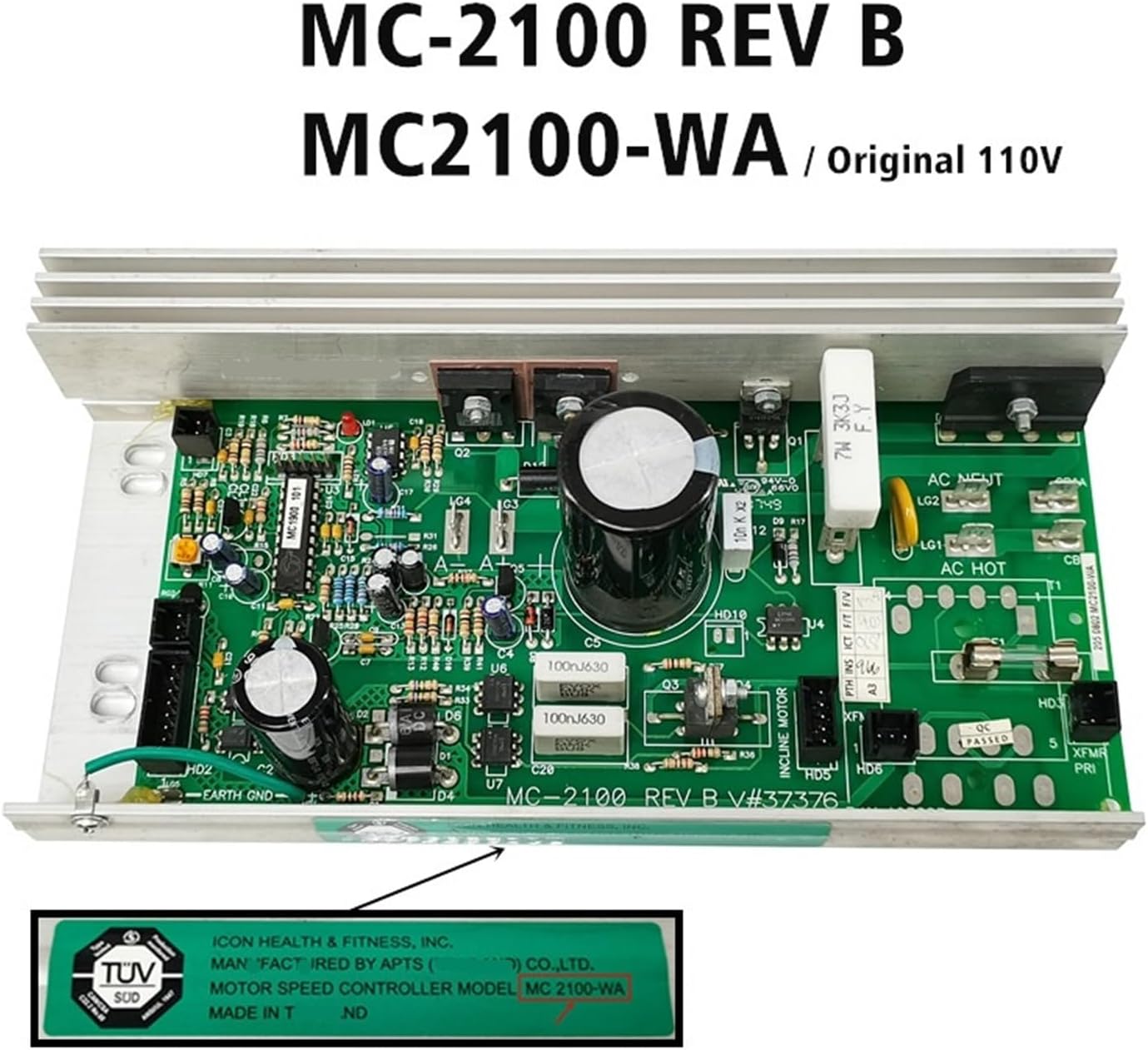
Figure 4: The MC-2100 REV B / MC2100-WA controller, confirming its model and 110V compatibility, along with a TUV SUD certification mark.
8. Warranty and Support
Specific warranty terms for the MC-2100 REV B / MC2100-WA Treadmill Controller are typically provided by the seller at the time of purchase. Please refer to your purchase documentation or contact the seller directly for detailed warranty information.
For technical support or assistance with installation and troubleshooting beyond the scope of this manual, please contact the seller or the manufacturer, zqingmaoyi. Provide your product model number and purchase details when seeking support.