
1. Product Overview
The IKUESM T11 Tire Pressure Monitoring System (TPMS) is designed to enhance driving safety by providing real-time tire pressure and temperature data. It features military-grade durability, precise sensors, and a user-friendly display.
Key Features:
- High Accuracy Sensors: Industrial-grade copper sensors and ABS+PC housings ensure accuracy within ±0.1 Bar (±1.45 PSI).
- Real-Time Monitoring: Provides continuous tire pressure and temperature readings.
- Instant Alerts: Vibration and visual warnings for abnormal pressure or temperature.
- Dual Display: Crisp LCD screen displays both Bar and PSI units.
- Universal Compatibility: Supports 4 or 6 wheels, suitable for sedans, SUVs, and MPVs (T11-4W for 0-99 PSI, T11-6W for 0-144 PSI).
- Durable Design: IP67 waterproof sensors withstand harsh road conditions (-20°C to 70°C).
- Dual Charging: Solar and USB-C charging methods for the display unit.
- Easy Installation: External sensors can be installed in approximately 5 minutes with anti-theft nuts.
- Power Saving: Auto-hibernate mode extends battery life up to 5 years.
2. Package Contents
Verify that all items are present in the package:
- 1x T11 Display Unit
- 4/6x External Sensors (depending on model)
- 4/6x Anti-Theft Metal Nuts
- 1x USB-C Charger Cable
- 1x Wrench
- 1x User Manual (Bilingual)
- 1x Double-sided Tape
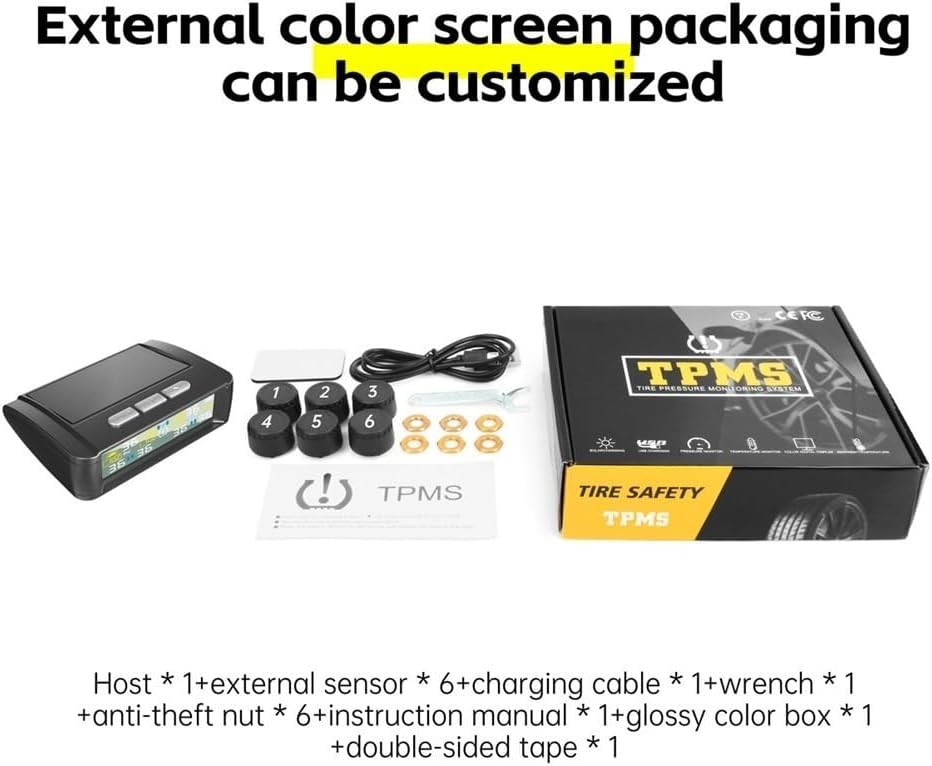
Image: Contents of the T11 TPMS package, including the display unit, sensors, charging cable, wrench, anti-theft nuts, and user manual.
3. Setup and Installation
3.1 Display Unit Placement and Charging
Place the T11 display unit on your dashboard using the provided double-sided tape. Ensure it has clear access to sunlight for solar charging.

Image: The T11 display unit positioned on a vehicle dashboard, showing its solar panel and screen.
The display unit supports two charging methods:
- Solar Charging: The built-in solar panel charges the unit when exposed to sunlight.
- USB-C Charging: Connect the provided USB-C cable to the unit and a power source for charging, especially in low-light conditions.

Image: Illustration of the T11 TPMS display unit highlighting its solar panel and USB charging port.
3.2 External Sensor Installation
The external sensors are designed for quick and easy installation without specialized tools. Follow these steps:
- Unscrew the original valve cap from the tire valve stem.
- Screw on an anti-theft metal nut onto the valve stem.
- Screw the corresponding sensor (labeled 1-6) onto the valve stem until it is snug. Ensure each sensor is installed on its designated wheel (e.g., sensor 1 on front left, sensor 2 on front right, etc.).
- Use the provided wrench to tighten the anti-theft nut against the sensor to secure it and prevent theft.
The sensors are IP67 waterproof, ensuring reliable performance in various weather conditions.

Image: The T11 TPMS display unit and six external sensors, numbered 1 through 6, ready for installation.
4. Operating Instructions
4.1 Display Interface
The T11 display unit provides a clear, intuitive interface for monitoring tire pressure and temperature. It shows real-time data for all connected tires.
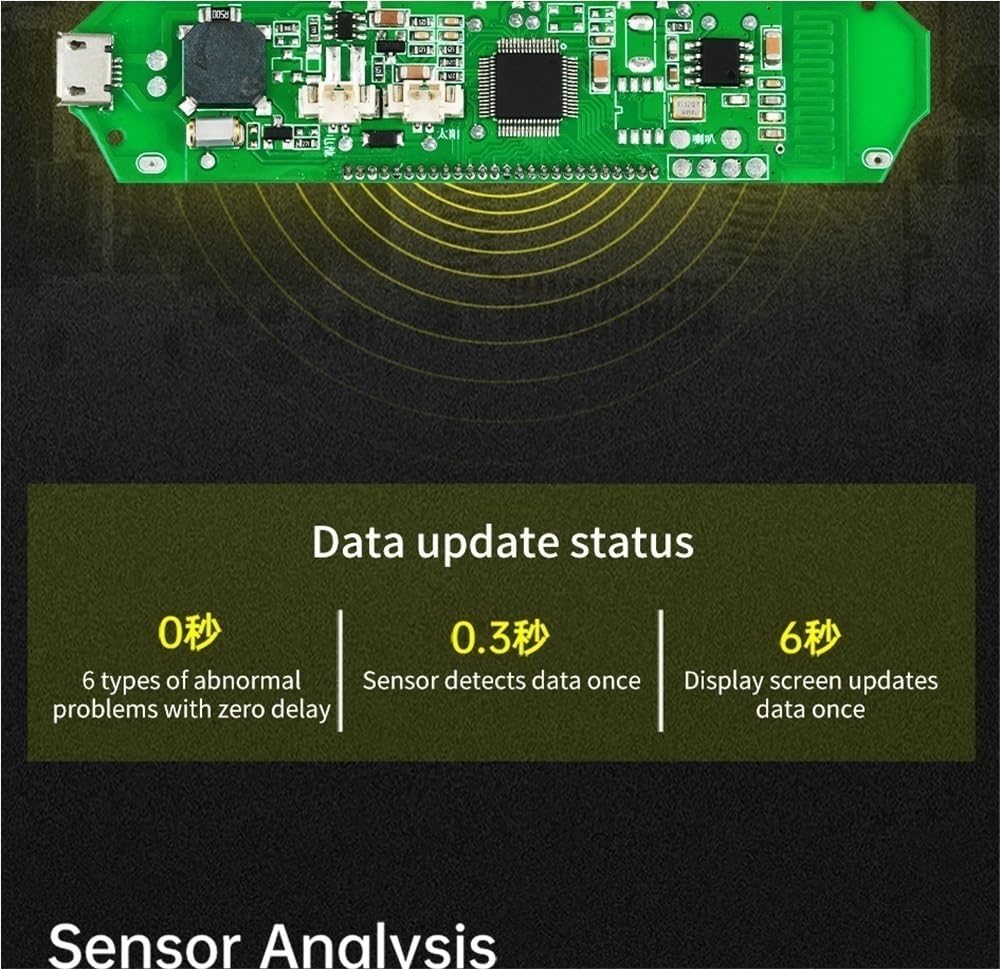
Image: Detailed view of the T11 TPMS display screen, indicating current tire pressure (Psi) and temperature (°F) for each wheel, along with solar charging and battery level indicators.
The display shows:
- Current tire pressure (in Psi or Bar) for each wheel.
- Current tire temperature (in °F or °C) for each wheel.
- Battery level of the display unit.
- Solar charging indicator.
4.2 Real-Time Data and Alerts
The system continuously monitors tire conditions. Data updates are rapid:
- Sensor detects data: Every 0.3 seconds.
- Display screen updates: Every 6 seconds.
- Abnormal problems detected with zero delay.

Image: Diagram illustrating the rapid data update status of the T11 TPMS, showing sensor detection at 0.3 seconds and display updates at 6 seconds.
In case of abnormal tire pressure or temperature, the display unit will provide instant vibration and visual warnings. The system supports monitoring for 4 or 6 tires, including a spare tire if applicable.
4.3 App Integration (Optional)
For optimal performance and to access pressure trends and maintenance logs, pair the T11 TPMS with the "T11 Driver" app, available for iOS and Android devices.
5. Maintenance
5.1 Battery Life and Calibration
The T11 TPMS display unit features an auto-hibernate mode to extend battery life up to 5 years. Monthly calibration reminders via the app ensure long-term reliability and accuracy of the sensors.
5.2 Sensor Care
The external sensors are designed to be robust and IP67 waterproof. Periodically check them for any physical damage or debris accumulation, especially after driving in harsh conditions (rain, snow, mud).
6. Troubleshooting and Alarms
The T11 TPMS provides clear alerts for various tire conditions. Understanding these alarms is crucial for safe operation.

Image: Diagram showing different alarm statuses on the T11 TPMS display: Air leakage (low tire pressure), High tire pressure, High temperature, and Low battery for the host unit.
Common Alarm Types:
| Alarm Type | Indicator on Display | Action Required |
|---|---|---|
| Air Leakage (Low Tire Pressure) | Icon flashing, specific tire pressure value flashing. | Immediately check the affected tire for punctures or leaks. Inflate to recommended pressure. |
| High Tire Pressure | Icon flashing, specific tire pressure value flashing. | Reduce tire pressure to the vehicle manufacturer's recommended level. High pressure can reduce traction and increase wear. |
| High Temperature Alarm | Icon flashing, specific tire temperature value flashing. | Stop driving safely and allow the tire to cool down. Check for potential issues like over-inflation or mechanical problems. |
| Host Battery Depleted | Battery icon flashing. | Charge the display unit using the solar panel or the USB-C cable. |
General Troubleshooting Tips:
- No Signal from Sensor: Ensure the sensor is correctly installed and tightened. Check if the sensor battery needs replacement (though external sensors typically have long battery life).
- Inaccurate Readings: Ensure sensors are installed on the correct wheels. Perform a system recalibration via the app if available, or consult the full user manual for specific recalibration steps.
- Display Not Turning On: Charge the display unit fully using the USB-C cable. Ensure the solar panel is not obstructed.
7. Specifications
| Feature | Detail |
|---|---|
| Model | T11 (T11-4W or T11-6W) |
| Pressure Range (T11-4W) | 0-99 PSI (0-6.8 Bar) |
| Pressure Range (T11-6W) | 0-144 PSI (0-9.9 Bar) |
| Pressure Accuracy | ±0.1 Bar (±1.45 PSI) |
| Temperature Range | -20°C to 70°C (-4°F to 158°F) |
| Sensor Water Resistance | IP67 |
| Display Charging | Solar / USB-C |
| Display Dimensions | Approx. 3.5” x 2” |
| Item Weight | 12.3 ounces (approx.) |
| Package Dimensions | 1.18 x 0.79 x 0.39 inches (approx.) |
8. Warranty and Support
For detailed warranty information, please refer to the documentation included with your product or contact IKUESM customer support. Ensure you retain your proof of purchase.
For further assistance, troubleshooting, or to provide feedback, please visit the official IKUESM website or contact their customer service department. The "T11 Driver" app also provides additional support and features.