
1. Introduction
The INKBIRD IBS-P05R is an advanced solar-powered wireless pool thermometer designed for accurate water temperature monitoring in various aquatic environments such as swimming pools, hot springs, spas, and hot tubs. It features an integrated ambient light with multiple colors and modes, an indoor remote control for convenient monitoring, and a robust IP68 waterproof rating for durability.
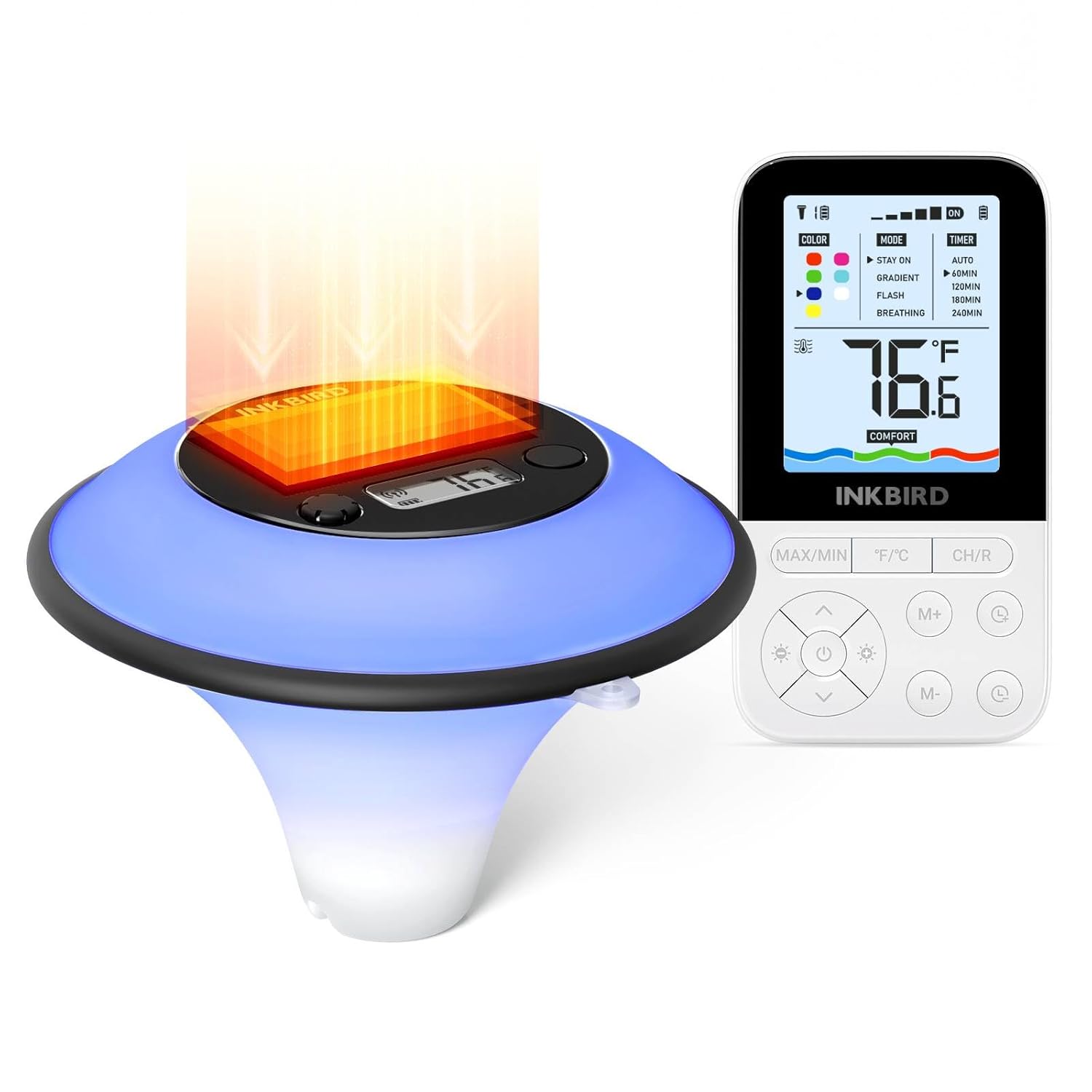
Figure 1: INKBIRD IBS-P05R Pool Thermometer and Indoor Remote Control.
2. What's in the Box
- Pool Thermometer (IBS-P05R)
- Indoor Remote Control
- AAA battery*2 (for remote control)
- User Manual
3. Key Features
3.1 Smart Atmosphere Light
The thermometer features a built-in atmosphere light with light sensing technology. It offers 7 vibrant colors, 4 dynamic modes (Stay On, Flash, Gradient, Breathing), and 5 brightness levels. You can also choose from 5 timer settings to control the light duration.
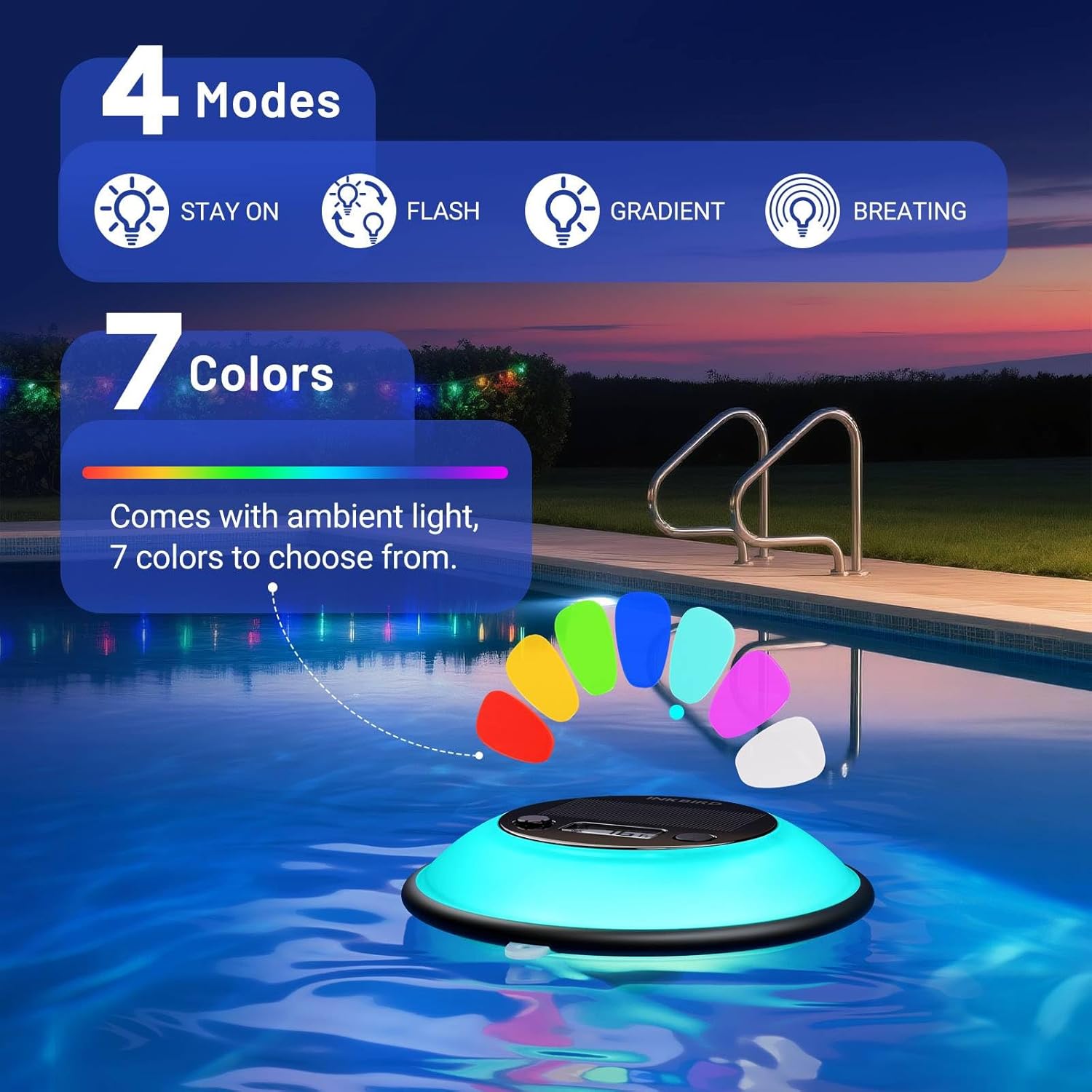
Figure 2: Visual representation of the 7 colors and 4 modes of the atmosphere light.
3.2 Solar Powered
Equipped with a high-efficiency solar panel, the IBS-P05R charges its internal battery using sunlight, eliminating the need for frequent battery replacements and ensuring continuous operation. This design also provides excellent sun protection.

Figure 3: The solar panel on the thermometer for eco-friendly charging.
3.3 Wireless Remote Monitoring
Monitor water temperature changes from indoors with the included remote control. The ultra-long wireless transmission distance of up to 300 meters (980 feet) in open space allows for convenient remote adjustments of the ambient light. The indoor monitor can connect to up to 9 pool thermometers simultaneously.

Figure 4: Illustration of the 300m/980ft wireless transmission range.
3.4 IP68 Waterproof
The pool thermometer boasts an IP68 waterproof rating, ensuring it can withstand harsh weather conditions, including heavy rain, and continuously monitor water temperature within an ultra-wide range of -40℃ to 70℃ (-40°F to 158°F).
3.5 Customized Water Temperature Comfort
Adjust the cold, hot, or comfortable level settings on the indoor remote to accurately determine the optimal water temperature for your specific use scenario, whether it's a swimming pool, hot spring, hot tub, or small pond.

Figure 5: Setting the water temperature comfort level on the remote.
4. Setup Guide
- Unpack Components: Carefully remove the pool thermometer, indoor remote control, AAA batteries, and user manual from the packaging.
- Install Remote Batteries: Open the battery compartment on the back of the indoor remote control and insert the two AAA batteries, ensuring correct polarity.
- Initial Thermometer Placement: Place the IBS-P05R pool thermometer directly into the water of your pool, spa, or hot tub. Ensure the solar panel on top is exposed to sunlight for charging.
- Power On: Short press the power button on the pool thermometer to turn it on. The display will activate.
- Remote Control Activation: The indoor remote control should automatically connect to the thermometer. If not, ensure both devices are within range and try restarting the remote.
- Initial Solar Charge: Allow the thermometer to charge in direct sunlight for approximately seven days for a full charge, especially before initial extended use of the ambient light feature.
5. Operating Instructions
5.1 Display Overview (Indoor Remote)
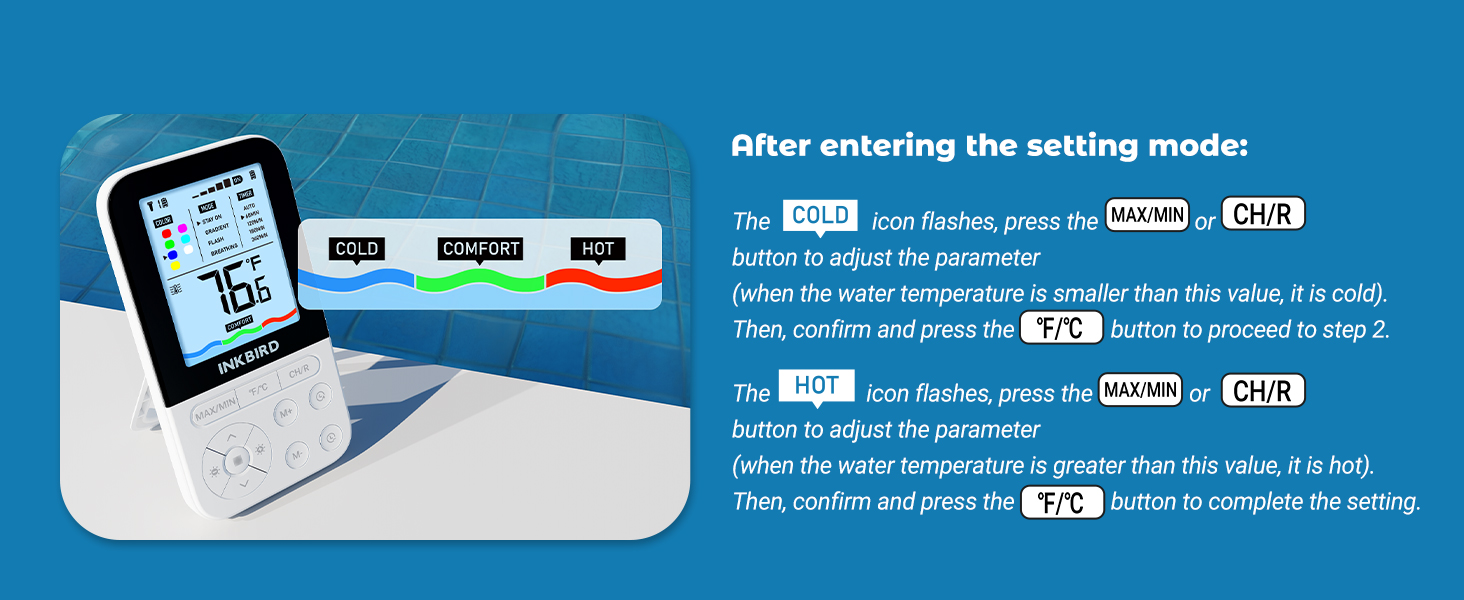
Figure 6: Indoor Remote Control Display and Button Functions.
- Wireless Icon: Indicates connection status.
- Battery Level Icon: Shows battery status of the thermometer and remote.
- Temperature Unit: Displays °F or °C.
- Water Temperature: Current temperature reading.
- Mood Lighting Status: ON/OFF state, current mode, color, brightness, and timer.
- Water Temperature Comfort Level: Indicates Cold, Comfort, or Hot.
5.2 Button Functions (Indoor Remote)
- MAX/MIN: Short press to display max/min water temperature. Long press to reset max/min record.
- °F/°C: Press once to change the temperature unit. Long press to enter setting mode.
- CH/R: Press once to change the channel (if multiple thermometers are connected). Long press to reset the channel. In setting mode, press to increase value.
- Power Button (⏻): Press to turn on/off the mood light under the current channel.
- Up/Down Arrows: Press to change the color of the mood light.
- Brightness Buttons (☀): Press to change the brightness of the mood light.
- M+/M-: Press to change the working mode of the mood light.
- Timer Buttons (◷): Press to change the timer mode of the mood light.
5.3 Adjusting Water Temperature Comfort Levels
To set your preferred comfort range:
- Long press the °F/°C button on the remote to enter setting mode.
- The COLD icon will flash. Use the MAX/MIN or CH/R buttons to adjust the upper limit for 'Cold' temperature. Press °F/°C to confirm and proceed.
- The HOT icon will flash. Use the MAX/MIN or CH/R buttons to adjust the lower limit for 'Hot' temperature. Press °F/°C to complete the setting.

Figure 7: Steps to customize water temperature comfort levels.
6. Maintenance
- Solar Charging: Ensure the thermometer's solar panel is regularly exposed to direct sunlight to maintain optimal battery levels. A full charge can take approximately seven days.
- Cleaning: Periodically wipe the thermometer and remote control with a soft, damp cloth to remove any dirt or debris. Do not use abrasive cleaners.
- Battery Replacement (Remote): Replace the AAA batteries in the indoor remote control when the battery indicator shows low power.
- Storage: If storing the device for an extended period, ensure the thermometer is fully charged and the remote batteries are removed. Store in a cool, dry place.
7. Troubleshooting
| Problem | Possible Cause | Solution |
|---|---|---|
| No temperature reading on remote. | Out of range; low battery (thermometer or remote); interference. | Move remote closer to thermometer; ensure thermometer solar panel is exposed to sunlight; replace remote batteries; check for strong interference sources. |
| Ambient light not working. | Low battery (thermometer); light turned off; incorrect mode/brightness setting. | Ensure thermometer is fully charged via solar panel; press the power button on the remote to turn on the light; adjust mode and brightness settings. |
| Inaccurate temperature readings. | Sensor obstruction; extreme temperature conditions. | Ensure the thermometer's sensor is clear of debris; allow time for temperature stabilization. |
8. Specifications
| Feature | Detail |
|---|---|
| Model Name | IBS-P05R |
| Brand | Inkbird |
| Power Source | Solar Powered (Thermometer), AAA battery*2 (Remote) |
| Connectivity Technology | Wireless |
| Display Type | Digital |
| Waterproof Rating | IP68 |
| Temperature Range | -40℃ to 70℃ (-40°F to 158°F) |
| Wireless Transmission Distance | Up to 300 meters / 980 feet (open space) |
| Ambient Light Colors | 7 Colors |
| Ambient Light Modes | 4 Modes (Stay On, Flash, Gradient, Breathing) |
| Ambient Light Brightness | 5 Levels |
| Ambient Light Timers | 5 Timers |
| Material | Plastic |
| Item Model Number | INKBIRD IBS-P05R |
| Package Dimensions | 7.28 x 6.89 x 4.57 inches; 1.28 Pounds |
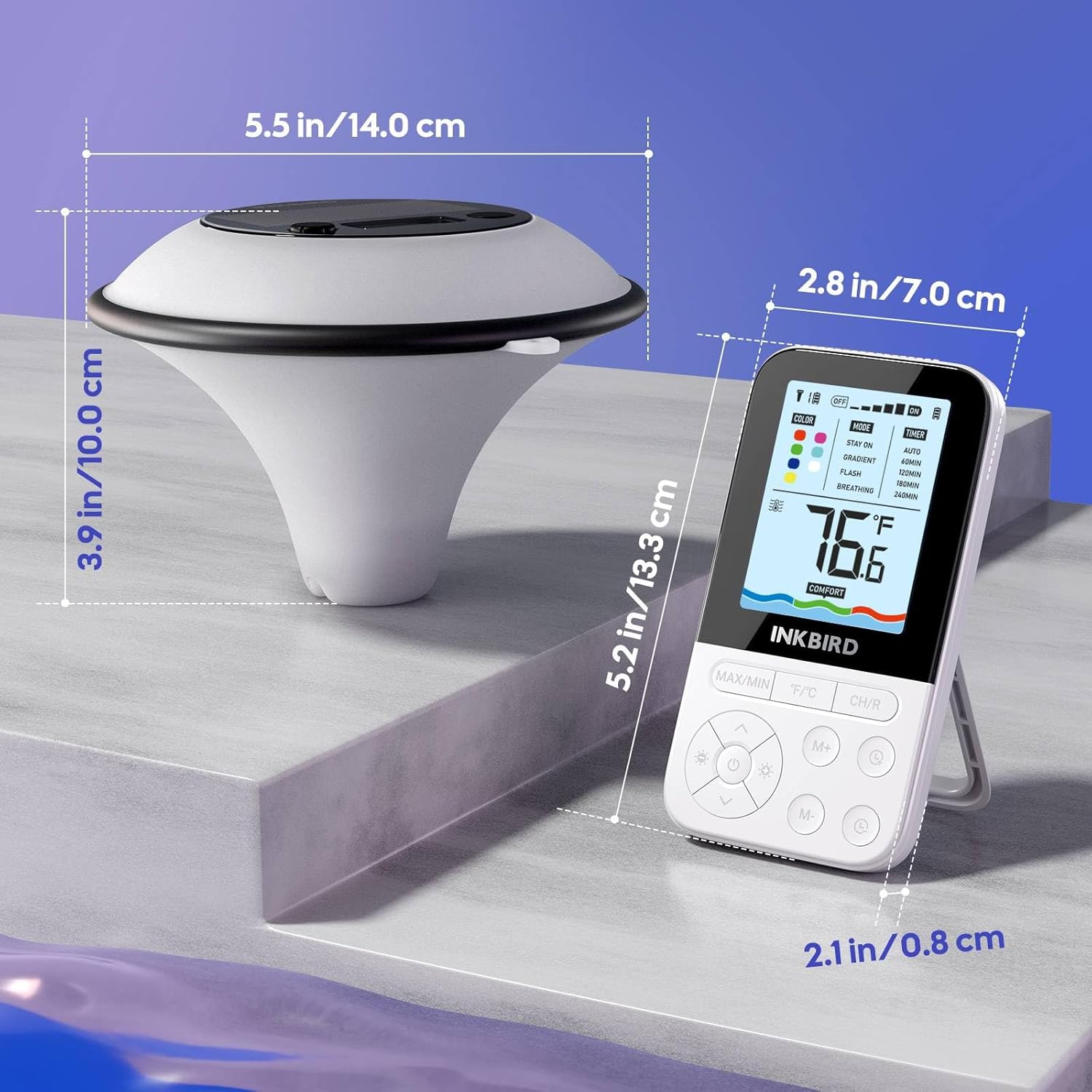
Figure 8: Product dimensions for the thermometer and remote.
9. Warranty and Support
INKBIRD is committed to providing high-quality products and excellent customer service. If you encounter any issues or have questions regarding the performance of your IBS-P05R thermometer, please refer to the following resources:
- Official User Manual (PDF): For detailed instructions and diagrams, please refer to the official PDF user manual available at: https://manuals.plus/m/3471b6ab10ca1ba9c4c6aaa0a62af39dc1c5d750138f271464c3a6ea20ca90d7
- Inkbird Store: Visit the official Inkbird store for product information, FAQs, and customer support contact details: https://www.amazon.com/stores/Inkbird/page/7C632972-5CDF-48B3-83B9-68D259D56A5B
INKBIRD strives to provide professional solutions and support for all its products.