
Product Overview
The HOOBRO Lateral File Cabinet BB37UWJ01 is designed to provide efficient storage and organization for your home or office. This cabinet features a built-in charging station, multiple storage compartments, and smooth-rolling casters for mobility. It is constructed from engineered wood with a sleek black finish and classic black metal accents.

Image: The HOOBRO Lateral File Cabinet BB37UWJ01, showcasing its design and functionality in an office environment.
Video: An overview of the HOOBRO Lateral File Cabinet, demonstrating its features and storage capabilities.
Safety Information
Please read and understand all safety instructions before assembly and use.
- Always use the lockable casters when moving the cabinet to prevent unexpected movement.
- Keep hands and feet away from casters during movement to avoid injury.
- Do not overload the cabinet. The maximum weight capacity is 44 pounds (20 kg).
- Ensure all connections for the power strip are secure before use.
- Keep liquids away from the power strip to prevent electrical hazards.
Components List
Before beginning assembly, verify that all components are present and undamaged. Refer to the included illustrated guide for a detailed list of parts and hardware.

Image: Detailed diagram illustrating the dimensions and individual components of the file cabinet, including drawers, shelves, and casters.
Typical components include:
- Top Panel
- Side Panels
- Back Panel
- Drawer Panels (for small and large drawers)
- Adjustable Hanging Rods
- Casters (5 total, 2 lockable)
- Power Strip with 2 AC Outlets, 1 USB Port, 1 Type-C Port
- Hardware (screws, dowels, cam locks, etc.)
- Metal Grips/Handles
Setup and Assembly
The HOOBRO Lateral File Cabinet requires assembly. All components are thoughtfully numbered, and a comprehensive illustrated guide is included to facilitate the process. Follow the step-by-step instructions provided in the packaging for effortless installation.
- Unpack Components: Carefully remove all parts from the packaging and lay them out on a clean, soft surface to prevent scratches.
- Identify Parts: Match each component with its corresponding number in the instruction manual.
- Assemble Frame: Follow the diagrams to connect the main frame panels using the provided hardware.
- Install Drawers: Assemble the small and large drawers according to the instructions, ensuring drawer slides are correctly oriented.
- Attach Casters: Securely attach the 5 casters to the bottom of the cabinet. Ensure the 2 lockable casters are placed as indicated for optimal stability.
- Install Power Strip: Integrate the power strip into the designated slot on the top panel.
- Final Checks: Verify all screws and connections are tightened. Ensure the cabinet is stable and level.
Operating Instructions
Using the Charging Station
The integrated power strip provides convenient access to power for your electronic devices.

Image: Detail of the power strip, showing 2 AC outlets, 1 USB port, and 1 Type-C port, ready for device charging.
- Plug the cabinet's power cord into a standard wall outlet.
- Use the 2 AC outlets (120V/12A) for devices like printers, laptops, or lamps.
- Use the USB port (5V/2A) or Type-C port (5V/2A) to charge compatible smartphones, tablets, or other USB-powered devices.
Utilizing Storage Drawers and Compartments
The cabinet offers diverse storage options for various office supplies and documents.
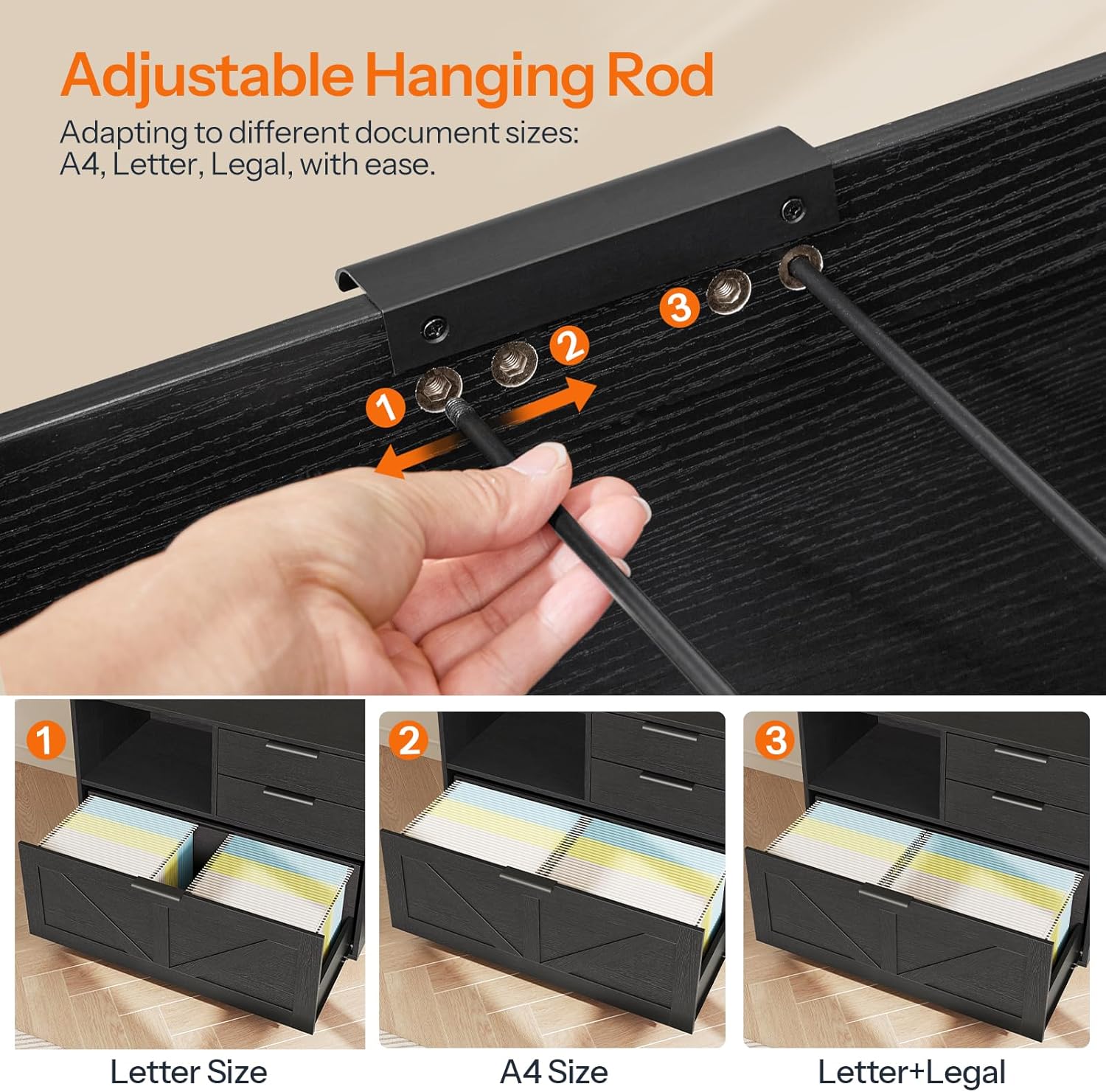
Image: An overhead view of the cabinet's interior, highlighting the open storage space, two smaller drawers, and the large bottom drawer for files.
- Top Surface: Use the wide top for a printer, office decor, or other frequently accessed items. The fenced top design helps prevent items from falling off.
- Open Compartment: Ideal for books, binders, or decorative items.
- Small Drawers: Two smaller drawers are provided for organizing personal items, stationery, or smaller office supplies.
- Large Filing Drawer: The bottom drawer is designed for hanging files. It includes adjustable rods to accommodate A4, letter, or legal-sized documents. Adjust the rods by sliding them into the appropriate slots to fit your file size.

Image: Instructions on adjusting the hanging rods within the large drawer to fit Letter, A4, or Legal-sized files.
Mobility and Stability
The cabinet is equipped with 5 casters for easy movement, two of which are lockable for stability.

Image: Detail of a universal caster, highlighting its 360-degree rotation and locking feature for secure placement.
- To move the cabinet, unlock the two lockable casters by flipping their levers.
- Gently push or pull the cabinet to its desired location.
- Once in position, lock the two casters to prevent accidental movement and ensure stability.
Maintenance
Proper care will extend the life and appearance of your HOOBRO Lateral File Cabinet.
- Cleaning: Wipe surfaces with a soft, damp cloth. Avoid harsh chemicals or abrasive cleaners, which can damage the finish.
- Spills: Clean up spills immediately to prevent staining or damage to the engineered wood.
- Hardware: Periodically check and tighten all screws and hardware to ensure the cabinet remains stable.
- Casters: Keep casters free of debris to ensure smooth rolling.
- Power Strip: Ensure the power strip remains dry and free from dust. Do not attempt to disassemble or repair the power strip.
Troubleshooting
| Problem | Possible Cause | Solution |
|---|---|---|
| Cabinet is wobbly or unstable. | Loose hardware; uneven floor; casters not locked. | Tighten all assembly screws. Move to a level surface. Ensure lockable casters are engaged. |
| Drawers do not slide smoothly. | Drawer slides misaligned; debris in slides; drawer overloaded. | Check drawer slide installation. Clean slides. Reduce drawer contents. |
| Power strip not working. | Cabinet not plugged in; wall outlet not active; power strip switch off (if applicable); overloaded circuit. | Ensure the cabinet's power cord is securely plugged into a live wall outlet. Check the wall outlet with another device. Reduce the number of devices plugged into the power strip. |
| Casters not rolling freely. | Casters locked; debris caught in casters. | Unlock casters. Remove any hair or debris from the caster wheels. |
Specifications
| Brand | HOOBRO |
| Model Number | BB37UWJ01 |
| Color | Black |
| Material | Engineered Wood |
| Product Dimensions (D x W x H) | 13.8"D x 31.5"W x 24.4"H (35cm x 80cm x 62cm) |
| Weight Capacity (Maximum) | 44 Pounds (20 kg) |
| Number of Drawers | 3 (2 small, 1 large filing) |
| Number of Shelves | 2 (open compartment) |
| Casters | 5 (2 lockable) |
| Power Strip Outlets | 2 AC Outlets (120V/12A) |
| Power Strip USB Ports | 1 USB Port (5V/2A), 1 Type-C Port (5V/2A) |
| File Compatibility | A4, Letter, Legal-Sized Files |
| Assembly Required | Yes |
Warranty Information
This product is covered by a manufacturer's warranty. Please refer to the warranty card included in your packaging or contact HOOBRO customer support for details regarding warranty terms and conditions.
Customer Support
If you have any questions, require assistance with assembly, or encounter any issues with your HOOBRO Lateral File Cabinet, please contact our customer support team.
- Website: Visit the official HOOBRO website for FAQs and support resources.
- Email: Refer to your product packaging for customer service email address.
- Phone: Refer to your product packaging for customer service phone number.
Please have your model number (BB37UWJ01) and purchase date ready when contacting support.