
Introduction
Thank you for choosing the Beautiful 14-Cup Programmable Coffee Maker. This appliance is designed to deliver a rich and flavorful coffee experience with convenience and style. Please read this manual thoroughly before use to ensure proper operation and maintenance.
Key features include a 14-cup capacity, programmable timer, customizable brew strength, a charcoal water filter for enhanced flavor, a touch-activated display, and a durable glass carafe.

Figure 1: Front view of the Beautiful 14-Cup Programmable Coffee Maker in Lavender.
Safety Information
- Always unplug the coffee maker from the electrical outlet before cleaning or when not in use.
- Do not immerse the appliance, cord, or plug in water or other liquids.
- Ensure the coffee maker is placed on a stable, level surface away from hot surfaces or open flames.
- Do not operate the appliance with a damaged cord or plug, or if the appliance malfunctions or has been damaged in any manner.
- Keep the appliance out of reach of children.
- Use only accessories recommended by the manufacturer.
Components
Familiarize yourself with the various parts of your coffee maker:
- Main Unit: Houses the heating element, water reservoir, and control panel.
- Control Panel: Touch-activated display for setting time, programming, and selecting brew options.
- Water Reservoir: Located under the top cover, for filling with water.
- Filter Basket: Holds the coffee filter and grounds.
- Reusable Gold Filter: An eco-friendly alternative to paper filters.
- Charcoal Water Filter: Ensures optimal freshness and flavor by removing impurities.
- Glass Carafe: 14-cup capacity carafe with a no-drip, perfect-pour spout.
- Warming Plate: Keeps brewed coffee warm.
- Measuring Scoop: For accurate coffee ground measurement.

Figure 2: Overview of the coffee maker's touch display and key features.
Setup
First-Time Use and Cleaning
- Unpack all components and remove any packaging materials.
- Wash the glass carafe, reusable filter, and measuring scoop in warm, soapy water. Rinse thoroughly and dry. These parts are also dishwasher-safe (see Maintenance section).
- Wipe the exterior of the coffee maker with a damp cloth.
- Before brewing coffee for the first time, run two full cycles with just water to clean the internal components. Fill the water reservoir to the MAX fill line, place the empty carafe on the warming plate, and press the Brew/Off button. Discard the water after each cycle.
Installing the Charcoal Water Filter
For optimal coffee flavor, install the charcoal water filter:
- Soak the charcoal water filter in cold water for 15 minutes.
- Insert the soaked filter into the filter holder.
- Place the filter holder into the water reservoir.
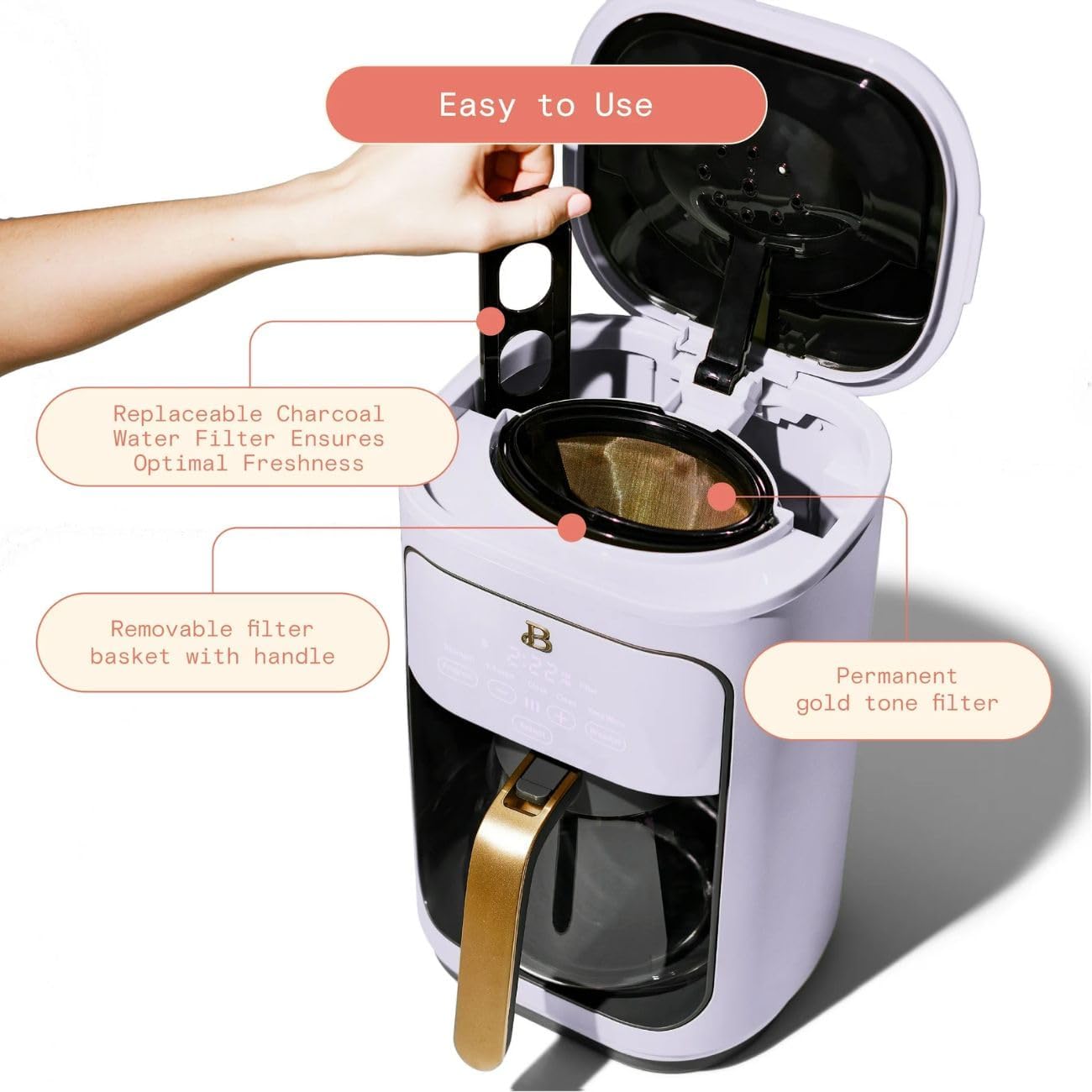
Figure 3: Top view with lid open, showing the water filter and reusable coffee filter basket.
Operating Instructions
Setting the Clock and Program Timer
- Plug the coffee maker into a standard electrical outlet. The display will illuminate.
- Press the 'Hour' and 'Minute' buttons to set the current time. Hold to scroll quickly.
- To set the auto-brew time, press the 'Program' button. The display will show 'Program' or 'Auto'. Use the 'Hour' and 'Minute' buttons to set your desired brew time.
- Press the 'Program' button again to confirm the setting. The 'Program' indicator light will illuminate.
Brewing Coffee
- Open the top cover and fill the water reservoir with cold, fresh water up to the desired cup marking on the side of the unit. Do not exceed the MAX fill line.
- Place the reusable gold filter (or a #4 cone-shape paper filter) into the filter basket.
- Add ground coffee to the filter. Generally, 1 tablespoon of ground coffee per cup is recommended, but adjust to your personal preference.
- Close the top cover securely.
- Place the empty glass carafe with its lid on the warming plate.
- Press the 'Brew/Off' button to start brewing immediately. The 'Brew' indicator light will illuminate.
- To select brew strength (Regular, Gourmet, or Bold), press the 'Strength' button before starting the brew cycle.
- For smaller batches (1-4 cups), press the '1-4 Cup' button before brewing to optimize flavor.

Figure 4: A user selecting a function on the touch-activated display.
Pause & Serve Feature
The Pause & Serve feature allows you to temporarily remove the carafe during the brewing cycle to pour a cup of coffee. The brewing will automatically pause for up to 30 seconds. Return the carafe to the warming plate within 30 seconds to resume brewing and prevent overflow.
Keep Warm Mode & Auto Shut-Off
After brewing is complete, the coffee maker automatically enters Keep Warm mode, keeping your coffee warm for up to 4 hours. The appliance will automatically shut off after the set Keep Warm duration (adjustable from 30 minutes to 4 hours) for safety and energy saving.
Maintenance
Daily Cleaning
- Always unplug the coffee maker and allow it to cool completely before cleaning.
- Remove the reusable filter and discard used coffee grounds. Wash the reusable filter, filter basket, and glass carafe in warm, soapy water or place them in the dishwasher.
- Wipe the exterior surfaces of the coffee maker with a soft, damp cloth. Do not use abrasive cleaners or scouring pads.

Figure 5: Dishwasher-safe parts for easy cleaning.
Replacing the Charcoal Water Filter
The charcoal water filter should be replaced approximately every 60 days or after 60 uses, whichever comes first, to maintain optimal water quality and coffee flavor.
- Remove the old charcoal water filter from its holder.
- Discard the old filter.
- Install a new charcoal water filter following the steps in the 'Setup' section.
Descaling (Special Cleaning Cycle)
Mineral deposits from water can build up in your coffee maker over time, affecting performance and flavor. It is recommended to descale the appliance every 2-3 months, or more frequently if you have hard water.
- Fill the water reservoir with a mixture of 1/3 white vinegar and 2/3 water.
- Place the empty carafe on the warming plate.
- Press the 'Clean' button on the control panel. The 'Clean' indicator light will illuminate.
- The coffee maker will run a special cleaning cycle. Once complete, the 'Clean' light will turn off.
- Run two full cycles with fresh water to rinse out any remaining vinegar solution.
Troubleshooting
| Problem | Possible Cause | Solution |
|---|---|---|
| Coffee does not brew. | No water in reservoir; power not connected; program timer not set correctly. | Fill reservoir; check power plug; verify program settings. |
| Coffee is too weak/strong. | Incorrect coffee-to-water ratio; wrong brew strength selected. | Adjust coffee grounds amount; select desired brew strength (Regular, Gourmet, Bold). |
| Water overflows from filter basket. | Too much coffee grounds; filter basket clogged; carafe not properly placed. | Reduce coffee grounds; clean filter basket; ensure carafe is centered on warming plate. |
| Coffee has an unusual taste. | Mineral buildup; old charcoal filter; stale coffee. | Descale the coffee maker; replace charcoal filter; use fresh coffee grounds. |
Specifications
| Feature | Detail |
|---|---|
| Brand | Beautiful |
| Model Name | 14-Cup Programmable Coffee Maker |
| Model Number | 19027 |
| Capacity | 14 Cups |
| Power | 1200 Watts |
| Voltage | 120 Volts (AC) |
| Dimensions (D x W x H) | 11.73" x 14.8" x 9.58" |
| Weight | 12 pounds |
| Special Features | Auto Shut-Off, Programmable, Timer, Touch-Activated Display, Brew Strength Control, Keep Warm, Pause & Serve |
| Included Components | Filter, Measuring Scoop, Reusable Gold Filter Basket, User Manual |
| Dishwasher Safe Parts | Yes (Carafe, Reusable Filter Basket) |
Warranty and Support
For warranty information and customer support, please refer to the documentation included with your product or visit the official Beautiful brand website. Keep your purchase receipt as proof of purchase for any warranty claims.