1. Introduction
This manual provides essential information for the safe and efficient operation of your UPS-CR1K 1KVA/800W Uninterruptible Power Supply. Please read this manual thoroughly before installation and operation, and retain it for future reference.
The UPS-CR1K is designed to provide reliable backup power and protection against power surges, outages, and other electrical disturbances for critical electronic equipment such as network devices and security systems.
2. Safety Information
Always follow these safety precautions to prevent injury or damage to the UPS and connected equipment:
- Do not open the UPS casing. There are no user-serviceable parts inside. Refer all servicing to qualified service personnel.
- Ensure the UPS is connected to a grounded power outlet.
- Do not block ventilation openings. Maintain adequate airflow around the UPS.
- Avoid installing the UPS in areas with excessive dust, humidity, or extreme temperatures.
- Disconnect the UPS from the power source before cleaning or performing any maintenance.
- The battery inside the UPS is not user-replaceable. Battery replacement should only be performed by qualified personnel.
3. Package Contents
Verify that all items are present in the package:
- UPS-CR1K 1KVA/800W UPS Unit
- User Manual (this document)
- Power Cord
- USB Communication Cable (if applicable)
4. Product Overview
4.1 Front Panel
The front panel features the LCD display, control buttons, and status indicators.
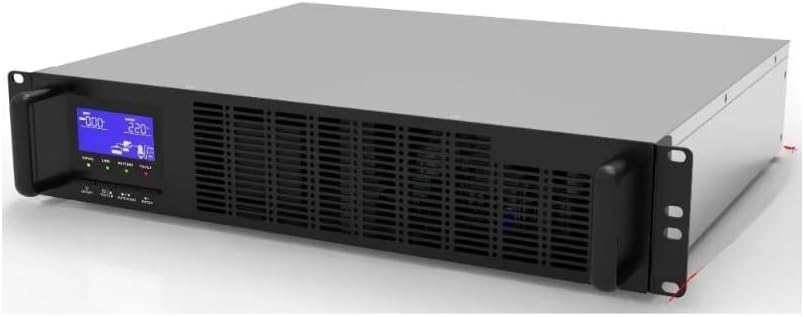
Figure 4.1: Front view of the UPS-CR1K, highlighting the LCD display and control interface.
- LCD Display: Shows real-time status, input/output voltage, battery level, and load capacity.
- Control Buttons: Used for navigating menus, checking status, and performing self-tests.
- Status Indicators (LEDs):
- Online: Green LED, indicates UPS is operating on utility power.
- Battery: Yellow LED, indicates UPS is operating on battery power.
- Fault: Red LED, indicates a system fault.
- Ventilation Grilles: Ensure proper airflow for cooling.
4.2 Rear Panel
The rear panel contains the input power connector, output receptacles, and communication ports.
(Image of rear panel not available. Please refer to the physical unit for port identification.)
- AC Input: Connects to the utility power source.
- Output Receptacles: Provide power to connected equipment.
- Communication Ports (USB/RS232): For connecting to a computer for monitoring and management.
- Circuit Breaker: Provides overload protection.
5. Setup
5.1 Unpacking and Inspection
- Carefully unpack the UPS from its packaging.
- Inspect the unit for any shipping damage. If damage is found, do not operate the unit and contact your dealer.
5.2 Placement
- Place the UPS in a clean, dry, and temperature-controlled environment.
- Ensure adequate clearance (at least 20 cm) around the ventilation openings for proper airflow.
- Avoid direct sunlight, heat sources, and excessive moisture.
5.3 Connecting to Power and Equipment
- Connect the UPS power cord to a grounded wall outlet.
- Allow the UPS to charge for at least 8 hours before initial use to ensure full battery capacity.
- Connect your critical equipment (e.g., network switches, servers, security cameras) to the output receptacles on the rear panel of the UPS.
- Do not connect surge protectors or power strips to the UPS output, as this may overload the unit.
6. Operating the UPS
6.1 Turning On the UPS
Press and hold the power button on the front panel for approximately 3 seconds until the UPS beeps and the LCD display illuminates. The UPS will perform a self-test and then enter online mode.
6.2 Turning Off the UPS
To turn off the UPS, press and hold the power button for approximately 3 seconds until the UPS beeps and the display turns off. Ensure all connected equipment is safely shut down before turning off the UPS.
6.3 LCD Display and Indicators
The LCD display provides detailed information about the UPS status. Use the navigation buttons to cycle through different screens, which may include:
- Input Voltage (V)
- Output Voltage (V)
- Battery Capacity (%)
- Load Level (%)
- Operating Mode (Online, Battery, Bypass, Fault)
The LED indicators provide a quick visual status:
- Green (Online): Normal operation, utility power is supplying the load.
- Yellow (Battery): UPS is operating on battery power due to a power outage or fluctuation.
- Red (Fault): Indicates an internal fault. Refer to the troubleshooting section.
7. Maintenance
7.1 General Care
- Keep the UPS clean and free of dust. Use a soft, dry cloth for cleaning.
- Ensure ventilation openings are clear and unobstructed.
- Avoid spilling liquids on the UPS.
7.2 Battery Maintenance
- The internal battery is sealed and maintenance-free. It is not user-replaceable.
- To maximize battery life, ensure the UPS is kept in a cool, dry environment.
- Perform a battery self-test periodically (e.g., every 3-6 months) using the control buttons or management software to check battery health.
- If the UPS is stored for an extended period, recharge the battery every 3 months to prevent deep discharge.
8. Troubleshooting
Before contacting technical support, please refer to the following table for common issues and solutions:
| Problem | Possible Cause | Solution |
|---|---|---|
| UPS does not turn on. | No utility power; Battery not charged; Power button not pressed long enough. | Check power cord connection and wall outlet; Allow battery to charge for 8 hours; Press and hold power button for 3 seconds. |
| UPS beeps continuously. | Overload; Low battery; Fault condition. | Reduce connected load; Allow battery to recharge; Check LCD for fault code and refer to manual. |
| UPS is on battery mode frequently. | Unstable utility power; Battery nearing end of life. | Check utility power quality; Consider battery replacement by qualified personnel. |
| Red Fault LED is lit. | Internal fault. | Turn off the UPS, disconnect all equipment, and restart. If fault persists, contact technical support. |
9. Specifications
| Feature | Detail |
|---|---|
| Model | UPS-CR1K |
| Capacity | 1KVA / 800W |
| Input Voltage Range | (Typical: 110-120V AC or 220-240V AC, depending on region) |
| Output Voltage | (Typical: 110-120V AC or 220-240V AC, depending on region) |
| Transfer Time | (Typical: 2-6ms) |
| Battery Type | Sealed Lead-Acid, Maintenance-Free |
| Recharge Time | 8 hours to 90% capacity |
| Protection | Overload, Discharge, Overcharge, Short Circuit, Surge |
| Operating Temperature | 0°C to 40°C (32°F to 104°F) |
| Humidity | 0-90% RH (non-condensing) |
| Dimensions (W x D x H) | (Refer to product packaging or manufacturer's website for exact dimensions) |
| Weight | (Refer to product packaging or manufacturer's website for exact weight) |
Note: Specifications are subject to change without notice for product improvement.
10. Warranty and Support
For warranty information and technical support, please refer to the warranty card included with your product or visit the manufacturer's official website. Keep your purchase receipt as proof of purchase for warranty claims.
Manufacturer: ENS
Date First Available: February 26, 2025


