
1. Introduction
The Sony FE 400-800mm F6.3-8 G OSS is Sony's first α Lens that zooms to 800mm, a range ideal for distant subjects and telephoto compression. It features fast, precise autofocus to capture unpredictable subjects with accuracy and precision. The internal zoom design minimizes center-of-gravity shift for smooth handling.
Key Features:
- First α series super-telephoto zoom lens covering the 400 to 800 mm range.
- High resolution and natural bokeh throughout the zoom range.
- Internal zoom for stable handling.
- Fast, precise AF captures even fast-moving subjects.
- High-performance 1.4x and 2.0x teleconverters extend the lens’s focal length.
2. What's in the Box
- Sony FE 400-800mm f/6.3-8 G OSS Lens
- Lens Hood
- Lens Front Cap
- Lens Rear Cap
3. Setup
3.1 Attaching the Lens
Align the white index mark on the lens barrel with the white index mark on your camera body. Rotate the lens clockwise until it clicks into place. Ensure the lens is securely mounted before use.

Figure 1: Front view of the Sony FE 400-800mm f/6.3-8 G OSS Lens.
3.2 Using the Tripod Collar
The lens includes an integrated tripod collar for stable mounting, especially given its weight. Loosen the collar locking knob to rotate the lens for horizontal or vertical shooting, or any angle in between. Tighten the knob to secure the position. The tripod collar can be removed by fully unscrewing the knob and pulling the collar away from the lens barrel.
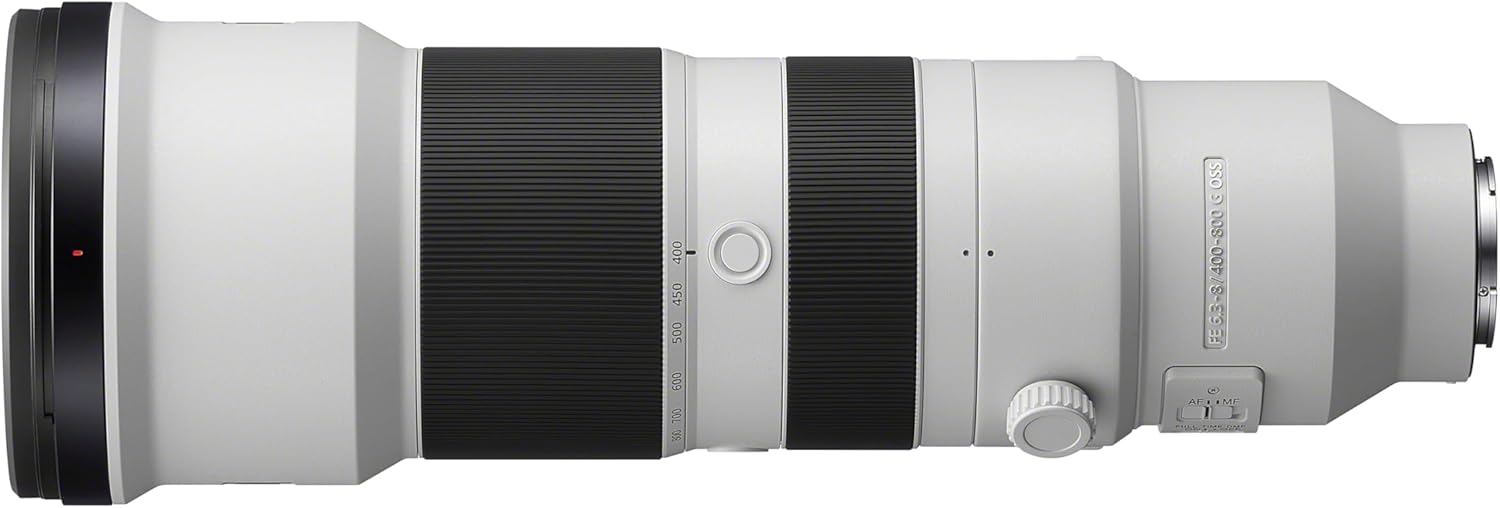
Figure 2: Side view of the lens showing the tripod collar.
3.3 Attaching the Lens Hood
Align the lens hood with the front of the lens and rotate it clockwise until it clicks into place. The lens hood helps to block unwanted stray light and protect the front element of the lens.
4. Operating Instructions
4.1 Lens Controls
The lens features several controls for versatile shooting:
- AF/MF Switch: Toggles between autofocus (AF) and manual focus (MF) modes.
- Focus Range Limiter: Allows you to select the autofocus range. Options typically include 'FULL' (full range) or a limited range (e.g., '10m-∞' or '3m-8m') to speed up autofocus performance for specific distances.
- OSS (Optical SteadyShot) ON/OFF Switch: Activates or deactivates the optical image stabilization. Useful for reducing camera shake, especially at longer focal lengths.
- Mode Switch (1/2/3): Selects different Optical SteadyShot modes. Mode 1 is for general stabilization, Mode 2 is for panning shots, and Mode 3 is for unpredictable movement.
- Programmable Focus Hold Buttons: Three customizable buttons located around the lens barrel. These can be assigned various functions via your camera body's menu.
- Zoom Ring: Adjusts the focal length from 400mm to 800mm. This lens features an internal zoom mechanism, meaning the physical length of the lens does not change when zooming, which helps maintain balance.
- Focus Ring: Used for manual focusing.

Figure 3: Detailed view of the lens controls.
4.2 Usage Scenarios
This super-telephoto zoom lens is designed for capturing distant subjects with exceptional detail and clarity. Ideal applications include:
- Wildlife Photography: The extensive zoom range allows photographers to capture animals from a distance without disturbing them.
- Sports Photography: Fast and precise AF, combined with image stabilization, makes it suitable for tracking fast-moving subjects in sports events.
- Astrophotography: The long focal length can be utilized for capturing detailed images of celestial bodies like the moon.
- Landscape Photography: Achieve telephoto compression effects to bring distant elements of a landscape closer together.
5. Maintenance
To ensure the longevity and optimal performance of your lens, follow these maintenance guidelines:
- Cleaning: Use a soft, lint-free cloth to clean the lens barrel. For lens elements, use a lens brush or blower to remove dust, then gently wipe with a lens cleaning cloth and solution.
- Storage: Store the lens in a cool, dry place away from direct sunlight and extreme temperatures. Use the provided lens caps and hood to protect the elements.
- Handling: Always handle the lens with care. Avoid dropping it or subjecting it to strong impacts. When mounting or dismounting, hold the lens firmly by the barrel, not the extending parts.
6. Troubleshooting
If you encounter issues with your lens, consider the following:
- Blurry Images due to Camera Shake: At 800mm, camera shake is significantly magnified. Ensure Optical SteadyShot (OSS) is enabled. For critical shots, especially in low light or with static subjects, using a sturdy tripod is highly recommended.
- Autofocus Issues: If autofocus is slow or inaccurate, check the Focus Range Limiter switch. Setting it to a limited range (e.g., 10m-∞) can improve speed if your subject is within that range. Ensure the AF/MF switch is set to AF.
- Lens Not Sharp at 800mm: While the lens is designed for high resolution, extreme telephoto settings can sometimes show reduced sharpness, especially if not perfectly stable or in challenging lighting. Ensure proper technique, use a fast enough shutter speed, and consider stopping down the aperture slightly if light permits.
7. Specifications
| Product Dimensions | 13.62 x 4.75 x 4.75 inches |
| Item Weight | 5.46 pounds |
| Item Model Number | SEL400800G |
| Brand | Sony |
| Focal Length Description | 400-800mm |
| Lens Type | Telephoto |
| Compatible Mountings | Sony E, Sony FE |
| Manufacturer | Sony |
| Date First Available | February 27, 2025 |
8. Warranty and Support
This Sony lens is covered by a manufacturer's warranty. For detailed warranty information, please refer to the documentation included with your product or visit the official Sony support website. For technical support, service, or inquiries, please contact Sony customer service directly.