
D3LX0Z1 PY600acn
D3LX0Z1 PY600acn Sliding Gate Opener Control Board Instruction Manual
Models: PY600acn, SL600, PY600, PY800, SL1500
1. Introduction
This manual provides essential instructions for the installation, operation, and maintenance of the D3LX0Z1 PY600acn Sliding Gate Opener Control Board. This control board is designed for use with various sliding gate opener systems, including PY600acn, SL600, PY600, PY800, and SL1500 models. Please read this manual thoroughly before attempting any installation or operation to ensure safe and correct usage.
The control board acts as the central processing unit for your sliding gate opener, managing motor functions, limit switches, and remote control signals. Proper understanding of its functions is crucial for optimal performance and longevity of your gate system.
2. Safety Information
Warning: Failure to follow these safety instructions may result in serious injury or property damage.
- Installation and wiring should only be performed by qualified personnel in accordance with local electrical codes and regulations.
- Disconnect power to the gate opener system before performing any installation, maintenance, or troubleshooting.
- Keep hands, feet, and clothing clear of the gate and moving parts at all times.
- Do not allow children to operate the gate opener or play near the gate.
- Ensure all safety devices, such as photocells and emergency stop buttons, are correctly installed and functioning.
- Never attempt to repair the control board yourself. Contact a qualified technician for service.
3. Product Overview
The D3LX0Z1 PY600acn control board is a replacement or upgrade component for compatible sliding gate opener systems. It integrates the necessary circuitry to manage motor operations, interpret signals from limit switches, and respond to remote control commands.
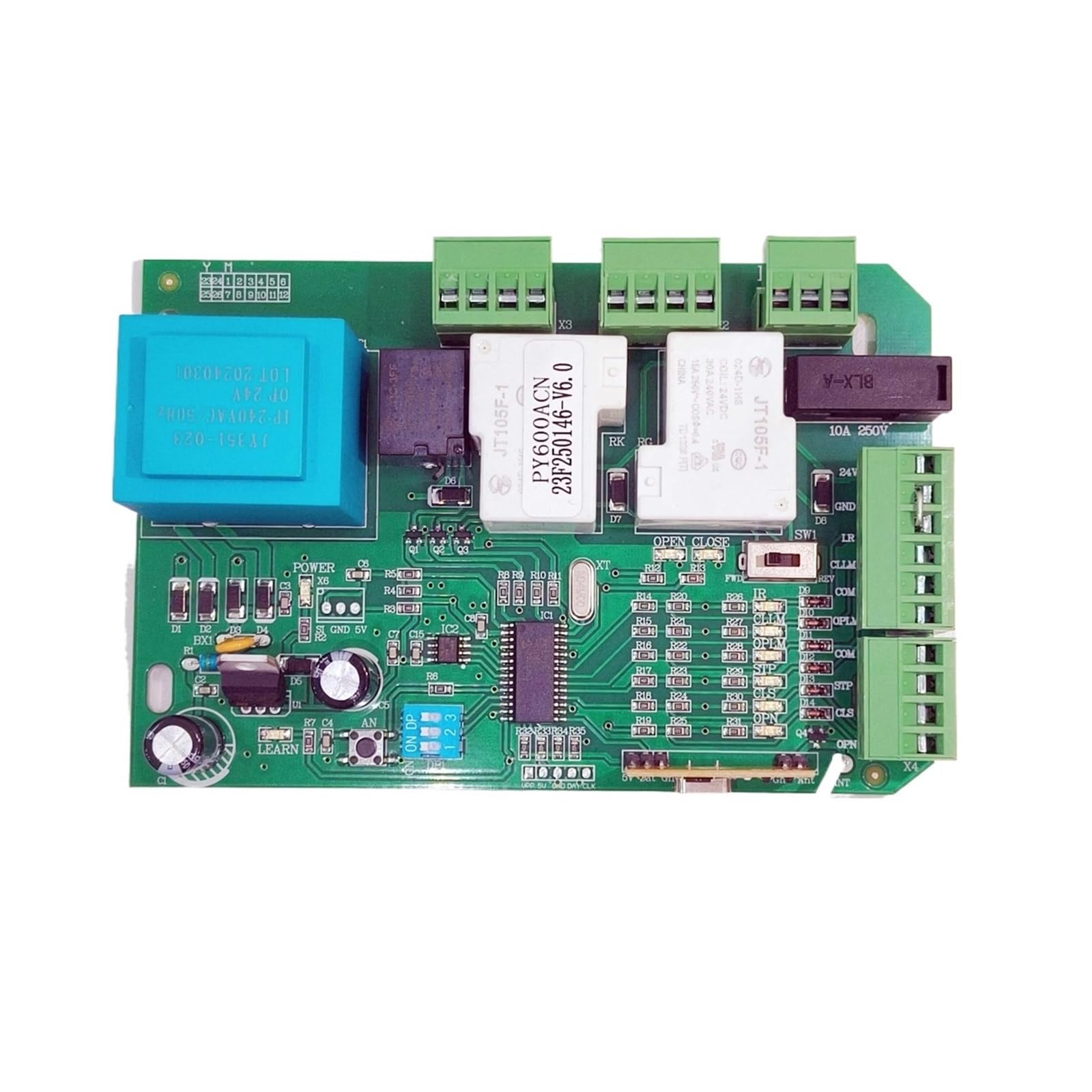
This image displays the main circuit board for the PY600acn sliding gate opener, featuring various connectors and electronic components.
Key features typically include:
- Motor control terminals
- Magnetic or Spring Limit Switch inputs
- Remote control receiver
- Safety sensor inputs (e.g., photocells)
- Adjustable parameters for gate operation (e.g., auto-close time, force)
4. Setup and Installation
Important: Professional installation is highly recommended for this product due to electrical connections and safety considerations.
4.1 Pre-Installation Checks
- Ensure the gate opener motor is compatible with this control board.
- Verify that all power is disconnected from the gate opener system.
- Have all necessary tools and wiring diagrams for your specific gate opener model.
4.2 Control Board Replacement/Installation
- Carefully remove the old control board (if replacing) or prepare the mounting location for the new board. Note the existing wiring connections.
- Mount the new PY600acn control board securely within the gate opener housing, ensuring it is protected from weather and moisture.
- Connect the main power supply to the designated terminals on the control board. Ensure correct polarity and voltage.
- Connect the motor wires to the appropriate motor output terminals. Refer to your gate opener's specific wiring diagram for motor direction.
- Connect the limit switch wires (magnetic or spring type) to their respective inputs on the control board. Proper connection of limit switches is critical for safe gate operation.
- Connect any optional safety devices (e.g., photocells, flashing lights) to their designated terminals.
- Connect any external control devices (e.g., push buttons, keypads) if applicable.
4.3 Remote Control Pairing
After installation, you will need to pair your remote controls with the new board. The exact procedure may vary slightly, but generally involves:
- Pressing a 'Learn' or 'Code' button on the control board.
- Pressing a button on your remote control within a short timeframe.
- The board's indicator light will typically flash or change state to confirm successful pairing.
Refer to the specific instructions provided with your remote controls or gate opener system for detailed pairing steps.
5. Operating Instructions
Once installed and configured, the gate opener can be operated using the paired remote controls or external control devices.
5.1 Basic Operation
- Open: Press the designated 'Open' button on your remote control. The gate will move to the fully open position and stop.
- Close: Press the designated 'Close' button on your remote control. The gate will move to the fully closed position and stop.
- Stop: Press the 'Stop' button (if available) or press the 'Open'/'Close' button again during gate movement to halt the gate.
5.2 Advanced Features (if applicable)
Depending on your specific gate opener model and control board firmware, additional features may be available:
- Auto-Close: The gate may automatically close after a set delay once it reaches the fully open position.
- Pedestrian Mode: Allows the gate to open partially for pedestrian access.
- Obstacle Detection: Safety sensors (photocells) will stop or reverse the gate if an obstruction is detected during closing.
Consult your complete gate opener system manual for details on configuring and utilizing these advanced features.
6. Maintenance
Regular maintenance helps ensure the longevity and reliable operation of your gate opener system.
- Visual Inspection: Periodically check the control board for any signs of damage, loose connections, or corrosion.
- Cleanliness: Keep the control board and its housing free from dust, debris, and insects. Use a soft, dry brush or compressed air for cleaning.
- Wiring: Ensure all wiring connections remain secure and free from fraying or damage.
- Limit Switches: Verify that the magnetic or spring limit switches are clean and properly positioned for accurate gate stopping.
- Safety Devices: Regularly test all safety devices (e.g., photocells) to ensure they are functioning correctly.
For maintenance of the gate motor and mechanical components, refer to the specific manual for your gate opener system.
7. Troubleshooting
If you encounter issues with your gate opener, perform these basic troubleshooting steps before contacting support.
- Gate Not Responding:
- Check if the power supply to the gate opener is active.
- Verify that the remote control batteries are not depleted.
- Ensure the remote control is properly paired with the control board.
- Gate Stops Mid-Movement:
- Check for any physical obstructions in the gate's path.
- Inspect safety sensors (photocells) for alignment or obstructions.
- Verify limit switch connections and functionality.
- Gate Opens/Closes Incorrectly:
- Re-check limit switch positions and wiring.
- Ensure motor wiring polarity is correct.
If the problem persists after performing these checks, it is recommended to contact a qualified technician for further diagnosis and repair.
8. Specifications
| Feature | Specification |
|---|---|
| Model Number | LUADDLJRN (PY600acn series compatible) |
| Item Weight | 1.76 ounces |
| Package Dimensions | 0.39 x 0.39 x 0.39 inches |
| Manufacturer | D3LX0Z1 |
| Batteries Required | No (for the control board itself) |
9. Warranty and Support
For warranty information regarding your D3LX0Z1 PY600acn Sliding Gate Opener Control Board, please refer to the documentation provided at the time of purchase or contact your seller directly. Warranty terms and conditions may vary.
For technical support or assistance with installation and troubleshooting beyond the scope of this manual, please contact the manufacturer or your authorized dealer. Ensure you have your product model number (LUADDLJRN) and purchase details available when seeking support.
Ask a question about this manual
Ask about setup, troubleshooting, compatibility, parts, safety, or missing instructions. Manuals+ will review the question and use this page’s manual context to help answer it.