
1. Introduction
This manual provides detailed instructions for the installation, programming, operation, and maintenance of your ASONPAO 877MAX Wireless Universal Garage Door Opener Keypad. This keypad offers convenient, secure access to your garage without the need for a remote control.
Key features include:
- Security+ 2.0 Rolling Code Technology for enhanced security.
- Backlit buttons for visibility in low-light conditions.
- Support for temporary PINs for guest access.
- Wireless design for easy installation.
- Durable, weatherproof, and frost-resistant construction.
2. Compatibility
The ASONPAO 877MAX keypad is compatible with various Chamberlain, LiftMaster, and Sears Craftsman garage door openers manufactured since 1993. Compatibility is determined by the color of the 'Learn' button on your garage door opener motor head.
- Purple Learn Button: Compatible (2005-2014 models).
- Red/Orange Learn Button: Compatible (1997-2005 models).
- Yellow Learn Button: Compatible (2011-Present models).
- Green Learn Button: Compatible (1993-1997 models).
Important Note:
- This keypad does NOT support Security+ 3.0 White Learn Button openers produced in 2026 or later.
- This keypad does NOT support DIP switch openers or Craftsman Series 100 models.

Image: Compatibility chart for ASONPAO 877MAX keypad.
3. Setup and Installation
The ASONPAO 877MAX keypad is designed for wireless installation and operates on a single 9V battery (included).
3.1. Battery Installation
The keypad comes with a 9V battery pre-installed. If replacement is needed, open the battery compartment on the back of the keypad and insert a new 9V alkaline battery, ensuring correct polarity.

Image: Keypad showing 9V battery compartment.
3.2. Programming the Keypad
Follow these steps to program your keypad to your garage door opener:
- Locate the Learn Button: Find the 'Learn' button on your garage door opener motor head. The location and color may vary depending on your model.
- Initiate Programming Mode: On the keypad, press and hold the '*' and '#' buttons simultaneously until the keypad lights begin to blink.
- Enter Your PIN: Enter your desired 4-digit Personal Identification Number (PIN). Then, press the 'ENTER' button.
- Select Opener Type: Press and release the 'ENTER' button the number of times that corresponds to your garage door opener's learn button color/type:
- 1: Security+ 2.0 (Yellow Learn Button)
- 2: Security+ (Purple Learn Button)
- 3: 390 MHz Security+ (Red/Orange Learn Button)
- 4: 315 MHz Security+ (Red/Orange Learn Button)
- 5: 390 MHz Billion Code (Green Learn Button)
- Activate Learn Mode on Opener: Press and release the 'Learn' button on your garage door opener motor head. The Learn LED will light up. You have approximately 30 seconds to complete the next step.
- Finalize Programming: On the keypad, enter your 4-digit PIN again, then press the 'ENTER' button. The garage door opener lights will flash, or you will hear a click, indicating successful programming.
- Test: To test, enter your PIN and press 'ENTER'. The garage door should activate.
To program the keypad for more than one garage door opener, repeat the steps above using a new PIN for each additional garage door opener.
To exit programming mode at any time, press the '0' button.

Image: Keypad programming steps.
4. Operating Instructions
4.1. Opening/Closing the Garage Door
To open or close your garage door, simply enter your 4-digit PIN on the keypad and press the 'ENTER' button. The garage door will activate.
4.2. One-Touch Close Function
After entering your PIN, the one-touch close function activates within 15 seconds. If more than 15 seconds pass, you will need to re-enter your PIN to close the door.
4.3. Backlit Buttons
The keypad features backlit buttons, providing clear visibility and ease of use in low-light conditions or at night.
4.4. Temporary PIN for Guest Access
The keypad supports setting a temporary PIN for limited-time guest access. Consult your garage door opener's manual for specific instructions on setting temporary access codes, as this feature is typically managed through the opener's programming.

Image: Keypad with backlit buttons and temporary PIN feature.
5. Maintenance
5.1. Battery Replacement
The keypad operates on a single 9V alkaline battery. When the battery is low, the keypad's backlight may dim or the keypad may become unresponsive. Replace the battery by opening the compartment on the back of the unit. Ensure proper polarity when inserting the new battery.
5.2. Cleaning
Clean the keypad's surface with a soft, damp cloth. Avoid using abrasive cleaners or solvents, as these can damage the finish or internal components. The keypad is designed to be weatherproof and frost-resistant, operating reliably in temperatures as low as -30°C.

Image: Keypad demonstrating weatherproof and frost-resistant capabilities.
6. Troubleshooting
- Keypad Not Responding:
- Check the 9V battery. Replace if necessary.
- Ensure the keypad is within the maximum operating range of 164 feet from the garage door opener.
- Garage Door Not Activating After PIN Entry:
- Verify that the keypad is correctly programmed to your garage door opener. Refer to Section 3.2 for programming steps.
- Confirm your garage door opener's 'Learn' button color and type are compatible with the keypad (refer to Section 2).
- Ensure you are entering the correct 4-digit PIN.
- Check for any obstructions in the path of the garage door sensors.
- Interference Issues:
- The keypad uses radio frequency (RF) for communication. Strong local RF interference might affect performance.
7. Specifications
| Brand | ASONPAO |
| Model Name | Universal Garage Door Opener Keypad |
| Model Number | 877MAX |
| Item Dimensions (L x W x H) | 6.42" x 2.95" x 1.54" |
| Item Weight | 0.16 Kilograms |
| Battery Type | 1 x 9V Alkaline Battery (included) |
| Maximum Range | 164 Feet |
| Connectivity Technology | Radio Frequency (310/315/390MHz) |
| Button Quantity | 13 |
| Controller Type | Button Control |
| Max Number of Supported Devices | 5 |
| Color | Brown |

Image: Keypad dimensions and specifications.
8. Warranty and Support
8.1. Warranty Information
The ASONPAO 877MAX Wireless Universal Garage Door Opener Keypad comes with a 3-Year Manufacturer's Warranty, ensuring long-term value and peace of mind. This product meets North American FCC Safety Standards.
8.2. Technical Support
For any technical assistance or inquiries, 24-hour online technical support is available. Please refer to your purchase platform or the manufacturer's website for contact details.
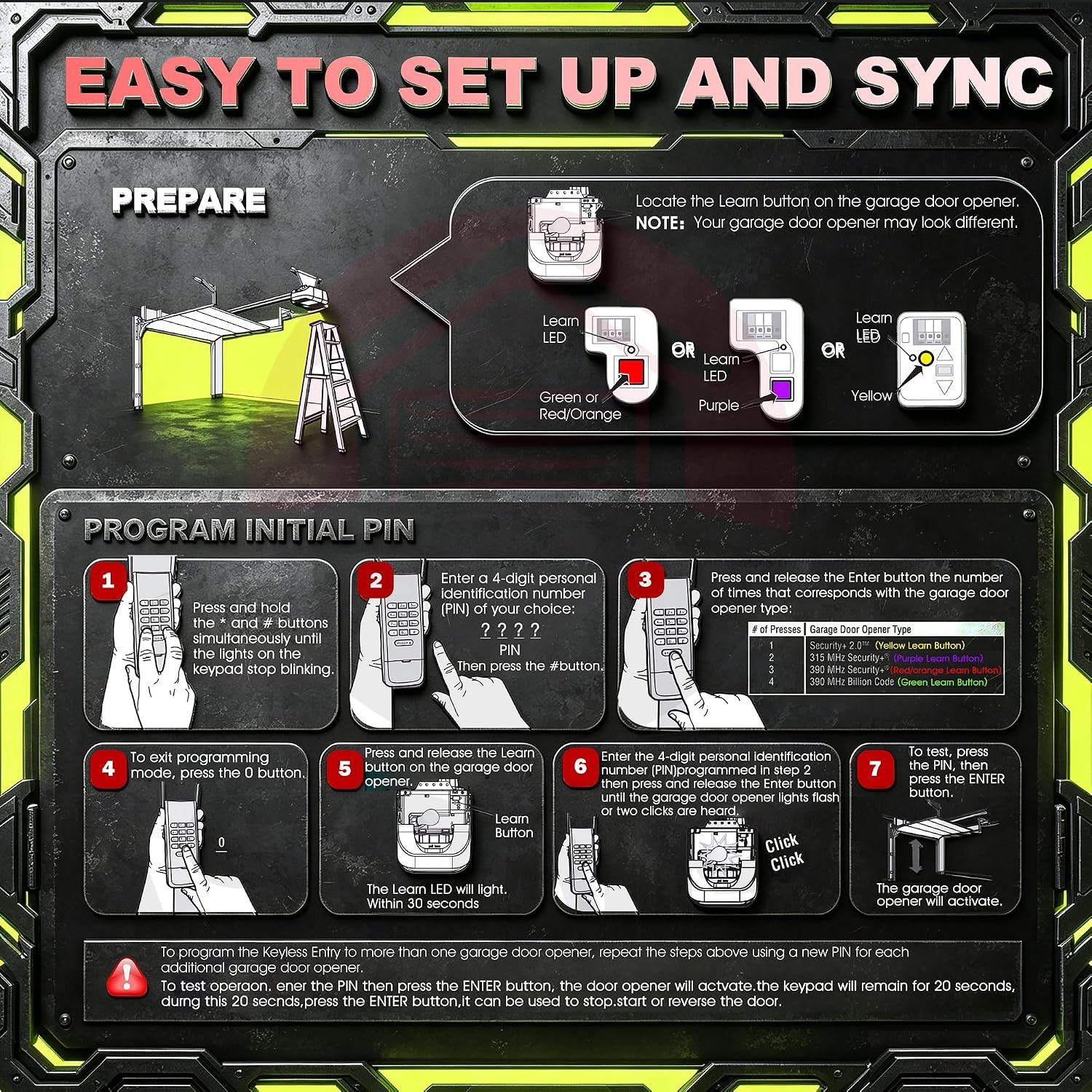
Image: Warranty and support details.