
HarmoHaby PHO_16PMVF73MwtbA
HarmoHaby Vanity Desk with Mirror & Lights Instruction Manual
1. Product Overview
This HarmoHaby Vanity Desk is a comprehensive makeup vanity set designed to enhance your beauty routine. It features a mirror with adjustable LED lighting, ample storage with six drawers and open shelves, and a built-in charging station for convenience. The set includes a matching stool and is finished in an elegant imitation marble white.

Figure 1: HarmoHaby Vanity Desk with Mirror & Lights. This image displays the complete vanity desk setup, including the lighted mirror, storage drawers, side shelves, and accompanying stool.
Key Features:
- Customizable Lighting: LED mirror with 3 adjustable lighting colors (cool white, warm white, warm yellow) and brightness control.
- Ample Storage: Six spacious drawers and two open shelves for organizing cosmetics, skincare, and accessories.
- Built-in Charging Station: Equipped with two USB-A ports and two AC outlets for charging devices and powering beauty tools.
- Integrated Hairdryer Holder: Conveniently keeps your hairdryer within reach.
- Comfortable Stool: Includes a matching upholstered stool for comfortable use.
- Durable Construction: Made from engineered wood with an imitation marble finish.
2. Specifications
| Attribute | Detail |
|---|---|
| Brand | HarmoHaby |
| Model Number | PHO_16PMVF73MwtbA |
| Product Dimensions | 44.29"D x 24.61"W x 10.12"H (Overall) |
| Item Weight | 116.8 pounds |
| Color | Imitation Marble White |
| Frame Material | Engineered Wood |
| UPC | 199108859266 |
| Charging Station | 2 USB-A ports, 2 AC outlets (125V/12A) |
| Power Cord Length | 4.9 Feet |

Figure 2: Detailed Product Dimensions. This diagram provides precise measurements for various components of the vanity desk, including the mirror, shelves, drawers, and overall height and width.
3. Setup
The HarmoHaby Vanity Desk requires assembly. Please follow the included assembly instructions carefully. Ensure all components are present before beginning. It is recommended to assemble the unit on a soft, clean surface to prevent scratches.
Assembly Steps (General Guidance):
- Unpack Components: Carefully remove all parts from the packaging and verify against the parts list in your separate assembly manual.
- Assemble Base Structure: Begin by assembling the main desk frame and leg supports.
- Install Drawers: Assemble and insert the six drawers into their designated slots.
- Attach Mirror and Shelves: Securely attach the mirror unit and the side storage shelves to the main desk.
- Connect Charging Station: Ensure the charging station's power cord is routed correctly and accessible.
- Assemble Stool: Put together the accompanying stool.
- Final Placement: Position the vanity desk in your desired location, ensuring it is stable and level.
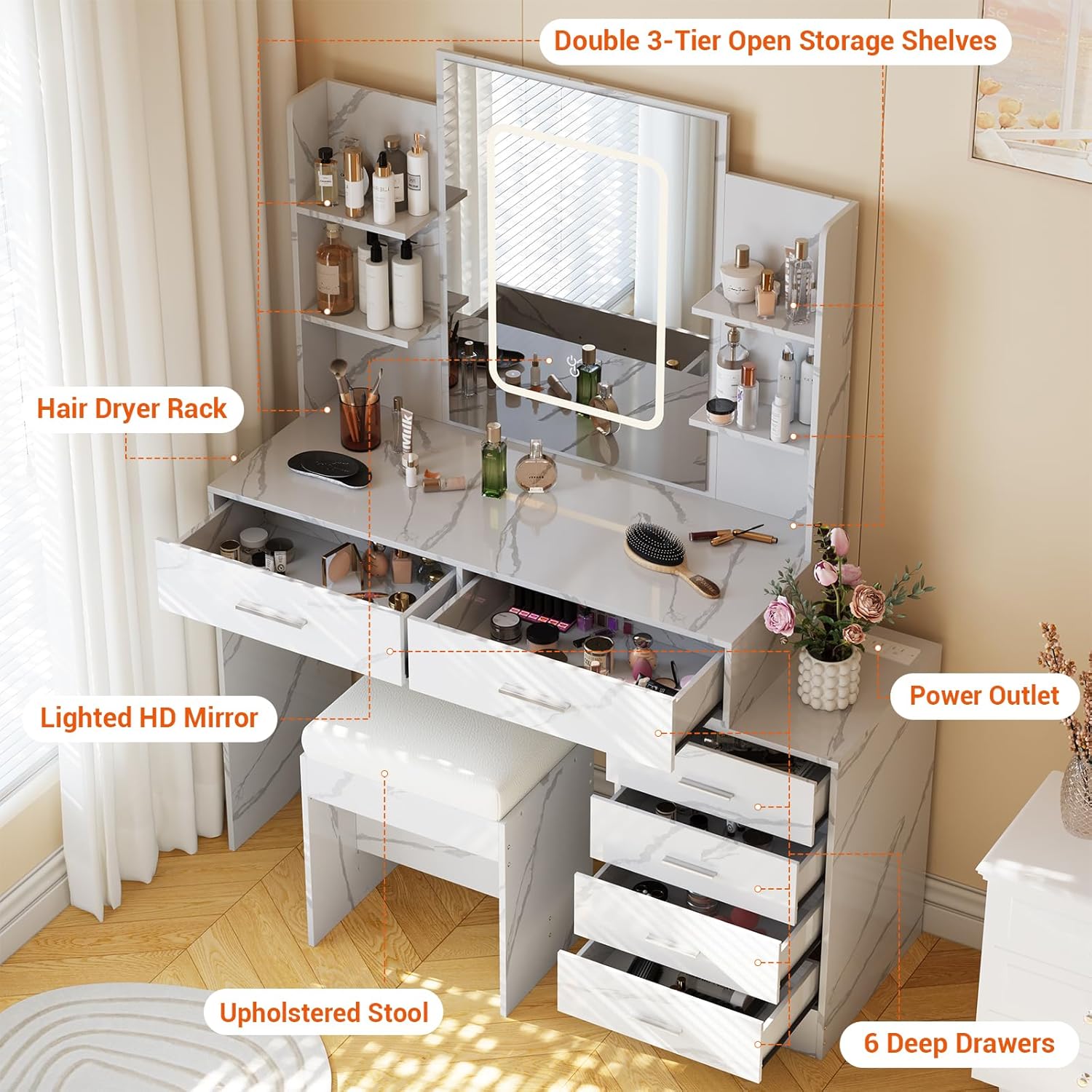
Figure 3: Vanity Desk with Labeled Components. This image highlights various parts of the vanity, such as the lighted HD mirror, double 3-tier open storage shelves, hair dryer rack, 6 deep drawers, upholstered stool, and power outlet, providing a visual guide for assembly and feature identification.
4. Operating Instructions
4.1. LED Mirror Lighting
The mirror features integrated LED lighting with adjustable colors and brightness.
- Power On/Off: Locate the touch sensor on the mirror surface. A short press will turn the lights on or off.
- Change Lighting Mode: With the lights on, a short press on the touch sensor will cycle through the three lighting modes: Cool White, Warm White, and Warm Yellow.
- Adjust Brightness: With the lights on, a long press on the touch sensor will gradually adjust the brightness level. Release when the desired brightness is achieved.

Figure 4: LED Mirror Lighting Controls. This image illustrates the three available lighting modes (Cold White, Warm White, Warm Yellow) and explains how to adjust brightness with a long press and change modes with a short press on the mirror's touch sensor.
4.2. Charging Station
The built-in charging station provides convenient power access for your electronic devices and beauty tools.
- AC Outlets: Plug in your hair dryer, curling iron, or other AC-powered devices into the two 125V/12A outlets.
- USB Ports: Connect your smartphones, tablets, smartwatches, or other USB-powered devices to the two 5V/2A USB ports for charging.
- Power Connection: Ensure the vanity's main power cord is securely plugged into a wall outlet for the charging station to function.

Figure 5: Built-in Charging Station. This image details the charging station, showing the two 125V/12A AC outlets and two 5V/2A USB ports, along with the 4.9-foot power cord and pre-installed holes for cable management.
5. Maintenance
Regular maintenance will help preserve the appearance and functionality of your vanity desk.
- Cleaning Surfaces: Wipe down all surfaces, including the imitation marble finish and engineered wood, with a soft, damp cloth. Avoid abrasive cleaners or harsh chemicals that could damage the finish.
- Mirror Cleaning: Use a glass cleaner specifically designed for mirrors and a lint-free cloth to clean the mirror surface. Spray cleaner onto the cloth, not directly onto the mirror, to prevent liquid from seeping into the LED components.
- Drawer Maintenance: Periodically check drawer slides for smooth operation. If needed, clean any dust or debris from the tracks.
- Electrical Components: Ensure the charging station and mirror light connections remain dry and free of dust. Do not attempt to service electrical components yourself.
- Avoid Excessive Moisture: While the surface is durable, prolonged exposure to water or high humidity should be avoided to prevent damage to the engineered wood.
6. Troubleshooting
If you encounter issues with your vanity desk, refer to the following common problems and solutions:
| Problem | Possible Cause | Solution |
|---|---|---|
| Mirror lights not turning on. | No power, loose connection, faulty sensor. | Ensure the vanity is plugged into a working outlet. Check all electrical connections. Try pressing the touch sensor firmly. |
| Charging station not working. | No power, device not compatible, faulty port. | Verify the vanity is plugged in. Test with a different device and cable. Ensure the device's power requirements are within the station's specifications (125V/12A for AC, 5V/2A for USB). |
| Drawers are stiff or difficult to open/close. | Misalignment, debris in tracks, overloaded drawer. | Check if drawers are properly aligned on their slides. Clean tracks of any dust or obstructions. Reduce the weight in the drawer. |
| Vanity feels unstable. | Loose assembly, uneven floor. | Retighten all assembly screws. Use shims under the legs if the floor is uneven. |
If the problem persists after attempting these solutions, please contact customer support.
7. Warranty & Support
This HarmoHaby Vanity Desk is designed for quality and durability. While specific warranty details are not provided in this manual, most products come with a manufacturer's warranty covering defects in materials and workmanship.
Returns:
This product is eligible for a 30-day easy return policy from the date of purchase. Please refer to your purchase platform's return guidelines for detailed instructions on initiating a return.
Customer Support:
For any questions, concerns, or assistance with assembly or product functionality, please contact HarmoHaby customer support through the retailer where you purchased the product. Please have your model number (PHO_16PMVF73MwtbA) and purchase information ready when contacting support.