
1. Introduction
This manual provides detailed instructions for the installation, operation, and maintenance of the D3LX0Z1 T329E Soft Start Control Board. This electronic controller is specifically designed for sliding gate opener motors utilizing a Normally Open (NO) magnetic limit switch system. It features a soft start function to ensure smooth operation and extended motor life. Please read this manual thoroughly before installation and use to ensure proper function and safety.
1.1 Safety Information
- Installation should only be performed by qualified personnel.
- Disconnect power before performing any installation or maintenance.
- Ensure all wiring connections are secure and correct to prevent damage or malfunction.
- This device operates with AC220V. Exercise extreme caution.
- Keep children and pets away from the gate area during operation.
Warning: Incorrect installation or use can lead to serious injury or damage to equipment.
2. Package Contents
- 1 x T329E Control Board
- 1 x Remote Control
3. Product Overview
The T329E control board is the central unit for managing your sliding gate opener. It integrates motor control, limit switch inputs, remote control reception, and safety features.
3.1 Key Components

Figure 1: Top view of the D3LX0Z1 T329E control board, showing the main components including relays, transformer, terminal blocks, DIP switches, and potentiometers.

Figure 2: Close-up of the control board highlighting the DIP switches (red block, labeled 1-8) for function selection and the three potentiometers (circled in red) for adjusting parameters like force, soft start time, and auto-close delay.
- Terminal Blocks: For connecting power, motor, limit switches, and external devices.
- Relays: Control motor direction and power.
- Transformer: Provides necessary power to the control circuitry.
- DIP Switches: Configure various operational parameters.
- Potentiometers: Fine-tune settings such as motor force, soft start duration, and auto-close timer.
- Antenna: For remote control signal reception.
4. Installation
4.1 Wiring Diagram (General Guidance)
Refer to the labels on the control board for specific terminal connections. A typical setup involves connecting the main power, motor, and magnetic limit switches.
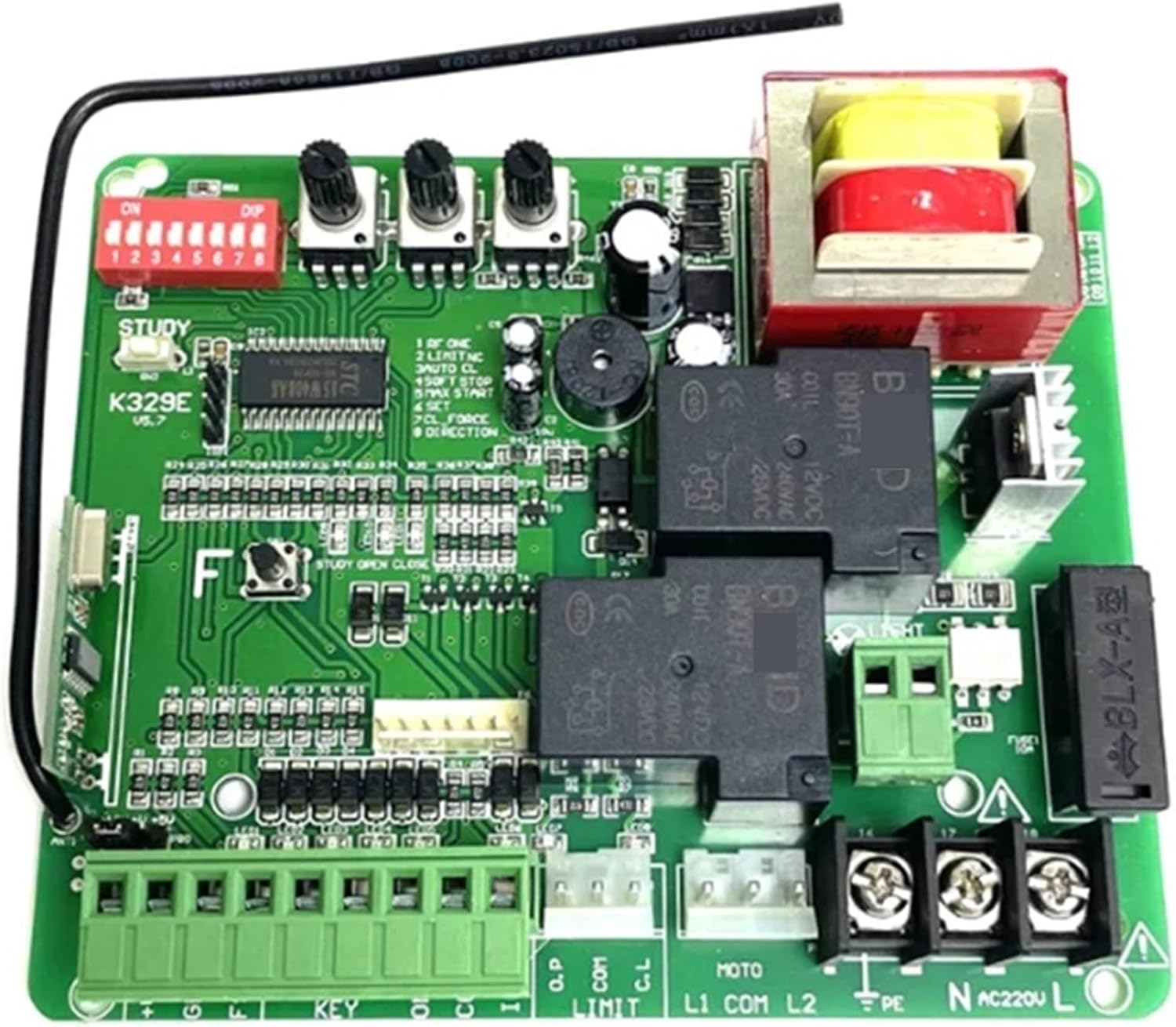
Figure 3: View of the control board's terminal blocks, indicating connection points for power (AC220V L, N, PE), motor (MOTO L1, COM, L2), limit switches (LIMIT L1, COM, L2), and other accessories.
4.2 Step-by-Step Wiring
- Power Connection: Connect the AC220V Live (L), Neutral (N), and Earth (PE) wires to the corresponding terminals on the board. Ensure proper grounding.
- Motor Connection: Connect the gate opener motor wires to the MOTO L1, COM, and L2 terminals. L1 and L2 typically control the two directions of the motor, and COM is the common wire. Test motor direction after initial setup.
- Magnetic Limit Switches: Connect the Normally Open (NO) magnetic limit switches to the LIMIT L1, COM, and L2 terminals. L1 and L2 correspond to the open and close limits, and COM is the common. Ensure the switches are correctly positioned to stop the gate at its fully open and fully closed positions.
- Remote Control Pairing: Press the "STUDY" button on the board (refer to Figure 2). While the LED indicator is lit, press a button on your remote control. The LED will flash to confirm successful pairing. Repeat for additional remotes.
- Optional Accessories: Connect any additional accessories such as photocells, flashing lights, or external push buttons to their designated terminals (e.g., FSW, STP, ONE, COM, INRF, O.P, C.L). Refer to the specific accessory's manual for wiring details.
Important: Always verify all connections before applying power.
5. Configuration (DIP Switches and Potentiometers)
The T329E board features DIP switches and potentiometers to customize its operation.
5.1 DIP Switch Settings
The red DIP switch block (labeled 1-8) allows for various function selections. "ON" typically means the switch is engaged.

Figure 4: Detailed view of the DIP switches, which are used to set various operational modes and features of the control board.
| DIP Switch | Function (OFF/DOWN) | Function (ON/UP) |
|---|---|---|
| 1 | Normal Operation | Single Button Cycle (Open-Stop-Close-Stop) |
| 2 | No Auto-Close | Auto-Close Enabled |
| 3 | Standard Soft Start | Extended Soft Start |
| 4 | Limit Switch Detection (Normal) | Limit Switch Detection (Enhanced) |
| 5 | Motor Force (Normal) | Motor Force (High) |
| 6 | Stop Force (Normal) | Stop Force (High) |
| 7 | Direction (Standard) | Direction (Reversed) |
| 8 | Photocell (Normal) | Photocell (Active) |
Note: The exact functions of each DIP switch may vary slightly. Always refer to the specific markings on your board if available.
5.2 Potentiometer Adjustments
The three potentiometers allow for fine-tuning of operational parameters. Use a small screwdriver to adjust them.
- Force Adjustment: Controls the motor's pushing/pulling force. Adjust carefully to prevent excessive force on the gate.
- Soft Start/Stop Time: Adjusts the duration of the soft start and soft stop phases, ensuring smooth gate movement.
- Auto-Close Delay: Sets the time delay before the gate automatically closes after reaching the fully open position (if auto-close is enabled via DIP switch).
Recommendation: Start with default or mid-range settings and adjust incrementally as needed.
6. Operating Instructions
6.1 Remote Control Operation
Once the remote control is paired, pressing the assigned button will initiate the gate's movement cycle:
- First Press: Gate opens.
- Second Press (during opening): Gate stops.
- Third Press (after stop): Gate closes.
- Fourth Press (during closing): Gate stops.
- Fifth Press (after stop): Gate opens again.
6.2 Manual Override
In case of power failure or system malfunction, most gate openers have a manual release mechanism. Refer to your gate opener's manual for instructions on how to disengage the motor and operate the gate manually.
7. Maintenance
The T329E control board requires minimal maintenance.
- Regular Inspection: Periodically check all wiring connections for tightness and signs of wear or corrosion.
- Cleanliness: Keep the control board free from dust, moisture, and insects. Ensure the enclosure (if applicable) is sealed.
- Battery Check (Remote): Replace remote control batteries as needed.
- Gate System Check: Regularly inspect the gate, tracks, and motor for proper function and lubrication as per the gate opener manufacturer's guidelines.
Caution: Always disconnect power to the control board before performing any cleaning or inspection.
8. Troubleshooting
This section addresses common issues you might encounter.
| Problem | Possible Cause | Solution |
|---|---|---|
| Gate does not respond to remote. | Remote battery low/dead; Remote not paired; Power issue to board. | Replace remote battery; Re-pair remote (see Installation); Check power supply to board. |
| Gate opens but does not close, or vice versa. | Limit switches incorrectly wired or faulty; Motor wiring incorrect. | Verify limit switch connections and functionality; Check motor wiring (L1, COM, L2). |
| Gate stops unexpectedly. | Obstruction detected (photocell); Limit switch triggered prematurely; Motor overload. | Check for obstructions; Inspect limit switch positions; Reduce motor force if adjustable. |
| Gate operates erratically. | Loose wiring; Interference; Faulty component. | Check all connections; Ensure proper grounding; Contact support if issue persists. |
If the problem persists after attempting these solutions, please contact customer support.
9. Specifications
- Model: T329E
- Brand: D3LX0Z1
- Input Voltage: AC220V
- Compatible Limit Switch Type: Magnetic, Normally Open (NO)
- Features: Soft Start, Soft Stop, Auto-Close (configurable), Remote Control Support
- Package Dimensions: 1.18 x 0.79 x 0.39 inches
- Item Weight: 1.76 ounces
10. Warranty and Support
For warranty information and technical support, please refer to the seller's policies or contact D3LX0Z1 customer service directly. Keep your purchase receipt for warranty claims.
For further assistance, visit the product page on Amazon or contact the seller "Yuexuan Department Store".