
Introduction
Thank you for purchasing the Generic Portable Tower Fan. This user manual provides important information regarding the safe operation, installation, maintenance, and troubleshooting of your new fan. Please read this manual thoroughly before using the product and retain it for future reference.
This 32-inch oscillating bladeless tower fan is designed to provide efficient and quiet cooling for your home, office, or bedroom, featuring remote control and a built-in timer for convenience.
Safety Instructions
To reduce the risk of fire, electric shock, or injury, please observe the following safety precautions:
- Always unplug the fan from the power outlet before cleaning, performing maintenance, or when not in use.
- Do not operate the fan with a damaged cord or plug. If the cord or plug is damaged, contact customer support for assistance.
- Keep the power cord away from heated surfaces.
- Do not run the power cord under carpeting or cover it with throw rugs, runners, or similar coverings. Arrange the cord away from traffic areas where it will not be tripped over.
- This appliance is not intended for use by persons (including children) with reduced physical, sensory, or mental capabilities, or lack of experience and knowledge, unless they have been given supervision or instruction concerning use of the appliance by a person responsible for their safety.
- Children should be supervised to ensure that they do not play with the appliance.
- Do not insert fingers or foreign objects into any openings on the fan.
- Do not use the fan in wet or damp locations, such as bathrooms or laundry areas.
- Place the fan on a stable, level surface to prevent it from tipping over.
- The bladeless design prevents accidental contact with moving parts, making it safer for households with children and pets. However, always ensure the fan is placed in a secure location.
Product Overview
The Portable Tower Fan is designed for optimal air circulation and user convenience. Key features include:
- 180° Wide-Range Oscillation: Ensures even air distribution throughout the room.
- Lower Noise Operation: Unique air-duct design minimizes noise for a quiet environment.
- Built-in Timer: Convenient timer function for automated operation.
- Compact & Portable: Space-saving design with a convenient carry handle.
- Safety Design: Bladeless fan prevents accidental contact, ideal for homes with children and pets.
- Remote Control: Allows for convenient operation from a distance.
- Infinitely Variable Speed: Precise control over airflow intensity.
- All Copper High-Speed Motor: Provides powerful and efficient airflow.
- Convenient Filter Screen Replacement: Easy access for cleaning and maintenance.
Components and Design
The fan unit consists of the main tower, a stable base, and a remote control for convenient operation. Its bladeless design is a key safety feature.

Figure 1: The Portable Tower Fan with its remote control, illustrating its cooling capability.
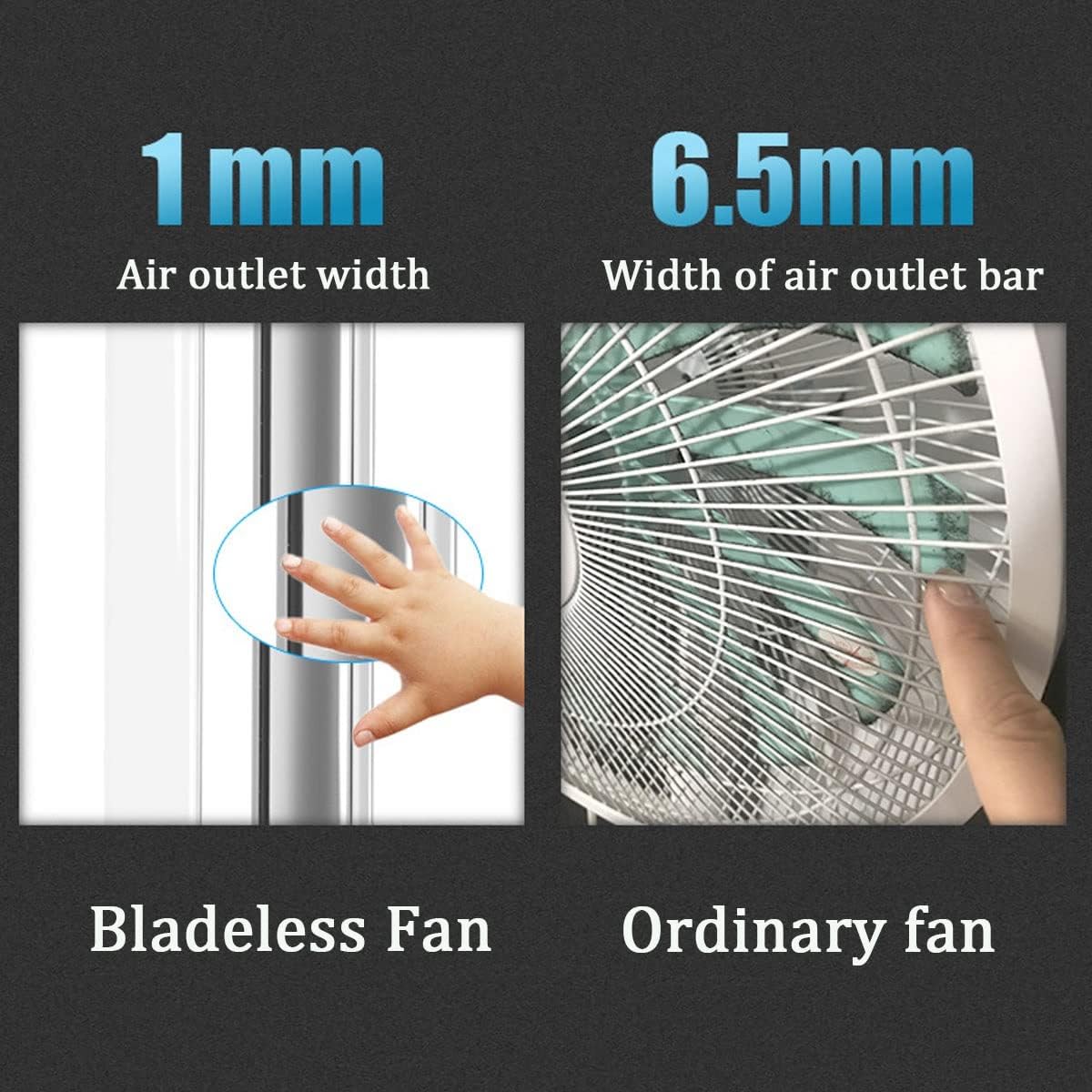
Figure 2: Comparison illustrating the narrow air outlet of the bladeless fan (1mm) compared to an ordinary fan (6.5mm), enhancing safety by preventing accidental contact.

Figure 3: The remote control for the tower fan, capable of operating the unit from up to 5 meters away.

Figure 4: Product dimensions, showing the fan's height of 73.5cm, width of 23.5cm, and depth of 9cm.
Setup
- Unpacking: Carefully remove the fan and all accessories from the packaging. Retain the packaging for future storage or transport.
- Placement: Place the fan on a firm, level surface. Ensure there is adequate space around the fan for proper airflow and oscillation. Avoid placing it near curtains or other objects that could obstruct the air intake or outlet.
- Power Connection: Insert the power plug into a standard electrical outlet. Ensure the voltage matches the requirements specified on the product label. The power cord length is 1.5 meters.
Operating Instructions
Your Portable Tower Fan can be operated using the touch controls on the unit or the included remote control.
Power On/Off
- Press the Power button on the fan's control panel or the remote control to turn the fan on or off.
Adjusting Fan Speed
- The fan features an infinitely variable speed control. Use the "+" and "-" buttons on the remote control or the corresponding touch controls on the unit to increase or decrease the airflow intensity.
Oscillation Function
- Press the Oscillation (SWAY) button on the remote control or the unit to activate the 180° wide-range oscillation. Press it again to stop oscillation.

Figure 5: The fan's oscillation function helps circulate air efficiently throughout a room.
Timer Function
- Press the Timer button on the remote control to set the desired operating time. Each press cycles through available timer settings (e.g., 1 hour, 2 hours, etc., up to 8 hours). The fan will automatically turn off once the set time has elapsed.
Remote Control Usage
- Ensure the remote control has working batteries.
- Point the remote control directly at the fan's receiver for optimal response.
- The remote control has a range of up to 5 meters.
Maintenance
Regular maintenance helps ensure the longevity and optimal performance of your fan.
Cleaning
- Always unplug the fan before cleaning.
- Use a soft, damp cloth to wipe the exterior surfaces of the fan. Do not use abrasive cleaners or solvents.
- For the air intake and outlet areas, use a soft brush or vacuum cleaner with a brush attachment to remove dust and debris.
- Do not immerse the fan in water or allow water to drip into the motor housing.
Filter Screen Replacement
The fan features a convenient filter screen that can be replaced to effectively filter fine dust and particles from the air. Refer to the product diagram for the exact location of the filter screen. To replace:
- Unplug the fan from the power outlet.
- Locate the filter screen access point (usually on the rear or side of the lower unit).
- Open the access cover and carefully remove the old filter screen.
- Insert a new, clean filter screen, ensuring it is properly seated.
- Close the access cover securely.
Storage
- If storing the fan for an extended period, clean it thoroughly.
- Store the fan in its original packaging in a cool, dry place, away from direct sunlight and extreme temperatures.
Troubleshooting
Before contacting customer support, please refer to the following troubleshooting guide for common issues:
| Problem | Possible Cause | Solution |
|---|---|---|
| Fan does not turn on. | No power supply. Power button not pressed. | Ensure the power cord is securely plugged into a working outlet. Press the Power button on the unit or remote control. |
| Weak airflow. | Fan speed set too low. Air intake/outlet blocked. Dirty filter screen. | Increase the fan speed using the controls. Ensure nothing is obstructing the fan's air intake or outlet. Clean or replace the filter screen. |
| Remote control not working. | Dead batteries. Obstruction between remote and fan. | Replace the batteries in the remote control. Ensure there is a clear line of sight between the remote and the fan's receiver. |
| Fan makes unusual noise. | Fan not on a level surface. Internal obstruction. | Place the fan on a stable, level surface. Unplug the fan and check for any foreign objects inside the air pathways. If the noise persists, contact support. |
Specifications
| Attribute | Detail |
|---|---|
| Product Name | Vaneless Tower Fan |
| Model | 32-Inch Oscillating Bladeless Tower Fan |
| Brand | Generic |
| Product Color | Silver |
| Product Size (H x W x D) | 73.5 cm x 23.5 cm x 9 cm |
| Power Cord Length | 1.5 meters |
| Speed Regulation Method | Infinitely Variable Speed |
| Material | ABS |
| Mounting Type | Floor Mount |
| ASIN | B0DYDPZ5NJ |
| Country of Origin | China |
Support
If you have any questions or require further assistance with your Portable Tower Fan, please feel free to contact our customer support. We are committed to providing excellent service.
Please note: Specific warranty details may vary. Refer to your purchase documentation for warranty information.