
Introduction
This manual provides detailed instructions for the setup, operation, and maintenance of your Anydry Automatic LCD Air Freshener Dispenser, Model 1802. This programmable spray dispenser is designed to automatically release fragrance at preset intervals, ensuring a consistently fresh environment in various settings such as bathrooms, offices, hotels, and other commercial or residential spaces. It is compatible with standard Glade aerosol spray refills (5.51" H × 2.56" D).

The Anydry Automatic LCD Air Freshener Dispenser provides consistent room refresh in various environments.
What's Included
Please verify that all components are present in the package:
- Key X1
- Screws X4
- User Guide X1
- Expansion Anchors X4
- Adhesive Mounting Plate X1
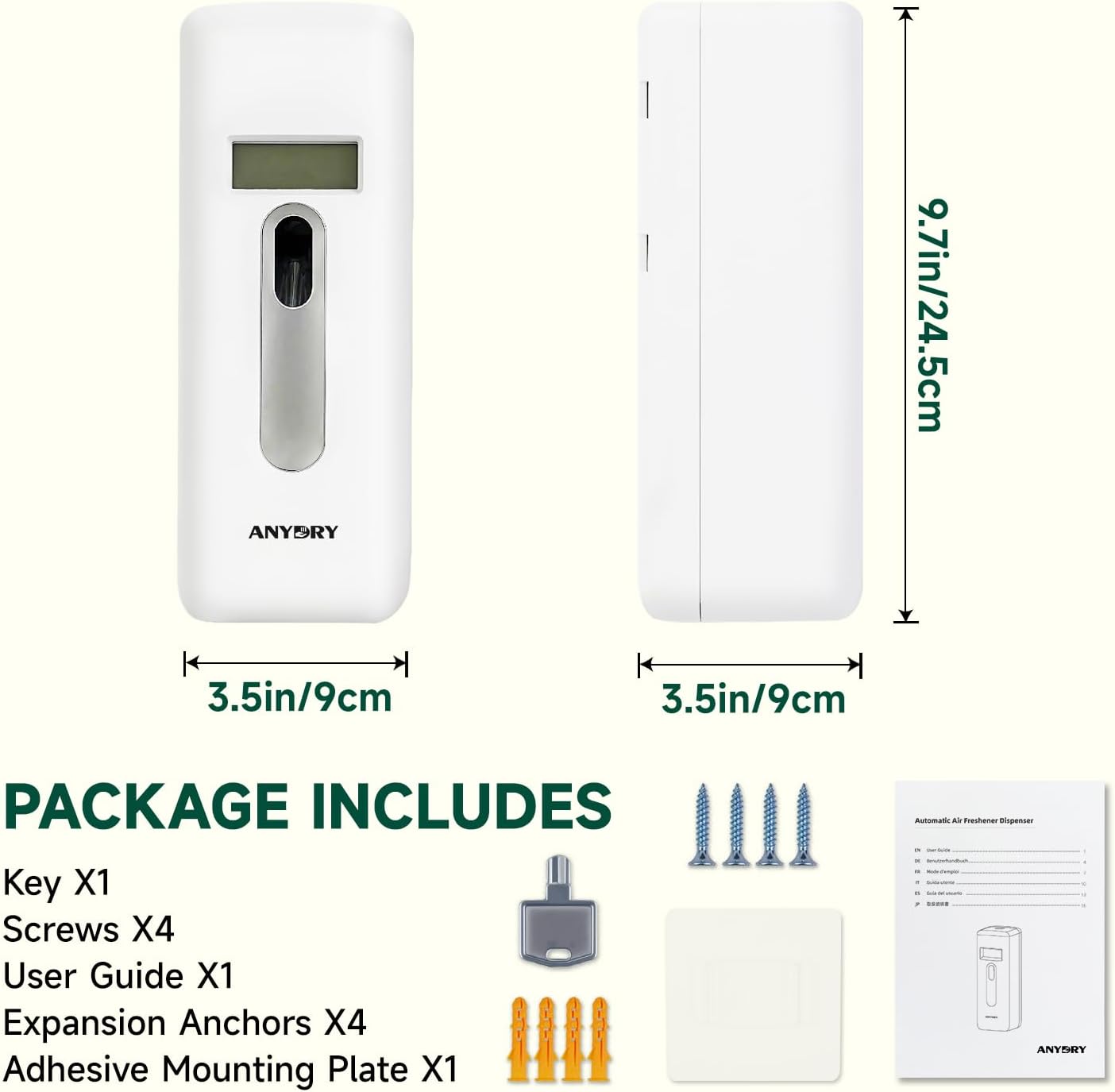
All items included in the product package.
Safety Information
Before operating the device, please read and understand all safety instructions. Keep this manual for future reference.
- Do not expose the dispenser to water or excessive moisture.
- Keep out of reach of children and pets.
- Use only D-size (1.5V) batteries. Do not mix old and new batteries or different types of batteries.
- Ensure the spray can is correctly inserted before closing the unit.
- Do not spray directly onto food, fabrics, or delicate surfaces.
- If the device malfunctions, do not attempt to repair it yourself. Contact customer support.
Setup Instructions
Follow these steps to set up your Anydry Automatic LCD Air Freshener Dispenser:
1. Clear All Settings
- Press the "RESET" button. This will clear any previous settings. Do not install the spray can during this step.
2. Turn On the Switch
- Press the "ON/OFF" button to turn on the dispenser.
3. Install Batteries
The dispenser requires two D-size (1.5V) batteries (not included).
- Press down the top button to open the battery compartment.
- Insert two D-size (1.5V) batteries, ensuring correct polarity.
- Close the battery compartment securely.

Insert two D-size batteries into the compartment for long-lasting power.
4. Install Spray Can
This dispenser is designed for Glade aerosol spray refills (5.51" H × 2.56" D).
- Ensure the dispenser is turned off or in a safe mode.
- Insert the Glade refill can into the dispenser, aligning the nozzle with the spray mechanism.
- Close the dispenser cover securely.

The dispenser is compatible with standard 5.51" x 2.56" refill cans.
5. Mounting Options
The dispenser can be wall-mounted or used as a free-standing unit.
- Wall-Mounted: Use the provided screws and expansion anchors to securely mount the dispenser to a wall at the desired height.
- Free-Standing: Place the dispenser on a flat, stable surface.

Flexible installation allows for wall-mounting or tabletop placement.
Operating Instructions
The LCD screen allows for precise control over spray settings. Refer to the video below for a quick start guide.
Official video: Quick Start Guide for Anydry Automatic Air Freshener Dispenser Setup & Use.
1. Set the Working Time (Start and End)
- Long-press the "MODE" button until "START" appears on the screen.
- Use the "HOUR" and "MIN" buttons to adjust the desired start time. Long-press to accelerate time adjustment.
- Press the "MODE" button again until "STOP" appears on the screen.
- Use the "HOUR" and "MIN" buttons to adjust the desired end time.
2. Set the Spray Interval
- Press the "MODE" button until "INTERVAL" appears on the screen.
- Use the "MIN" button to set the time period between sprays (e.g., 5, 10, 15 minutes).
3. Set the Working Days
- Press the "MODE" button until the day selection appears (e.g., 1,2,3,4,5,6,7 for all days).
- Press the "WEEK" button to select the desired working days. Options typically include weekdays, weekends, or all days.
4. Set the Current Time
- Press the "MODE" button until "CLOCK" flashes on the screen.
- Use the "HOUR" and "MIN" buttons to adjust the current time.
5. Spray Test
- Turn the dispenser ON.
- Press the "SPRAY" button. The device will spray after 3 seconds. This confirms proper installation of the spray can.

The LCD screen provides clear display for setting working status, battery level, and spray settings.
Maintenance
Regular maintenance ensures optimal performance and longevity of your dispenser.
- Cleaning: Wipe the exterior of the dispenser with a soft, damp cloth. Do not use abrasive cleaners or immerse the unit in water.
- Battery Replacement: Replace batteries when the low battery indicator appears on the LCD screen. Always replace both D-size batteries simultaneously.
- Refill Replacement: Replace the aerosol spray can when it is empty. Ensure the dispenser is turned off before replacing the can.
Troubleshooting
If you encounter issues with your dispenser, refer to the following common problems and solutions:
| Problem | Possible Cause | Solution |
|---|---|---|
| Dispenser not spraying | Empty spray can; incorrect spray can installation; dead batteries; dispenser turned off. | Replace spray can; ensure can is properly seated; replace batteries; turn dispenser ON. |
| LCD screen not displaying | Dead or incorrectly installed batteries. | Check battery polarity; replace batteries. |
| Spray interval inconsistent | Incorrect interval setting. | Re-set the spray interval using the operating instructions. |
If the problem persists after attempting these solutions, please contact Anydry customer support.
Specifications
- Product Dimensions: 3.54 x 3.54 x 9.84 inches
- Item Weight: 1.1 Pounds (0.5 Kilograms)
- Power Source: 2 × D-size batteries (1.5V, not included)
- Compatibility: Glade aerosol spray refills (5.51" H × 2.56" D)
- Installation: Wall-mount or Free-standing
- Manufacturer: Hangzhou Aiyouwei Appliances Co., Ltd.
Warranty and Support
The Anydry Automatic LCD Air Freshener Dispenser is backed by a 1-year replacement warranty.
For any assistance, questions, or warranty claims, please contact Anydry customer support via Amazon. Provide your product details and a description of the issue for prompt and hassle-free assistance.