
Introduction
Thank you for choosing the Vagusicc Nightstand with Charging Station. This manual provides detailed instructions for assembly, operation, maintenance, and troubleshooting to ensure safe and efficient use of your new furniture. Please read this manual thoroughly before assembly and retain it for future reference.

Image: The Vagusicc Nightstand with Charging Station positioned next to a bed, showcasing its design and functionality in a bedroom environment.
Specifications
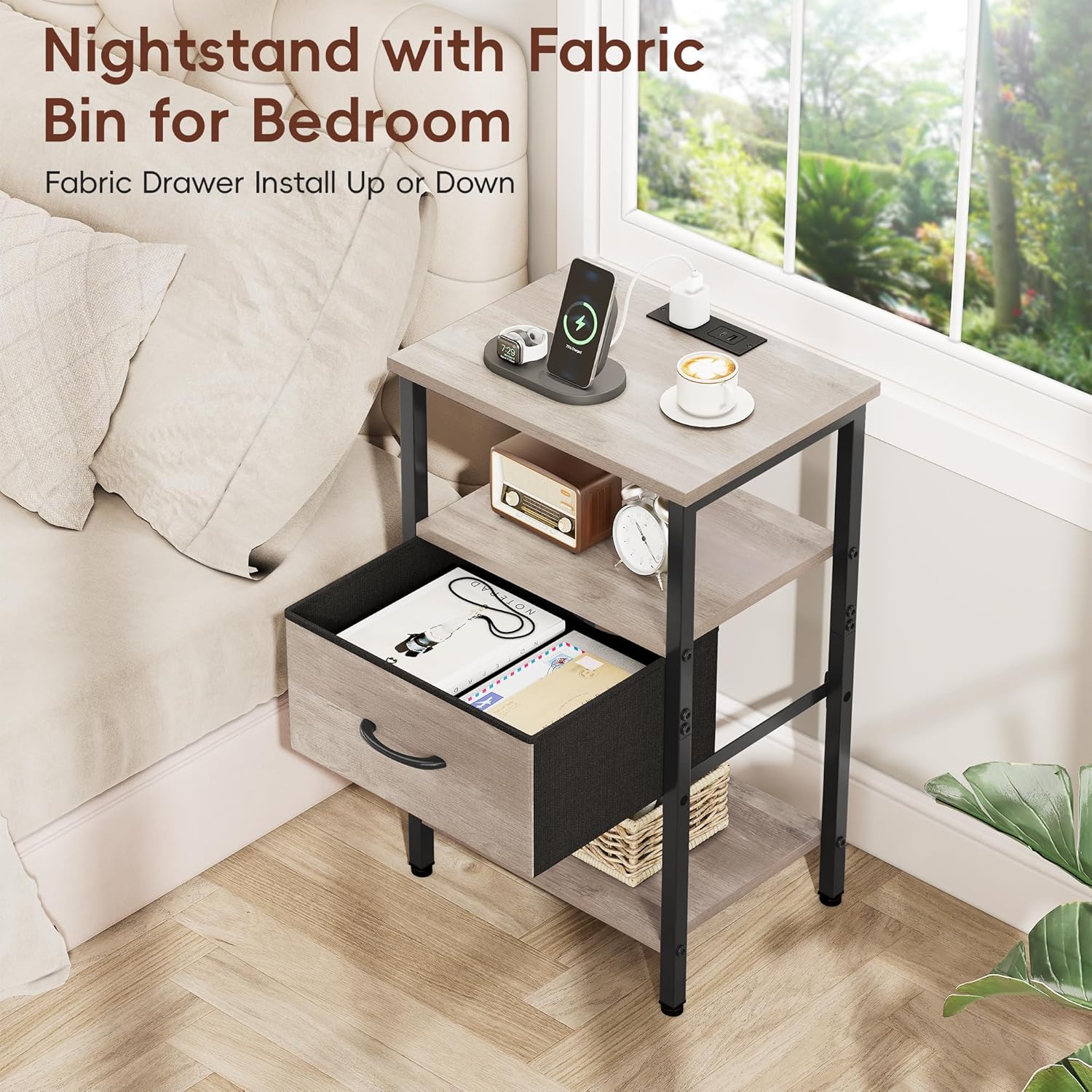
Image: A diagram illustrating the precise measurements of the nightstand, including its height, width, depth, and the dimensions of the fabric drawer and shelf spacing.
| Feature | Detail |
|---|---|
| Brand | Vagusicc |
| Model Name | BZ3132 |
| Product Dimensions | 15.4"D x 11.5"W x 23.8"H |
| Item Weight | 9 Pounds |
| Maximum Weight Recommendation | 35 Pounds |
| Frame Material | Metal |
| Top Material Type | Engineered Wood |
| Color | Greige |
| Number of Items | 1 |
| Number of Racks | 3 |
| Special Features | Adjustable Fabric Drawer, Charging Station (USB, Type C, AC), Easy Assembly, Space Saving, Storage, Tall |
| Included Components | Assembly Guide, Charging Station, Installation Tool |
Setup and Assembly
The Vagusicc Nightstand is designed for straightforward assembly. All necessary parts, tools, and an explanatory guide are included. Assembly typically takes approximately 15 minutes.
Before You Begin:
- Unpack all components and verify against the parts list in the included assembly guide.
- Ensure you have a clear, flat workspace.
- Keep small parts away from children.
Assembly Steps:
- Follow the step-by-step instructions provided in the assembly guide. Each part is labeled for easy identification.
- Assemble the metal frame components securely using the provided tools.
- Attach the wooden tabletops and shelves to the frame.
- Install the fabric drawer. The drawer offers three adjustable installation positions. Choose the height that best suits your storage needs.
- Integrate the charging station into the designated slot on the top surface. Ensure the 4.9ft power cable is routed safely.
- Attach the four adjustable plastic feet to the bottom of the nightstand. These feet help prevent floor scratches and ensure stability.

Image: A close-up view of the fabric drawer, highlighting its texture and handle, demonstrating its design for easy opening and closing.

Image: A detailed shot of the adjustable plastic feet at the base of the nightstand, designed to protect floors and provide stability.
Operating Instructions
Charging Station:
The integrated charging station provides convenient power access for your electronic devices. It includes:
- 2 AC Outlets (125V/12A): For standard electrical plugs.
- 1 USB Port (5V/2A): For charging USB-compatible devices.
- 1 Type C Charger (5V/2A): For charging Type C compatible devices.
To use, simply plug the nightstand's 4.9ft power cable into a wall outlet. Then, connect your devices to the appropriate ports on the charging station.

Image: A detailed view of the nightstand's top surface, showing the integrated charging station with a smartphone and other devices connected to the USB, Type C, and AC outlets.
Storage and Organization:
The nightstand features a three-tier storage design, including an adjustable fabric drawer and open shelves.
- Adjustable Fabric Drawer: Use the drawer for discreet storage of personal items. Its adjustable height allows customization based on your needs.
- Open Shelves: Utilize the two open shelves for books, decorative items, or other essentials you wish to keep within easy reach.

Image: The nightstand with its fabric drawer pulled open, revealing the interior storage space, and items placed on the open shelves.
Maintenance
Proper care will extend the life and appearance of your Vagusicc Nightstand.
Cleaning:
- Wipe surfaces with a damp cloth. Avoid harsh chemicals or abrasive cleaners.
- For spills, wipe immediately to prevent staining, especially on the engineered wood surfaces.

Image: A close-up of water droplets on the nightstand's surface, demonstrating its water-resistant properties.
General Care:
- Avoid placing excessively hot or cold items directly on the tabletop without protective coasters.
- Do not overload the shelves or drawer beyond the recommended weight capacity of 35 pounds.
- Periodically check all screws and connections to ensure they remain tight.

Image: A hand holding a screw, demonstrating the anti-scratch feature of the nightstand's surface by attempting to mark it.
Troubleshooting
If you encounter any issues with your Vagusicc Nightstand, please refer to the following common solutions:
- Stability Issues: Ensure all screws are tightened. Adjust the plastic feet on the bottom of the nightstand to level it on uneven surfaces.
- Charging Station Not Working: Verify that the nightstand's power cable is securely plugged into a functional wall outlet. Check if the devices are properly connected to the USB, Type C, or AC ports. Test the wall outlet with another appliance.
- Drawer Sticking: Ensure the fabric drawer is correctly inserted into its runners. Check for any obstructions within the drawer compartment.
- Missing Parts: If you find any parts missing during assembly, please contact customer support immediately with your purchase details.
Warranty Information
The Vagusicc Nightstand with Charging Station comes with a One Year Quality Assurance. This warranty covers manufacturing defects and issues arising from normal use within one year from the date of purchase. Please retain your proof of purchase for warranty claims.
The warranty does not cover damage caused by misuse, improper assembly, accidents, modifications, or normal wear and tear.
Customer Support
For any questions, concerns, or assistance with assembly, quality issues, or warranty claims, please contact Vagusicc customer service. Our team is available to help you.
Please have your model number (BZ3132) and purchase information ready when contacting support.
You can typically find contact information on the Vagusicc brand store page on Amazon or through your purchase order details.