
ADIMO Fingerprint Handgun Safe
Model: BGX-M/D-K2 Instruction Manual
Important Safety Information
- Always store firearms unloaded in the safe.
- Keep keys, passcodes, and registered fingerprints confidential and out of reach of unauthorized individuals, especially children.
- Do not store the safe keys inside the safe.
- Ensure the safe is securely mounted to prevent unauthorized removal.
- Test all unlocking methods (fingerprint, keypad, key) regularly to ensure proper function.
- Replace batteries promptly when the low battery indicator appears.
Package Contents
- ADIMO Fingerprint Handgun Safe
- Emergency Keys (2)
- Mounting Hardware (Screws)
- USB-A to USB-C Cable (for emergency power)
- User Manual
Product Overview
The ADIMO Fingerprint Handgun Safe offers secure storage with multiple access options. It features a biometric fingerprint scanner, a backlit keypad, and traditional key access. The interior is lined with foam to protect contents, and an LED light illuminates the interior upon opening.

Image: The ADIMO safe features three distinct unlocking methods: fingerprint recognition, a numerical keypad, and a traditional key. The image highlights the fingerprint sensor, the illuminated keypad with numbers 1-5 and #, and the concealed keyhole with the ADIMO logo cover.
- Biometric Fingerprint Sensor: For quick, single-touch access. Supports up to 32 fingerprints.
- Backlit Keypad: 5-digit illuminated keypad for passcode entry.
- Emergency Key Access: Traditional key override for manual unlocking.
- Auto-Opening Mechanism: Lid automatically opens upon successful authentication.
- LED Interior Light: Illuminates the safe's contents.
- Silent Mode: Option to disable audible feedback.
- USB Power Port: For emergency power in case of battery failure.
Setup
1. Battery Installation
- Locate the battery compartment, typically on the underside or inside the safe.
- Insert 4 AA batteries (not included), ensuring correct polarity.
- Close the battery compartment cover securely.
2. Initial Key Access
- Locate the ADIMO logo on the front panel, which conceals the keyhole.
- Gently remove the ADIMO logo cover to reveal the keyhole.
- Insert one of the provided emergency keys and turn it to unlock the safe.
- Open the safe and remove any internal packaging.
- Keep the emergency keys in a secure location outside the safe.
3. Mounting the Safe
The safe can be mounted to a flat surface, such as inside a drawer or cabinet, using the provided mounting hardware.

Image: The ADIMO safe is shown securely placed within a drawer, demonstrating its compact design and suitability for discreet storage. A hand is shown reaching towards the safe's front panel.
- Choose a secure and stable location for mounting.
- Mark the drilling points through the pre-drilled holes on the bottom of the safe.
- Drill pilot holes into the mounting surface.
- Align the safe with the pilot holes and secure it using the provided screws.
Operating Instructions
1. Setting Up a Passcode
- With the safe open, press and hold the '1' button until the keypad lights up.
- Enter your desired 5-digit passcode.
- Press the '#' button to confirm. The safe will beep to indicate successful registration.
- Test the new passcode with the safe open before closing it.
2. Registering Fingerprints
The safe can store up to 32 individual fingerprints.
- With the safe open, press and hold the 'O' (fingerprint sensor) button until it lights up.
- Place your finger firmly on the sensor. Lift and repeat 4-5 times from different angles until the safe beeps and the light turns green, indicating successful registration.
- Repeat the process for additional fingerprints or users.
- To delete all registered fingerprints, press and hold the 'O' button for approximately 10 seconds until it beeps twice. This will clear all stored fingerprints.
3. Unlocking with Passcode
- Press any key to activate the keypad.
- Enter your 5-digit passcode.
- Press the '#' button. The safe will unlock and open automatically.
4. Unlocking with Fingerprint
- Place a registered finger firmly on the fingerprint sensor.
- If recognized, the sensor light will turn green, and the safe will unlock and open automatically.
5. Unlocking with Key
- Remove the ADIMO logo cover to expose the keyhole.
- Insert the emergency key and turn it clockwise to unlock.
- Manually lift the lid to open the safe.
6. Silent Mode Activation/Deactivation
To toggle silent mode (disable/enable keypad beeps):
- With the safe open, press and hold the '5' button for 3 seconds.
- The safe will beep once for silent mode ON, or twice for silent mode OFF.
7. Low Battery Indicator
When batteries are low, the fingerprint button will flash red four times after an attempt to open the safe. Replace the 4 AA batteries promptly.
8. USB Emergency Power
In case of complete battery failure, the safe can be temporarily powered via the USB-C port.
- Connect the provided USB-A to USB-C cable to the USB-C port on the safe's front panel.
- Connect the USB-A end to a power source (e.g., power bank, wall adapter).
- Once powered, you can use the keypad or fingerprint sensor to open the safe.
- Note: This port is for temporary power only and does not charge the internal AA batteries.
Maintenance
- Cleaning: Wipe the exterior with a soft, damp cloth. Avoid abrasive cleaners or solvents.
- Battery Replacement: Replace all 4 AA batteries when the low battery indicator appears. Use high-quality alkaline batteries for optimal performance.
- Fingerprint Sensor: Keep the fingerprint sensor clean and dry for accurate readings.
Troubleshooting
| Problem | Possible Cause | Solution |
|---|---|---|
| Safe does not open with fingerprint. | Finger not properly placed; unregistered fingerprint; dirty sensor. | Ensure full contact with sensor; register fingerprint correctly; clean sensor; try another registered finger. |
| Keypad does not respond or lights are dim. | Low batteries; incorrect passcode. | Replace batteries; use USB emergency power; re-enter correct passcode. |
| Safe does not open after successful authentication. | Obstruction; mechanism issue. | Check for obstructions around the lid; contact customer support if issue persists. |
| Safe beeps continuously. | Low battery warning. | Replace batteries immediately. |
Specifications
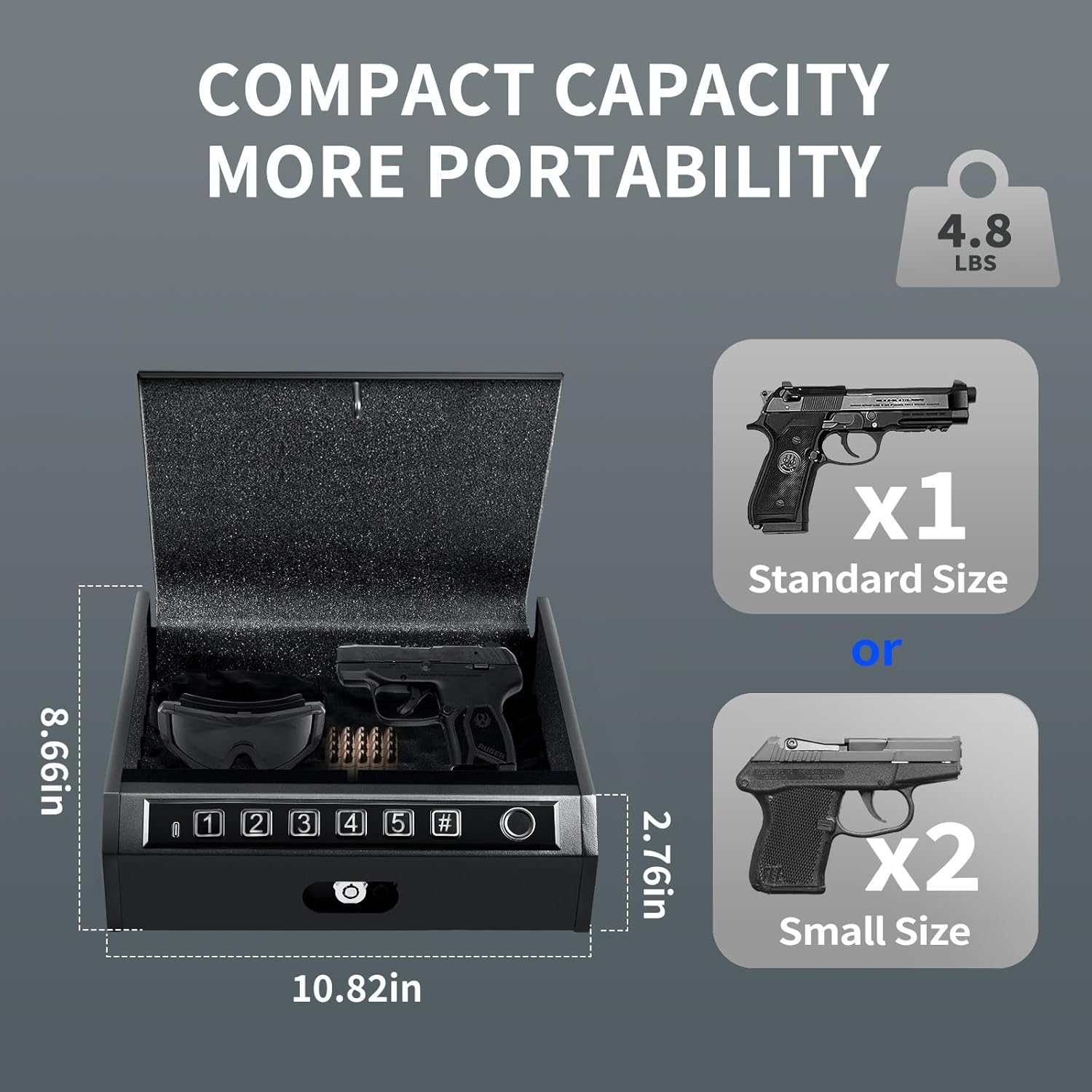
Image: The ADIMO safe's compact dimensions are illustrated, showing a length of 10.82 inches, a width of 8.66 inches, and a height of 2.76 inches. It also indicates capacity for one standard-sized pistol or two small-sized pistols, and a weight of 4.8 lbs.
- Model: BGX-M/D-K2
- Lock Type: Biometric, Keypad, Key
- Material: Metal
- Exterior Dimensions (L x W x H): 10.82" x 8.66" x 2.76" (as per image) / 11"D x 12"W x 4"H (as per specifications) - Please refer to the product packaging for the most accurate dimensions.
- Power Source: 4 x AA Batteries (not included)
- Emergency Power: USB-C Port
- Fingerprint Capacity: Up to 32
- Weight: Approximately 4.8 lbs
Warranty and Support
ADIMO products are manufactured with quality and durability in mind. For warranty information, technical support, or assistance with your product, please refer to the contact details provided on the product packaging or visit the official ADIMO website.
Please retain your proof of purchase for any warranty claims.