
Introduction
Thank you for choosing the OEM Air 31 Mini True Wireless Earbuds. These earbuds are designed to provide a high-quality, immersive audio experience with the convenience of true wireless stereo technology. Their compact and portable design makes them ideal for various activities, including gaming, music listening, and travel. This manual will guide you through the setup, operation, and maintenance of your new earbuds.
What's in the Box
- OEM Air 31 Mini True Wireless Earbuds (Left and Right)
- Charging Case
- User Manual (this document)
- USB Charging Cable (not explicitly listed but common)
Product Overview
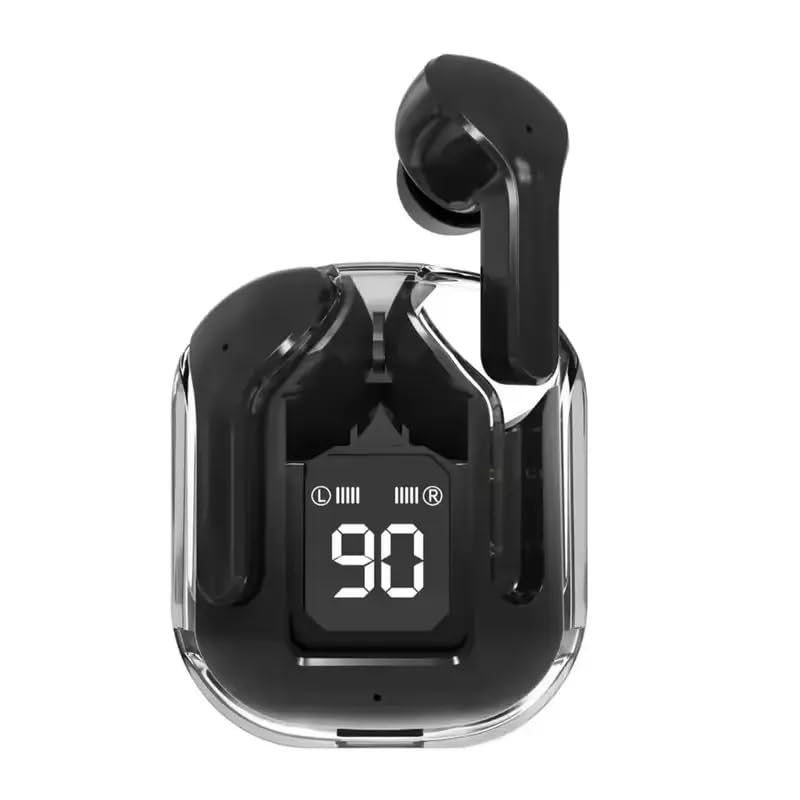
Image: OEM Air 31 Mini True Wireless Earbuds in their transparent charging case. The case features a digital display indicating a 90% charge level, along with separate battery level indicators for the left (L) and right (R) earbuds. The earbuds themselves are black and have an in-ear design.
The Air 31 earbuds feature a compact, in-ear design made from durable ABS material. They come with a transparent charging case, which also serves as a portable power bank for the earbuds. The case includes a digital display to show the battery percentage and individual charging status for each earbud.
Setup
1. Charging the Earbuds and Case
Before first use, fully charge the earbuds and the charging case. Place the earbuds into the charging case. Connect the USB charging cable to the charging port on the case and the other end to a USB power source (e.g., computer, wall adapter). The digital display on the case will show the charging progress. A full charge typically takes approximately 1-2 hours.
2. Pairing with Your Device
- Ensure the earbuds are charged.
- Open the charging case. The earbuds will automatically power on and enter pairing mode. You may see indicator lights flashing on the earbuds.
- On your device (smartphone, tablet, PC), go to the Bluetooth settings.
- Search for available Bluetooth devices. You should see "Air 31" or a similar name appear in the list.
- Select "Air 31" to connect. Once connected, a voice prompt will confirm the successful pairing, and the indicator lights on the earbuds will stop flashing or turn off.
- If pairing fails, place the earbuds back into the case, close the lid, wait a few seconds, and then repeat the steps.
The earbuds support Bluetooth 5.0 for a stable connection up to 10 meters.
Operating Instructions
Touch Controls
The Air 31 earbuds feature touch-sensitive controls for easy management of calls and music playback. Specific touch functions may vary slightly, but common controls include:
- Play/Pause: Single tap on either earbud.
- Next Track: Double tap on the right earbud.
- Previous Track: Double tap on the left earbud.
- Answer/End Call: Single tap on either earbud during an incoming call.
- Reject Call: Press and hold either earbud for 2 seconds during an incoming call.
- Activate Voice Assistant: Triple tap on either earbud (e.g., Siri, Google Assistant).
- Volume Control: Typically, press and hold the right earbud to increase volume, and press and hold the left earbud to decrease volume. Refer to your device's app control for precise settings if available.
Power On/Off
- Power On: Open the charging case, or press and hold the touch area on both earbuds for approximately 3 seconds.
- Power Off: Place the earbuds back into the charging case and close the lid, or press and hold the touch area on both earbuds for approximately 5 seconds until you hear a power-off prompt.
Maintenance
- Cleaning: Use a soft, dry, lint-free cloth to clean the earbuds and charging case. Do not use harsh chemicals or abrasive materials. For earwax buildup, gently clean the earbud mesh with a dry cotton swab.
- Storage: When not in use, store the earbuds in their charging case to protect them and keep them charged. Store in a cool, dry place away from direct sunlight and extreme temperatures.
- Water Resistance: The earbuds are water resistant. However, they are not waterproof. Avoid submerging them in water or exposing them to heavy rain. Dry them thoroughly if they get wet.
- Battery Care: To prolong battery life, avoid fully discharging the earbuds and case frequently. Charge them regularly, even if not in constant use.
Troubleshooting
| Problem | Possible Solution |
|---|---|
| Earbuds not pairing/connecting. |
|
| Only one earbud working. |
|
| Low volume or poor sound quality. |
|
| Charging case not charging. |
|
Specifications
| Feature | Detail |
|---|---|
| Model Name | Air 31 |
| Connectivity Technology | Wireless (Bluetooth 5.0) |
| Wireless Range | Up to 10 meters (33 feet) |
| Included Components | Earbuds, Charging Case |
| Material | Acrylonitrile Butadiene Styrene (ABS) for earbuds, Aluminum for carrying case |
| Recommended Uses | Calling, Gaming, Recording, Music, Travel |
| Compatible Devices | Mobile, PC, computer, notebook, iPhone, iPad, Skype, MSN, etc. |
| Control Type | Media Control, App (if applicable) |
| Item Weight | 32 Grams (1.13 ounces) |
| Water Resistance Level | Water Resistant |
| Ear Placement | In Ear |
| Noise Control | Sound Isolation |
| Manufacturer | Shenzhen XFH Technology Co., Ltd. |
Warranty and Support
For warranty information and technical support, please refer to the retailer or the manufacturer's official website. Keep your proof of purchase for any warranty claims. The manufacturer is Shenzhen XFH Technology Co., Ltd.
For further assistance, you may contact the seller through the platform where the product was purchased.