
1. Introduction
This manual provides essential instructions for the safe and efficient operation, setup, and maintenance of your SDKEHUI 130W CO2 Laser Cutter Engraver. Please read this manual thoroughly before operating the machine.
The machine is designed for precision cutting and engraving of various materials, including:
- Wood, Bamboo, Plexiglass, Acrylic
- Leather, Fabric, Paper, Rubber
- Fiberglass, Tile, Plastic, Marble, Cardboard
- Melamine, Mylar, Pressboard, Veneer Wood, Cork, Corian
- Jade, Crystal, Ceramic, Glass (for engraving only, cutting capability varies)
Applicable industries include crafts, architectural decoration, computer embroidery and cutting, and packaging.

Image 1: Front view of the SDKEHUI 130W CO2 Laser Cutter Engraver with the top lid open, revealing the honeycomb work platform and the laser head assembly.
2. Safety Information
Operating a laser engraving and cutting machine requires adherence to strict safety protocols to prevent injury and damage. This machine is a Class 1 laser product with an output power of 0.386 mW, but the internal CO2 laser tube is significantly more powerful and requires caution.
- Eye Protection: Never look directly into the laser beam or at the laser spot during operation without appropriate laser safety glasses. The machine features a protective lid with a safety interlock.
- Lid Interlock: The laser is equipped with a locking device that automatically turns off the laser when the lid is opened during operation. Do not bypass this safety feature.
- Ventilation: Ensure proper ventilation is in place to remove fumes and smoke generated during cutting and engraving. The machine includes an exhaust fan.
- Fire Safety: Keep a fire extinguisher nearby. Some materials can ignite during laser processing. Never leave the machine unattended while operating.
- Electrical Safety: Ensure the machine is properly grounded. Do not operate with wet hands or in damp environments.
- Material Safety: Only process materials approved for CO2 lasers. Avoid materials that produce toxic fumes or are highly flammable.

Image 2: Front view of the SDKEHUI 130W CO2 Laser Cutter Engraver with the lid closed, highlighting the emergency stop button and safety warnings.
3. Package Contents
Upon unpacking, verify that all the following items are included in your package:
- 1x SDKEHUI 130W CO2 Laser Cutter Engraver Machine
- 1x Laser Tube (1650mm, 130W CO2 glass, estimated performance 8000 hours)
- 1x Water Pump (for laser tube cooling)
- 1x Exhaust Fan (built-in)
- 1x Air Pump (built-in)
- 1x Communication Cable (USB cable)
- 3x Reflective Optics (installed on the machine)
- 1x Focusing Optics (installed on the machine)
- 1x Lasergravur-Softwarepaket (English Version) / USB Stick with Software
- 1x User Manual (CD)
- 1x Accessory Bag
- 1x Vent Duct
- 10x Allen Keys
- 1x Screwdriver
- 1x Power Cord
- 1x Ground Wire
- 1x Hose Clamp
- 1x Double-Sided Tape
- 1x Network Cable
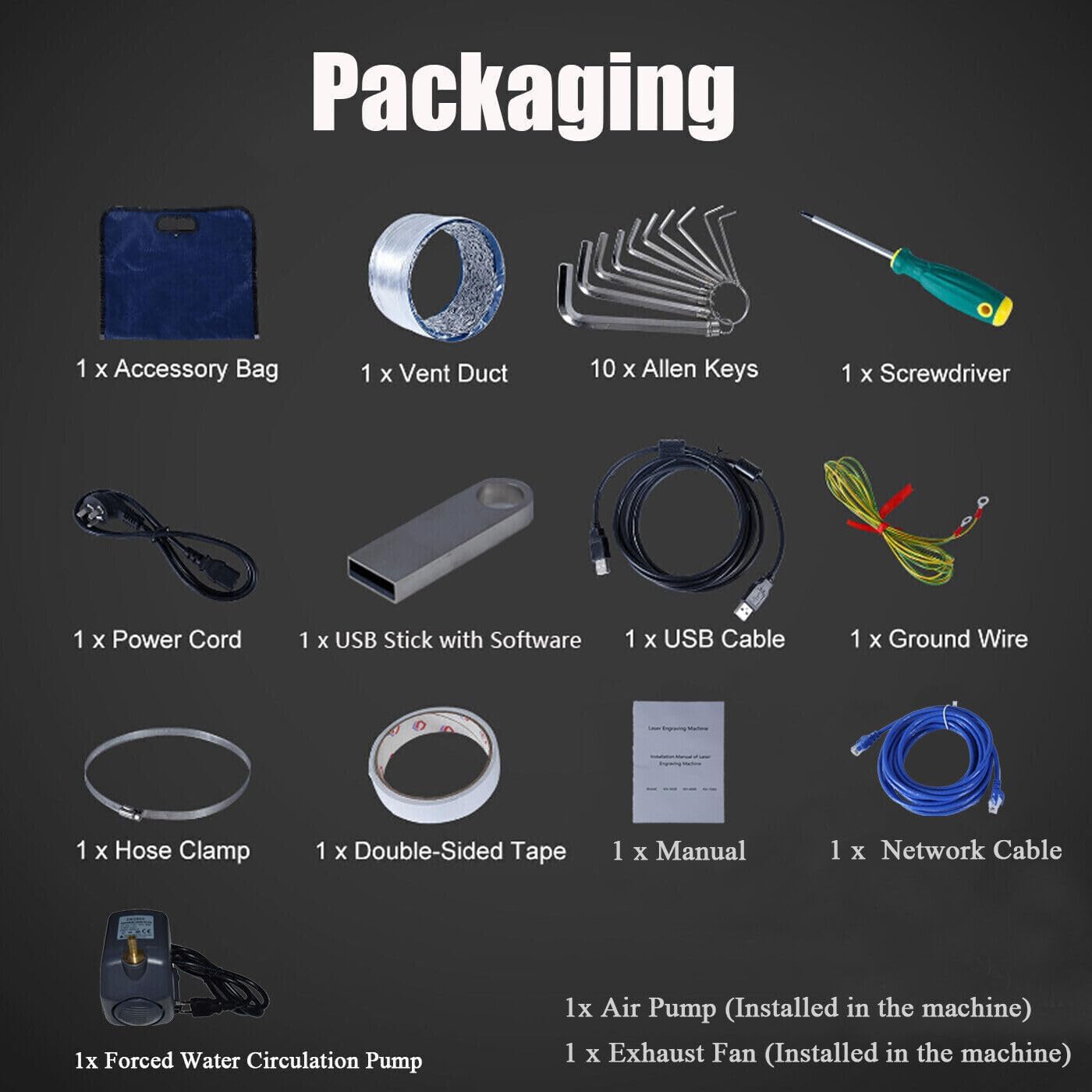
Image 3: Visual representation of the accessories included with the laser cutter engraver.
4. Setup
4.1 Unpacking and Placement
- Carefully remove the machine from its packaging.
- Place the machine on a stable, level surface in a well-ventilated area. Ensure sufficient space around the machine for operation and maintenance.
- Connect the ground wire to a proper electrical ground.
4.2 Connecting Peripherals
- Water Pump: Connect the water pump to the designated inlet and outlet ports for laser tube cooling. Ensure the water reservoir is filled with distilled water. The self-developed built-in circulating water cooling system requires proper connection of the external pump.
- Exhaust System: Connect the provided vent duct to the exhaust fan outlet and direct it to an outdoor vent or a suitable filtration system. The machine has a built-in exhaust fan.
- Air Pump: The air pump is built-in. Ensure its connection is secure. Air assist helps clear debris and reduce scorching during cutting.
- Power Connection: Connect the power cord to the machine and a grounded 110V AC power outlet.
4.3 Software Installation and Connection
- Install the provided software (e.g., LightBurn, RuidaDraw) from the USB stick or CD onto your computer.
- The machine is compatible with Windows 10, 8, 7 (64/32 bit), XP, 2000, VISTA. It is NOT compatible with iOS systems.
- Connect the computer to the laser machine using the provided USB cable or network cable.
- Supported design software includes LightBurn, CorelDRAW, AutoCAD, and Illustrator.

Image 4: Side view of the laser engraver, illustrating the machine's profile and potential connection points.
5. Operating Instructions
5.1 Basic Operation Flow
- Design: Create or import your design using compatible software (LightBurn, CorelDRAW, AutoCAD, Illustrator).
- Material Placement: Place the material on the appropriate work platform (honeycomb or knife strip). The machine features a large working area of 1400x900mm with integrated input and output, allowing for processing of extra-long objects.
- Focus Adjustment: Adjust the laser focus according to the material thickness. The machine has an autolift bed with an electric lifting height adjustable up to 22cm. A red pointer is present for precise positioning.
- Transfer File: Transfer the design file to the machine via USB cable, network cable, or USB flash drive.
- Control Panel: Use the Ruida controller (RD6445) to set parameters and initiate the job.
- Start Operation: Ensure all safety precautions are met, then press the start button on the control panel.
5.2 Work Platforms
The machine includes two types of working platforms:
- Honeycomb Platform: Composed of small, honeycomb-shaped holes, this platform allows the laser beam to penetrate the material more effectively, improving work efficiency and cutting quality.
- Knife Strip Platform: This platform helps reduce reflections from the back of the material, resulting in cleaner cuts and engravings.

Image 5: The laser head in operation, engraving a detailed pattern onto a wooden surface.
5.3 Digital Control Panel
The machine is equipped with a Ruida RD6445 controller. The digital control panel allows for precise setting of engraving and cutting parameters, job management, and machine control.

Image 6: The digital control panel, showing various settings and control buttons for operating the laser engraver.
6. Maintenance
Regular maintenance ensures optimal performance and extends the lifespan of your laser machine.
- Laser Tube Cooling: Regularly check the water level in the external water pump reservoir and ensure the water is clean. Replace water as needed.
- Laser Tube Usage: The 130W CO2 glass laser tube has an estimated performance life of 8000 hours. It is recommended to operate the machine for a maximum of 8 hours per day. Allow the laser tube to rest for half an hour after every 4 hours of continuous operation.
- Optics Cleaning: Periodically clean the reflective optics and focusing optics with appropriate lens cleaning solutions and wipes to maintain laser beam quality and power.
- Work Area Cleaning: Keep the honeycomb and knife strip platforms clean from debris and residue.
- Exhaust System: Ensure the exhaust fan and ducting are free from blockages to maintain effective fume extraction.
7. Troubleshooting
This section addresses common questions and issues.
- Q: What operating systems are compatible with this machine?
A: The machine is compatible with Windows 10, 8, 7 (64/32 bit), XP, 2000, and VISTA. It is NOT compatible with iOS systems. - Q: Is the laser safe to operate?
A: Yes, the laser is designed with safety in mind. It is secured with a locking device that turns off the laser when the lid is opened. Always follow safety guidelines outlined in Section 2. - Q: How long is the laser tube?
A: The laser tube measures 1650mm in length. - Q: Does the engraver have a red pointer?
A: Yes, the machine includes a red pointer for precise material positioning. - Q: What is the expected lifespan of the laser tube?
A: The 130W CO2 glass laser tube has an estimated performance life of 8000 hours. Adhering to recommended operating and resting periods (8 hours daily, with a 30-minute rest after every 4 hours) can help maximize its lifespan.
8. Specifications
| Feature | Specification |
|---|---|
| Model | KH-1490 (130W 1400X900MM) |
| Total Power | <1100W |
| Working Environment | 5% - 95% Non-condensing environment |
| Working Temperature | 5-50°C |
| Laser Type | CO2 glass laser |
| Laser Model | R7 |
| Laser Power | 130W |
| Laser Life | ≥8000H |
| Drive Type | Digital two-phase stepper driver |
| XY Running Track | Linear guide rail |
| Motor Type | 57 Hybrid Stepper Motor |
| Working Area | 1400×900 MM (55.1 x 35.4 inches) |
| Work Platform | Dual-platform (Honeycomb & Knife Strip), Electric lifting (height adjustable up to 22cm) |
| Laser Cooling Mode | Self-developed built-in circulating water cooling system |
| Exhaust Gas Emission Mode | Built-in smoke purification filter element |
| Engraving Speed | 0-500mm/s |
| Cutting Speed | 0-400mm/s |
| Engraving Cutting Depth | 0-20mm |
| Laser Head Extension | 3cm |
| Auxiliary Positioning | Red light positioning |
| Protective Function | Built-in air blowing flame retardant, circulating water protection, door opening protection, laser emission indicator |
| Name of Software | RDworks v8 |
| Software Compatible | CorelDraw, AutoCAD, Illustrator, LightBurn |
| Operating System | Windows (10, 8, 7, XP, 2000, VISTA) |
| Graphic Format Supported | JPG, BMP, AI, PLT, etc. |
| Controller Model | RD6445 |
| Data Transmission | USB2.0, offline U disk, network cable transmission |
| Power Supply | AC110±10% 60Hz |
| Minimal Shaped Text | 2mm*2mm |
| Smallest Formed Letter | 1mm*1mm |
| Product Dimensions | 1990*1460*1190 mm (78.35 x 57.48 x 46.85 inches) |
| Packaging Size | 1980*1440*840 mm (78"×57"×33") |
| Packaging Weight | 300 kg / 661 lbs |

Image 7: A comprehensive table detailing the technical specifications of the laser engraver.
9. Warranty and Support
The SDKEHUI 130W CO2 Laser Cutter Engraver comes with a 3-year warranty. For technical support, service, or warranty claims, please refer to the contact information provided with your purchase documentation.


