Introduction
This manual provides detailed instructions for the installation, operation, and maintenance of your Inefala Android 15 Car Stereo for Dodge Journey 2009-2011. Please read this manual thoroughly before using the product to ensure proper function and safety.
What's in the Box
Verify that all components are present before beginning installation:
- 1 x Android Car Stereo
- 1 x Power Cable
- 1 x GPS Antenna
- 2 x Radio Antenna
- 1 x Backup Camera Input Cable
- 1 x RCA Cable
- 2 x USB Cable
- 1 x Installation Tool
- 1 x Instruction Manual
- 1 x External Microphone
- 1 x Backup Camera
- 1 x Canbus
- 1 x Accessories

Image: All components included in the Inefala Android Car Stereo package.
Setup and Installation
Proper installation is crucial for optimal performance. If you are unsure about any steps, it is recommended to seek professional assistance.
1. Removing the Original Car Stereo
Carefully remove the trim pieces and screws securing the factory radio. Use appropriate tools to avoid damage.
Video: Demonstration of central control wiring and removal for a similar car model.
Video: Detailed demonstration of central control installation and removal process.

Image: Comparison of the Dodge Journey dashboard before and after car stereo installation.
2. Wiring Connections
Connect the provided wiring harness to the car stereo and the vehicle's existing wiring. Ensure all connections are secure.

Image: Stereo wiring diagram illustrating connections for power, RCA, GPS, USB, and camera input.
3. Backup Camera Installation
Connect the included HD night vision backup camera. Route the cable carefully to the rear of the vehicle.
Video: Instructions on how to connect the included backup camera.

Image: Backup camera view with parking assist lines.
Operating Instructions
1. Wireless CarPlay & Android Auto
Connect your smartphone wirelessly for seamless integration of navigation, music, and calls.
Video: Demonstration of wireless CarPlay and Android Auto connection and features.

Image: Wireless CarPlay and Android Auto functionality.
2. GPS Navigation
Utilize built-in GPS for online and offline navigation. Download maps via WiFi for offline use.

Image: GPS Accurate Positioning and WiFi connection for app downloads.
3. Bluetooth Connectivity
Pair your phone via Bluetooth for hands-free calling and audio streaming. The external microphone ensures clear communication.

Image: Ultra-clear microphone for Bluetooth hands-free calls and EQ functionality.
4. EQ Settings and Audio
Customize your audio experience with the built-in EQ settings. Enjoy high-quality sound through FM/RDS radio and various media sources.

Image: Superb sound quality with YD7388 amplifier chip and custom EQ options.
5. Steering Wheel Controls
The unit supports existing steering wheel controls for convenient operation without taking your hands off the wheel.
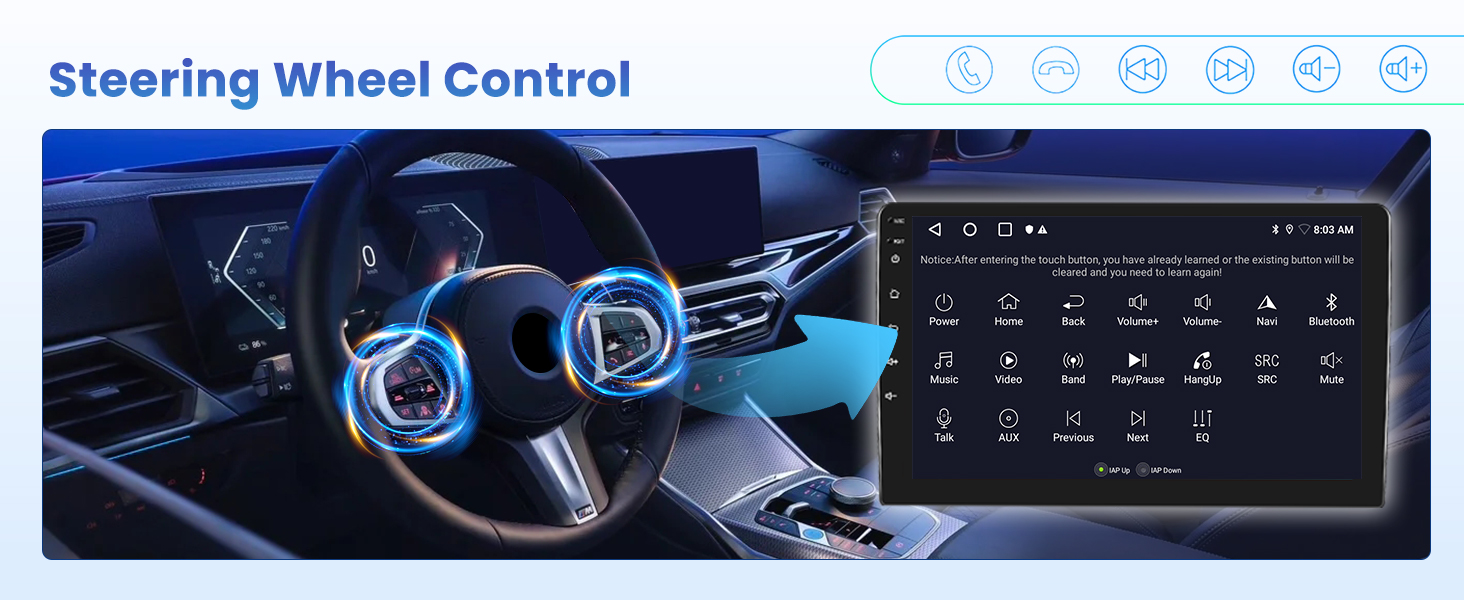
Image: Steering Wheel Control functionality.
Maintenance
- Screen Cleaning: Use a soft, lint-free cloth to clean the touchscreen. Avoid abrasive cleaners or solvents.
- Software Updates: Periodically check for software updates to ensure optimal performance and access to new features. Updates can typically be found on the manufacturer's website or through the device's settings.
- Cable Inspection: Regularly inspect all cables and connections for any signs of wear or damage. Ensure they are securely plugged in.
- Temperature Control: Avoid exposing the unit to extreme temperatures for prolonged periods, as this can affect its lifespan and performance.
Troubleshooting
- No Power:
- Check all power connections to ensure they are secure.
- Verify the vehicle's fuse for the stereo is not blown.
- No Sound:
- Ensure the volume is not muted or set too low.
- Check speaker connections.
- Verify audio settings in the EQ/DSP menu.
- GPS Signal Loss:
- Ensure the GPS antenna is properly installed and has a clear view of the sky.
- Check for any obstructions that might block the signal.
- Bluetooth Connection Issues:
- Ensure Bluetooth is enabled on both the stereo and your smartphone.
- Delete previous pairings and try reconnecting.
- Restart both devices.
- CarPlay/Android Auto Not Connecting:
- Ensure your phone's operating system is up to date.
- Check USB cable connection if using wired mode.
- For wireless, ensure Wi-Fi and Bluetooth are enabled on your phone and connected to the stereo.
Specifications
| Feature | Detail |
|---|---|
| Item Weight | 7 pounds |
| Product Dimensions | 8.87 x 10.24 x 5.32 inches |
| Display Size | 9 Inches |
| Voice Command | Microphone, Touchscreen |
| Brand | Inefala |
| Vehicle Service Type | Car |
| Special Feature | EQ, Bluetooth, FM/RDS, GPS Navigation, WiFi Connection, HD Backup Camera & Steering Wheel Controls, Touchscreen, Wireless/Wired Carplay Android Auto & Mirror Link |
| Connectivity Technology | Bluetooth, USB, Wi-Fi |
| Map Type | Worldwide |
| Audio Output Mode | Stereo |
| Mounting Type | Dashboard Mount |
| Operating System | Android, iOS |
Warranty and Support
Your Inefala Android Car Stereo comes with a 24-month warranty. For any technical assistance, product inquiries, or warranty claims, please contact Inefala-US customer support.
- Online Consultation Support: Response within 24 hours.
- Returns: 30-day refund/replacement policy.
- Contact Seller: You can contact Inefala-US directly through the Amazon platform or via email at inefalatech@163.com.

Image: Inefala 24/7 Technical Support details.


