
1. Introduction
This manual provides comprehensive instructions for the installation, operation, and maintenance of your MIUCDA RF Smart Wi-Fi Thermostat with Receiver. This intelligent thermostat system is designed to efficiently control your heating system, offering features such as wireless communication, programmable schedules, and smart home integration.
The system consists of two main components: a battery-powered transmitter (thermostat unit) that measures room temperature and a wall-mounted receiver that controls the heating system. The wireless communication between these units allows for flexible placement of the thermostat.
2. Product Components
The MIUCDA RF Smart Wi-Fi Thermostat system includes the following components:
- Thermostat Transmitter Unit: This is the main control unit with a display and rotary knob. It measures ambient temperature and sends signals to the receiver. It is powered by 3x AAA batteries or a USB-C cable.
- Receiver Unit: This unit is wall-mounted and connects directly to your heating system (e.g., gas boiler, underfloor heating pumps). It receives commands from the transmitter and operates the heating. It is powered by 110-230V / 50Hz.
- Mounting Accessories: Includes a stand for tabletop placement and screws for wall mounting.

Image 2.1: MIUCDA RF Smart Wi-Fi Thermostat Transmitter (front) and Receiver (back) with a smartphone displaying the control app.
3. Setup and Installation
3.1. Transmitter Unit Placement and Power Supply
The thermostat transmitter offers flexible installation options:
- Tabletop Placement: Use the included stand to place the transmitter on any flat surface in your desired room.
- Wall Mounting: Secure the transmitter to a wall using the provided screws.
The transmitter can be powered in two ways:
- Battery Power: Insert 3x AAA batteries into the battery compartment. Ensure correct polarity.
- USB-C Power: Connect a USB-C cable to the designated port for continuous power.

Image 3.1: Flexible installation and power supply options for the thermostat transmitter.
3.2. Receiver Unit Installation and Wiring
The receiver unit requires professional installation as it connects directly to your heating system's electrical wiring. It is designed for flush-mounted installation.
Important: Ensure the main power supply to your heating system is turned off before attempting any wiring. If you are unsure, consult a qualified electrician.
The receiver operates on 110-230V / 50Hz and communicates wirelessly with the transmitter via RF433 signals, with a maximum transmission distance of 35 meters (up to 100 meters in open areas).

Image 3.2: Wiring diagrams for connecting the receiver to various heating systems.

Image 3.3: Overview of the wireless thermostat system and its applications.
3.3. Initial Pairing and Wi-Fi Connection
Follow the instructions in the quick start guide (usually included in the packaging) to pair the transmitter with the receiver and connect the system to your home Wi-Fi network. This typically involves putting the receiver into pairing mode and then initiating the connection from the thermostat unit or the mobile application.
4. Operating Instructions
4.1. Basic Temperature Control
The thermostat allows for precise temperature control within a range of 5°C to 39°C. The current and desired temperatures are displayed on the unit's screen. Use the rotary knob to adjust the desired temperature.
The hysteresis (temperature difference before the heating switches on/off) is adjustable from 0.2°C to 6°C. This setting determines the sensitivity of the thermostat to temperature fluctuations.
An integrated frost protection feature activates heating if the temperature drops below +3°C to prevent pipes from freezing.
4.2. Weekly Programming
The thermostat supports flexible weekly programming with up to 6 temperature variations per day. You can program schedules for the entire week, specific weekdays (Monday-Friday), or weekends (Saturday-Sunday).
To set up weekly programs, use the mobile application (Tuya / Smart Life) for an intuitive interface. Refer to the app's instructions for detailed steps on creating and modifying schedules.
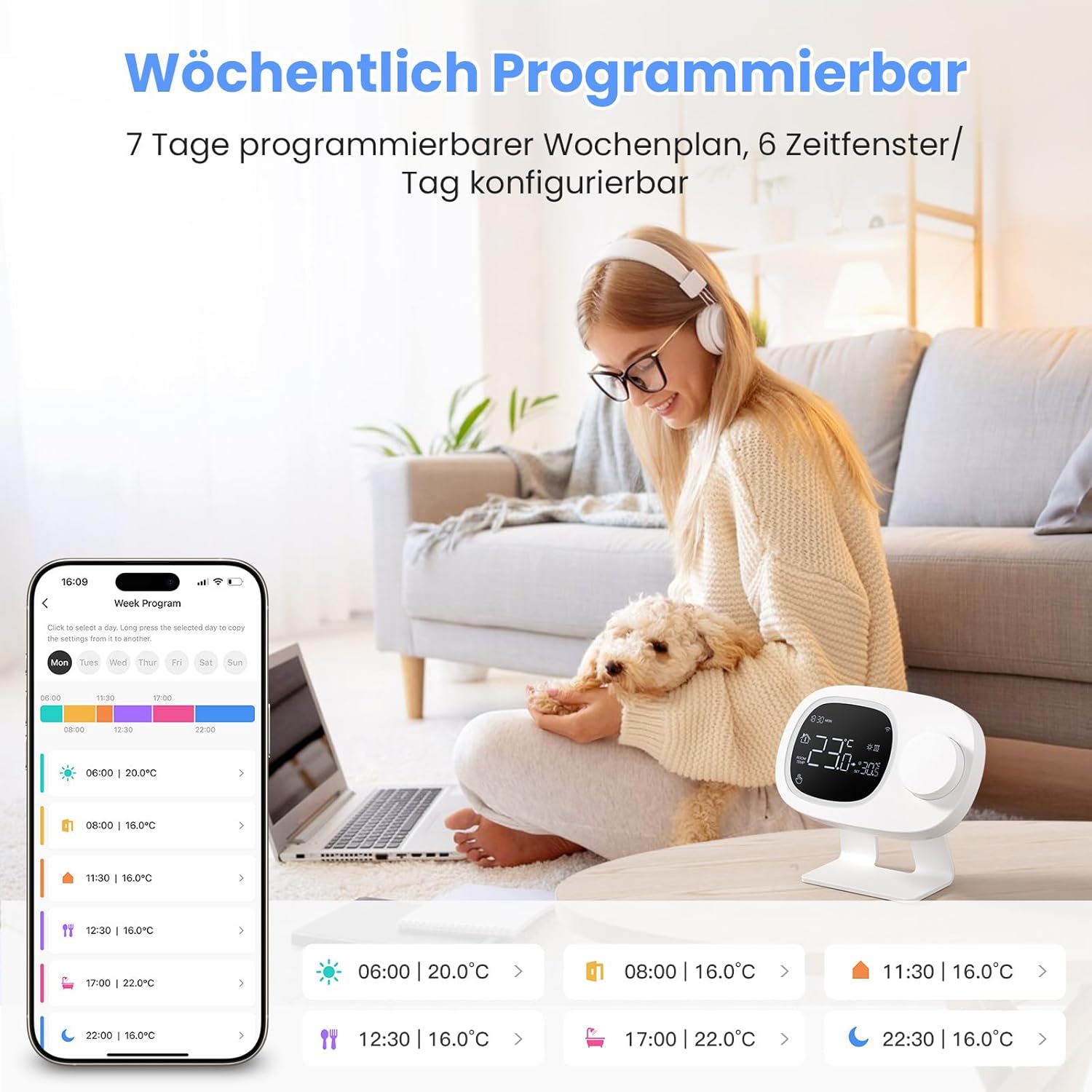
Image 4.1: Weekly programming interface via the mobile application.
4.3. Mobile App Remote Control
Control your thermostat anytime, anywhere using the Tuya or Smart Life mobile application. The app allows you to:
- View current room temperature.
- Adjust the target temperature.
- Set and modify weekly heating schedules.
- Switch between different operating modes.
- Lock the thermostat to prevent unauthorized changes.

Image 4.2: Remote control via the mobile application.
4.4. Voice Control Integration
The MIUCDA thermostat is compatible with Amazon Alexa and Google Home, allowing for convenient voice control of your heating system. Ensure your thermostat is linked to your smart home assistant through the respective app (Alexa app or Google Home app).
Example Voice Commands:
- "Alexa, set the living room thermostat to 22 degrees."
- "Hey Google, what is the temperature in the bedroom?"
- "Alexa, turn on the heating."

Image 4.3: Voice control compatibility with Amazon Alexa and Google Home.
5. Maintenance
- Cleaning: Wipe the thermostat and receiver units with a soft, dry cloth. Do not use abrasive cleaners or solvents.
- Battery Replacement: If using battery power for the transmitter, replace the 3x AAA batteries when the low battery indicator appears on the display. Ensure to use fresh, high-quality batteries.
- Firmware Updates: Periodically check the mobile application for available firmware updates for your thermostat to ensure optimal performance and access to new features.
6. Troubleshooting
| Problem | Possible Cause | Solution |
|---|---|---|
| Thermostat display is blank or unit not responding. | Low or depleted batteries (if battery-powered); no power via USB-C. | Replace AAA batteries. Ensure USB-C cable is securely connected and receiving power. |
| Heating system not responding to thermostat. | Receiver not powered; receiver not paired with transmitter; wiring issue; out of RF range. | Check receiver power. Re-pair transmitter and receiver. Verify wiring connections (consult electrician if needed). Ensure transmitter is within 35 meters of the receiver. |
| Inaccurate temperature readings. | Thermostat placed near heat sources/drafts; calibration issue. | Relocate thermostat to a central area away from direct sunlight, drafts, or heat sources. Check if there's a calibration setting in the app or device menu. |
| Wi-Fi disconnection or app control issues. | Weak Wi-Fi signal; incorrect Wi-Fi password; router issues. | Ensure the receiver is within Wi-Fi range. Restart your Wi-Fi router. Reconnect the thermostat to Wi-Fi via the app. Verify Wi-Fi password. |
| Voice control (Alexa/Google Home) not working. | Incorrect linking in smart home app; device name not recognized. | Ensure the thermostat is correctly linked in the Alexa or Google Home app. Try renaming the device to something simpler. Check internet connection. |
7. Specifications
- Brand: MIUCDA
- Model: Wireless Knob with RX
- Color: White
- Transmitter Power: 3x AAA batteries or USB-C
- Receiver Power: 110-230V / 50Hz
- Wireless Communication: RF433 (Thermostat to Receiver), Wi-Fi (Receiver to App/Smart Home)
- RF Transmission Distance: Up to 35 meters (indoor)
- Temperature Control Range: 5°C to 39°C
- Temperature Control Type: Heating
- Hysteresis: Adjustable from 0.2°C to 6°C
- Special Features: Programmable weekly schedules, frost protection (+3°C), compatible with Amazon Alexa, Google Assistant.
- Dimensions (packaging): 10 x 7 x 5 cm
- Item Weight: 200 g
8. Warranty and Support
For warranty information and technical support, please refer to the documentation included with your product or contact MIUCDA customer service directly. Contact details can typically be found on the manufacturer's website or on the product packaging.
When contacting support, please have your product model number (Wireless Knob with RX) and purchase details readily available.