
1. Important Safety Information
Please read this entire instruction manual before installation and assembly. If you have any questions regarding these instructions or the safety of the installation, please contact customer support. USX MOUNT is not responsible for damage or injury caused by incorrect mounting, incorrect assembly, or incorrect use.
- Weight Capacity: This TV wall mount is designed for TVs weighing up to 77 lbs (35 kg). Do not exceed this weight limit.
- TV Size Compatibility: Suitable for most 26-60 inch flat/curved TVs.
- VESA Compatibility: Supports VESA patterns from 100x100mm to 400x400mm. Ensure your TV's VESA pattern falls within this range.
- Wall Type: This mount is compatible with vertical wood studs (minimum size 4x2 inches), brick, or concrete walls. DO NOT INSTALL ON DRYWALL ALONE. Concrete anchors are required for brick/concrete installations.
- Always ensure the mounting surface can safely support the combined weight of the mount and the TV.
- Use the provided hardware. If your TV requires different mounting hardware, contact the TV manufacturer or USX MOUNT for assistance.

Figure 1: Wall Type and VESA Compatibility. Note: Do not install on drywall alone.
2. Package Contents
Verify that all components are present and undamaged. If any parts are missing or defective, contact USX MOUNT customer support.

Figure 2: Included Hardware and Support Information.
Typical Hardware Included:
- Wall Plate Assembly
- TV Brackets (x2)
- Various TV Screws (M4, M6, M8)
- Washers and Spacers
- Lag Bolts (for wood studs)
- Concrete Anchors (for concrete/brick walls)
- Hex Wrench
- Small Bubble Level
3. Product Specifications
| Feature | Specification |
|---|---|
| Brand | USX MOUNT |
| Model Number | B0DY7VF8T6 |
| TV Size Compatibility | 26-60 inches |
| Weight Capacity | Up to 77 lbs (35 kg) |
| VESA Compatibility | 100x100mm to 400x400mm |
| Movement Type | Full Motion (Swivel, Tilt, Extend/Retract, Leveling) |
| Swivel Range | ±90° |
| Tilt Range | +8° / -5° |
| Leveling Adjustment | ±4° (Post-installation) |
| Extension from Wall | Up to 17.18 inches (436.3mm) |
| Retraction to Wall | 2.05 inches (52mm) |
| Material | Metal (Cold Rolled Steel with Powder Coating Finish) |
| Product Dimensions | 11.42 x 10.04 x 1.97 inches |
| Item Weight | 5.96 pounds |

Figure 3: Available VESA Patterns.
4. Installation Guide
4.1. Before You Begin
- Check TV Weight and VESA: Confirm your TV's weight and VESA pattern are within the mount's specifications.
- Identify Wall Type: Determine if your wall is wood stud, concrete, or brick. This will dictate the hardware and installation method.
- Gather Tools: You will need a drill, stud finder (for wood studs), level, pencil, and a Phillips head screwdriver.
4.2. Wall Type Compatibility
- Wood Stud Walls: Locate the center of a single wood stud. The mount is designed for single stud installation.
- Concrete/Brick Walls: Use the provided concrete anchors. Drill pilot holes as instructed.
- Drywall: This mount is NOT for drywall-only installation.

Figure 4: Single Wood Stud Design for Centering Your TV.
4.3. Step-by-Step Installation
- Step 1: Attach TV Brackets to TV. Carefully place your TV face down on a soft, clean surface. Align the TV brackets with the VESA mounting holes on the back of your TV. Select the appropriate screws, washers, and spacers from the hardware pack. Secure the brackets to the TV, ensuring they are tight but do not overtighten.
- Step 2: Mount Wall Plate to Wall. Mark the desired height for your TV on the wall. Use a stud finder to locate the center of a wood stud, or mark pilot holes for concrete/brick. Drill pilot holes according to the instructions for your wall type. Secure the wall plate assembly to the wall using the provided lag bolts (for wood studs) or concrete anchors (for concrete/brick). Use the included bubble level to ensure the wall plate is perfectly horizontal.
- Step 3: Hang TV. With assistance, carefully lift the TV with the attached brackets and hook them onto the wall plate. Ensure the TV is securely seated on the mount. Use the safety locking mechanism (if applicable) to prevent accidental dislodgement.

Figure 5: Easy 3-Step Installation Overview.

Figure 6: Installed Full Motion TV Wall Mount.
5. Operating Instructions
This full motion TV wall mount offers various adjustments to achieve optimal viewing angles.
- Swivel: The articulating arm allows for a wide ±90° swivel range. Gently push or pull the TV to adjust the horizontal viewing angle. This feature is ideal for corner installations or viewing from different areas of a room.
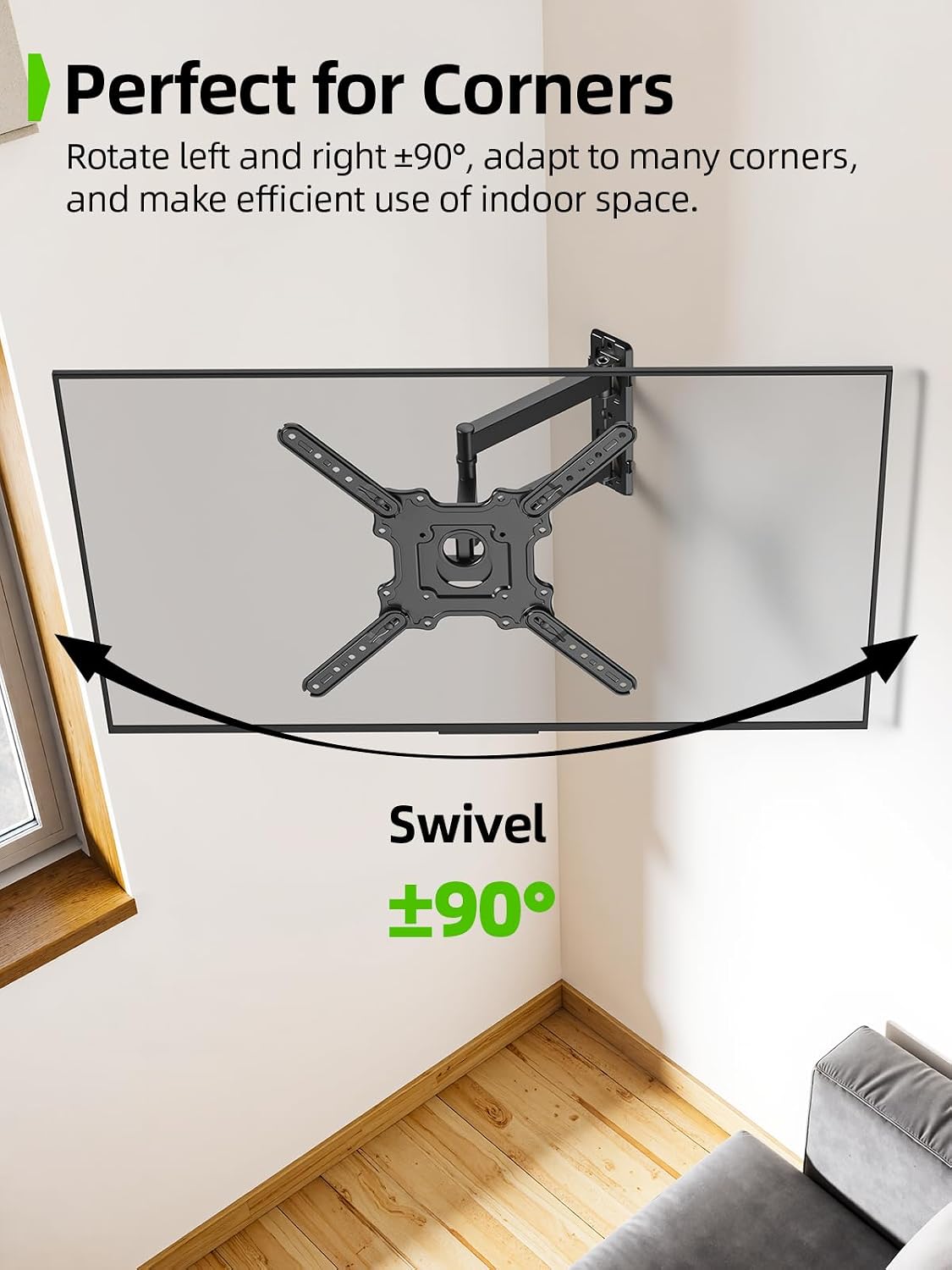
Figure 7: Swivel Function for Corner Placement.
- Tilt: Adjust the vertical tilt from +8° to -5° to reduce glare and optimize your viewing experience. Loosen the tilt adjustment knobs, set the desired angle, and then tighten the knobs to secure the position.

Figure 8: Tilting Adjustment.
- Extension and Retraction: The articulating arm extends up to 17.18 inches (436.3mm) from the wall for immersive viewing and retracts to a slim 2.05 inches (52mm) to save space.
- Post-Installation Leveling: If your TV is not perfectly level after installation, you can adjust it by ±4°. Loosen the leveling screws, adjust the TV to the desired level, and then retighten the screws.

Figure 9: Leveling Adjustment.
6. Maintenance
Regular maintenance ensures the longevity and safe operation of your TV wall mount.
- Periodic Checks: Every few months, check that all screws and bolts are securely tightened. Do not overtighten.
- Cleaning: Wipe the mount with a soft, dry cloth to remove dust. Avoid using abrasive cleaners or solvents.
- Movement: If the mount's movement becomes stiff, check for any obstructions. Do not apply lubricants unless specifically recommended by the manufacturer.

Figure 10: Solid 2-Layer Structure for Secure Mounting.
7. Troubleshooting
- TV is not level: Use the post-installation leveling adjustment feature (refer to Section 5). Loosen the leveling screws, adjust, and retighten.
- Mount feels unstable: Recheck all mounting points on the wall and TV. Ensure the correct wall type was identified and appropriate fasteners were used. Verify all screws are tightened according to the instructions. Do not exceed the maximum weight capacity.
- Difficulty moving the TV: Check for any cables or obstructions hindering movement. Ensure all pivot points are free and not over-tightened.
- Missing parts or damaged components: Do not proceed with installation. Contact USX MOUNT customer support immediately.
8. Customer Support
For any questions, concerns, or assistance with installation, please contact USX MOUNT customer support. We are ready to assist with pre-purchase and installation questions.
You can typically find contact information on the product packaging, the official USX MOUNT website, or through the retailer where the product was purchased.


