
1. Introduction
This manual provides detailed instructions for the assembly, operation, and maintenance of your Casaottima 50 Inch L Shaped Desk. Designed for home office and study environments, this desk features a reversible L-shape configuration, six fabric drawers for storage, and integrated power outlets for convenience. Please read this manual thoroughly before assembly and use to ensure proper setup and longevity of your product.
2. Package Contents
Before beginning assembly, verify that all components listed in the packing list are present and undamaged. If any parts are missing or damaged, please contact customer service.
- Desk frame components
- Desk panels (MDF boards)
- 6 Fabric drawers
- Power outlet unit
- Assembly hardware (screws, bolts, tools)
- Instruction manual
3. Assembly Instructions
Assembly is required for this product. Follow the included step-by-step instructions carefully. It is recommended to assemble the desk on a soft, clean surface to prevent scratches.
3.1 Reversible L-Shape Configuration
The L-shaped design is reversible, allowing you to configure the drawer section on either the left or right side to best suit your space. Refer to the specific diagrams in the assembly guide for your desired orientation.

Image: Product dimensions and reversible assembly options. The diagram illustrates the overall dimensions of the desk (49.6 inches width, 31.5 inches depth, 30.9 inches height) and how the L-shape can be reversed.
3.2 Fabric Drawer Assembly
The fabric drawers are designed for easy assembly. Fold the drawer panels into shape and insert the bottom support. Ensure they are securely formed before placing them into the desk frame.

Image: Step-by-step guide for assembling the fabric drawers. This image shows how to unfold and secure the fabric drawer components.
3.3 Adjustable Footpads
The desk is equipped with adjustable footpads. After assembly, adjust these footpads to ensure the desk is stable and level on uneven surfaces. This also helps protect your flooring from scratches.
4. Operating Instructions
4.1 Integrated Power Outlet
The desk includes a built-in power outlet unit with 3 AC outlets (120V/12A), 1 USB port (5V/2A), and 1 Type-C port (5V/2A). Connect the desk's power cord (6.6 ft) to a wall outlet. Use the integrated ports to charge electronic devices such as laptops, phones, and gaming accessories.
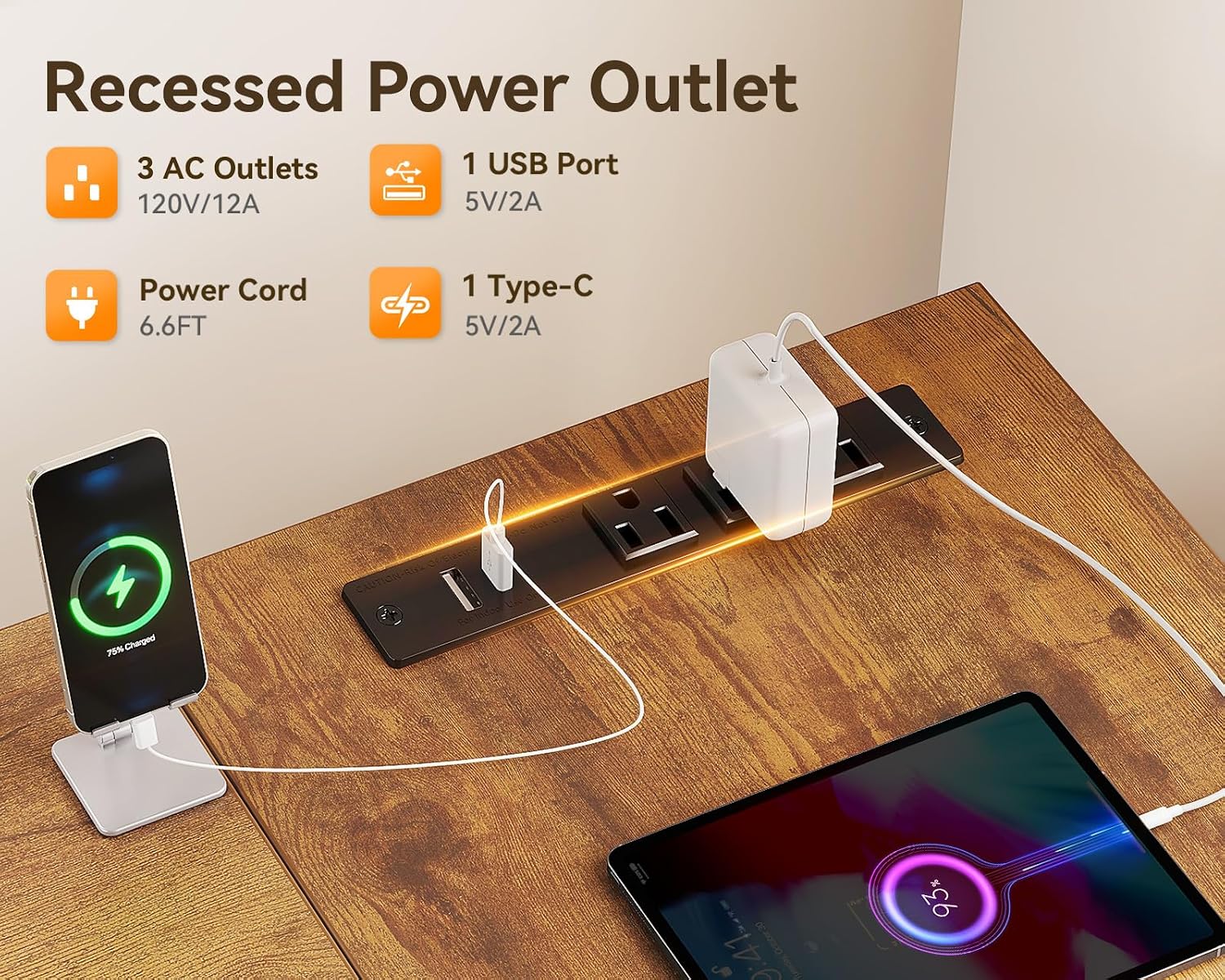
Image: Recessed power outlet with 3 AC outlets, 1 USB port, and 1 Type-C port. This shows the functionality of the integrated charging station.
4.2 Fabric Drawers
The six fabric drawers provide ample storage for office supplies, documents, and personal items. These drawers are designed to slide smoothly and help keep your workspace organized and clutter-free.

Image: Open fabric drawers revealing storage capacity for books, files, and other items. This demonstrates the practical storage solution.
4.3 Headphone Hook
A durable iron hook is integrated into the desk frame, providing a convenient place to hang headphones, bags, or other accessories, helping to keep your workspace tidy.

Image: Detailed view of the durable iron hook, the high-quality MDF board surface, and the adjustable footpads.
5. Maintenance
5.1 Desk Surface (MDF Boards)
- Wipe the surface with a soft, damp cloth.
- Avoid using harsh chemicals or abrasive cleaners, as these can damage the finish.
- Promptly clean up spills to prevent water damage.
- Avoid placing extremely hot items directly on the surface; use coasters or protective pads.
5.2 Fabric Drawers
- Spot clean fabric drawers with a mild detergent and a damp cloth.
- Allow to air dry completely before use.
- Do not machine wash or tumble dry.
- Avoid overloading drawers to maintain their shape and functionality.
5.3 General Care
- Periodically check all screws and bolts to ensure they remain tight. Retighten if necessary.
- Keep the desk away from direct sunlight and excessive humidity to prevent material degradation.
6. Troubleshooting
6.1 Desk Wobbles
- Check Footpads: Ensure all adjustable footpads are making firm contact with the floor and are adjusted to compensate for uneven surfaces.
- Tighten Hardware: Verify that all assembly screws and bolts are securely tightened.
6.2 Power Outlets Not Working
- Power Connection: Ensure the desk's main power cord is securely plugged into a functional wall outlet.
- Circuit Breaker: Check if the wall outlet's circuit breaker has tripped.
- Device Compatibility: Confirm that the device you are trying to charge is compatible with the outlet's voltage/amperage (120V/12A for AC, 5V/2A for USB/Type-C).
6.3 Drawers Do Not Slide Smoothly
- Drawer Assembly: Recheck the assembly of the fabric drawers to ensure they are correctly formed and not warped.
- Obstructions: Remove any items that might be obstructing the drawer's movement within its compartment.
- Overloading: Ensure drawers are not overloaded, which can cause them to sag or stick.
7. Specifications
| Brand | Casaottima |
| Model | L Shaped Desk 50 Inch |
| Product Dimensions | 31.5"D x 49.61"W x 29.61"H |
| Color | Brown |
| Material | Engineered Wood (MDF), Metal Frame, Fabric Drawers |
| Power Outlets | 3 AC Outlets (120V/12A), 1 USB Port (5V/2A), 1 Type-C Port (5V/2A) |
| Power Cord Length | 6.6 feet |
| Special Features | 6 Fabric Drawers, Reversible L-Shape, Built-in Power Outlet, Headphone Hook, Adjustable Footpads |
| Assembly Required | Yes |
| UPC | 850073018767 |
8. Warranty and Support
This Casaottima L Shaped Desk is backed by a 1-year warranty from the date of purchase. This warranty covers manufacturing defects and material flaws under normal use. It does not cover damage resulting from improper assembly, misuse, accidents, or unauthorized modifications.
For warranty claims, missing parts, or any product-related inquiries, please contact Casaottima customer service. Our responsive customer service team is available to assist you with any concerns.
Please retain your proof of purchase for warranty validation.