
Introduction
This manual provides detailed instructions for the assembly, operation, maintenance, and troubleshooting of your Casaottima 42 Inch L Shaped Desk. Please read this manual thoroughly before assembly and use to ensure proper setup and safe operation. Keep this manual for future reference.

Image: The Casaottima 42 Inch L Shaped Desk, showcasing its design with six fabric drawers, a built-in power outlet, and a headphone hook.
Safety Information
Observe the following safety precautions during assembly and use:
- Keep all small parts and packaging materials away from children and pets to prevent choking hazards.
- Assemble the desk on a soft, clean surface (e.g., carpet or cardboard) to prevent scratches and damage.
- Ensure all screws and fasteners are securely tightened before use. Do not overtighten, as this may damage the materials.
- Do not stand or sit on the desk.
- Distribute weight evenly across the desk surface.
- If any parts are missing or damaged, do not proceed with assembly. Contact customer service for assistance.
Package Contents
Verify that all components are present before beginning assembly. Refer to the parts list provided in your packaging for specific item codes and quantities.
- Desktop Panels (L-shaped sections)
- Metal Frame Components (legs, support bars)
- Fabric Drawers (various sizes)
- Power Outlet Unit (with AC, USB, Type-C ports)
- Headphone Hook
- Adjustable Footpads
- Hardware Pack (screws, Allen wrench, etc.)

Image: Diagram illustrating the overall product dimensions and the reversible L-shape configuration options.
Assembly Instructions (Setup)
Follow these steps carefully for proper assembly. It is recommended to have two people for certain steps.
1. Prepare the Workspace
Clear an open area and lay out all components on a soft surface to prevent damage.
2. Assemble the Metal Frame
Connect the metal frame components using the provided screws and Allen wrench. Ensure all connections are snug but do not fully tighten until all frame pieces are in place.
3. Attach Desktop Panels
Carefully place the desktop panels onto the assembled metal frame. Secure them using the designated screws. Ensure the pre-drilled holes align correctly.
4. Configure Reversible L-Shape
The desk is designed for a reversible L-shape. Decide whether you want the longer desk section on the left or right side. The drawer unit can be installed on either side to match your preferred configuration. Refer to the diagram in the package contents section for visual guidance.

Image: Two desks configured in opposite L-shapes, demonstrating the reversible design feature.
5. Assemble and Insert Fabric Drawers
Unfold each fabric drawer and insert the bottom panel to create its rigid structure. Slide the assembled drawers into their designated slots within the desk frame.

Image: Close-up view of the desk with fabric drawers open, showing ample storage space for various items.
6. Install Power Outlet Unit
Place the recessed power outlet unit into the pre-cut opening on the desktop. Ensure it sits flush and secure it if necessary according to the specific instructions in your hardware pack.
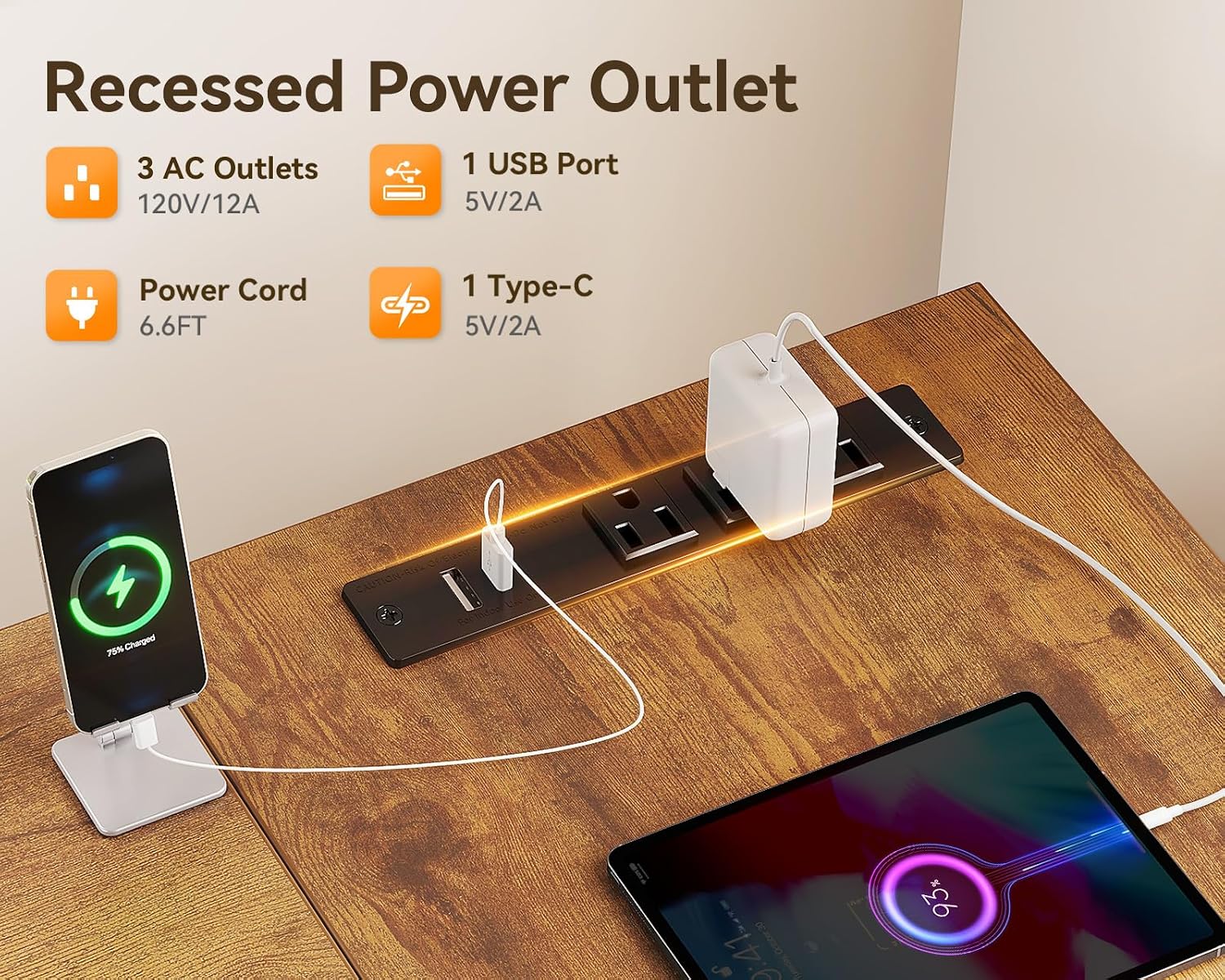
Image: Detailed view of the recessed power outlet, showing its 3 AC outlets, 1 USB port, and 1 Type-C port in use.
7. Attach Headphone Hook and Adjust Footpads
Attach the headphone hook to the desired location on the metal frame. Adjust the footpads at the bottom of the desk legs to ensure stability and level the desk on uneven surfaces.

Image: Close-up showing the durable iron hook, the high-quality MDF board surface, and the adjustable footpads for stability.
8. Final Tightening
Once all components are in place and aligned, fully tighten all screws and fasteners. Do not overtighten.
Operating Instructions
Using the Fabric Drawers
The desk features six fabric drawers for storage. These drawers are designed to hold office supplies, documents, and small personal items. To use, simply pull the handle to open and push to close. Avoid overloading the drawers to ensure smooth operation and longevity.
Utilizing the Built-in Power Outlet
The integrated power outlet unit provides convenient access to power. Plug the desk's main power cord (6.6 ft) into a wall outlet. You can then use the 3 AC outlets for laptops or monitors, and the 1 USB port and 1 Type-C port (both 5V/2A) for charging mobile devices.
Using the Headphone Hook
The attached hook is designed to hold headphones, bags, or other small accessories, helping to keep your workspace tidy and organized.
Maintenance
Regular maintenance will help prolong the life of your desk.
- Cleaning the Desktop: Wipe the engineered wood surface with a soft, damp cloth. Avoid harsh chemicals or abrasive cleaners.
- Cleaning Fabric Drawers: Spot clean fabric drawers with a mild detergent and damp cloth. Allow to air dry completely. Do not machine wash.
- Frame Care: Clean the metal frame with a damp cloth.
- Hardware Check: Periodically check all screws and fasteners to ensure they remain tight. Retighten if necessary.
Troubleshooting
If you encounter any issues, refer to the following common solutions:
- Desk is Wobbly: Ensure all assembly screws are fully tightened. Adjust the footpads on the bottom of each leg to level the desk on uneven floors.
- Power Outlet Not Working: Verify that the desk's main power cord is securely plugged into a functional wall outlet. Check if the wall outlet itself is receiving power.
- Drawers Not Sliding Smoothly: Ensure the fabric drawers are correctly assembled and not overloaded. Check for any obstructions in the drawer slots.
- Missing or Damaged Parts: Do not attempt to force assembly. Contact Casaottima customer service immediately for replacement parts.
Specifications
| Feature | Detail |
|---|---|
| Product Dimensions | 31.5"D x 41.73"W x 29.61"H |
| Material | Engineered Wood (MDF), Metal Frame, Fabric Drawers |
| Color | Brown |
| Drawers | 6 Fabric Drawers |
| Power Outlet | 3 AC Outlets (120V/12A), 1 USB Port (5V/2A), 1 Type-C Port (5V/2A) |
| Power Cord Length | 6.6 Feet |
| Special Features | Reversible L-Shape, Adjustable Footpads, Headphone Hook |
| Assembly Required | Yes |
Warranty and Support
Your Casaottima L Shaped Desk comes with a 1-year warranty against manufacturing defects. If you experience any issues or require assistance, please contact Casaottima customer service. Provide your purchase details and a description of the problem for prompt support.
For customer service inquiries, please visit the official Casaottima store or contact the seller through your purchase platform.