
JUCFRDNJ huangjiaxuan
Tuya Smart Biometric Fingerprint Door Lock User Manual
Model: huangjiaxuan | Brand: JUCFRDNJ
Introduction
This manual provides comprehensive instructions for the installation, operation, and maintenance of your Tuya Smart Biometric Fingerprint Door Lock. Designed for enhanced security and convenience, this intelligent lock offers multiple unlocking methods and smart home integration. Please read this manual thoroughly before installation and use to ensure proper functionality and safety.

Image: Front and back view of the Tuya Smart Biometric Fingerprint Door Lock, showcasing its sleek black design and integrated keypad and fingerprint sensor.
Product Features
- All-weather Waterproof Design: Engineered for outdoor use, ensuring stable operation in various weather conditions including rain, humidity, and heat.
- Advanced Security Protection: Features built-in biometric fingerprint technology and anti-sabotage design to prevent unauthorized access. The smart lock core and high-strength aluminum alloy material enhance overall security.
- Low Maintenance: Utilizes advanced WiFi and Bluetooth unlocking technology, eliminating the need for frequent battery replacements and offering flexible unlocking methods.
- Quick Installation & Wide Compatibility: Compatible with various door materials (wooden, metal, glass) and designed for easy installation without requiring professional skills.
- Intelligent Additional Functions: Supports APP remote control for unlocking and status viewing, intelligent scene linkage, and doorbell message promotion, enhancing the smart home experience.
Package Contents
Please verify that all items listed below are included in your package:
- 2 x IC Cards
- 2 x Mechanical Keys
- 1 x Lock Core
- 1 x Micro USB Cable
- 1 x Drawing & Instruction Manual
- 1 x Fixing Screw Accessory Kit
- Note: Lock body is optional and may not be included in all packages.
Setup and Installation
The Tuya Smart Biometric Fingerprint Door Lock is designed for quick and straightforward installation. Before beginning, ensure you have the necessary tools and have measured your door accurately.
Door Measurement Guide
Accurate door measurements are crucial for proper installation. Refer to the diagram below and measure the following:
- Thickness of the door frame.
- Length of the guide piece.
- Width of the guide piece.
- Distance from the door edge to the handle center.
- Screw hole distance of the rear panel.
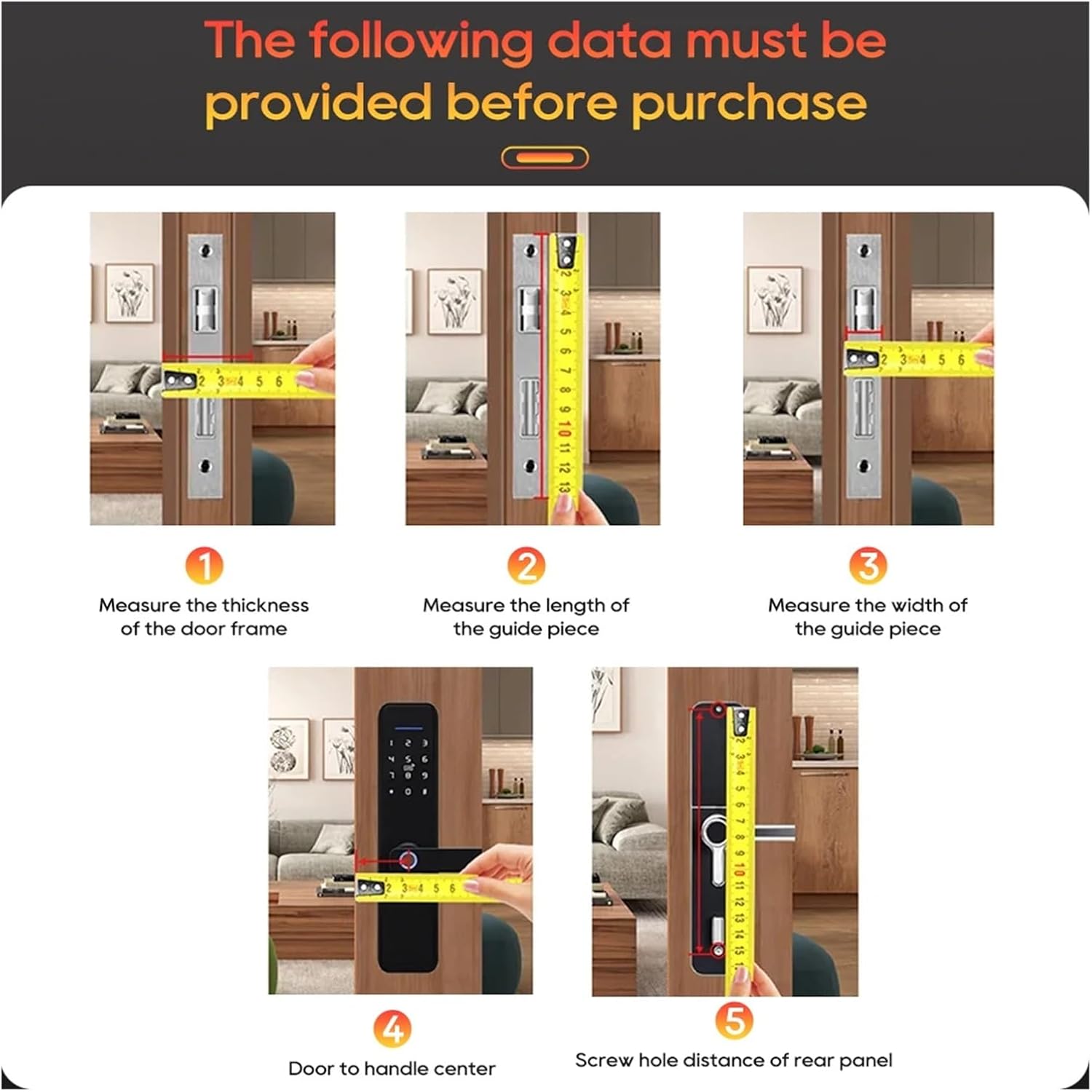
Image: A visual guide demonstrating five key measurements required for door lock installation, including door thickness, guide piece dimensions, and handle/screw hole distances.
Lock Body Dimensions
The lock body dimensions are critical for compatibility with your door. The standard size for this model is 24x250(60*68) with a rounded edge and single hole configuration.

Image: Detailed diagram illustrating the dimensions of the lock body, including measurements for length (250mm), width (24mm), and internal components (60mm, 68mm, 90mm, 175mm).
For detailed installation steps, please refer to the included "Drawing & Instruction Manual" provided in the package.
Operating Instructions
Your Tuya Smart Biometric Fingerprint Door Lock offers multiple convenient ways to unlock, ensuring flexible access control.
Unlocking Methods
The lock supports 6 primary unlocking modes:
- Fingerprint Unlocking: Utilize the integrated biometric sensor for quick and secure access. The AI Fingerprint Algorithm ensures a 99.9% success rate with recognition time under 0.5 seconds.
- Password Unlocking: Enter your pre-set digital password on the keypad.
- Card Unlocking: Use the provided IC cards for tap-to-unlock functionality.
- Mechanical Key Unlocking: For traditional access or in case of emergency, use the physical keys.
- APP Remote Unlocking: Control the lock remotely via the Tuya APP (or Wishome APP).
- Temporary Password Unlocking (via Applet): Generate temporary passwords for guests or service providers through the app.

Image: An infographic illustrating the six different unlocking methods available for the smart door lock: Temporary Password, Fingerprint, Password, Remote, Card, and Key.

Image: A graphic detailing the performance of the AI Fingerprint Algorithm, highlighting a 99.9% success rate, wear resistance (exceeding 1 million times), and fast recognition time of less than 0.5 seconds.
Smart APP Integration (Tuya/Wishome APP)
The lock integrates seamlessly with the Tuya (or Wishome) smart home platform, providing enhanced control and monitoring capabilities:
- Remote Unlocking: Unlock your door from anywhere using your smartphone.
- Intelligent Scene Linkage: Integrate the lock with other smart devices for automated scenarios.
- Doorbell Message Promotion: Receive notifications related to doorbell activity.
- Door-unlocking Log Viewing: Access a history of all lock and unlock events.

Image: A smartphone displaying the Tuya APP interface, illustrating features like remote unlocking, intelligent scene linkage, doorbell messages, and door-unlocking log viewing, promoting an intelligent life experience.

Image: A composite image showing the Wishome APP interface on a smartphone, demonstrating its use for smart lock control, alongside a close-up view of the lock's durable alloy material construction.
Maintenance
The Tuya Smart Biometric Fingerprint Door Lock is designed for low maintenance. Follow these guidelines to ensure its longevity and optimal performance:
- Cleaning: Wipe the lock's surface with a soft, damp cloth. Avoid abrasive cleaners or solvents that could damage the finish or electronic components.
- Fingerprint Sensor: Keep the fingerprint sensor clean and free of dirt or moisture for accurate recognition.
- Power: The lock uses a built-in rechargeable battery. Ensure it is charged when indicated by the low battery warning. An emergency 5V power input is available via Micro USB.
- Environmental Conditions: While waterproof, avoid prolonged submersion. Operate within the specified temperature range of -20~60°C and humidity below 93%RH.
Troubleshooting
If you encounter issues with your smart lock, refer to the following common problems and solutions:
- Lock not responding:
- Check battery level. Connect a 5V emergency power source via Micro USB if needed.
- Ensure the lock is properly installed and all connections are secure.
- Fingerprint not recognized:
- Ensure your finger is clean and dry.
- Try re-registering your fingerprint if the issue persists.
- Clean the fingerprint sensor surface.
- APP connectivity issues:
- Ensure your phone's Bluetooth and Wi-Fi are enabled.
- Check if the lock is within range of your Wi-Fi router.
- Restart the APP and/or the lock.
- Verify your home network is stable.
- Mechanical key not working:
- Ensure the key is fully inserted and turned correctly.
- Check for any obstructions in the keyhole.
For further assistance, please contact customer support.
Specifications
| Feature | Detail |
|---|---|
| Brand | JUCFRDNJ |
| Model Name | huangjiaxuan |
| Color | Black 24x250(6068)R S |
| Material | Aluminium Alloy |
| Power Supply | Built-in Rechargeable Battery |
| Emergency Power | 5V (Micro USB) |
| Protection Level | IP67 (Waterproof) |
| Suitable Door Types | Steel Door, Wooden Door, Glass Door, Brass Door, Stainless Steel Door, others |
| Connectivity | Bluetooth, WiFi |
| Unlocking Methods | APP, Remote Control, Bluetooth, Mechanical Keys, Card, WiFi, Password, Fingerprint |
| Password Capacity | 100pcs |
| Card Capacity | 100pcs |
| Fingerprint Recognition Time | <0.5s |
| Operating Temperature | -20~60°C |
| Operating Humidity | <93%RH |
| Smart Home Platform | Tuya |
| Item Weight | 1.76 ounces (50 Grams) |
| Package Dimensions | 1.18 x 0.79 x 0.39 inches |
Warranty and Support
For warranty information and technical support, please refer to the documentation provided with your purchase or contact the manufacturer directly. Keep your purchase receipt as proof of purchase.
Manufacturer: huangjiaxuan
Brand: JUCFRDNJ
For assistance, please visit the official JUCFRDNJ website or contact their customer service department.
Ask a question about this manual
Ask about setup, troubleshooting, compatibility, parts, safety, or missing instructions. Manuals+ will review the question and use this page’s manual context to help answer it.