
1. Introduction
This manual provides essential information for the assembly, operation, and maintenance of your Casaottima L Shaped Desk. Please read these instructions carefully before beginning assembly and retain them for future reference. This desk is designed for home office use, offering a spacious work surface, integrated storage, and convenient power outlets.
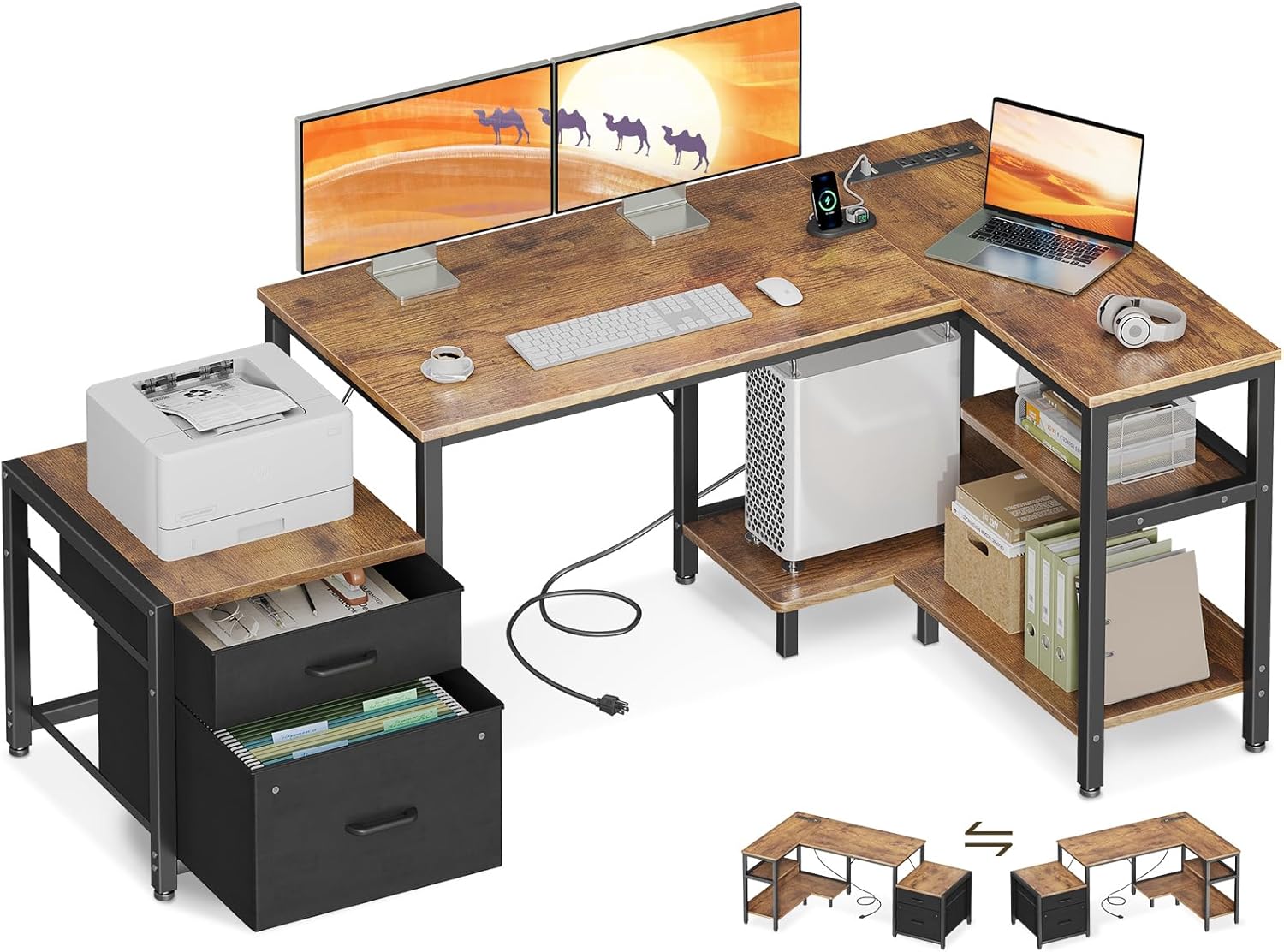
Image 1.1: Overview of the Casaottima L Shaped Desk in a typical setup, showcasing its L-shape, integrated storage, and power outlets.
2. Safety Guidelines
- Always assemble the desk according to the provided instructions.
- Ensure the desk is properly anchored to the wall or floor if recommended, to prevent tip-overs, especially when utilizing the file cabinet or drawers.
- Do not overload the desk or file cabinet beyond their specified weight limits. Refer to the specifications section for details.
- Keep small parts and packaging materials away from children during assembly.
- Ensure all electrical connections for the built-in power outlet are secure and conform to local electrical codes. Do not exceed the rated electrical capacity.
3. Package Contents
Before assembly, verify that all components listed below are present and undamaged. If any parts are missing or damaged, please contact customer support.
- Desk panels (L-shaped desktop, printer shelf, storage shelves)
- Metal frame components and legs
- Fabric drawers and file cabinet frame
- CPU stand panel
- Built-in power outlet unit with power cord
- Assembly hardware (screws, bolts, connectors)
- Assembly tools (e.g., Allen wrench)
- Instruction manual
4. Assembly Instructions
The Casaottima L Shaped Desk is designed for straightforward assembly. All parts are labeled, and necessary tools are included. Follow the step-by-step instructions provided in the separate assembly guide included with your package.
4.1 Reversible Layout
The L-shaped desktop is reversible, allowing you to configure the longer and shorter sections to either the left or right side to best fit your room layout. Plan your desired orientation before beginning assembly.

Image 4.1: Illustration demonstrating the reversible configuration of the L-shaped desk, allowing for left or right orientation.
4.2 Key Assembly Steps
- Unpack all components and verify against the parts list.
- Assemble the main desk frame according to the chosen reversible layout.
- Attach the desktop panels securely to the frame.
- Assemble and integrate the fabric file cabinet and drawers into their designated section.
- Install the CPU stand and storage shelves.
- Mount the built-in power outlet unit into the pre-drilled slot on the desktop.
- Ensure all connections are tightened and the desk is stable.
5. Operating Instructions
5.1 Storage Features
The desk includes a spacious fabric drawer and a file cabinet designed for dust-free storage. The file cabinet accommodates letter and A4 size files, ensuring document organization.

Image 5.1: Detail of the fabric file cabinet and storage drawer, illustrating their capacity for documents and office essentials.
The dual-layer shelf and printer shelf provide additional space for office supplies, books, or a printer. The printer shelf measures 14.2'' x 17.3''.

Image 5.2: The printer cabinet in use, demonstrating its function for holding a printer or other office items.
5.2 CPU Stand
A dedicated CPU stand elevates your computer tower, promoting better airflow and reducing dust accumulation, which can extend the life of your computer.

Image 5.3: The CPU stand providing elevated placement for a computer tower, next to a storage shelf.
5.3 Built-in Power Outlet
The desk features a built-in power strip with 3 AC outlets (125V/12A) and 2 USB ports (5V/2A). This allows for convenient charging of laptops, phones, and other electronic devices directly from your workspace, reducing cable clutter.

Image 5.4: Detailed view of the recessed power strip, showing its 3 AC outlets and 2 USB ports in use.
6. Care and Maintenance
- Cleaning: Wipe surfaces with a soft, damp cloth. Avoid harsh chemicals or abrasive cleaners that may damage the finish.
- Spills: Clean up spills immediately to prevent staining or damage to the engineered wood surface.
- Stability: Periodically check all screws and bolts to ensure they remain tight. Re-tighten if necessary to maintain desk stability.
- Fabric Drawers: The fabric drawers can be spot cleaned with a mild detergent and damp cloth. Allow to air dry completely.
7. Troubleshooting
- Desk Wobbles: Ensure all assembly hardware is securely tightened. Check that the adjustable feet are properly leveled on uneven floors.
- Power Outlet Not Working: Verify the power cord is fully plugged into a functional wall outlet. Check if the power strip's circuit breaker (if present) has tripped. Ensure devices are properly plugged into the outlets/USB ports.
- Drawers Stick: Ensure the fabric drawers are correctly inserted and not overloaded. Check for any obstructions in the drawer slides.
8. Product Specifications
| Feature | Specification |
|---|---|
| Brand | Casaottima |
| Model Number | CasaottimaB01061601003 |
| Product Dimensions (D x W x H) | 31.5"D x 55.12"W x 29.8"H |
| Size | 55 Inch (41"+14") |
| Color | Brown |
| Material | Engineered Wood (Top), Metal (Base) |
| Item Weight | 35.3 Pounds |
| Number of Drawers | 4 (Fabric Drawers) |
| Number of Shelves | 2 (Storage Shelves) |
| Power Outlet | 3 AC Outlets (125V/12A), 2 USB Ports (5V/2A) |
| Reversible Design | Yes |
| Assembly Required | Yes (All tools included) |
9. Customer Support
For any questions, concerns, or assistance with your Casaottima L Shaped Desk, please contact Casaottima customer service. Our dedicated team aims to provide quick assistance within 24 hours.
Please refer to your purchase documentation or the Casaottima brand store on Amazon for specific contact details.
Online Support: Visit the Casaottima Store on Amazon