
Introduction
The PUNICE 43-inch Vanity Desk (Model VD001) is designed to provide a functional and organized space for your beauty routine. This desk features a spacious glass top, five storage drawers, an 11-bulb LED mirror with adjustable lighting modes, and a built-in charging station. A cushioned stool is also included for comfort during use.

Figure 1: Overall view of the PUNICE 43-inch Vanity Desk with mirror, lights, and stool.

Figure 2: Multifunctional design showcasing the desk's storage capacity and integrated power strip.
Setup
This vanity desk requires assembly. Please follow the detailed instructions provided in the packaging. All necessary tools are included. It is recommended to assemble the desk in the intended location to avoid moving it after assembly.
- Unpack all components and verify against the parts list in the instruction manual.
- Identify all hardware and tools.
- Follow the step-by-step diagrams and instructions carefully.
- Ensure all screws and fasteners are tightened securely before use.
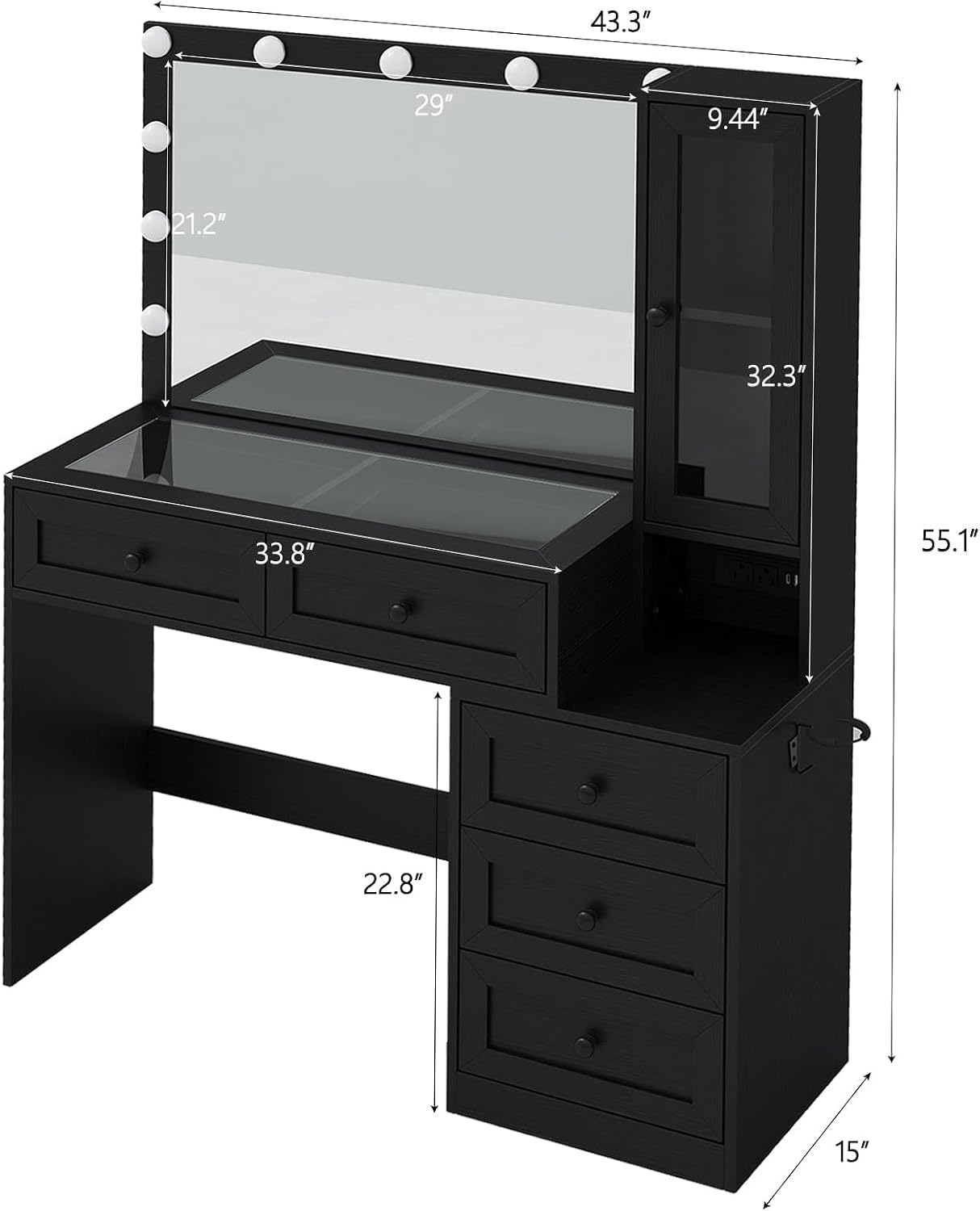
Figure 3: Vanity Desk Dimensions and Components. This image illustrates the overall dimensions of the vanity desk, including the mirror, desktop, drawers, and side storage cabinet.
Operating Instructions
LED Mirror Lighting System
The integrated mirror features 11 LED bulbs with three adjustable color modes and brightness control. This allows you to customize the lighting to suit your preferences and environment.
- Power On/Off: Locate the touch switch on the mirror surface. Tap once to turn the lights on or off.
- Change Color Mode: With the lights on, tap the touch switch repeatedly to cycle through the three color modes: Cold White, Warm White, and Warm Yellow.
- Adjust Brightness: Press and hold the touch switch to gradually increase or decrease the brightness. Release when the desired brightness level is reached.

Figure 4: LED Lighting Modes. This image displays the three available lighting modes: Cold White, Warm White, and Warm Yellow, along with a brightness adjustment scale.
Built-in Charging Station
The vanity desk includes a convenient charging station to power your electronic devices. It features two standard AC outlets, one USB port, and one Type-C port.
- AC Outlets: Insert standard electrical plugs into the 125V/25A AC outlets.
- USB Port: Connect USB-A cables to the 5V/2A USB port for charging compatible devices.
- Type-C Port: Connect USB-C cables to the 5V/2A Type-C port for charging compatible devices.

Figure 5: Charging Station. This image highlights the integrated power strip with AC outlets, USB, and Type-C ports for convenient device charging.
Maintenance
Proper care and maintenance will ensure the longevity and appearance of your vanity desk.
- Cleaning the Surface: Wipe engineered wood surfaces with a soft, damp cloth. Avoid abrasive cleaners or harsh chemicals.
- Glass Top and Mirror: Use a glass cleaner and a lint-free cloth for the glass top and mirror. Spray cleaner onto the cloth, not directly onto the surface, to prevent liquid from seeping into edges.
- Electrical Components: Ensure the charging station and LED lights are unplugged before cleaning. Use a dry cloth to wipe dust. Do not expose electrical components to liquids.
- Drawer Slides: Periodically check drawer slides for smooth operation. If a drawer sticks, ensure it is not overloaded and the slides are free of debris.
- Stool Cushion: Spot clean the cushioned stool with a mild fabric cleaner as needed.
Troubleshooting
| Problem | Possible Cause | Solution |
|---|---|---|
| LED lights do not turn on. | Power cable not connected; touch switch malfunction; bulb failure. | Ensure the power cable is securely plugged into a working outlet. Tap the touch switch firmly. If individual bulbs are replaceable, check for replacements. |
| Charging station not working. | Power cable not connected; device not compatible; circuit overload. | Verify the main power cable is plugged in. Check device compatibility and cable. Avoid overloading the outlets. |
| Drawers are difficult to open/close. | Overloaded drawer; debris in slides; improper assembly. | Reduce contents in the drawer. Clean drawer slides. Recheck assembly instructions for drawer slide installation. |
| Desk feels unstable. | Loose fasteners; uneven floor. | Tighten all assembly screws. Place shims under the desk legs if the floor is uneven. |
Specifications
| Feature | Detail |
|---|---|
| Model Number | VD001 |
| Dimensions (D x W x H) | 15"D x 43.3"W x 55.1"H |
| Material | Engineered Wood |
| Color | Black |
| Number of Drawers | 5 |
| Lighting | 11 LED Bulbs, 3 Color Modes (Cold White, Warm White, Warm Yellow), Adjustable Brightness |
| Charging Station | 2 x 125V/25A AC Outlets, 1 x 5V/2A USB Port, 1 x 5V/2A Type-C Port |
| Item Weight | 88 pounds |
Warranty Information
Please refer to the manufacturer's official warranty documentation included with your product for detailed information regarding coverage, terms, and conditions. For warranty claims or inquiries, contact PUNICE customer service.
Customer Support
For assistance with assembly, operation, troubleshooting, or any other product-related questions, please contact PUNICE customer support. Refer to the contact information provided in your product packaging or visit the official PUNICE website.