
1. Introduction
This manual provides detailed instructions for the installation, operation, and maintenance of the XCHANG HCWA21NEHH Line Controller 2104828.B. This control panel is designed for central air conditioning systems, offering various functions to manage your indoor climate effectively. Please read this manual thoroughly before using the product to ensure safe and optimal performance.
2. Safety Information
- Electrical Safety: The electrical parts voltage is 220V. If your country's voltage differs, ensure compatibility or use an appropriate voltage converter. Incorrect voltage can damage the device and pose safety risks.
- Professional Installation: Installation of this control panel should be performed by a qualified technician to prevent electrical hazards and ensure proper functioning.
- Handling: Handle the control panel with care to avoid physical damage.
- Cleaning: Disconnect power before cleaning. Use a soft, dry cloth. Do not use liquid cleaners or sprays directly on the unit.
- Modifications: Do not attempt to modify or repair the unit yourself. Contact qualified service personnel for any repairs.
3. Product Overview
The XCHANG HCWA21NEHH Line Controller 2104828.B is a compact and intuitive control panel for central air conditioning units. It features a clear digital display and tactile buttons for easy operation.
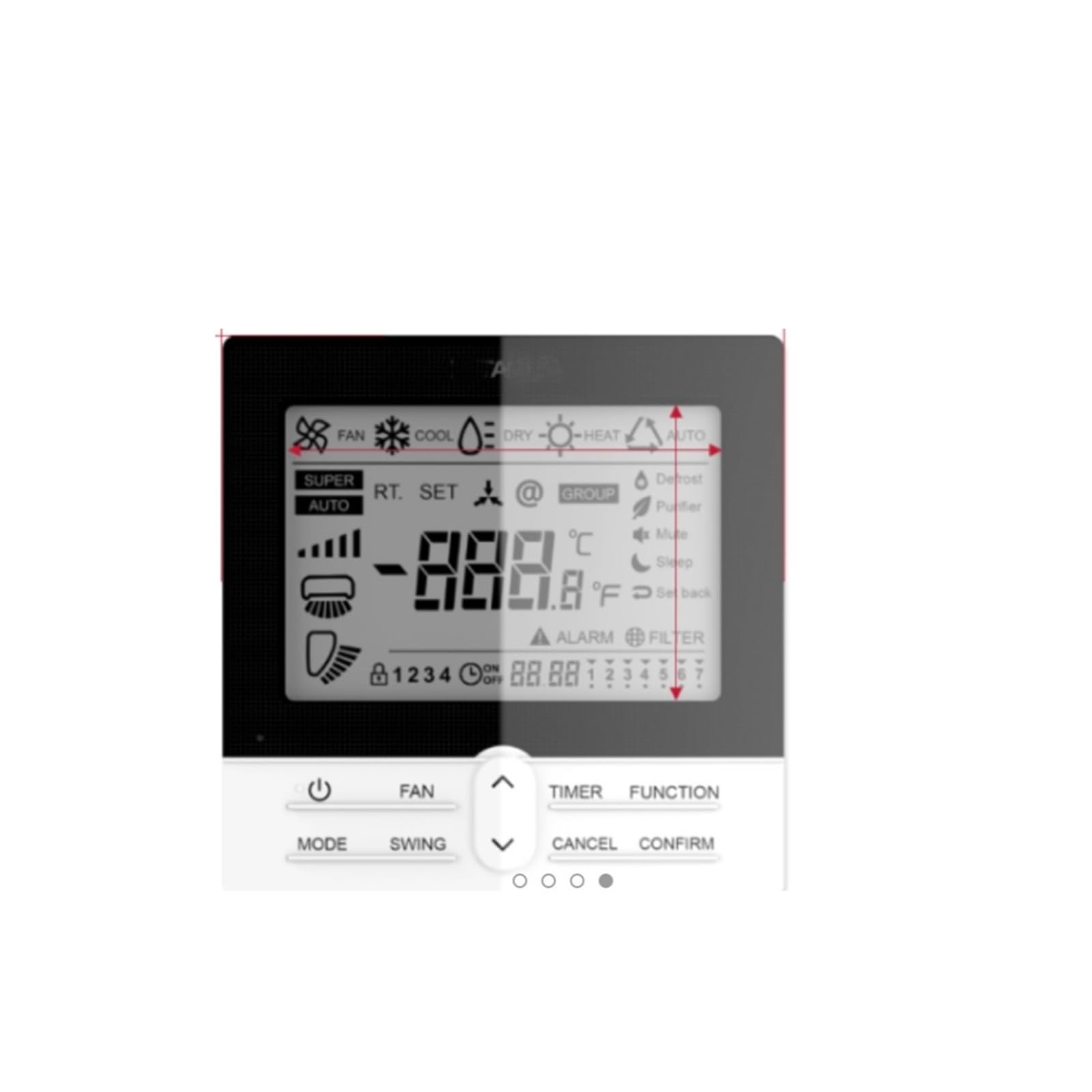
Figure 3.1: XCHANG HCWA21NEHH Line Controller 2104828.B. The front panel measures 120mm (4.72 inches) in width and height. The side profile indicates a thickness of 16mm (0.62 inches). The display shows various icons for fan, cool, dry, heat, auto modes, super auto, real-time (RT), set, group, defrost, purifier, mute, sleep, alarm, and filter. A digital temperature reading is prominently displayed, along with fan speed indicators and a timer section. Control buttons include Power, Fan, Mode, Swing, Timer, Function, Cancel, and Confirm, along with up/down arrows for adjustments.
3.1. Key Features and Display Indicators
- Digital Display: Shows current temperature, selected mode, fan speed, and active functions.
- Mode Indicators: Icons for Fan, Cool, Dry, Heat, and Auto modes.
- Function Indicators: Icons for Super Auto, RT (Real-Time), Set, Group, Defrost, Purifier, Mute, Sleep, Alarm, and Filter.
- Temperature Display: Shows temperature in Celsius (°C) or Fahrenheit (°F).
- Fan Speed Indicator: Displays current fan speed setting.
- Timer Display: Shows active timer settings.
3.2. Control Buttons
- Power Button (⏻): Turns the unit on or off.
- FAN Button: Adjusts fan speed.
- MODE Button: Cycles through operating modes (Cool, Heat, Fan, Dry, Auto).
- SWING Button: Controls the air swing function.
- TIMER Button: Sets or cancels the timing function.
- FUNCTION Button: Accesses additional functions (e.g., Sleep, Purifier).
- CANCEL Button: Cancels current settings or operations.
- CONFIRM Button: Confirms selected settings.
- Up/Down Arrows (∧/∨): Adjusts temperature, time, or navigates menu options.
4. Installation
This control panel is an accessory for central air conditioning systems. Due to the complexity of central air conditioning systems and electrical connections, professional installation is highly recommended.
4.1. Pre-Installation Checks
- Ensure the main power to the central air conditioning unit is turned off before beginning installation.
- Verify that the voltage requirements of the control panel (220V) match your electrical system.
- Confirm the model number HCWA21NEHH Line Controller 2104828.B is compatible with your central air conditioning system.
4.2. Installation Steps (Professional Recommended)
- Carefully remove the existing control panel, if any, or prepare the mounting location according to the central air conditioning system's specifications.
- Connect the wiring from the central air conditioning unit to the new HCWA21NEHH Line Controller 2104828.B, following the wiring diagram provided with your central air conditioning system or by a qualified technician.
- Mount the control panel securely to the wall or designated area.
- Once all connections are secure and the panel is mounted, restore power to the central air conditioning unit.
- Test all functions of the control panel to ensure proper operation.
5. Operating Instructions
This section details the primary functions of the control panel. Refer to Figure 3.1 for button locations.
5.1. Power On/Off
- Press the Power button (⏻) to turn the air conditioning system on or off.
5.2. Mode Selection
Central air conditioners typically offer several operating modes. Select the appropriate mode based on your comfort needs and environmental conditions.
- Press the MODE button repeatedly to cycle through the available modes:
- Cool: For cooling the room, typically used in warmer seasons.
- Heat: For heating the room, typically used in colder seasons.
- Fan: Circulates air without heating or cooling.
- Dry (Dehumidify): Reduces humidity in the room.
- Auto: The system automatically selects the appropriate mode based on the set temperature and current room temperature.
5.3. Temperature Adjustment
Adjust the desired indoor temperature for optimal comfort and energy efficiency.
- Use the Up (∧) and Down (∨) arrow buttons to increase or decrease the set temperature.
- Recommendation: For energy saving and comfort, set the indoor temperature around 26°C (79°F) in summer and between 18-22°C (64-72°F) in winter.
5.4. Wind Speed Adjustment
The central air conditioner typically offers high, medium, and low wind speeds.
- Press the FAN button repeatedly to cycle through high, medium, and low wind speed settings.
- Choose a high wind speed for rapid temperature adjustment.
- Select a low wind speed for a quieter environment, such as during sleep.
5.5. Timing Function
The timing function allows you to program the air conditioner to turn on or off automatically at specified times.
- Press the TIMER button to activate the timing setting mode.
- Use the Up (∧) and Down (∨) arrow buttons to set the desired on/off time.
- Press CONFIRM to save the timer setting.
- To cancel the timer, press the CANCEL button while in timer setting mode or repeatedly press TIMER until the timer indicator disappears.
5.6. Other Functions (e.g., Swing, Function)
- SWING: Press the SWING button to activate or deactivate the automatic air swing function, which helps distribute air evenly.
- FUNCTION: Press the FUNCTION button to access additional features such as Sleep mode, Purifier mode, or Defrost. Use the arrow buttons to navigate and CONFIRM to select.
6. Maintenance
Regular maintenance ensures the longevity and efficient operation of your control panel.
- Cleaning: Periodically wipe the surface of the control panel with a soft, dry cloth. Do not use abrasive cleaners, solvents, or excessive moisture, as these can damage the display or internal components.
- Inspection: Regularly check for any visible damage to the panel or its wiring. If any damage is observed, contact a qualified technician for inspection and repair.
- Environment: Ensure the control panel is not exposed to direct sunlight, extreme temperatures, or high humidity, which can affect its performance and lifespan.
7. Troubleshooting
If you encounter issues with your control panel, refer to the following common troubleshooting steps. For complex problems, contact a qualified technician.
| Problem | Possible Cause | Solution |
|---|---|---|
| Control panel does not power on. | No power supply; loose wiring; internal fault. | Check main power supply to the AC unit. Ensure all wiring connections are secure. If problem persists, contact a technician. |
| Display is blank or flickering. | Power issue; faulty display. | Check power supply. Try cycling power to the AC unit. If issue continues, professional service is required. |
| Buttons are unresponsive. | Software glitch; physical damage; dirt/debris. | Gently clean buttons. Try resetting the AC unit by cycling power. If unresponsive, contact a technician. |
| Incorrect temperature reading. | Sensor malfunction; incorrect settings. | Verify temperature unit (°C/°F) setting. If problem persists, a sensor issue may require professional diagnosis. |
| Air conditioner not responding to commands. | Communication error; AC unit fault. | Ensure the control panel is correctly connected to the AC unit. Check the AC unit's own status. Contact a technician if the issue persists. |
8. Specifications
| Feature | Detail |
|---|---|
| Product Name | Central Air Conditioning Control Panel |
| Model Number | HCWA21NEHH Line Controller 2104828.B |
| Brand | XCHANG |
| Voltage | 220V (Please confirm compatibility with local voltage) |
| Package Dimensions | 1.18 x 0.79 x 0.39 inches |
| Item Weight | 1.76 ounces |
| Assembly Required | No (for the panel itself, but installation into AC system requires assembly) |
| Number of Pieces | 1 |
9. Warranty and Support
For warranty information, technical support, or service inquiries regarding your XCHANG HCWA21NEHH Line Controller 2104828.B, please contact the seller or manufacturer directly. Keep your purchase receipt as proof of purchase.
For specific model inquiries or additional support, please refer to the contact information provided at the point of purchase or on the official XCHANG website.