
1. Introduction
1.1 Welcome
Thank you for choosing the Neo Classic W11 Pro Smart Watch. This manual provides essential information for setting up, operating, and maintaining your device. Please read it carefully to ensure optimal performance and longevity of your smart watch.
1.2 Product Overview
The Neo Classic W11 Pro Smart Watch is an advanced wearable device designed for comprehensive health monitoring and smart communication. It integrates cutting-edge sensors to provide insights into your vital signs and activity levels. Key features include:
- Advanced Health Monitoring: Tracks ECG, blood pressure, heart rate, and body temperature.
- Uric Acid Tracking: Specialized monitoring for uric acid levels.
- Bluetooth Calling: Make and receive calls directly from your wrist.
- Smart Features: Comprehensive health dashboard with real-time monitoring and data tracking.
- Sleek Design: Modern interface with an easy-to-read screen for clear health metrics visualization.
2. Package Contents
Please check the box for the following items:
- Neo Classic W11 Pro Smart Watch
- Charging Cable (Magnetic USB)
- User Manual (this document)
3. Getting Started
3.1 Charging the Device
Before first use, fully charge your Neo Classic W11 Pro Smart Watch. Connect the magnetic charging cable to the charging points on the back of the watch and plug the USB end into a standard USB power adapter (5V/1A recommended) or a computer's USB port. The watch display will indicate charging status.

Image: Rear view of the Neo Classic W11 Pro Smart Watch, highlighting the magnetic charging contacts and health sensors.
3.2 App Installation and Pairing
- Download the App: Scan the QR code in the manual (if provided) or search for the official Neo Classic companion app on your smartphone's app store (iOS App Store or Google Play Store).
- Enable Bluetooth: Ensure Bluetooth is enabled on your smartphone.
- Open the App: Launch the Neo Classic app and follow the on-screen instructions to create an account or log in.
- Pair the Watch: In the app, navigate to the device pairing section. The app will search for nearby devices. Select "Neo Classic W11 Pro" from the list. Confirm the pairing request on both your phone and the watch if prompted.
- Complete Setup: Once paired, the app will guide you through initial settings, such as personal profile, notification preferences, and health monitoring permissions.
4. Operating Instructions
4.1 Basic Navigation
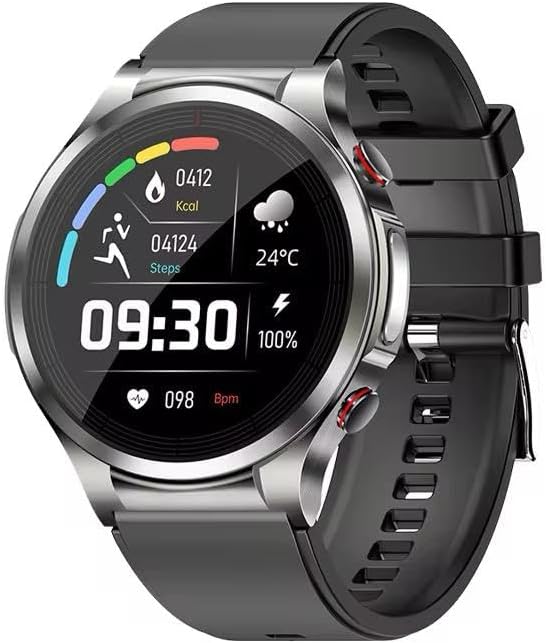
Image: Front view of the Neo Classic W11 Pro Smart Watch, showing the main watch face with time, steps, calories, heart rate, and battery status.
- Touch Screen: Swipe left/right to access different functions (e.g., activity tracking, health data, weather). Swipe up/down for quick settings or notifications.
- Side Buttons: The watch typically has one or more physical buttons. Press the top button to return to the home screen or wake the device. The lower button may be customizable for quick access to a specific function.
- Watch Faces: Customize your watch face through the companion app or directly on the watch by long-pressing the home screen.
4.2 Health Monitoring Features
The W11 Pro Smart Watch offers comprehensive health tracking:
- Heart Rate (HR): Continuous monitoring. Access HR data on the watch or in the app for detailed graphs.
- Blood Pressure (BP): Initiate a measurement from the watch's health menu. Ensure the watch is worn correctly for accurate readings.
- ECG (Electrocardiogram): Follow the on-screen instructions to place your finger on the designated sensor for an ECG reading. Results are displayed on the watch and synced to the app.
- Body Temperature: The built-in sensor provides real-time body temperature readings.
- Uric Acid: Utilize the dedicated uric acid measurement function as per the app's guidance. This feature provides insights into metabolic health.
Note: The health data provided by this device is for reference only and should not be used for medical diagnosis or treatment. Consult a medical professional for any health concerns.
4.3 Bluetooth Calling
Once paired with your smartphone, the W11 Pro allows you to make and receive calls directly from your wrist:
- Making Calls: Access the dial pad or contact list on the watch to initiate a call.
- Receiving Calls: When a call comes in, the watch will display the caller ID. You can answer or reject the call directly from the watch.
- Call Audio: Audio will be routed through the watch's built-in speaker and microphone.
4.4 Other Smart Features
- Notifications: Receive call, SMS, and app notifications directly on your watch. Manage notification settings in the companion app.
- Activity Tracking: Monitors steps, distance, calories burned, and active minutes throughout the day.
- Sleep Monitoring: Tracks your sleep patterns, including deep sleep, light sleep, and awake times.
- Weather: View current weather conditions and forecasts (requires app connection and location permissions).
- Music Control: Control music playback on your smartphone from the watch.
5. Maintenance and Care
5.1 Cleaning Your Smart Watch
Regular cleaning helps maintain the watch's appearance and sensor accuracy:
- Wipe the watch screen and body with a soft, lint-free cloth.
- For stubborn spots, dampen the cloth slightly with water. Do not use harsh chemicals or abrasive cleaners.
- Clean the charging contacts and sensors on the back of the watch regularly to ensure proper charging and accurate readings.
- If the watch band is removable, clean it separately according to its material (e.g., silicone bands can be washed with mild soap and water).
5.2 Battery Care
- Avoid fully discharging the battery frequently.
- Charge the watch regularly, ideally before the battery level drops below 20%.
- Store the watch in a cool, dry place if not used for extended periods.
6. Troubleshooting
| Problem | Possible Solution |
|---|---|
| Watch does not power on | Ensure the watch is fully charged. Press and hold the power button for at least 10 seconds. |
| Unable to pair with smartphone | Ensure Bluetooth is enabled on your phone. Restart both the watch and your phone. Make sure the watch is within range. Check if the app is updated. |
| Inaccurate health readings | Ensure the watch is worn snugly on your wrist, about one finger's width above the wrist bone. Clean the sensors on the back of the watch. Avoid excessive movement during measurements. |
| Notifications not received | Check app notification permissions on your phone. Ensure the watch is connected via Bluetooth. Verify notification settings within the Neo Classic app. |
| Battery drains quickly | Reduce screen brightness. Turn off unnecessary features like continuous heart rate monitoring if not needed. Limit frequent screen wake-ups. |
7. Specifications
| Feature | Detail |
|---|---|
| Model Number | W11 Pro |
| Manufacturer | Neo Classic |
| Connectivity Technology | Bluetooth |
| Operating System | Proprietary |
| Memory Storage Capacity | 32 GB |
| Special Features | Bluetooth Calling, Heart Rate Monitoring, Blood Pressure Monitoring, ECG Monitoring, Body Temperature Monitoring, Uric Acid Tracking |
| Batteries | 1 12V battery (included) |
| Package Dimensions | 16 x 11.8 x 3.6 cm; 65 g |
| Country of Origin | China |
8. Warranty and Support
8.1 Product Warranty
The Neo Classic W11 Pro Smart Watch comes with a standard manufacturer's warranty. Additionally, a 2-Year Extended Warranty by Salama Care may be available for purchase, providing extended coverage for your device. Please refer to the warranty card included with your product or contact your retailer for specific warranty terms and conditions.
8.2 Customer Support
For technical assistance, troubleshooting, or any inquiries regarding your Neo Classic W11 Pro Smart Watch, please contact Neo Classic customer support through their official website or the contact information provided with your purchase. When contacting support, please have your product model number (W11 Pro) and purchase details ready.


