
1. Introduction
This manual provides comprehensive instructions for the safe and efficient operation, maintenance, and troubleshooting of your ZOCWJK Electronic Scale VES-50A. This precision instrument is designed for quantitative weighing of refrigerants, ensuring accuracy in HVAC and refrigeration applications. Please read this manual thoroughly before using the device.
2. Safety Information
- Always operate the scale on a stable, level surface to ensure accurate readings.
- Do not exceed the maximum weight capacity of 50kg.
- Keep the scale away from direct sunlight, extreme temperatures, and high humidity.
- Avoid dropping or subjecting the scale to strong impacts, as this may damage internal components.
- Do not attempt to disassemble or repair the scale yourself. Contact qualified personnel for service.
- Ensure the power supply (DC 9V) is correct to prevent damage.
3. Product Overview
The ZOCWJK Electronic Scale VES-50A consists of a weighing platform and a remote control unit with an LCD display.

Figure 3.1: Overall view of the ZOCWJK Electronic Scale VES-50A, showing the weighing platform connected to the remote control unit via a coiled cable.
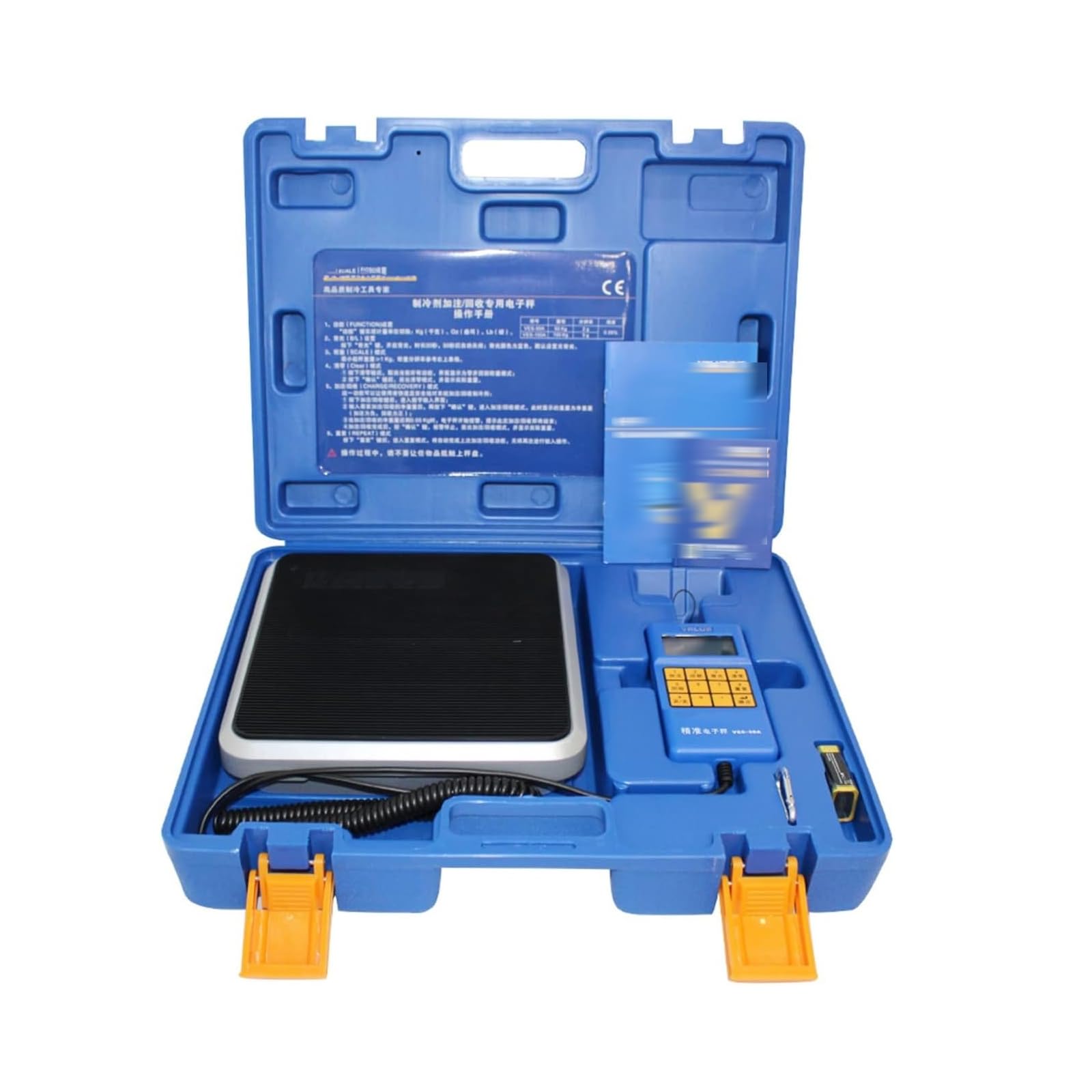
Figure 3.2: Close-up of the control unit, featuring a numeric keypad for input and an LCD display for readings. Key functions include 'Fill', 'Function', 'Backlight', 'Clear Zero', 'Recycle', 'Repeat', 'On/Off', and 'OK'.
4. Setup
- Unpack all components and ensure they are free from damage.
- Place the weighing platform on a firm, level, and stable surface.
- Connect the control unit to the weighing platform using the provided cable.
- Insert a DC 9V battery into the control unit, observing correct polarity.
- Press the 'On/Off' button (labeled '9' on the keypad) to power on the electronic scale.
5. Operating Instructions
The VES-50A scale supports both 'Fill' and 'Recycle' functions for refrigerant management.
- Power On: Press the 'On/Off' button to turn on the electronic scale.
- Place Tank: Carefully place the coolant tank onto the center of the weighing platform. Ensure the tank is empty if performing a 'Fill' operation, or contains refrigerant if performing a 'Recycle' operation.
- Select Function: Press the 'Fill' (labeled '1') or 'Recycle' (labeled '5') button as required. The corresponding indicator will be displayed on the LCD.
- Enter Net Weight: Use the numeric keypad to enter the desired net weight value for filling or recycling.
- Monitor Process: The scale will monitor the weight. As the filling or recycling amount approaches the set value, an electronic alarm will sound, or the system may signal for valve closure to indicate completion.
- Terminate Operation: After the 'Fill' or 'Recycle' process is completed, manually terminate the operation by pressing the 'OK' button (labeled '确定' on the keypad).
- Clear Zero: To reset the display to zero, press the 'Clear Zero' button (labeled '4').
6. Maintenance
- Cleaning: Use only a damp cloth and a small amount of mild detergent to clean the surface of the electronic scale. Do not use chemical solvents to wipe the main body shell or rubber pad, as this may cause damage.
- Storage: After each use, turn off the electronic scale. If the scale will not be used for an extended period, it is recommended to remove the battery to prevent leakage. Store the electronic scale in a dry place, away from moisture, high temperatures, and strong electromagnetic fields.
7. Troubleshooting
If you encounter issues with your VES-50A Electronic Scale, please refer to the following common solutions:
- No Display/Power: Check if the battery is correctly installed and has sufficient charge. Replace the battery if necessary. Ensure the 'On/Off' button has been pressed.
- Inaccurate Readings: Ensure the scale is placed on a stable, level surface. Verify that no objects are touching the weighing platform or interfering with its movement. Recalibrate if possible (refer to advanced functions if available, not detailed in this basic manual).
- Buttons Unresponsive: Check for any debris or liquid under the buttons. Ensure the control unit cable is securely connected to the platform.
- Alarm Issues: Confirm that the set weight value is correctly entered. Check for any obstructions that might prevent the scale from reaching the target weight.
If problems persist after attempting these steps, please contact customer support.
8. Specifications
| Feature | Specification |
|---|---|
| Maximum Range | 50 kg |
| Resolution | 2 g |
| Display | 5-digit 7-segment LCD |
| Power Supply | DC 9V |
| Continuous Working Time | ≥ 80 hours |
| Working Environment | -10℃ to 40℃, 75% humidity |
| Table Size | 237 x 237 mm |
| Accuracy | ±0.05% |
| Anti-collision Function | Yes |
9. Warranty and Support
Specific warranty information for the ZOCWJK Electronic Scale VES-50A is not provided in this manual. For warranty details, technical support, or service inquiries, please refer to the product packaging or contact your retailer or the manufacturer directly.