
Introduction
The Fosmon Universal Travel Adapter is designed to provide power connectivity and charging capabilities for your electronic devices in over 200 countries. Featuring advanced GaN III technology, multiple USB ports, and dual AC outlets, this compact adapter offers a versatile solution for international travelers. This manual provides essential information for the safe and efficient use of your travel adapter.

Image: Front view of the Fosmon Universal Travel Adapter, highlighting its compact design and the various charging ports available.
What's in the Box
- 1x Fosmon International Travel Adapter
- 1x User Manual (this document)
- 1x Spare Fuse
Key Features
- Advanced GaN III Fast Charger: Equipped with two USB-C ports (3A), one USB-A port (2.4A), and two AC outlets. The USB-C1 port delivers up to 20W when used alone.
- Worldwide Compatibility: Features four plug types (Type C, G, I, A) to cover over 200 countries, including most of Europe, UK, Australia, New Zealand, USA, and Japan.
- Versatile AC Outlet: Supports Type A, B, C, D, E, F, G, H, I, J, K, L, N, and O outlets for broad connectivity.
- Universal Device Compatibility: Rapidly charges smartphones, tablets, and USB-C computers. Compatible with iPhone, Galaxy, Pixel, Android phones, iPad, MacBook, AirPods, and other electronic devices.
- Enhanced Safety: Constructed from fireproof PC material, includes a child-proof safety shutter, and a dual 10A fuse system (one active, one spare) for protection against over-current, over-voltage, and short circuits. Certified by CE, FCC, and RoHS.
Setup and Plug Selection
The Fosmon Universal Travel Adapter integrates multiple plug types into a single unit. To select the appropriate plug for your destination, slide the corresponding buttons on the side of the adapter until the desired prongs extend fully and lock into place. Ensure the prongs are securely locked before inserting into an outlet.
Plug Types and Regions:
- Type A (USA/Japan):
Used in USA, Canada, Mexico, Japan, Thailand, and other regions. To deploy, slide the 'USA/AUS' button. The prongs can be twisted for Australian outlets.

Image: Illustration of Type A and Type B plugs, indicating compatibility with the adapter's USA/AUS prongs.
- Type C (Europe):
Common in most European countries, including France, Germany, Italy, Spain, Iceland, Greece, and many others. To deploy, slide the 'EU' button.

Image: Visual guide to various European plug types and how the adapter's EU prongs are used.
- Type G (UK):
Used in the UK, Scotland, Ireland, Dubai, Hong Kong, Malaysia, Singapore, and other regions. To deploy, slide the 'UK' button.

Image: Diagram illustrating the Type G plug and the adapter's extended UK prongs.
- Type I (Australia/China):
Common in China, Australia, New Zealand, Argentina, and other regions. To deploy, slide the 'USA/AUS' button and twist the prongs to align with Type I outlets.

Image: Diagram of the Type I plug, demonstrating how the adapter's USA/AUS prongs can be adjusted for Australian outlets.
Operating Instructions
Once the correct plug type is extended and locked, insert the adapter into the wall outlet. The adapter is now ready to power and charge your devices.
Connecting Devices:
- AC Outlets: The adapter features a universal AC socket on the front and an additional Type A (US/Japan) socket on the side. Plug your device's power cord directly into these outlets. The maximum power output is 1000W at 100V and 2500W at 250V.
- USB Ports: Utilize the two USB-C ports and one USB-A port for charging compatible devices such as smartphones, tablets, and other USB-powered electronics. The USB-C1 port supports up to 20W fast charging.
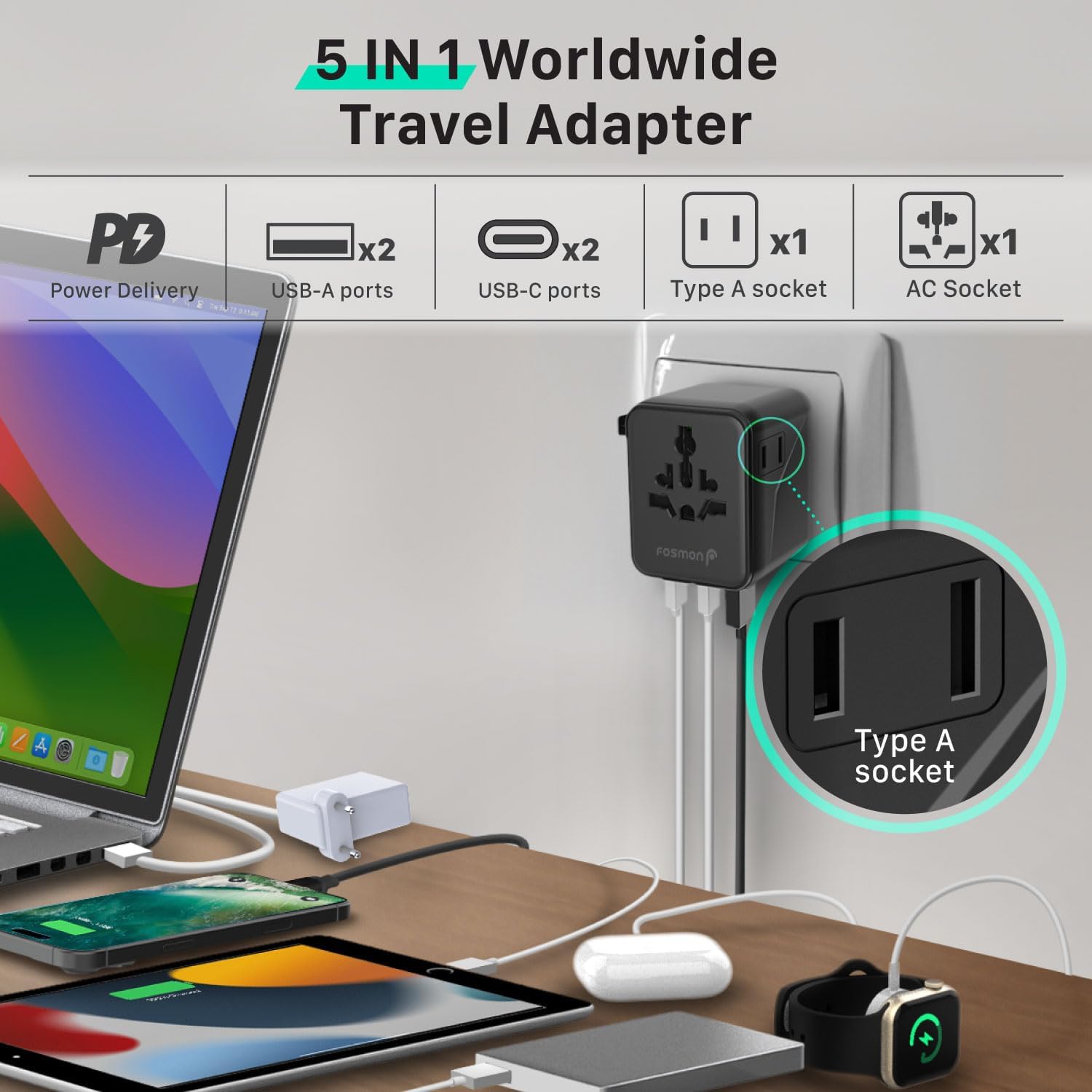
Image: The adapter in use, demonstrating its capability to charge multiple devices (laptop, tablet, phone, earbuds, smartwatch) simultaneously via its AC and USB ports.

Image: A user charging a smartphone with the travel adapter plugged into a European wall socket, illustrating its use during travel.
Important Voltage Reminder:
This universal power adapter does NOT convert voltage. It is a plug adapter only. Ensure your devices connected support 100-250V dual voltage. Do not use with high-power appliances that require voltage conversion, such as hair dryers, curling irons, straighteners, coffee machines, or electric kettles. Using the adapter with incompatible high-power devices may cause damage to the device or the adapter.

Image: A visual warning indicating that the travel adapter does not convert voltage and should not be used with high-power appliances like hair curlers, kettles, or coffee machines.
Maintenance
To ensure the longevity and safe operation of your Fosmon Universal Travel Adapter, follow these maintenance guidelines:
- Keep the adapter dry and clean. Avoid exposure to liquids or excessive humidity.
- Store the adapter in a cool, dry place when not in use.
- Do not attempt to disassemble or modify the adapter. This will void the warranty and may pose a safety risk.
- Regularly check the adapter for any signs of damage, such as cracks in the casing or bent prongs. Discontinue use if damage is observed.
Fuse Replacement:
The adapter is equipped with a dual 10A fuse system for protection. If the adapter stops functioning, the fuse may have blown. A spare fuse is included with your purchase.
- Locate the fuse compartment, typically on the side of the adapter near the prongs.
- Carefully slide open the fuse compartment cover.
- Remove the blown fuse and replace it with the spare 10A fuse.
- Close the fuse compartment cover securely.

Image: Detailed view of the adapter's fuse compartment, illustrating the location of the active and spare 10A fuses for easy replacement.
Troubleshooting
| Problem | Possible Cause | Solution |
|---|---|---|
| Adapter not powering devices | No power from wall outlet; Blown fuse; Prongs not fully extended/locked. | Test wall outlet with another device. Replace fuse if blown. Ensure prongs are fully extended and locked. |
| Device not charging via USB port | Incorrect cable; Device not compatible; Overloaded USB ports. | Try a different USB cable. Ensure device is compatible with USB charging. Reduce number of devices charging simultaneously. |
| Adapter feels warm during use | Normal operation; Overloaded. | Slight warmth is normal. If excessively hot, unplug immediately and reduce load. Ensure total wattage does not exceed adapter's maximum. |
| Prongs retract when plugging in | Prongs not locked. | Ensure prongs are pushed forward firmly until they click into the locked position before inserting into the outlet. |
Specifications
| Feature | Detail |
|---|---|
| Model Number | C-10834FM |
| Input Voltage | 100-250 Volts AC |
| Max AC Power | 1000W at 100V / 2500W at 250V |
| USB-C1 Output | 20W Max (when used alone) |
| USB-C Ports | 2 (3A total shared output) |
| USB-A Port | 1 (2.4A output) |
| Fuse Rating | 10A (Dual Fuse System) |
| Dimensions | 2.53" x 1.97" x 2.14" (64.70mm x 54.85mm x 54.44mm) |
| Item Weight | 4.9 oz (139g) |
| Material | Fireproof PC |
| Certifications | CE, FCC, RoHS |

Image: Visual representation of the adapter's compact size and its adherence to multiple safety and quality certifications.
Safety Information and Warnings
- This adapter is designed for use with dual-voltage appliances (100-250V). It does not convert voltage.
- Do not use with high-power appliances (e.g., hair dryers, curling irons, electric kettles) that exceed the adapter's maximum power rating (1000W at 100V / 2500W at 250V) or require voltage conversion.
- Always ensure the correct plug type is selected and fully locked before inserting into an outlet.
- Keep out of reach of children. The adapter features a child-proof safety shutter.
- Do not expose the adapter to water, rain, or excessive humidity.
- Do not operate the adapter if it has been damaged in any way.
- Unplug the adapter from the wall outlet when not in use.
- Proposition 65 Warning: This product may contain chemicals known to the State of California to cause cancer and birth defects or other reproductive harm.
Warranty and Support
Fosmon is committed to providing reliable products and excellent customer service. For any inquiries or support needs regarding your Universal Travel Adapter, please contact Fosmon customer support.
- Fosmon has been a trusted brand since 2007.
- 24/7 Free Customer Support is available for assistance.
- For detailed warranty information or to contact support, please visit the official Fosmon website or refer to the contact information provided with your purchase.