
1. Introduction
Thank you for choosing the FeirTon 10.1-inch Android 13 Double Din Car Stereo. This manual provides detailed instructions for installation, operation, and maintenance to ensure optimal performance and user satisfaction. This unit is specifically designed for Jeep Compass 2 MP models from 2017 to 2019. Please review this manual thoroughly before installation and use.
Video 1: Overview of the FeirTon Car Stereo features and interface.
2. Package Contents
Please verify that all items listed below are included in your package:
- User manual (1)
- Power cord (1)
- USB 4Pin cable (1)
- USB 6Pin cable (1)
- Car radio (1280*720) with frame (1)
- GPS antenna (1)
- CVBS 720P rear view camera (1)
- RCA Cable (1)

Image 1: All components included in the FeirTon car stereo package.
3. Installation
Professional installation is recommended. Ensure the vehicle's power is disconnected before beginning installation. Refer to the wiring diagrams and videos for detailed steps.
3.1 General Wiring Connections
- GPS Antenna: Insert the GPS antenna and tighten the screws. Tear off the paper and stick the GPS antenna under the front windshield for optimal signal reception.
- Camera Input Cable: Insert the camera input cable into the designated port on the car stereo.
- USB Cables: Insert both the 6-Pin and 4-Pin USB cables into their respective ports.
- RCA Cable: Insert the RCA cable into the corresponding ports.
- CANBUS Box: Insert the plug into the CANBUS box, then plug the 8-Pin CANBUS connector into the rear panel of the car stereo.
- Buzzer: Connect the buzzer.
- Radio Adapter Cable: Insert the radio adapter cable into the radio socket.
- Main Power Harness: Insert the main power harness into the radio socket.
Video 2: Detailed wiring instructions for the FeirTon car stereo in a Jeep Compass.
Video 3: Step-by-step wiring tutorial for the car stereo in a Jeep Compass.
3.2 Rear View Camera Connection
- If your vehicle has an OEM camera, connect the adapter's yellow video signal wire to the "Camera In" cable.
- If your car has an AUX jack, connect AUX L/R to AUX IN L/R on the RCA cable.
- If your car has an OEM amplifier, connect the "AMP" cable to the "AMP" cable on the RAC and enable 'Amp Control' in the settings.

Image 2: Illustration of rear view camera and parking sensor support.
3.3 Screen Disassembly and Installation
Video 4: Guide for screen display disassembly and installation for a 7-inch Compass screen.
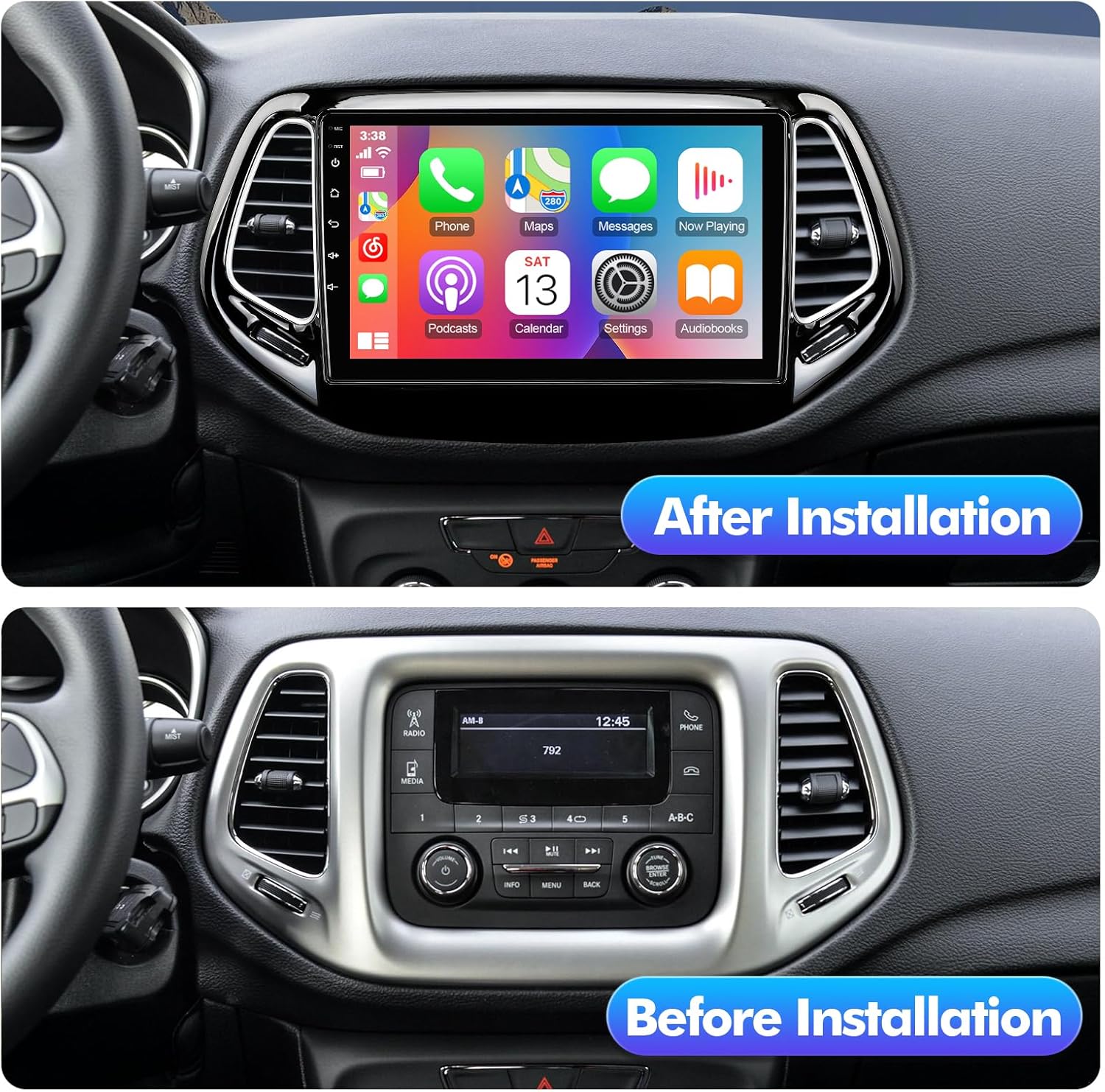
Image 3: Visual comparison of the car dashboard before and after the stereo installation.
4. Operating Instructions
4.1 CarPlay & Android Auto
The FeirTon car stereo supports both wired CarPlay and wired Android Auto. It features built-in WiFi 6 (5Ghz and 2.5GHz dual-band) for stable wireless connections. Use the original USB data cable to connect your Apple or Android phone. This allows you to sync phone apps, run online navigation, and access other features directly on the car stereo display.

Image 4: Display showing the CarPlay and Android Auto interfaces.
4.2 Built-in GPS Navigation
Connect to WiFi or a mobile phone hotspot to download navigation software and access online or offline maps. The system supports worldwide map types for comprehensive navigation.
4.3 Bluetooth 5.4
Connect your phone via Bluetooth 5.4 for hands-free calling and Bluetooth music streaming. The advanced Bluetooth version offers improved transfer rates and stability.

Image 5: Demonstrates hands-free calling and Bluetooth music playback.
4.4 WiFi 6 Connectivity
Utilize the built-in WiFi 6 function, supporting both 5Ghz and 2.5GHz dual-band, to connect to the internet. This allows for downloading apps, browsing, and streaming content directly on the car stereo.

Image 6: Screenshot of the Android App Download interface.
4.5 FM Radio
Access FM radio stations with clear stereo audio output. The interface allows for easy station tuning and preset management.

Image 7: Display of the FM Radio interface.
4.6 Steering Wheel Control (SWC)
The car radio supports the steering wheel control function of the original car. This function can be paired and configured using the "Settingwheel" app on the car radio, allowing you to control media playback and volume directly from your steering wheel.

Image 8: Illustration of steering wheel control integration.
5. Maintenance
To maintain the longevity and performance of your car stereo, follow these guidelines:
- Regularly clean the touchscreen with a soft, lint-free cloth. Avoid abrasive cleaners.
- Keep the unit free from dust and debris.
- Avoid exposing the unit to extreme temperatures or direct sunlight for prolonged periods.
- Ensure all cables are securely connected to prevent intermittent issues.
6. Troubleshooting
If you encounter any issues, refer to the following common problems and solutions:
- No Power: Check all power connections and ensure the vehicle's ignition is on. Verify fuses.
- No Sound: Check speaker connections and volume settings. Ensure the amplifier (if installed) is powered on and correctly connected.
- Touchscreen Unresponsive: Try restarting the unit. If the issue persists, contact support.
- GPS Signal Loss: Ensure the GPS antenna is correctly installed and has a clear view of the sky.
- Rear Camera No Signal: Verify the camera input cable connection and ensure the camera is powered. Check the camera settings in the stereo's menu.
Video 5: Troubleshooting guide for 'No signal detected from rear camera'.
7. Specifications
| Brand | FeirTon |
| Model Name | for Jeep Compass 2017-2019 |
| Screen Size | 10.1 Inches |
| Display Type | IPS |
| Resolution | 1280*720P |
| Operating System | Android 13 |
| Memory Storage Capacity | 32 GB |
| Connectivity Technology | Bluetooth 5.4, WiFi 6 (2.4G & 5Ghz) |
| Special Features | Touchscreen, CarPlay, Android Auto, Built-in GPS, Steering Wheel Control, OEM Camera/Parking Sensor Support, AHD Rearview Support |
| Map Type | Worldwide |

Image 9: Visual representation of Bluetooth 5.4 and WiFi 6 capabilities.

Image 10: Displaying 4K HD video playback on the 1280*720P IPS HD screen.
8. Warranty and Support
Your FeirTon car stereo comes with a 12-month quality assurance warranty. Our professional after-sales team is available 7 days a week, 24 hours a day, to provide support for any questions during installation or use. Please do not hesitate to contact us for assistance.


