
1. Product Overview
The Agilestic L Shaped Standing Desk is designed to provide a versatile and ergonomic workspace. Featuring adjustable height settings, ample storage, and a robust construction, it supports both sitting and standing work modes to enhance comfort and productivity.
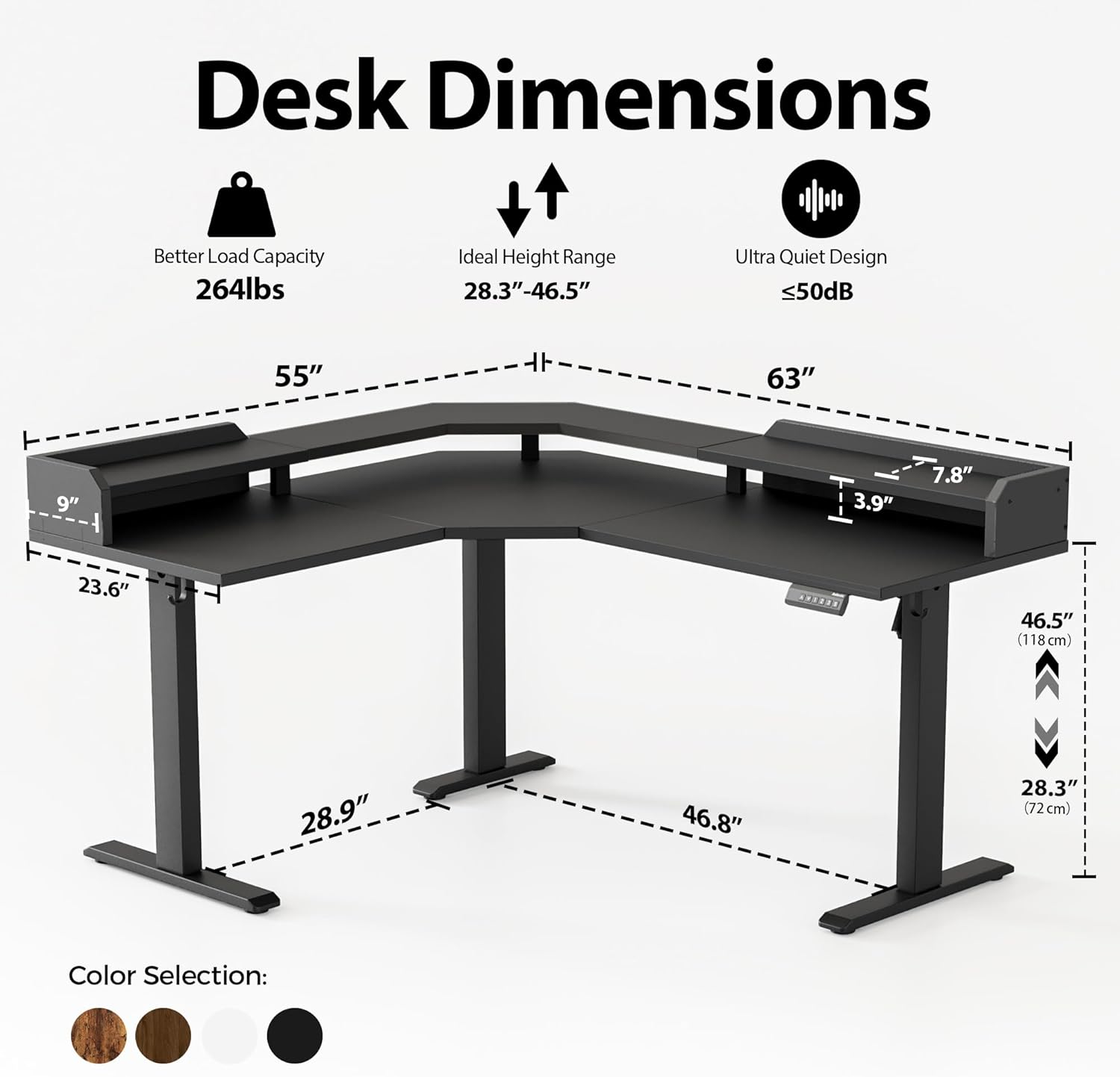
Image: Desk dimensions, showing a load capacity of 264 lbs, an ideal height range of 28.3"-46.5", and an ultra-quiet design (≤50dB).
2. Setup and Assembly
Carefully unpack all components and verify against the parts list provided in your package. Ensure all parts are present and undamaged before beginning assembly. Follow the step-by-step instructions in the assembly video for a smooth setup process.
Assembly Video Guide
Video: A detailed assembly guide for the Agilestic L Shaped Standing Desk with Shelf. This video demonstrates the complete installation process, including attaching legs, connecting frame components, and securing the desktop. It highlights important steps such as ensuring consistent leg height and proper motor alignment.
Key Assembly Tips:
- Check Leg Consistency: Before proceeding, ensure the height of all desk legs is consistent. If there's a significant difference, press down on the taller legs to equalize their height.
- Motor Installation: The motor mounting hole is located on the side of the table leg. Adjust the motor's position to align its base holes with the table leg holes before tightening screws.
- Do Not Overtighten: During initial assembly, do not tighten screws completely until all components are loosely fitted. This allows for minor adjustments and ensures proper alignment. Fully tighten all screws once the desk frame is correctly aligned.
- Controller Placement: The manual controller should be installed on the right side of the desktop, utilizing the pre-drilled holes.
- Hexagonal Bar Orientation: When installing the hexagonal bar, ensure the long side with the card slot is tightly connected to the motor. If it's upside down, disassemble and reorient it.
3. Operating Instructions
The Agilestic L Shaped Standing Desk features an intelligent keypad for effortless height adjustment and memory presets.
Control Panel Functions:

Image: Close-up of the multi-function intelligent keypad, detailing the LED screen, Up/Down buttons, Memory Presets (1, 2, 3), and Memorable Control (S) button.
- LED Screen: Displays the current desk height in inches.
- Up/Down Arrows (∧/∨): Press to manually adjust the desk height upwards or downwards.
- Memory Presets (1, 2, 3): Press a numbered button to move the desk to a pre-saved height. To save a height, adjust the desk to your desired position, then press the 'S' (Memorable Control) button followed by the desired number (1, 2, or 3).
- Memorable Control (S): Used to save your favorite height settings to the preset buttons.
Ergonomic Use:

Image: Illustration demonstrating the benefits of switching between sitting and standing positions to avoid improper posture and improve energy levels.
Regularly switch between sitting and standing positions to promote better posture and reduce strain during long work sessions. Utilize the memory presets for quick transitions between your preferred sitting and standing heights.
4. Maintenance
- Cleaning: Wipe the desk surfaces with a soft, damp cloth. Avoid harsh chemicals or abrasive cleaners that could damage the finish.
- Screw Tightness: Periodically check all screws and bolts, especially those connecting the legs to the desktop and the motor components, to ensure they remain tight. Tighten if necessary to maintain stability.
- Cable Management: Keep cables organized using the provided adhesive zip ties or integrated cable management features to prevent snagging during height adjustments.
5. Troubleshooting
This section addresses common issues you might encounter with your adjustable standing desk.
Common Installation Problem Solutions:
Video: This video provides solutions for common installation and operational problems with the Agilestic standing desk. It covers error codes (E10, E20, E02), abnormal noise, instability, integral inability to rise/fall, and single-side lift issues, offering step-by-step fixes.
- Error Code E10 (Manual Controller Issue): If E10 is displayed, hold down the down button for three seconds until 'RES' is shown. The table will run down to its lowest height, then bounce to a certain height. Press the lift key to resume normal operation. If this doesn't work, wait 8 minutes for the manual to cool down and repeat. If the issue persists, the motor may need replacement.
- Error Code E20 (Overload/Weight Issue): If E20 is displayed, reduce the weight on the desk to less than the rated load range (154 lbs for this error). Then, hold down the down button for three seconds until 'RES' is shown. The table will run down to its lowest height, then bounce to a certain height. Press the lift key to resume normal operation.
- Error Code E02 (Sensitivity Adjustment): If E02 is displayed frequently, press buttons 1 and 2 simultaneously for two seconds. The display will blink and show the current key force gear (OFF, H, N, L). Press 1 and 2 again to cycle through gears. 'H' is for heavy loads, 'N' for normal, 'L' for light. Select the appropriate gear.
- Abnormal Noise: Check that the two mounting screws of the motor are tightened. If not, tighten them.
- Instability/Wobbling: Check that the screws on the footing and column are tight. If not, tighten them. Also, ensure the screws on the beam and column are tight.
- Unilateral Rise and Fall: This often indicates an issue with the hexagonal bar. Check if the hexagonal bar is inverted. The long side with the card slot must be installed on the side with the motor. If it's upside down, disassemble the frame and turn the hex bar the other way around.
- Overall Inability to Lift: If the desk cannot lift using the hand controller, check that the wires behind the hand controller are properly connected. Reinsert and install if improperly connected. Also, check if the power supply is properly connected and reinsert it.
6. Specifications
| Feature | Detail |
|---|---|
| Brand | Agilestic |
| Model Number | B0DY1CFPJ4 |
| Product Dimensions | 35.04"D x 35.04"W x 6.5"H (Overall package dimensions) |
| Size (L-Shape) | 63" x 55" with shelf |
| Adjustable Height Range | 28.3" - 46.5" |
| Maximum Weight Recommendation | 264 Pounds |
| Noise Level | Under 50dB |
| Top Material Type | Wood (FSC-Certified) |
| Base Material | Metal |
| Included Components | Desk with integrated shelf, Monitor Arm, Keyboard Tray (as per general product listing, actual components may vary slightly) |
| Special Feature | Cordless (referring to the desk's clean aesthetic, not power source) |
7. Warranty
This Agilestic product comes with a Limited Warranty. Please refer to the warranty documentation included with your purchase for specific terms and conditions.
8. Support
For any questions, technical assistance, or to report missing/damaged parts, please contact Agilestic customer support. Refer to your product packaging or purchase documentation for contact details.