
1. Introduction
This manual provides essential information for the proper installation, operation, and maintenance of your CUIPPWRJ 4KYFA26100 Carburetor. This carburetor is designed as a replacement part for Onan Cummins Microquiet 4000W generators, including models 4KYFA26100P, 4KYFA26100K, and 4KYFA26100L. A carburetor is a device that blends air and fuel for an internal combustion engine. Proper installation and maintenance are crucial for optimal engine performance and longevity.
2. Safety Information
Always observe the following safety precautions when working with engine components and fuel systems:
- Disconnect Power: Before beginning any work, ensure the generator is turned off and disconnected from any power source.
- Fuel Handling: Gasoline is highly flammable. Work in a well-ventilated area, away from open flames or sparks. Store fuel in approved containers.
- Hot Surfaces: Engine components can remain hot for an extended period after operation. Allow the engine to cool completely before handling.
- Eye Protection: Always wear appropriate eye protection to guard against fuel splashes, debris, or other hazards.
- Professional Installation: If you are unsure about any step of the installation process, consult a qualified technician.
- Ventilation: Ensure adequate ventilation when working with fuel and engine fumes.
3. Package Contents
Verify that all components are present and undamaged upon opening the package:
- 1 x CUIPPWRJ 4KYFA26100 Carburetor Assembly
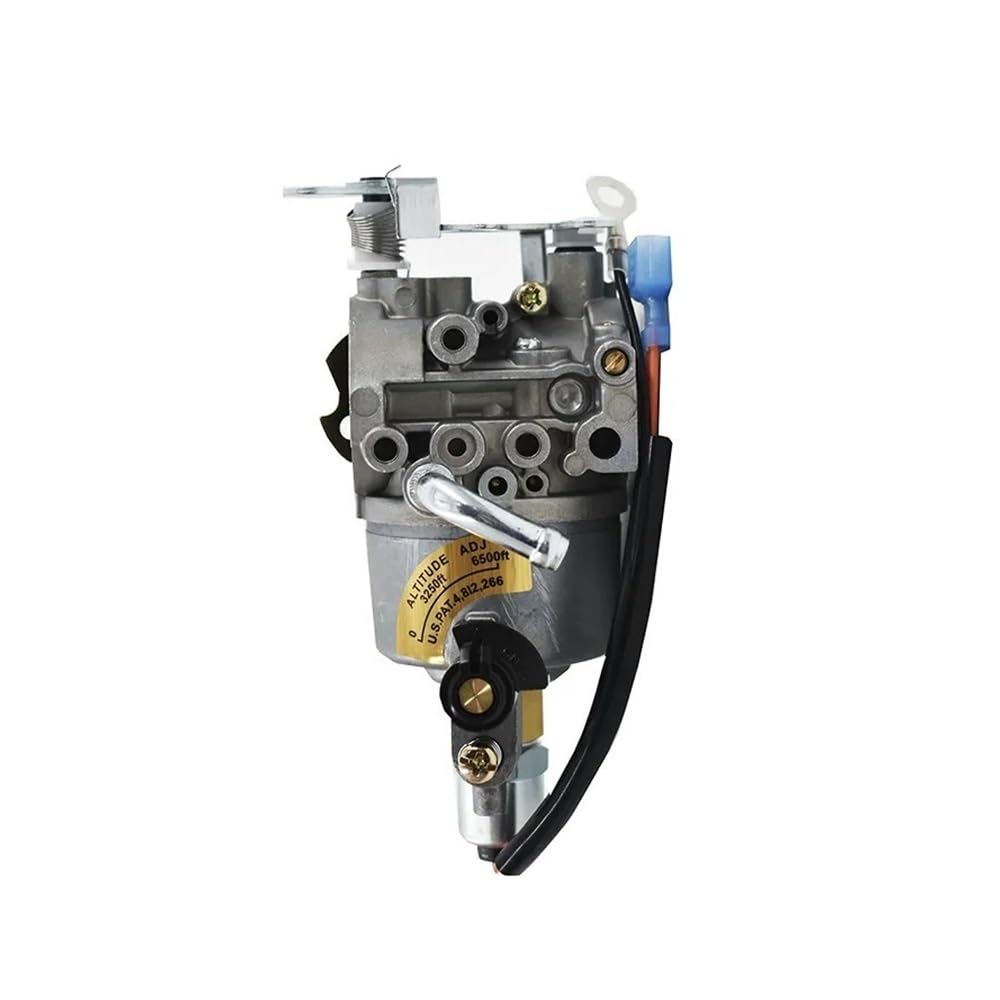
Figure 3.1: Front-side view of the CUIPPWRJ 4KYFA26100 Carburetor assembly, showing the main body, fuel inlet, and linkage.
4. Setup and Installation
This section outlines the general steps for replacing a carburetor. Specific procedures may vary depending on your generator model. Refer to your generator's service manual for detailed instructions.
- Preparation: Ensure the generator is off, cooled, and the fuel supply is shut off. Disconnect the spark plug wire to prevent accidental starting.
- Access: Remove any air filter housings, shrouds, or other components that obstruct access to the carburetor.
- Disconnect Lines: Carefully disconnect the fuel line(s), vacuum lines, and any electrical connections from the old carburetor. Be prepared for minor fuel spills.
- Remove Old Carburetor: Unbolt the old carburetor from the engine manifold. Note the position of any gaskets or spacers.
- Install New Carburetor: Place new gaskets (if supplied or required) and mount the CUIPPWRJ 4KYFA26100 Carburetor onto the engine manifold. Secure it with the appropriate bolts, ensuring a snug fit without overtightening.
- Reconnect Lines: Reconnect all fuel lines, vacuum lines, and electrical connections to the new carburetor. Ensure all connections are secure to prevent leaks.

Figure 4.1: Rear-side view of the carburetor, highlighting the electrical connection point and fuel inlet.
- Reassemble: Reinstall any removed air filter housings or shrouds.
- Fuel System Prime: Turn on the fuel supply. Check for any fuel leaks around the carburetor and fuel lines.
- Final Check: Reconnect the spark plug wire.
5. Operating Instructions
After successful installation, follow your generator's operating procedures. The carburetor's primary function is automatic, but understanding its role can aid in troubleshooting.
- Fuel Quality: Always use fresh, clean fuel as recommended by your generator manufacturer. Stale or contaminated fuel can clog the carburetor.
- Air Filter: Ensure the air filter is clean and properly installed. A dirty air filter can restrict airflow and affect the fuel-air mixture.
- Choke Operation: For cold starts, use the choke as per your generator's instructions. The choke enriches the fuel mixture for easier starting.

Figure 5.1: Top view of the carburetor, showing the throttle and choke linkage mechanisms.
6. Maintenance
Regular maintenance helps ensure the longevity and reliable performance of your carburetor.
- Fuel System Cleanliness: Use a fuel stabilizer if the generator will be stored for extended periods. Drain the fuel system if storing for very long durations.
- Air Filter: Clean or replace the air filter regularly according to your generator's maintenance schedule.
- Carburetor Cleaning: If performance issues arise due to fuel contamination, the carburetor may need cleaning. This typically involves disassembling the carburetor, cleaning jets and passages with carburetor cleaner, and replacing gaskets. This procedure should only be performed by individuals with mechanical experience.
7. Troubleshooting
If you experience issues after installing the new carburetor, consider the following common problems:
| Symptom | Possible Cause | Solution |
|---|---|---|
| Engine cranks but won't start | No fuel, clogged fuel filter, incorrect choke setting, spark plug issue | Check fuel level, replace fuel filter, adjust choke, inspect/replace spark plug. |
| Engine runs rough or stalls | Dirty carburetor jets, air leak, old fuel, dirty air filter | Clean carburetor, check for air leaks around manifold, use fresh fuel, clean/replace air filter. |
| Fuel leaks from carburetor | Loose connections, damaged gasket, stuck float | Tighten fuel lines, replace gaskets, inspect float and needle valve. |
| Lack of power or poor acceleration | Clogged main jet, restricted exhaust, dirty air filter | Clean main jet, check exhaust for blockages, clean/replace air filter. |
If these troubleshooting steps do not resolve the issue, it is recommended to seek assistance from a qualified service technician.
8. Specifications
- Brand Name: CUIPPWRJ
- Model Number: 4KYFA26100 (also referred to as CUIPPWRJ123 in some documentation)
- Manufacturer: CUIPPWRJ
- Item Weight: 50 Grams
- Unit Count: 1.0 Count
- Material: Aluminium-copper Alloy
- Compatibility: Onan Cummins Microquiet 4000W (4KYFA26100P, 4KYFA26100K, 4KYFA26100L)
9. Warranty Information
For specific warranty terms and conditions, please refer to the official warranty documentation provided by CUIPPWRJ or contact their customer support directly. Warranty coverage typically addresses manufacturing defects under normal use.
10. Customer Support
If you have questions, require technical assistance, or need to report an issue, please contact CUIPPWRJ customer support through their official website or the retailer from whom the product was purchased. Have your product model number and purchase details ready when contacting support.