
1. Product Overview
This document provides instructions for the Bayjebu replacement motherboard, model 5B20W27656 IB560ME2, designed for the Lenovo Legion T5-26IOB6 series desktop computers. This motherboard features an Intel Rocket-Lake B560 chipset and is provided in Grade A, tested condition.
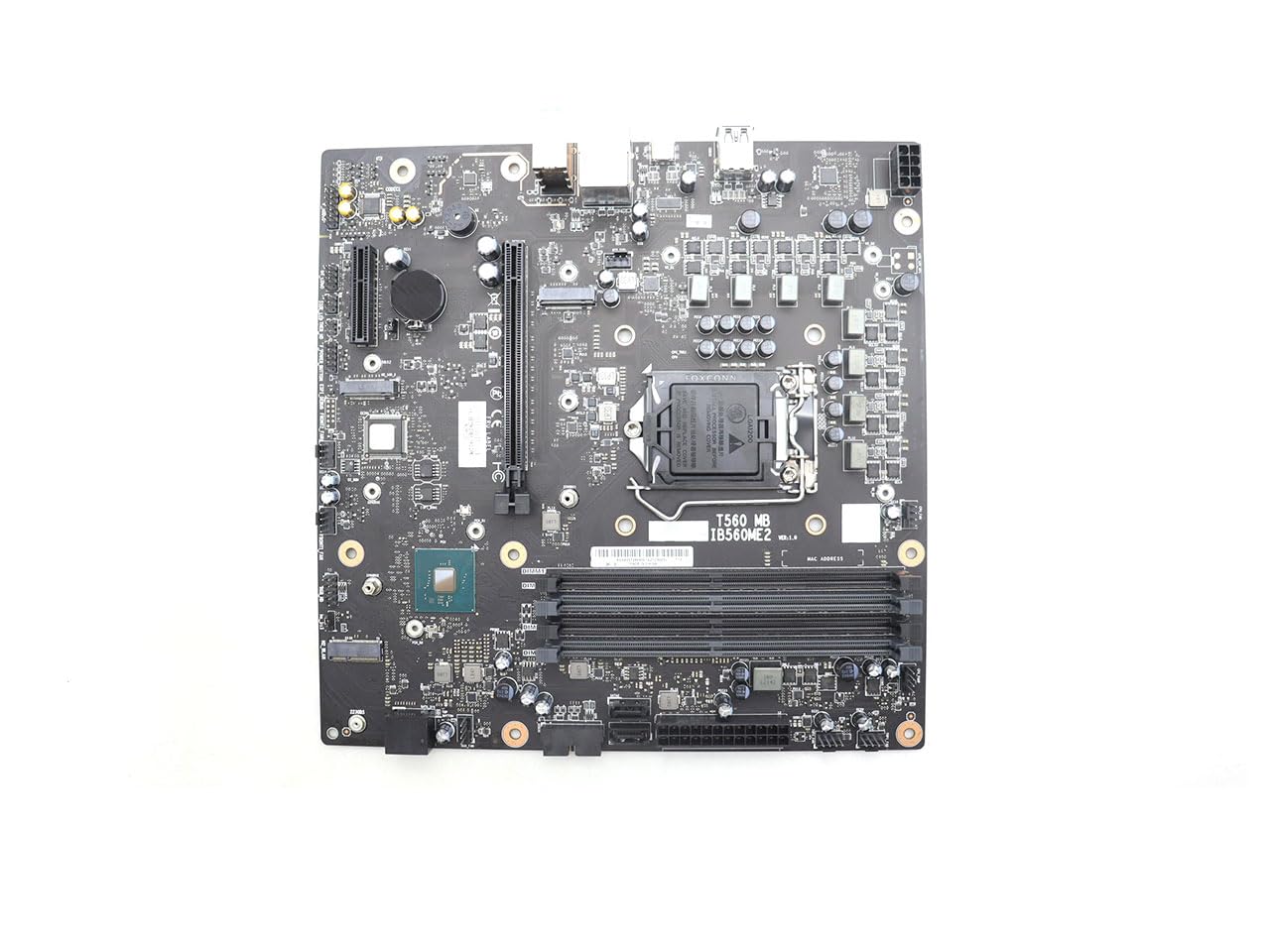
Figure 1: Front view of the Bayjebu replacement motherboard. This image displays the front side of the motherboard, highlighting the CPU socket, RAM slots, PCIe slots, and various connectors for peripherals and power.
Key Features:
- Intel Rocket-Lake B560 Chipset
- Compatibility: Lenovo Legion T5-26IOB6 series
- Condition: Grade A, tested
- Memory: 4 RAM slots (RAM not included)
- CPU: No CPU included (on board processing not specified)
2. Safety Information
Always observe the following safety precautions when handling and installing computer components:
- Electrostatic Discharge (ESD) Prevention: Wear an anti-static wrist strap or frequently touch a grounded metal object (e.g., the computer chassis) to discharge static electricity before handling the motherboard.
- Power Disconnection: Ensure the computer is completely powered off and disconnected from the main power supply before opening the chassis or installing components.
- Component Handling: Handle the motherboard by its edges. Avoid touching integrated circuits, connectors, or other sensitive components directly.
- Ventilation: Ensure adequate ventilation within the computer chassis to prevent overheating.
- Professional Installation Recommended: If you are unsure about any installation steps, seek assistance from a qualified technician.
3. What's in the Box
The package includes:
- 1 x Bayjebu Replacement Motherboard (Model: 5B20W27656 IB560ME2)
Note: Additional components such as CPU, RAM, heatsink fan, cables, and mounting hardware are not included and must be sourced separately.
4. Setup and Installation
This section outlines the general steps for installing the replacement motherboard. Specific steps may vary based on your computer chassis and existing components. Always refer to your computer's service manual for detailed instructions.

Figure 2: Rear view of the Bayjebu replacement motherboard. This image shows the reverse side of the motherboard, featuring the CPU socket retention backplate, mounting screw holes, and solder points for various components. This view is crucial for proper installation within the computer chassis.
Installation Steps:
- Preparation: Power off your computer, disconnect all cables, and open the computer chassis. Place the chassis on a clean, flat, and static-free surface.
- Remove Old Motherboard: Carefully disconnect all cables (power, data, front panel, etc.) from the old motherboard. Unscrew the mounting screws holding the old motherboard in place and gently remove it.
- Install CPU and Cooler (if applicable): If your CPU and cooler are not pre-installed, install them onto the new motherboard according to their respective manuals. Ensure thermal paste is applied correctly.
- Install RAM: Insert your DDR4 RAM modules into the designated slots on the new motherboard. Ensure they are seated firmly until the clips lock into place.
- Mount New Motherboard: Align the new motherboard with the standoffs in your computer chassis. Carefully lower the motherboard into place, ensuring the I/O shield aligns with the rear panel opening. Secure the motherboard with the appropriate mounting screws.
- Connect Cables: Reconnect all necessary cables: main ATX power, CPU power, SATA data and power, front panel connectors (power button, reset, USB, audio), fan headers, and any other peripheral cables.
- Install Expansion Cards: If you have any PCIe expansion cards (e.g., graphics card), install them into the appropriate slots and secure them.
- Final Checks: Double-check all connections to ensure they are secure and correctly oriented. Close the computer chassis.
Compatibility Note: This motherboard is specifically designed for the Lenovo Legion T5-26IOB6 series. It may not be compatible with other laptop or desktop series. Verify your system model before installation.
5. Operating Instructions
Once the motherboard is installed and all components are connected, you can power on your computer.
- Initial Boot: Connect your monitor, keyboard, and mouse. Power on the computer. The system should initiate the Power-On Self-Test (POST).
- BIOS/UEFI Access: During the POST sequence, press the designated key (commonly Del, F2, F10, or F12) to enter the BIOS/UEFI setup utility. Here, you can configure system settings, boot order, and monitor hardware status.
- Operating System: If a compatible operating system is installed on your storage drive, the system should boot into it. If installing a new operating system, follow the on-screen prompts or the OS installation guide.
6. Maintenance
Proper maintenance can extend the lifespan of your motherboard and system components:
- Dust Removal: Periodically clean the interior of your computer chassis using compressed air to remove dust buildup, which can impede airflow and cause overheating.
- Firmware Updates: Check the official Lenovo support website for BIOS/UEFI updates for your specific system model (Lenovo Legion T5-26IOB6). Apply updates as recommended to improve stability and compatibility.
- Environmental Control: Operate your computer in a clean, dry environment with stable temperatures. Avoid extreme heat, cold, or humidity.
7. Troubleshooting
If you encounter issues after installing the motherboard, consider the following troubleshooting steps:
- No Power/No Boot:
- Ensure all power cables (24-pin ATX, 8-pin CPU) are securely connected.
- Verify the front panel power button connector is correctly attached to the motherboard.
- Test the power supply unit (PSU) if possible.
- No Display:
- Confirm the monitor is connected to the correct graphics output (either integrated or dedicated GPU).
- Reseat the graphics card and RAM modules.
- Try booting with only one RAM stick.
- System Instability/Crashes:
- Check for proper CPU and GPU cooling.
- Ensure RAM modules are compatible and correctly installed.
- Update BIOS/UEFI firmware.
- POST Code Errors: Consult your system's service manual or the motherboard manufacturer's documentation for specific POST code meanings if your system provides them.
8. Specifications
| Feature | Detail |
|---|---|
| Manufacturer | Bayjebu |
| Model Number | 5B20W27656 IB560ME2 |
| Compatibility | Lenovo Legion T5-26IOB6 series |
| Chipset | Intel Rocket-Lake B560 |
| CPU Support | CPU not included (on board processing not specified) |
| RAM Slots | 4 Slots (RAM not included) |
| Graphics | Integrated (requires compatible CPU with integrated graphics) or dedicated GPU via PCIe |
| Fan | Heatsink fan not included |
| Condition | Grade A, tested |
| Date First Available | February 21, 2025 |
9. Warranty and Support
This Bayjebu replacement motherboard comes with a 90-day warranty from the date of purchase.
For technical assistance, installation guidance, or warranty claims, please contact the seller directly. Professional pre-sales guidance is available to ensure compatibility and proper usage.