
1. Introduction
This manual provides essential information for the proper use and maintenance of your GN Resound Premium Charger. This high-end charging solution is designed to keep your compatible GN ReSound rechargeable hearing aids fully charged and ready for use.
Compatibility Note: This charger is specifically designed for use with ONLY ReSound rechargeable hearing aids, including the LiNX Quattro, Key, Vox, and Vibrant series. Please ensure your hearing aids belong to one of these series to avoid incompatibility.
2. Product Overview
The GN Resound Premium Charger is a compact, sleek, and lightweight device with a stylish dark grey color. It features a protective hard-shell case with a magnetic lid and color-coordinated hearing aid bays (blue for the left aid and red for the right aid) for ease of use.

Figure 2.1: The GN Resound Premium Charger in its closed state, showcasing its compact and sleek design.
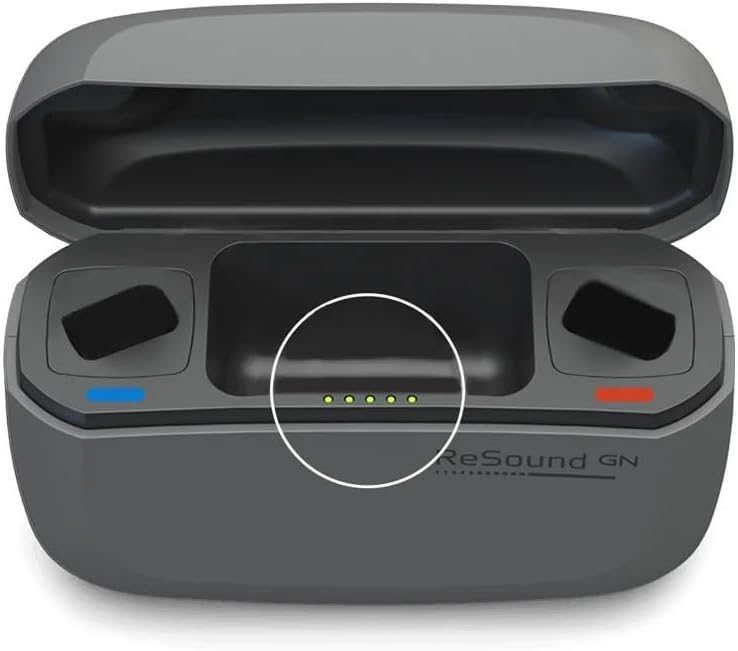
Figure 2.2: The charger opened, revealing the color-coded charging bays for left (blue) and right (red) hearing aids, along with the indicator lights.
3. Getting Started
Before using the charger for your hearing aids, it is recommended to ensure the charger itself is adequately charged. The charger contains a built-in lithium-ion battery that allows it to charge your hearing aids multiple times without being plugged into a power source.
3.1 Initial Charging of the Charger
Connect the provided power supply cable to the charger and plug it into a power socket. The indicator lights on the charger will show its charging status. Once fully charged, the charger can provide at least 3 full charges to your hearing aids before needing to be recharged itself.

Figure 3.1: Visual representation of the charger's indicator lights, showing different charge levels (10%, 30%, 60%, 100%).
4. Using the Charger
To charge your GN ReSound rechargeable hearing aids, follow these steps:
- Placement: Simply place your GN ReSound rechargeable hearing aids into the designated charging bays. Ensure they are correctly seated in the color-coordinated slots (blue for left, red for right).
- Charging Process: The charger can be plugged into a power socket or used on its internal battery for convenient charging at home or while traveling.
- Indicator Lights: The indicator light on your hearing aids will blink during charging. The hearing aids are fully charged when the indicator light stops blinking and remains on. The light will stay on until your hearing aid is removed from the charger.
A full charge typically takes approximately 3 hours. Once fully charged, your hearing aids can provide up to 30 hours of use, or 24 hours with 12 hours of audio streaming.

Figure 4.1: The GN Resound Premium Charger with hearing aids correctly placed in their respective charging bays, ready for charging.

Figure 4.2: The compact size of the charger demonstrated by a hand holding it, highlighting its portability for on-the-go use.

Figure 4.3: The charger and hearing aids neatly stored in a bag, illustrating its suitability for travel and convenient storage.
5. Care and Maintenance
Proper care and maintenance will ensure the longevity and optimal performance of your charger. Follow these guidelines:
- External Cleaning: Use a dry, clean cloth to wipe the outside of the charger.
- Internal Cleaning: Clean the charging bays using a clean cotton bud to remove any debris or dust.
- Keep Dry: Always keep your hearing aid charger dry and clean. Avoid exposure to moisture.
- Post-Use Wipe: To remove grease and moisture, wipe the hearing aid charger with a soft cloth after each use.
6. Specifications
| Feature | Detail |
|---|---|
| Dimensions | 99.4 mm x 35 mm x 67.5 mm (3.9 x 1.4 x 2.7 inches) |
| Weight | 145 grams (5.1 oz) / Item Weight: 12.6 ounces (from package) |
| Color | Gray |
| Output Voltage | 1.4 Volts (DC) |
| Charging Time (Hearing Aids) | Approximately 3 hours for full charge |
| Hearing Aid Usage Time (Full Charge) | Up to 30 hours, or 24 hours with 12 hours of streaming |
| Internal Battery Capacity | Can fully charge hearing aids at least 3 times before needing recharge |
7. Troubleshooting
This section addresses common issues you might encounter with your GN Resound Premium Charger. If you experience a problem not listed here, please refer to the support information.
- Hearing Aids Not Charging:
- Ensure hearing aids are correctly seated in their respective color-coded bays.
- Check if the charger itself has sufficient power (internal battery charged or plugged into a power source). Refer to Figure 3.1 for indicator light status.
- Verify that your hearing aids are compatible with this charger (LiNX Quattro/Key/Vox/Vibrant series).
- Charger Not Powering On/Charging:
- Ensure the power supply cable is securely connected to both the charger and the power outlet.
- Try a different power outlet to rule out an issue with the socket.
If issues persist, contact customer support.
8. Warranty and Support
The GN Resound Premium Charger is designed for long-term reliability, with an expected lifespan of a minimum of 5 years. For any support inquiries or further assistance, please refer to the contact information provided with your product packaging or visit the official Jungle Care website.
8.1 Protection Plans
Extended protection plans may be available for your product. These plans offer additional coverage beyond the standard warranty. For details on available protection plans, such as 2-Year or 3-Year Protection Plans, please refer to your purchase documentation or the retailer's website where the product was acquired.