
TOSHIBA GR-RT558WE-PMN(06)
TOSHIBA Refrigerator GR-RT558WE-PMN(06) User Manual
Model: GR-RT558WE-PMN(06)
Introduction
Welcome to the user manual for your new TOSHIBA Refrigerator GR-RT558WE-PMN(06). This manual provides essential information for the safe and efficient operation, maintenance, and troubleshooting of your appliance. Please read it thoroughly before using the refrigerator and keep it for future reference.
For your safety, always adhere to the safety instructions outlined in this manual.
Important Safety Instructions
- Read all instructions before using the appliance.
- Ensure the refrigerator is properly grounded to prevent electrical shock.
- Do not store explosive substances such as aerosol cans with a flammable propellant in this appliance.
- Keep ventilation openings clear of obstruction.
- Do not use mechanical devices or other means to accelerate the defrosting process, other than those recommended by the manufacturer.
- Do not damage the refrigerant circuit.
- Do not use electrical appliances inside the food storage compartments of the appliance, unless they are of the type recommended by the manufacturer.
- Supervise children to ensure they do not play with the appliance.
Setup and Installation
Unpacking
Carefully remove all packaging materials, including tape and protective films. Inspect the refrigerator for any signs of damage during transit. Report any damage to your retailer immediately.
Placement
Choose a stable, level surface capable of supporting the refrigerator's weight (approximately 80 kg). Ensure there is adequate space around the appliance for proper ventilation, especially at the back and sides, to allow heat dissipation. Avoid placing the refrigerator in direct sunlight or near heat sources such as stoves, radiators, or ovens, as this can affect cooling efficiency and increase energy consumption.
Leveling
Adjust the leveling feet at the bottom of the refrigerator to ensure it is perfectly level. This helps to prevent vibrations and ensures proper door sealing.
Electrical Connection
Connect the refrigerator to a dedicated, grounded electrical outlet. The appliance operates on 50 Volts. Do not use extension cords or adapters.
Initial Operation
After positioning and connecting the refrigerator, allow it to stand for at least 2-4 hours before plugging it in. This allows the refrigerant to settle. Once plugged in, the refrigerator will begin its initial cooling cycle. It may take several hours for the internal temperature to reach the desired level.
Operating Your Refrigerator
Overview of Features
Origin Inverter Technology
The Origin Inverter technology ensures consistent cooling by automatically adjusting its speed based on cooling demand. This results in significant energy savings, quieter operation, and a longer lifespan for the compressor.

Diagram showing the Origin Inverter compressor and its associated fan, highlighting its efficient operation.
AirFALL Cooling System
The AirFALL Cooling system ensures even temperature distribution throughout the refrigerator compartment and provides rapid cooling of items. This efficient system helps maintain the freshness of food, minimizes energy consumption, and prevents frost buildup.
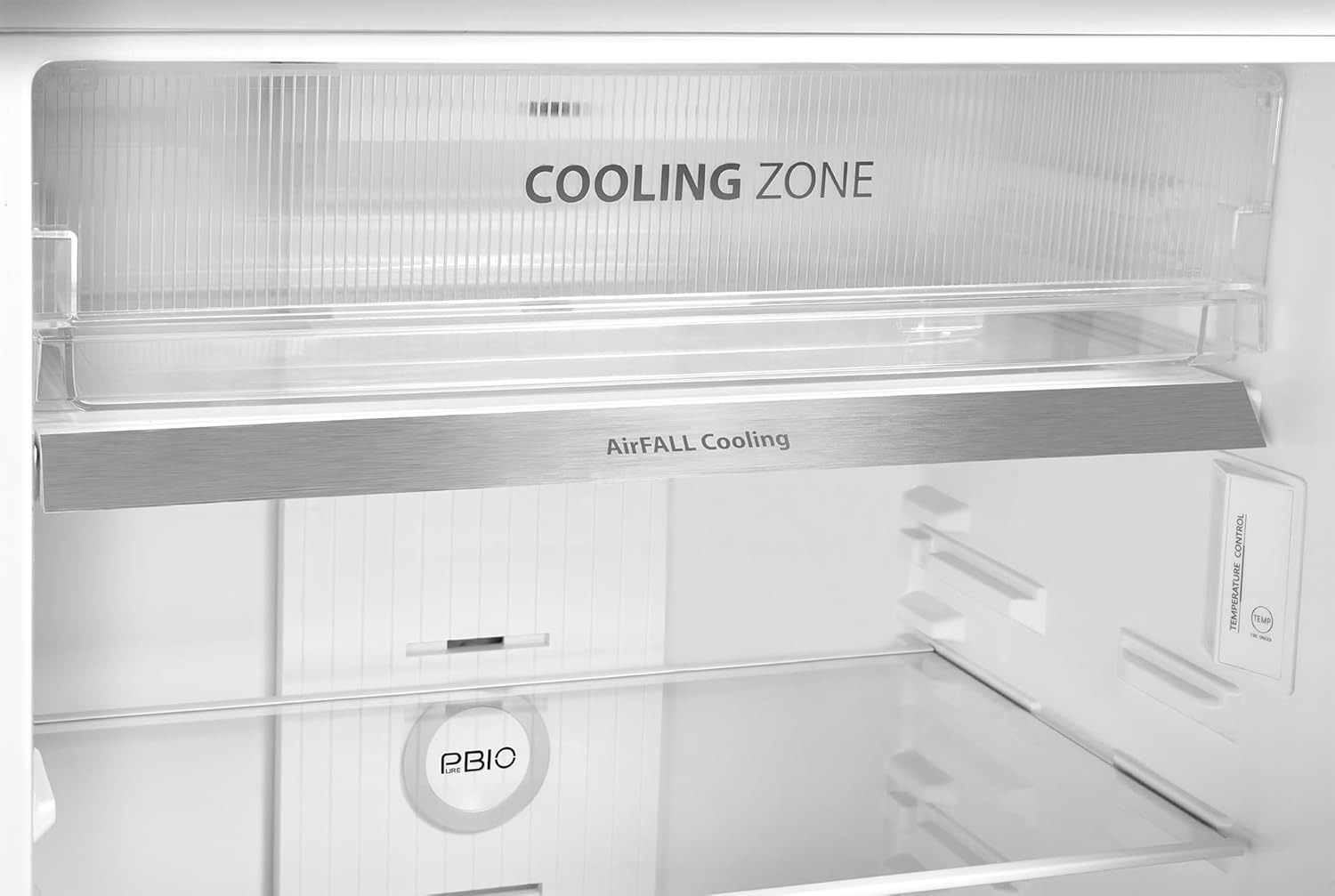
A close-up view of the AirFALL Cooling vent, located above the Cooling Zone, designed for optimal air circulation.
Pure BIO Filter
The Pure BIO Filter eliminates odors and harmful bacteria within the refrigerator, ensuring a hygienic environment for your food. This feature helps keep your refrigerator efficient and your groceries safe and fresh for a longer time.

An illustration of the Pure BIO filter actively purifying the air inside the refrigerator, removing odors and bacteria.
Cooling Zone
The dedicated Cooling Zone is ideal for storing sensitive items such as seafood and meat. It maintains a precise low temperature range of -1°C to 1°C, which keeps these foods fresh without freezing them.

The Cooling Zone, specifically designed to keep meat and seafood fresh at optimal low temperatures.
Humidity Control
The refrigerator features two crispers/drawers with humidity control, allowing you to adjust the moisture level to suit different types of produce, keeping fruits and vegetables fresh for longer.

A hand adjusting the humidity control slider, demonstrating how to optimize freshness for various produce.
Temperature Control
Your refrigerator is equipped with electronic temperature control for precise adjustments. Locate the control panel inside the refrigerator compartment to set your desired temperature.

A user adjusting the electronic temperature control panel located inside the refrigerator compartment.

Detailed view of the electronic temperature control panel, showing the 'TEMP' button for adjustments.
Storage Recommendations
Organize food items efficiently to maximize cooling performance and maintain freshness. Utilize the various shelves and compartments, including the Cooling Zone for meats and seafood, and the humidity-controlled crispers for fruits and vegetables.
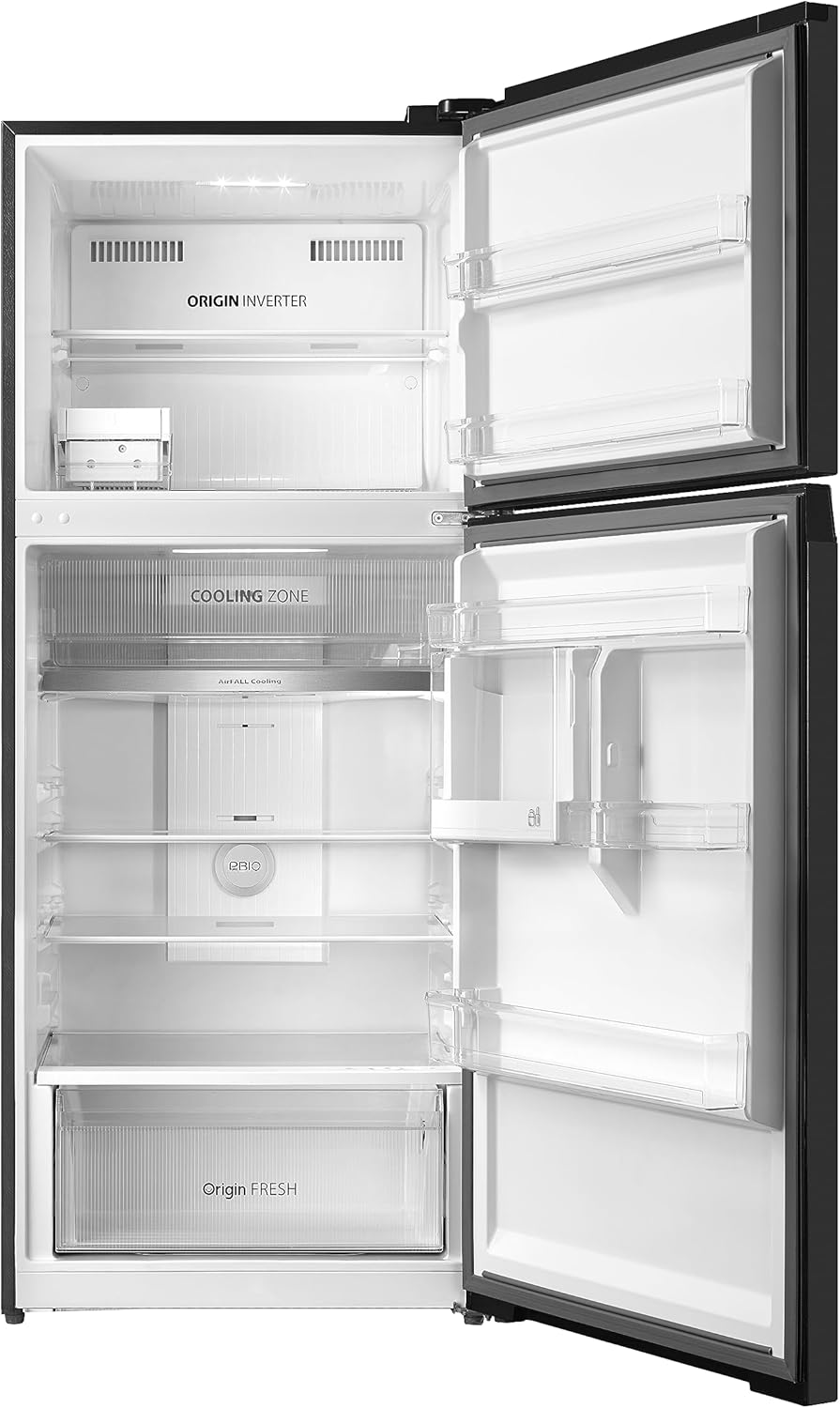
The spacious interior of the refrigerator with its doors open, revealing multiple shelves and storage options.

A clear crisper drawer filled with fresh produce, demonstrating optimal storage for fruits and vegetables.

A hand placing a bottle into one of the refrigerator's door shelves, showcasing the practical design of the storage bins.
Care and Maintenance
Cleaning the Interior
Regularly clean the interior of your refrigerator to prevent odors and maintain hygiene. Unplug the appliance before cleaning. Use a soft cloth and a mild detergent solution. Rinse with clean water and dry thoroughly. Avoid abrasive cleaners or solvents.
Cleaning the Exterior
Wipe the exterior surfaces with a soft, damp cloth. For the Morandi Grey finish, use a non-abrasive cleaner if necessary, then wipe dry. Keep the condenser coils at the back clean to ensure efficient operation; dust them periodically with a soft brush or vacuum cleaner.
Defrosting
This refrigerator features an automatic defrost system, eliminating the need for manual defrosting. If ice buildup occurs, ensure the door seal is intact and the door is closing properly.
Pure BIO Filter Maintenance
The Pure BIO filter is designed for long-term effectiveness. Periodically check the filter for any visible debris. If necessary, gently wipe it clean with a dry cloth. Replacement frequency may vary based on usage and environment.
Power Outage
In case of a power outage, keep the refrigerator doors closed to maintain the internal temperature for as long as possible. Food can remain safely stored for several hours depending on the ambient temperature. If the outage is prolonged, consider transferring perishable items to a cooler with ice.
Troubleshooting Guide
Before contacting service, please refer to the following table for common issues and their solutions:
| Problem | Possible Cause | Solution |
|---|---|---|
| Refrigerator not cooling | Not plugged in; power outage; temperature setting too high; door left open; excessive food load. | Check power connection; verify power supply; lower temperature setting; ensure door is fully closed; reduce food load if overloaded. |
| Unusual noises | Refrigerator not level; items vibrating inside; normal operating sounds (e.g., refrigerant flow, compressor). | Adjust leveling feet; rearrange items inside; normal sounds are expected and do not indicate a fault. |
| Water leakage | Clogged drain tube; door not sealing properly. | Clear any blockage from the drain tube; check and clean door gaskets for proper seal. |
| Odors inside | Spoiled food; strong-smelling food uncovered; Pure BIO filter needs attention. | Remove spoiled food; cover all food items; clean interior; check and clean Pure BIO filter. |
Product Specifications
| Feature | Specification |
|---|---|
| Brand Name | TOSHIBA |
| Model Number | GR-RT558WE-PMN(06) |
| Product Dimensions (D x W x H) | 70 x 68 x 121.8 cm |
| Item Weight | 80 Kilograms |
| Efficiency | A+ |
| Total Capacity | 411 Liters |
| Refrigerator Fresh Food Capacity | 300 Liters |
| Freezer Capacity | 105 Liters |
| Annual Energy Consumption | 1000 Kilowatt Hours |
| Installation Type | Freestanding |
| Form Factor | Standard Depth |
| Special Features | Frost Free |
| Color | Morandi Grey |
| Voltage | 50 Volts |
| Crispers/Drawers | 2 |
| Defrost System | Automatic |
| Door Hinges | Left |
| Shelves | 3 |
| Number of Doors | 2 |
Warranty and Support
Your TOSHIBA Refrigerator GR-RT558WE-PMN(06) comes with an impressive full 10-year warranty, providing peace of mind regarding its durability and performance. Please retain your proof of purchase for warranty claims.
For technical support, service requests, or warranty inquiries, please contact TOSHIBA customer service through their official channels. Refer to the product packaging or TOSHIBA's official website for contact details specific to your region.
Disposal Information
When disposing of this appliance, please do so in an environmentally responsible manner. Refrigerators contain refrigerant and other materials that require special handling. Do not dispose of the appliance with general household waste. Contact your local authorities or recycling center for information on proper disposal methods for electrical and electronic equipment.
Related Documents - GR-RT558WE-PMN(06)
 |
Toshiba Refrigerator Freezer GR-RT558, GR-RT559, GR-RT624 Series Owner's Manual This owner's manual provides comprehensive instructions for the safe and correct use, maintenance, and troubleshooting of Toshiba Refrigerator Freezer models GR-RT558WE-PM, GR-RT559WE-PM, GR-RT559WE-PG, and GR-RT624WE-PM. |
 |
Toshiba Refrigerator User Manual: Models GR-D, GR-C, GR-W Series This Toshiba refrigerator user manual provides essential information on safe operation, installation, maintenance, troubleshooting, and specifications for various Toshiba refrigerator models including the GR-D, GR-C, and GR-W series. Learn how to care for your appliance and ensure optimal performance. |
 |
Toshiba VEGETA Refrigerators 2025 Catalog: Advanced Freshness and Storage Explore the Toshiba VEGETA refrigerator lineup for 2025, featuring advanced technologies for superior freshness, large storage capacity, energy efficiency, and user-friendly designs. Discover models designed to fit modern kitchens and lifestyles, ensuring food stays fresh longer and storage is optimized. |
 |
Toshiba GR-RS530WE-PMI(06) Refrigerator Freezer Owner's Manual This manual provides comprehensive instructions for the Toshiba GR-RS530WE-PMI(06) Refrigerator Freezer, covering features, installation, operation, maintenance, and troubleshooting. Learn about its Real Inverter Compressor, OriginFRESH system, and various modes for optimal performance and energy saving. |
 |
Toshiba Refrigerator Freezer Owner's Manual: Models GR-B31MU, GR-A28MU, GR-A25MU, GR-B22MP, GR-A28HSZ, GR-A26HSZ, GR-B31SU, GR-B22HU, GR-A25SU Comprehensive owner's manual for Toshiba refrigerator freezer models. Includes installation, operation, safety instructions, troubleshooting, and maintenance for models GR-B31MU, GR-A28MU, GR-A25MU, GR-B22MP, GR-A28HSZ, GR-A26HSZ, GR-B31SU, GR-B22HU, GR-A25SU. |
 |
Toshiba TSmartLife Quick Start Guide A concise quick start guide for the Toshiba TSmartLife app and smart refrigerator features. Learn how to download the app, register, connect your device, and utilize smart functions like remote control, food management, energy saving, and self-diagnostics. |
Ask a question about this manual
Ask about setup, troubleshooting, compatibility, parts, safety, or missing instructions. Manuals+ will review the question and use this page’s manual context to help answer it.