
1. Introduction
The EARNMee 30A MPPT Solar Charge Controller is an advanced device designed to efficiently manage power flow from solar panels to various battery types, ensuring optimal charging performance and comprehensive system protection. This controller automatically detects system voltage and is compatible with 12V, 24V, 36V, 48V, 60V, 72V, 84V, and 96V lithium-ion and lead-acid batteries, including GEL, LiFePO4, and Li-ion.
Key features include a maximum PV input voltage (VOC) of up to 230V and a full power input function for stable and sufficient power delivery.
2. Product Overview
2.1. Components and Interface
The controller features a clear LCD display and intuitive buttons for easy operation. The side panel provides essential connection points for solar panels, batteries, and a temperature sensor, along with an RS485 communication port.


2.2. Multiple Protection Features
The controller is equipped with multiple protection mechanisms to ensure safe and reliable operation of your solar power system. These include:
- Overcharge Protection
- Overcurrent Protection
- Overheating Protection
- Short Circuit Protection
- Over-voltage Protection
- Under-voltage Protection
- Over-Load Protection
- Fault Alarm

Additionally, the lithium battery activation feature can restore low-activity lithium batteries to optimal working condition, extending their service life.
3. Technical Specifications
The EARNMee 30A MPPT Solar Charge Controller offers robust performance and broad compatibility.

| Parameter | Value |
|---|---|
| Model | MY-MPPT30A |
| System Voltage Recognition | 12V/24V/36V/48V/60V/72V/84V/96V (Automatic) |
| Controller Type | MPPT |
| Charging Current | 30A |
| PV Input Voltage (VOC) | Max 230V |
| Max PV Power (12V Battery) | 360W |
| Max PV Power (24V Battery) | 720W |
| Max PV Power (36V Battery) | 1080W |
| Max PV Power (48V Battery) | 1440W |
| Max PV Power (60V Battery) | 1800W |
| Max PV Power (72V Battery) | 2160W |
| Max PV Power (84V Battery) | 2520W |
| Max PV Power (96V Battery) | 2880W |
| Compatible Battery Types | Lithium-ion, Lead-acid (GEL, LiFePO4, Li-ion, User-defined) |
| Product Dimensions (L x W x H) | 7.09" x 3.62" x 7.48" (18cm x 9.2cm x 19cm) |
| Item Weight | 4.4 Pounds (2kg ± 0.2kg) |
| Material | Metal |
| Display Type | LED |
4. Setup and Installation
Proper installation is crucial for the safe and efficient operation of your solar charge controller. Follow these steps carefully.
4.1. Wiring Connections
Connect the components in the following order to prevent damage:
- Connect the Battery: First, connect the positive and negative poles of the battery to the controller's battery terminals. Ensure correct polarity.
- Connect the Solar Panels: Next, connect the positive and negative poles of the solar panel array to the controller's solar panel terminals. Verify polarity.
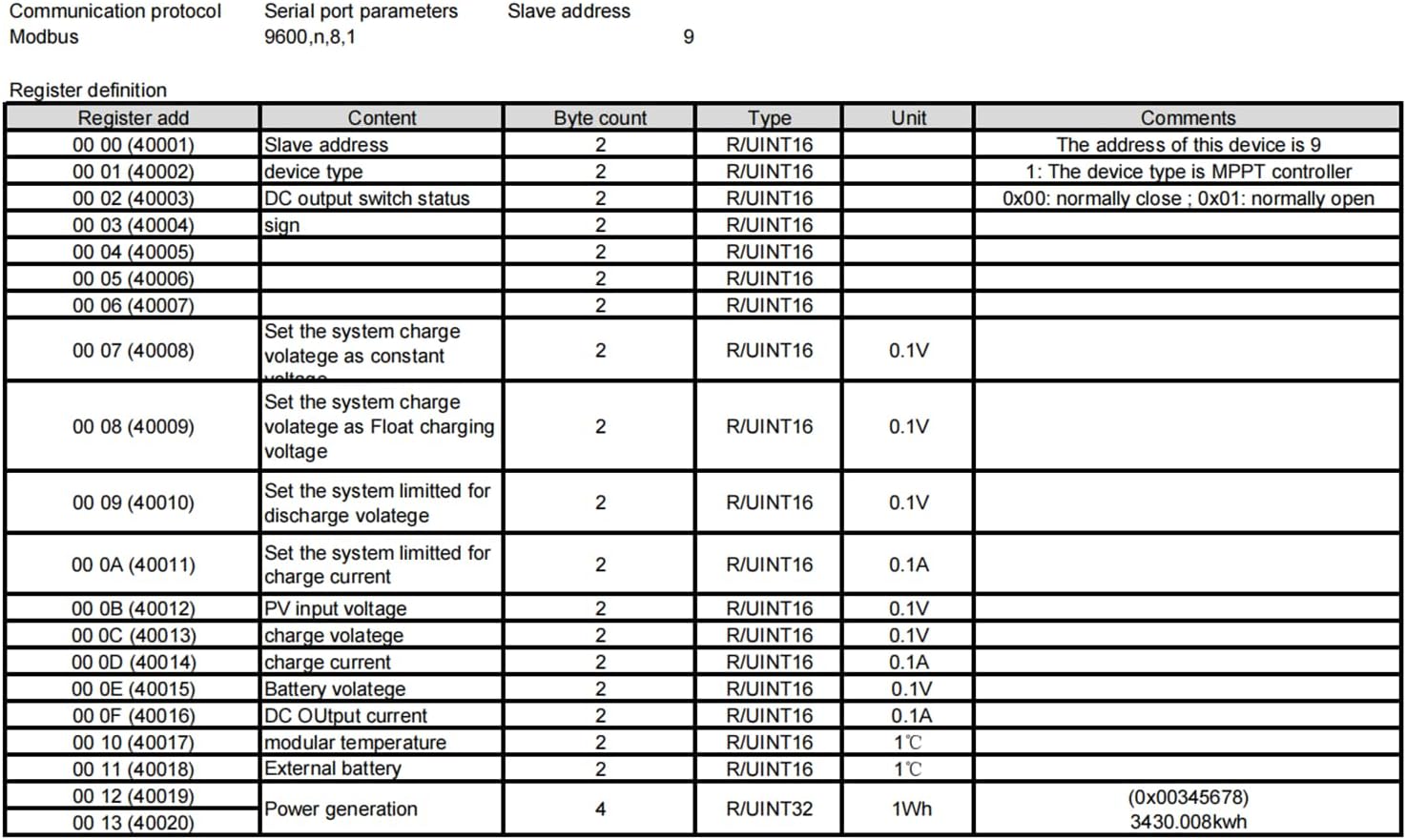
- Connect RS485 Communication Line: If using, connect the RS485 communication line to the designated RJ12 interface. Note that printing errors may occasionally reverse the A-B wires; connect according to the labeled A-B wiring on the unit.
- Connect Temperature Sensor: Attach the temperature sensor to its dedicated port. This helps the controller optimize charging based on battery temperature.

Important Safety Note: Always ensure all connections are secure and correct before applying power to the system. Incorrect wiring can cause damage to the controller, battery, or solar panels.
4.2. Internal Components (for reference)
The EARNMee MPPT controller utilizes a true MPPT core motherboard, distinguishing it from simpler PWM controllers. This design ensures maximum power point tracking for efficient energy harvesting.
Video 4.1: MPPT Core Motherboard. This video provides a brief internal view of the controller, highlighting the MPPT core motherboard, confirming it is a true MPPT device and not PWM.
5. Operating Instructions
5.1. LCD Display and Button Functions
The LCD display provides real-time information about your system's status. Use the buttons to navigate menus and adjust settings.
- SET/Back: Enters settings menu or returns to the previous screen.
- UP (+): Navigates up through menu options or increases values.
- DOWN (-): Navigates down through menu options or decreases values.
- CONFIRM (Press for 3 seconds): Confirms selections or enters sub-menus.

5.2. Battery Type Settings
The controller supports custom charging methods, allowing users to set their own charging voltage, float charging voltage, and charging current.
- Navigate to Setup.
- Select Battery Type Settings.
- Choose Custom Battery Type.
- For Lead-acid batteries: The controller offers automatic recognition for 12V/24V/36V/48V/60V/72V/84V/96V systems.
- For Lithium batteries: Manual settings are available for 12V/24V/48V/60V/72V/84V/96V systems. Adjust parameters as needed for your specific lithium battery chemistry.

5.3. Charging Process
The MPPT controller optimizes charging by tracking the maximum power point of the solar array.
Video 5.1: 60A MPPT Charge Controller connected to 12V lithium battery. This video demonstrates the charging process of an MPPT controller connected to a 12V lithium battery, showing how the charging current adjusts as the battery charges.
In the early stage of charging, when the battery voltage is low, the charging current will be high to quickly replenish energy. As charging progresses and the battery voltage increases, the current will naturally decrease, entering a constant voltage charging stage as the battery approaches full charge.
6. Maintenance
Regular maintenance ensures the longevity and optimal performance of your EARNMee MPPT Solar Charge Controller.
- Inspect Connections: Periodically check all wiring connections (solar panel, battery, load, temperature sensor, RS485) for tightness and corrosion. Loose connections can lead to power loss or system malfunction.
- Clean the Controller: Keep the controller's exterior clean and free of dust and debris. Ensure the cooling fan (if present) is not obstructed to maintain proper ventilation.
- Monitor Performance: Regularly check the LCD display for system status and any fault alarms. Consistent monitoring helps identify potential issues early.
- Lithium Battery Activation: The controller includes a lithium battery activation function. If a lithium battery enters a low-activity state, this feature can help restore it to good working condition, extending its lifespan.
7. Troubleshooting
If you encounter issues with your EARNMee MPPT Solar Charge Controller, refer to the following general troubleshooting tips.
- No Display/Power:
- Check battery connections and ensure the battery has sufficient voltage.
- Verify solar panel connections and ensure adequate sunlight.
- Battery Not Charging:
- Confirm solar panel input voltage is within the controller's operating range (PV Max 230V).
- Check for shading on solar panels.
- Ensure battery type settings are correctly configured for your battery.
- Fault Alarm Indication:
- Refer to the LCD display for specific error codes or indicators.
- Check for overcurrent, overvoltage, or short circuit conditions in the system.
- Ensure the temperature sensor is properly connected and functioning.
- RS485 Communication Issues:
- Verify the RJ12 cable connection.
- Ensure the A-B wiring is correct, noting potential printing errors on some units.
- If specific MODBUS commands are required or issues persist, please contact customer support.
For complex issues or if troubleshooting steps do not resolve the problem, please contact EARNMee customer support for assistance.
8. Application Scenarios
The EARNMee MPPT Solar Charge Controller is versatile and suitable for a wide range of applications, supporting various battery voltages and working environments.
- 12V MPPT Solar Controller: Ideal for low-power scenarios like solar streetlights, garden lights, small household power systems, and communication base stations. Offers high safety, simple circuits, and compatibility with common solar panels and batteries.
- 24V MPPT Solar Controller: Used in off-grid systems with slightly higher power demands, such as RVs, ships, and small PV plants. Benefits include smaller current, lower line loss at the same power, support for higher-power loads, and high efficiency.
- 48V MPPT Solar Controller: Suitable for small-to-medium commercial solar systems (e.g., power for small malls/offices) and off-grid industrial equipment. Supports high-power solar panels and loads for larger off-grid systems, with lower line loss for long-distance transmission.
- 96V and Above High Voltage MPPT Solar Controller: Primarily used for large-scale solar power generation and energy storage projects, including large photovoltaic power stations, energy storage systems, and smart microgrids. Allows connection of more solar panels for larger power generation systems, improving overall efficiency and power output, and reducing transmission costs.
Video 8.1: 30A MPPT Solar Charge Controller in Use. This video showcases the 30A MPPT Solar Charge Controller in a practical application, demonstrating its functionality.
Video 8.2: 30A/60A/120A MPPT Solar Charge Controller Overview. This video provides a general overview of the EARNMee MPPT Solar Charge Controller series, highlighting its features and voltage compatibility.
Video 8.3: EARNMee MPPT Solar Charge Controller Auto 120A/60A. This video demonstrates the automatic functionality of the EARNMee MPPT Solar Charge Controller, showcasing its use with an inverter and fan.
9. Warranty and Support
EARNMee provides a 12-month maintenance service for this product. We conduct quality checks on all MPPT Solar Charge Controllers before shipment to ensure you receive the product in good condition.
If you have any questions, require specific MODBUS commands, or need assistance with your controller, please feel free to contact us. We are committed to replying within 24 hours.