
ANJIELO SMART 6530+61681
ANJIELO SMART Video Intercom System User Manual
Model: 6530+61681
1. Introduction
Thank you for choosing the ANJIELO SMART Video Intercom System. This system provides enhanced security and convenience for apartments, villas, hotels, and offices, allowing for visual communication with visitors and remote door unlocking. This manual provides detailed instructions for the installation, operation, and maintenance of your new intercom system.

Figure 1.1: ANJIELO SMART Video Intercom System (1 Outdoor Unit + 2 Indoor Monitors)
This image displays the complete system, featuring two white indoor monitor units with handsets and a silver outdoor doorbell unit. A hand is shown interacting with the ID card reader on the outdoor unit, highlighting the unlocking feature.
2. System Components
The ANJIELO SMART Video Intercom System typically includes one outdoor doorbell camera unit and multiple indoor monitor units. This specific package includes one outdoor unit and two indoor monitors.
2.1. Outdoor Doorbell Unit
The outdoor unit is designed for external installation and features a camera, microphone, speaker, call buttons, and an ID card reader for convenient access.
- Camera Lens: AMOS, 700TVL resolution.
- Night Vision: Visible within 1 meter, with built-in LED infrared night vision light for clear viewing in low light.
- Durability: Aluminum panels, waterproof design (IP55 rated), operating temperature range of -35°C to 50°C.
- Unlocking: Supports ID card unlocking and remote unlocking via indoor monitor.

Figure 2.1: Outdoor Unit Component Diagram
This diagram labels the key components of the outdoor unit: Camera, IR detector, Speaker, Call button(s), Card swiping area, and Microphone. It provides a clear visual guide to the unit's features.

Figure 2.2: Day and Night Vision
This image illustrates the automatic switching between day and night vision modes. It shows a clear view during the day and a distinct, clear image at night, emphasizing the built-in LED infrared night vision light.

Figure 2.3: Outdoor Unit Durability Features
This image highlights the outdoor unit's robust design, featuring icons for a 90° viewing angle, IP55 waterproof rating, and an operating temperature range of -30°C to +60°C, demonstrating its suitability for various outdoor conditions.
2.2. Indoor Monitor Unit
The indoor monitor serves as the control center for the intercom system, allowing you to view visitors, communicate, and unlock the door.
- Screen: 4.3-inch TFT-LCD touch screen with 480 x 272 resolution.
- Audio: Hands-free and handle call options, clear voice, and good sound quality.
- Customization: 25-chord melody rings, adjustable brightness, color, and intercom volume.
- Installation: Can be surface mounted or placed on a table.
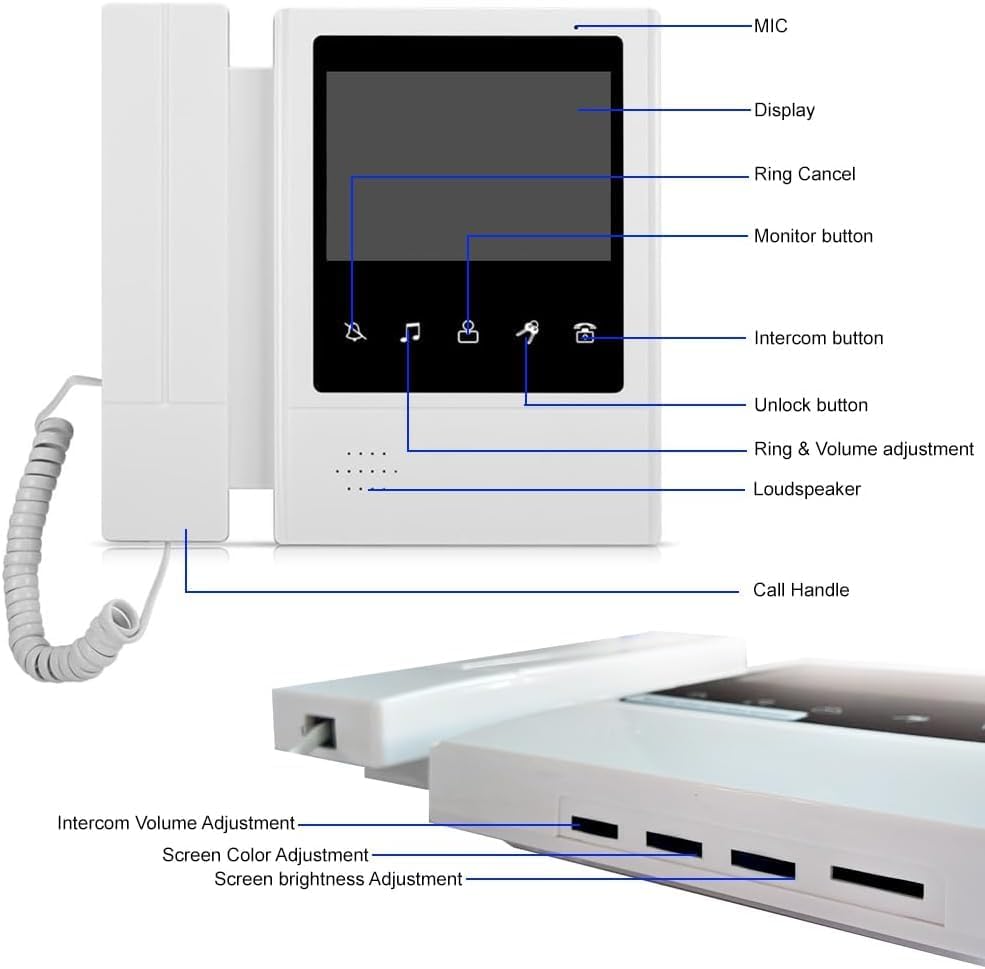
Figure 2.4: Indoor Monitor Component Diagram
This diagram provides a detailed view of the indoor monitor, labeling its various parts and adjustment points. These include the MIC, Display, Ring Cancel button, Monitor button, Intercom button, Unlock button, Ring & Volume adjustment, Loudspeaker, Call Handle, Intercom Volume Adjustment, Screen Color Adjustment, and Screen Brightness Adjustment.
3. Key Features
- Multi-Unit Support: Designed for multi-apartment buildings, supporting 1 outdoor camera and up to 6 indoor screens without interference. The system can be expanded to support up to 12 security monitoring devices.
- 4.3-inch Monitor & Hands-free Communication: Enjoy clear visual and audio communication with visitors. Adjust brightness, volume, contrast, and choose from 25 ringtones.
- Real-Time Monitoring: Receive instant notifications on your indoor monitor when the doorbell is pressed, ensuring you never miss a visitor.
- Wired Connection Stability: Ensures reliable and secure communication for home security.
- ID Card Unlocking: Conveniently unlock the door using pre-programmed ID cards.
- Two-Way Audio: Engage in clear conversations with visitors at your door.

Figure 3.1: System Overview and Features
This image provides a comprehensive view of the system in use, showing the outdoor unit in a rainy environment and two indoor monitors. Below the main image, there are icons representing key features: Two-way intercom, Remote monitoring, One key to unlock, Ringtone switching, Infrared night vision, and Mute Free.
4. Setup and Installation
Installation of the ANJIELO SMART Video Intercom System requires basic electrical knowledge. It is recommended to consult a qualified electrician for installation if you are unsure. Ensure all power is disconnected before beginning installation.
4.1. General Installation Guidelines
- Wiring: The system uses a wired connection for stability. Ensure proper cable routing and secure connections.
- Power Supply: Connect the system to a stable AC 100-240V 50/60Hz power source. The system operates on DC 15V.
- Outdoor Unit Mounting: The outdoor unit is designed for embedded installation. Choose a location that provides a clear view of visitors and is protected from direct impact.
- Indoor Monitor Mounting: The indoor monitors can be surface mounted on a wall or placed on a table. Ensure they are within reach and provide a clear view of the screen.
4.2. Wiring Diagram
Refer to the following diagram for proper wiring connections between the power supply, outdoor unit, indoor monitors, and electric locks (if applicable).

Figure 4.1: System Wiring Diagram
This diagram illustrates the electrical connections for the intercom system. It shows the power supply control unit, the outdoor doorbell unit, and connections to various types of electric locks (e.g., electric strike, magnetic lock). The wiring includes connections for power, signal, and door release, providing a comprehensive guide for installation.
Important: Always follow local electrical codes and safety regulations during installation. Incorrect wiring can damage the system or pose a safety hazard.
5. Operation
5.1. Receiving a Call
- When a visitor presses the call button on the outdoor unit, the indoor monitor(s) will ring and display the visitor's image.
- To answer the call, pick up the handset or press the Intercom button (usually a microphone icon) on the indoor monitor for hands-free communication.
- To end the call, replace the handset or press the Ring Cancel button (usually a bell with a cross-out icon).
5.2. Monitoring the Outdoor Area
You can manually view the outdoor area at any time:
- Press the Monitor button (usually an eye icon) on the indoor monitor. The screen will display the live feed from the outdoor camera.
- To exit monitoring mode, press the Ring Cancel button or wait for the automatic timeout.
5.3. Unlocking the Door
There are two primary methods for unlocking the door:
- Via Indoor Monitor: During a call or while monitoring, press the Unlock button (usually a key icon) on the indoor monitor. This will activate the connected electric lock.
- Via ID Card (Outdoor Unit): For authorized users, simply swipe a pre-programmed ID card over the Card swiping area on the outdoor unit. The door will unlock automatically.

Figure 5.1: Real-Time Monitoring and Interaction
This image demonstrates the real-time monitoring capability, showing a delivery person on the indoor monitor screen. The lower part of the image shows a person interacting with the outdoor unit, pressing a call button, illustrating the direct interaction with the system.
5.4. Adjusting Settings
The indoor monitor allows for various adjustments:
- Ringtone Selection: Cycle through 25 different melody rings.
- Volume Adjustment: Adjust the ring volume and intercom volume.
- Display Settings: Adjust screen brightness and color saturation for optimal viewing.
Refer to Figure 2.4 for the location of adjustment controls on the indoor monitor.
6. Maintenance
- Cleaning: Use a soft, dry cloth to clean the indoor monitor screen and outdoor unit. Do not use abrasive cleaners or solvents.
- Outdoor Unit: Periodically check the outdoor unit for any obstructions to the camera lens or microphone/speaker grilles. Ensure the unit is securely mounted.
- Cabling: Inspect visible wiring periodically for any signs of wear or damage.
- Software Updates: Check the manufacturer's website (ANJIELO SMART) for any available firmware updates for improved performance and security.
7. Troubleshooting
| Problem | Possible Cause | Solution |
|---|---|---|
| No image on indoor monitor. |
|
|
| No audio during intercom. |
|
|
| Door unlock function not working. |
|
|
| Poor night vision. |
|
|
8. Specifications
| Feature | Specification |
|---|---|
| Brand | ANJIELO SMART |
| Model Number | 6530+61681 |
| Connectivity Technology | Wired |
| Power Source | Corded Electric (AC 100-240V 50/60Hz input, DC 15V output) |
| Indoor Monitor (Per Unit) | |
| Screen | 4.3 inch TFT-LCD touch screen |
| Resolution | 480 x 272 pixels |
| Ringtones | 25-chord melody rings |
| Panel Material | ABS plastic cover, acrylic lenses |
| Installation | Surface mounting / On the table |
| Dimensions (L x W x H) | 195 x 185 x 30 mm (7.6 x 7.3 x 1.1 inches) |
| Working Voltage | DC 15V, 1.5A |
| Item Weight | Approx. 0.9 lbs (14.4 ounces) |
| Outdoor Doorbell Unit | |
| Camera Lens | AMOS |
| Camera Resolution | 700TVL |
| Illumination | 0LUX/F1.2 |
| Night Vision | Visible within 1m (Built-in IR LEDs) |
| Power Supply | DC 15V, 0.5A |
| Working Temperature | -35°C to 50°C (-31°F to 122°F) |
| Case Material | Aluminum panels, waterproof (IP55) |
| Installation | Embedded Installation |
| Dimensions (L x W x H) | 265 x 128 x 48 mm |
| Net Weight | 840g (Approx. 1.85 lbs) |
| Special Features | 2-Way Audio, ID Card Unlocking |
| Maximum System Capacity | 1 outdoor unit, up to 6 indoor monitors (expandable to 12 security monitoring devices) |
9. Warranty Information
ANJIELO SMART products are manufactured to high quality standards. For specific warranty terms and conditions, please refer to the warranty card included with your product or visit the official ANJIELO SMART website. Keep your purchase receipt as proof of purchase for any warranty claims.
Protection plans are available for purchase separately, offering extended coverage beyond the standard manufacturer's warranty. Please refer to your retailer for details on available protection plans.
10. Customer Support
If you encounter any issues not covered in this manual or require further assistance, please contact ANJIELO SMART customer support. You can typically find contact information on the product packaging, the official ANJIELO SMART website, or through your point of purchase.
When contacting support, please have your product model number (6530+61681) and purchase details ready to facilitate faster service.
Related Documents - 6530+61681
 |
Anjielo Smart 2-Wire Digital Video Doorbell Intercom System: User Manual and Installation Guide Comprehensive guide for the Anjielo Smart 2-Wire Digital Video Doorbell Intercom System, covering installation, setup, features, and app integration for enhanced home security and communication. |
 |
Anjielo SMART 2-Wire Digital Video Doorbell Intercom System User Manual User manual for the Anjielo SMART 2-Wire Digital Video Doorbell Intercom System, detailing features, installation, wiring, monitor interface, settings, and smartphone app integration for secure home access and communication. |
 |
Anjielo Smart 2-Wire HD Video Intercom System User Manual Comprehensive user manual for the Anjielo Smart 2-wire HD video intercom system, detailing installation, features, app integration, and settings for enhanced home security and communication. |
 |
ANJIELO SMART HOME Sistema Ibrido Digitale-Analogico: Guida Completa Guida completa al sistema ANJIELO SMART HOME, un videocitofono ibrido digitale-analogico a 4 fili con risoluzione 2MP, compatibile con APP Tuya Smart/Smart Life. Include installazione, configurazione, funzionalità e risoluzione problemi. |
 |
Anjielo Smart 2-Wire Digital Video Intercom Kit User Manual | Installation & Features User manual for the Anjielo Smart 2-Wire Digital Video Intercom Kit (Model KW06). Covers features of the monitor and intercom panel, connectivity, app integration with Tuya Smart/Smart Life, kit contents, wiring diagrams, installation steps, monitor interface, settings, and smartphone app usage for home security and communication. |
 |
Digital Apartment Video Intercom User Guide MC-0148 Comprehensive user guide for the Digital Apartment Video Intercom system (Model MC-0148), detailing installation diagrams, operation instructions, system settings, and technical specifications for apartment, high-level, and villa systems. |
Ask a question about this manual
Ask about setup, troubleshooting, compatibility, parts, safety, or missing instructions. Manuals+ will review the question and use this page’s manual context to help answer it.