
1. Product Overview
The COLALY 4K Night Vision Binoculars (Model: inskam326) are advanced optical devices designed for enhanced visibility in low-light and complete darkness conditions. Equipped with a 3-inch HD IPS display, 10x digital zoom, and 7-level infrared illumination, these binoculars are ideal for a variety of outdoor activities including camping, security monitoring, wildlife observation, hunting, and hiking. The integrated 5000mAh battery ensures extended operational periods, and the device supports both photo and video recording with a 32GB TF card included.

Image 1: Front view of the COLALY 4K Night Vision Binoculars, showcasing the display and primary controls.
2. Package Contents
Please verify that all items listed below are included in your package. If any items are missing or damaged, please contact customer support.
- 1 x COLALY Night Vision Goggle
- 1 x Neck Strap
- 1 x USB-C Cable
- 1 x User Manual
- 1 x 32GB TF Card

Image 2: Contents of the COLALY Night Vision Goggles package, including the device, straps, cables, and manual.
3. Setup Guide
3.1. Charging the Battery
The device comes with a built-in 5000mAh Lithium Ion battery. Before first use, fully charge the device.
- Locate the Type-C charging port on the device.
- Connect the provided USB-C cable to the device and a compatible USB power adapter (not included) or computer USB port.
- The charging indicator light will illuminate. Once fully charged, the indicator may change color or turn off.
3.2. Inserting the TF Card
A 32GB TF card is included for storing photos and videos. The device supports up to 512GB TF cards.
- Locate the TF card slot on the side of the device.
- Gently insert the TF card into the slot with the gold contacts facing down until it clicks into place.
- To remove, push the card in slightly until it springs out.
3.3. Attaching the Neck Strap
Attach the provided neck strap to the designated attachment points on the binoculars to ensure secure handling and prevent accidental drops during outdoor activities.
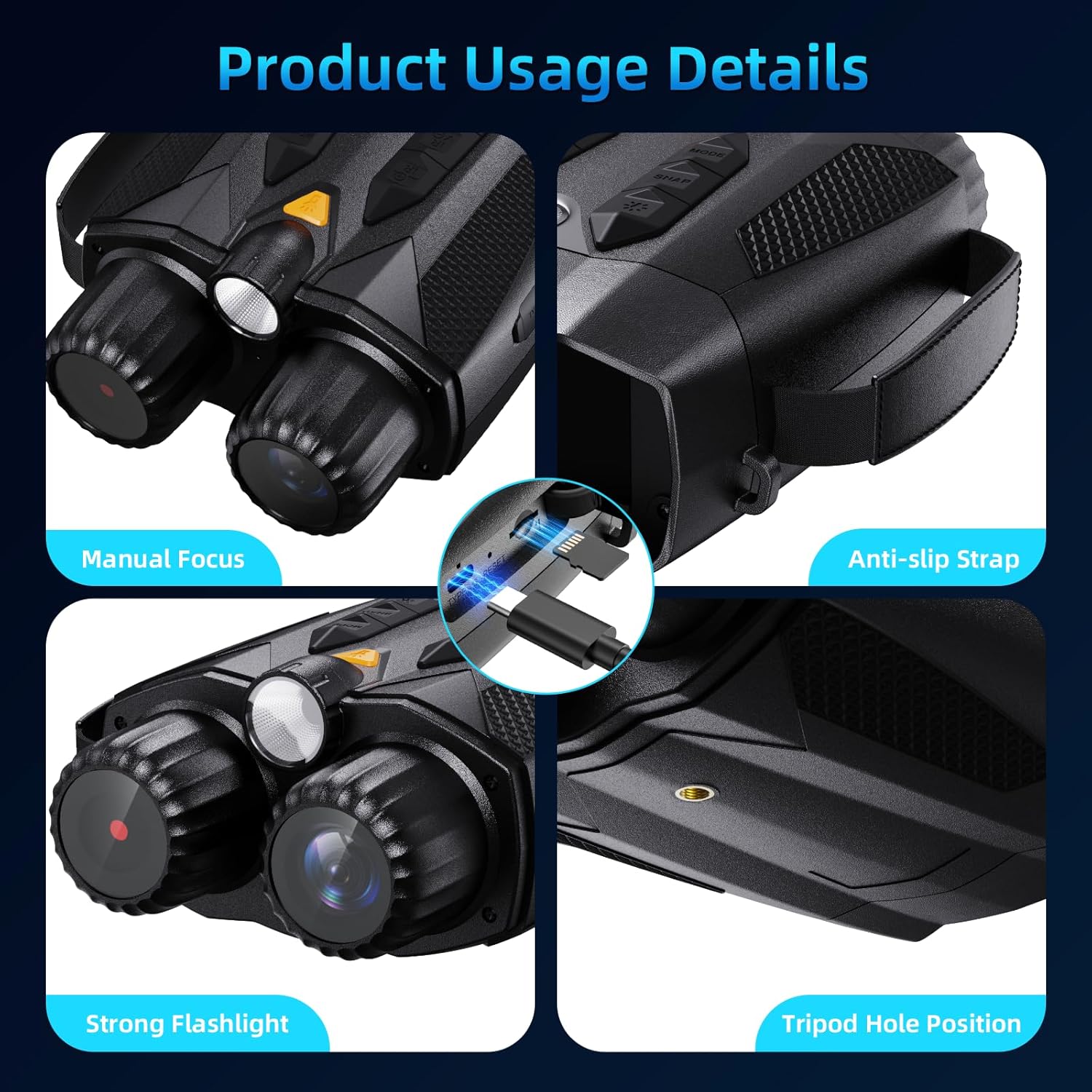
Image 3: Detailed view of the device, highlighting the anti-slip strap attachment point and tripod mount.
4. Operating Instructions
4.1. Power On/Off
Press and hold the power button (usually located on the top or side) for a few seconds to turn the device on or off. The 3-inch HD IPS display will activate upon power-on.
4.2. Adjusting Display Brightness
The display supports 5 levels of dynamic brightness adjustment. Use the designated brightness control buttons (refer to the device's button layout) to adjust the screen's luminosity for optimal viewing in various lighting conditions, from bright sunlight to dark environments.

Image 4: The binoculars displaying a clear image of a monkey, demonstrating the quality of the 3-inch HD IPS screen.
4.3. Focusing and Digital Zoom
The binoculars feature manual focus and 10x digital zoom.
- Manual Focus: Rotate the focus wheel (typically located near the objective lenses) until the image on the screen appears clear and sharp.
- Digital Zoom: Use the zoom in/out buttons to digitally magnify the image up to 10 times. Note that digital zoom may reduce image quality compared to optical magnification.

Image 5: Illustration of 10X digital zoom capability and manual focus adjustment.
4.4. Night Vision and Infrared (IR) Illumination
The device is equipped with 7-level infrared illumination for clear viewing in complete darkness, allowing observation of objects up to 800 meters away.
- Activating IR: Press the IR button to cycle through the 7 infrared intensity levels. Higher levels provide more illumination but may consume more battery.
- Day Use: For high-definition color images during the day, ensure the infrared hood is covered or IR is turned off.
- Night Use: To obtain black and white images in low light or darkness, activate the IR illumination.

Image 6: Visual representation of the 7 adjustable IR levels and their effect on night vision clarity.

Image 7: Comparison of image quality with IR turned off (day) and IR turned on (night).

Image 8: Demonstration of 800M long-range night vision with adjustable IR levels, showing a cormorant.
4.5. Photo and Video Recording
The binoculars can capture 48MP images and 4K video recordings.
- Switching Modes: Use the mode button to switch between photo and video recording modes.
- Taking Photos: In photo mode, press the shutter button to capture an image.
- Recording Videos: In video mode, press the record button to start and stop recording.
- Playback: Access the playback menu to review captured photos and videos on the display.

Image 9: Examples of photography and videography in both day and night settings.

Image 10: An example of a 48MP image captured by the binoculars, showing cows in a field.
4.6. Integrated Flashlight and Compass
The device includes an integrated flashlight for illumination and an electronic compass for navigation assistance.
- Flashlight: Activate the flashlight via its dedicated button. It can serve as a light source or for emergency signals.
- Compass: The built-in compass provides directional information, useful for outdoor navigation.
4.7. Tripod Mounting and Usage Scenarios
For stable, long-duration observation or recording, the binoculars can be mounted on a standard tripod using the tripod hole position located at the bottom of the device. These binoculars are versatile for various outdoor activities.

Image 11: Various scenarios where the night vision binoculars can be used, including hunting, fishing, hiking, camping, and wildlife observation.
5. Maintenance
- Cleaning Lenses: Use a soft, lint-free cloth specifically designed for optical lenses to clean the objective and eyepiece lenses. Do not use abrasive materials or harsh chemicals.
- Cleaning Body: Wipe the body of the binoculars with a soft, damp cloth. Avoid getting water into electronic components.
- Storage: Store the device in a cool, dry place away from direct sunlight and extreme temperatures. If storing for extended periods, ensure the battery is partially charged (around 50%) to prolong its lifespan.
- Battery Care: Avoid fully discharging the battery frequently. Recharge the battery regularly, even if the device is not in use, to maintain battery health.
6. Troubleshooting
| Problem | Possible Cause | Solution |
|---|---|---|
| Device does not power on. | Battery is depleted. | Charge the battery using the provided USB-C cable. |
| Poor image quality / Blurry image. | Incorrect focus; Lenses are dirty; Insufficient IR illumination. | Adjust manual focus; Clean lenses with an optical cloth; Increase IR level. |
| Cannot record photos/videos. | TF card is full or not inserted correctly; Device is in wrong mode. | Check TF card insertion and available space; Format TF card if necessary; Ensure device is in photo or video mode. |
| Screen is too dark/bright. | Display brightness setting is incorrect. | Adjust the display brightness using the dedicated buttons. |
7. Product Specifications
| Feature | Detail |
|---|---|
| Model Name | inskam326 |
| Brand | COLALY |
| Display | 3-inch IPS Full HD |
| Digital Zoom | 10x |
| Infrared Illumination | 7 Levels |
| Night Vision Range | Up to 800 meters |
| Battery Capacity | 5000mAh Lithium Ion (included) |
| Charging Port | Type-C |
| Storage | Supports up to 512GB TF card (32GB included) |
| Material | Plastic |
| Item Weight | 590 g |
| Dimensions | 19.1 x 14.9 x 8.8 cm |
| Usage | Camping, Hiking & Outdoors, Travel |
| Mounting Type | Tripod Mount |
8. Warranty and Customer Support
For warranty information, technical support, or any inquiries regarding your COLALY 4K Night Vision Binoculars, please refer to the contact information provided on the product packaging or the official COLALY website. Please retain your proof of purchase for warranty claims.
Manufacturer: COLALY
Model: inskam326