
1. Introduction
The HQcontL Digital Rain Gauge and Weather Station is a multi-functional device designed to provide comprehensive weather information for your home. It features a self-emptying wireless rain gauge, indoor/outdoor temperature and humidity monitoring, air pressure history, moon phase display, weather forecast, atomic clock with WWVB function, and customizable alerts. This manual provides detailed instructions for setup, operation, and maintenance to ensure optimal performance of your weather station.

Figure 1: Overview of the HQcontL Digital Rain Gauge and Weather Station components and display.
2. Package Contents
- Main Display Unit (Weather Station Console)
- Wireless Rain Gauge (Self-emptying)
- Wireless Outdoor Sensor (for temperature and humidity)
- Power Adapter for Main Display Unit
- Instruction Manual (this document)
Note: The package includes only 1 outdoor sensor. The weather station supports up to 3 remote channels for additional sensors, which are sold separately.
3. Setup
3.1 Battery Installation
- Main Display Unit: Insert 3 x AAA batteries (not included) into the battery compartment on the back of the main display unit. Ensure correct polarity.
- Wireless Outdoor Sensor: Insert 2 x AA batteries (not included) into the battery compartment of the outdoor sensor. Ensure correct polarity.
- Wireless Rain Gauge: Insert 2 x AA batteries (not included) into the battery compartment of the rain gauge. Ensure correct polarity.
3.2 Placement and Mounting
For accurate readings, proper placement of the rain gauge and outdoor sensor is crucial.
- Main Display Unit: Place the main display unit indoors on a flat surface (e.g., desk, table) using its integrated stand, or mount it on a wall.
- Wireless Outdoor Sensor: Place the outdoor sensor in a shaded area, protected from direct sunlight and rain, to ensure accurate temperature and humidity readings. It can be mounted using the integrated mounting options.
- Wireless Rain Gauge: Place the rain gauge in an open area, away from obstructions like trees or buildings, to ensure accurate rainfall collection. It is recommended to place the rain gauge at a height of one meter above the ground.

Figure 2: Recommended placement of the Host (main unit), Sensor, and Rain Gauge.

Figure 3: Two ways for placement: as a desk clock or wall-mounted.
3.3 Initial Synchronization
After installing batteries in all units, the main display unit will automatically search for and connect to the outdoor sensor and rain gauge. This process may take a few minutes. Ensure all units are within the specified transmission range (up to 328ft/100m in open areas).

Figure 4: Wireless transmission range of the rain gauge to the main unit.
4. Operating Instructions
4.1 LCD Display and Brightness
The weather station features a 7.5" colorful LCD screen with wide viewing angles. When connected to the power adapter, the backlight can be adjusted to five different levels of brightness (0%, 30%, 60%, 80%, 100%) to suit your preferences and conserve power.

Figure 5: The LCD display offers five levels of adjustable brightness.
4.2 Rainfall Measurement
The self-emptying rain gauge accurately measures rainfall. The main display unit shows current rainfall and historical data, including "NOW", "1 HOUR", "24 HOURS", "TODAY", "7 DAYS", "MONTH", "YEAR", and "TOTAL" rainfall amounts.
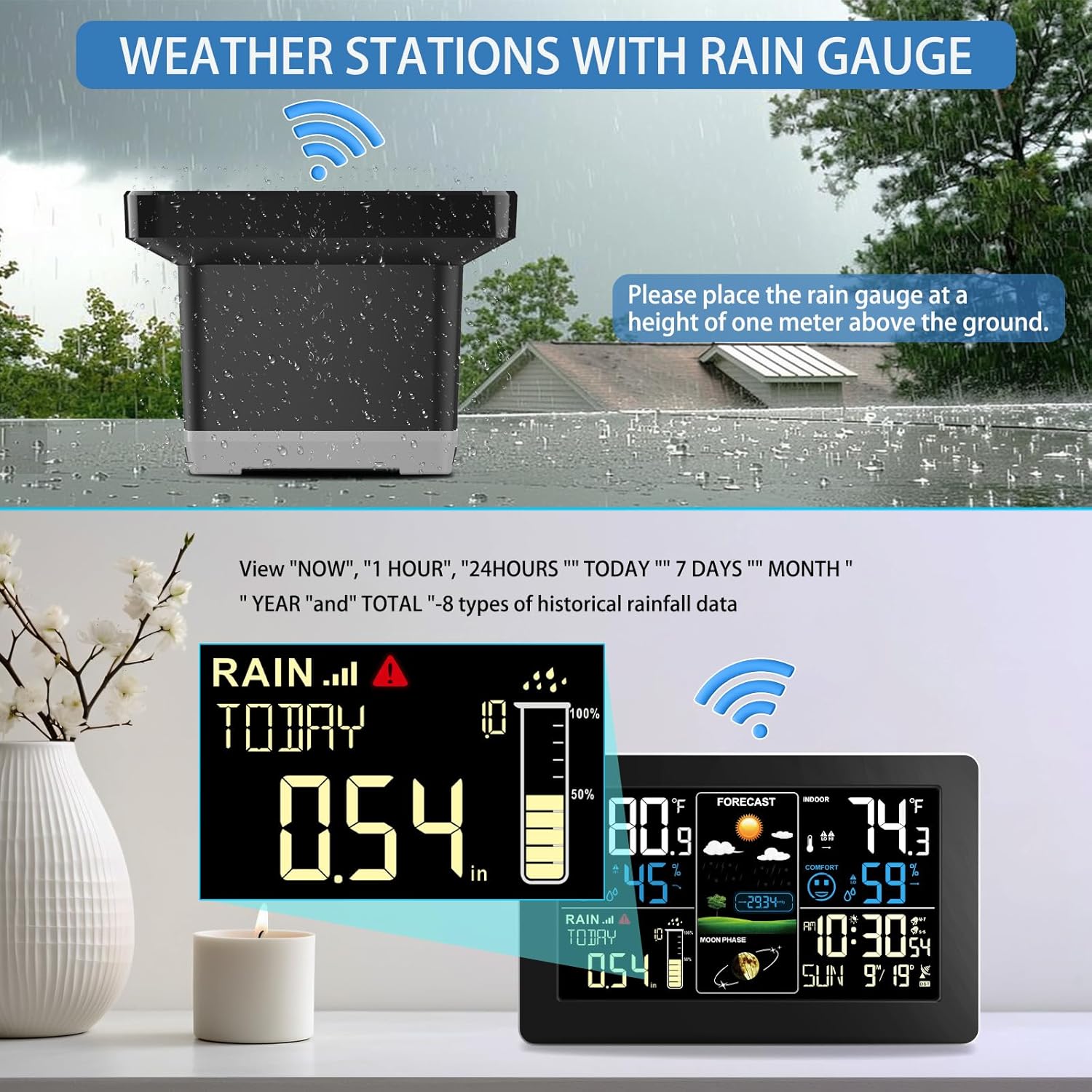
Figure 6: Display showing current and historical rainfall data.
4.3 Temperature and Humidity
Monitor indoor and outdoor temperature and humidity levels. The wireless weather station supports up to 3 remote channels, allowing you to detect conditions in multiple locations such as baby rooms, storage rooms, wine cellars, or vegetable sheds.

Figure 7: The weather station supports up to 3 outdoor sensors for multi-location monitoring.
4.4 Atomic Clock with WWVB Function
The weather station features an atomic clock with WWVB and an auto DST function. It automatically calibrates daily to provide accurate time and date information. If the WWVB signal is weak, you have the option to set it manually.

Figure 8: Digital Atomic Clock with WWVB Signal and Auto DST function.
4.5 Weather Forecast and Alerts
The station provides a 12-hour weather forecast and trend tracking. It also includes customizable alerts, such as a dual alarm clock with snooze function and an outdoor temperature alert. When the temperature exceeds a set range, an audible alarm will activate.

Figure 9: Dual alarm clock with snooze mode and comfort reminder.

Figure 10: Outdoor Hi/Lo Temperature Alert feature.
4.6 Barometric Pressure and Moon Phase
The weather station displays air pressure history and the current moon phase, offering additional environmental insights.

Figure 11: Barometric pressure with past 24 hours historical trends.
5. Maintenance
5.1 Cleaning the Rain Gauge
Although the rain gauge is self-emptying, occasional cleaning may be necessary to remove debris (leaves, dirt) that could obstruct the tipping bucket mechanism. Gently remove any foreign objects from the collection funnel.
5.2 Battery Replacement
Replace batteries in all units when the low battery indicator appears on the main display. Use fresh, high-quality batteries for optimal performance.
6. Troubleshooting
- No readings from outdoor sensor/rain gauge: Ensure units are within range and free from obstructions. Check battery levels in all units. Re-synchronize if necessary by removing and reinserting batteries.
- Inaccurate rainfall readings: Verify the rain gauge is placed in an open area, away from overhead obstructions. Check for debris inside the collection funnel.
- Inaccurate temperature/humidity: Ensure the outdoor sensor is in a shaded, well-ventilated area, away from heat sources or direct sunlight.
- WWVB signal weak: If the atomic clock signal is weak, try relocating the main display unit to a window or an area with less interference. Manual time setting is an alternative.
7. Specifications
| Brand | HQcontL |
| Model Number | Digital Wireless Rain Gauge |
| Product Dimensions | 0.73"D x 9"W x 6"H |
| Item Weight | 1.82 pounds (0.83 Kilograms) |
| Power Source | Corded Electric (for main unit backlight) / Battery (for all units) |
| Are Batteries Included | No |
| Material | Plastic |
| Connectivity Technology | Wireless |
| Display Type | LCD |
| Temperature Accuracy | 0.5 °C |
| Special Features | Adjustable Brightness, Alarm, Customizable Alert, Large Display, Wireless |
8. Official Product Videos
Watch these official product videos for additional guidance and demonstrations:
GEEVON Digital Rain Gauge
This video provides an overview of the GEEVON Digital Rain Gauge, demonstrating its features and functionality.
FanJu Weather station With Rain Gauge
This video showcases the FanJu Weather Station, highlighting its rain gauge capabilities and overall operation.
9. Warranty and Support
For warranty information and customer support, please refer to the contact details provided with your product packaging or visit the official HQcontL website. If the weather gauge does not meet your expectations or if you encounter any issues, please do not hesitate to reach out to us. Customer satisfaction is our top priority.