
1. Introduction
The A-BF SS-6020KDS is a high-performance, adjustable DC stabilized power supply designed for various laboratory, DIY, repair, and electronic testing applications. This unit features a color LED digital display for precise monitoring of voltage, current, power, and time. It offers both constant voltage (CV) and constant current (CC) output modes, along with comprehensive protection features and intelligent timing capabilities.
This manual provides essential information for the safe and efficient operation of your SS-6020KDS power supply. Please read it thoroughly before use.
2. Safety Instructions
To ensure safe operation and prevent damage to the unit or injury, observe the following safety precautions:
- Always connect the power supply to a grounded AC outlet.
- Do not operate the unit in wet or damp conditions.
- Ensure proper ventilation. Do not block the cooling fan or air vents.
- Do not open the casing. High voltages are present inside, posing a risk of electric shock. Refer all servicing to qualified personnel.
- Verify the input voltage matches your local power supply (AC220±10%, 50Hz).
- Utilize the built-in protection features: over-voltage, over-current, over-power, over-temperature, and short-circuit protection.
3. Product Overview
The SS-6020KDS power supply is equipped with a user-friendly interface and robust features for precise power control.
Key Features:
- Adjustable Voltage, Current, Power, and Time settings.
- Four-window LED color digital display for simultaneous display of voltage, current, power, and time.
- Dual output modes: Constant Voltage (CV) and Constant Current (CC).
- Intuitive interface with output control switch.
- Comprehensive protection: Over-voltage, over-current, over-power, over-temperature, and short-circuit.
- Intelligent timing and timing output functionalities (countdown and cumulative modes).
- Low noise temperature-controlled fan for efficient heat dissipation and extended fan life.
Front Panel Controls and Display:
The front panel provides all necessary controls and indicators for operation.
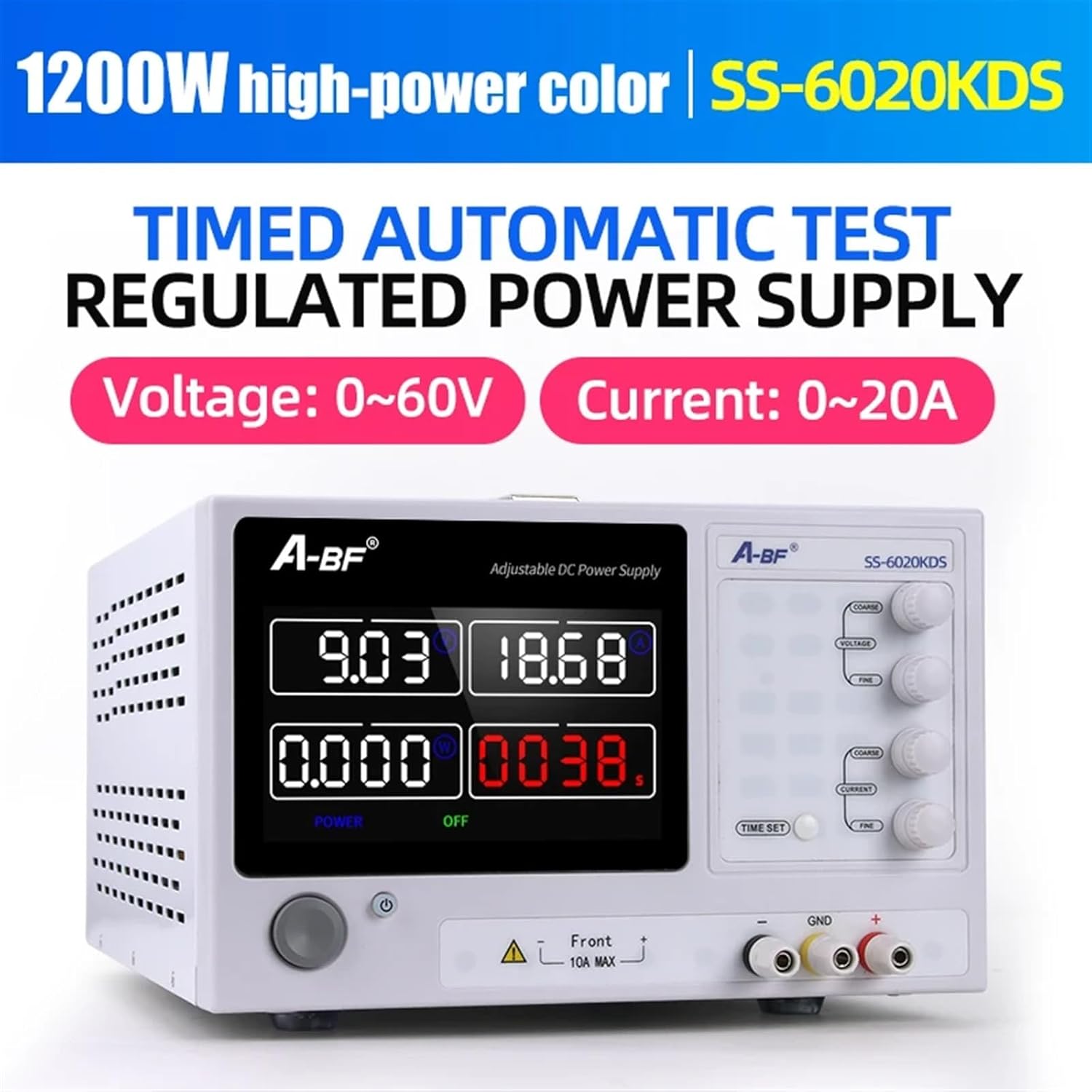
Figure 3.1: Front panel of the A-BF SS-6020KDS showing the color screen display, control knobs for voltage and current, and output terminals.

Figure 3.2: Close-up view of the large color screen display, providing clear visual data readings for voltage, current, power, and time.
Rear Panel:
The rear panel includes the power input, cooling fan, and output terminals.

Figure 3.3: Rear view of a similar KDS series power supply, illustrating the cooling fan and power input socket. The SS-6020KDS features a low-noise, temperature-controlled fan.
4. Setup
Follow these steps to set up your A-BF SS-6020KDS power supply:
- Unpacking: Carefully remove the power supply and all accessories from the packaging. Verify that all components are present, including the power cable and manual.
- Placement: Place the unit on a stable, level surface with adequate clearance around the air vents for proper cooling. Avoid placing it near heat sources or in direct sunlight.
- Power Connection: Connect the provided power cable to the AC input socket on the rear panel of the power supply and then to a grounded AC outlet.
- Output Connections: Connect your load to the output terminals on the front panel. Ensure correct polarity (red for positive, black for negative, green for ground).

Figure 4.1: A KDS series power supply shown with its included power cord and manual, ready for setup.
5. Operating Instructions
This section details the operation of your SS-6020KDS power supply.
5.1 Powering On/Off
- Press the main power switch (usually located on the front panel) to turn the unit on or off. The display will illuminate upon power-on.
5.2 Adjusting Voltage and Current
- Use the VOLTAGE coarse and fine adjustment knobs to set the desired output voltage. The coarse knob makes large adjustments, while the fine knob allows for precise tuning.
- Use the CURRENT coarse and fine adjustment knobs to set the desired output current limit. This acts as a safety feature to prevent excessive current draw by the load.
- The display will show the preset voltage and current values.
5.3 Output Control
- The power supply features an output control switch (often labeled 'POWER' or 'OUTPUT'). Press this button to enable or disable the power output to your load. This allows you to adjust settings without immediately applying power to the connected device.
5.4 Timing Functions
- The TIME SET button allows you to configure timing functions. Refer to the on-screen menu or specific instructions for setting countdown or cumulative time modes.
- The display will show the active timing status.
5.5 Understanding the Display
The color LED digital display provides real-time information:
- Voltage Value: Displays the current output voltage.
- Current Value: Displays the current output current.
- Power Value: Displays the calculated output power (Voltage x Current).
- Time: Displays the elapsed or remaining time when timing functions are active.
6. Maintenance
Proper maintenance ensures the longevity and reliable operation of your power supply.
- Cleaning: Disconnect the power supply from the AC outlet before cleaning. Use a soft, dry cloth to wipe the exterior. Do not use abrasive cleaners or solvents.
- Ventilation: Regularly check that the cooling fan and air vents are free from dust and obstructions. A blocked fan can lead to overheating and reduced performance.
- Storage: When not in use for extended periods, store the unit in a cool, dry place, away from direct sunlight and extreme temperatures.

Figure 6.1: Internal view of a KDS series power supply, showing the precision components and cooling fan. Regular cleaning of external vents helps maintain internal component health.
7. Troubleshooting
If you encounter issues with your SS-6020KDS, refer to the following common problems and solutions:
- No Power:
- Check if the power cable is securely connected to both the unit and the AC outlet.
- Ensure the main power switch is in the 'ON' position.
- Verify the AC outlet is functioning by plugging in another device.
- No Output Voltage/Current:
- Ensure the output control switch is enabled.
- Check if the voltage and current limits are set appropriately for your load.
- Verify that the load is correctly connected to the output terminals and there are no short circuits.
- Overload/Protection Indicator Active:
- If an over-voltage (OVP), over-current (OCP), or over-power (OPP) indicator is active, disconnect the load and reduce the voltage/current settings before re-enabling the output.
- If an over-temperature (OTP) indicator is active, turn off the unit, allow it to cool, and ensure proper ventilation.
- Inaccurate Readings:
- Ensure proper connections and that the unit is operating within its specified range.
- If issues persist, contact customer support.
8. Specifications
The following table details the specifications for the A-BF SS-6020KDS model and other KDS series variants:
| Model | Voltage | Current | Power |
|---|---|---|---|
| SS-2050KDS | 0-20V | 0-50A | 1000W |
| SS-3020KDS | 0-30V | 0-20A | 600W |
| SS-3030KDS | 0-30V | 0-30A | 900W |
| SS-3050KDS | 0-30V | 0-50A | 1500W |
| SS-3060KDS | 0-30V | 0-60A | 1800W |
| SS-5030KDS | 0-50V | 0-30A | 1500W |
| SS-6010KDS | 0-60V | 0-10A | 600W |
| SS-6020KDS | 0-60V | 0-20A | 1200W |
| SS-6030KDS | 0-60V | 0-30A | 1800W |
General Specifications:
- Voltage Stability: ±2%
- Current Stability: ±0.5%
- Load Stability: ±0.5%
- Ripple and Noise: ±1%
- Voltage Resolution: <100V: 10mV; ≥100V: 0.1V
- Current Resolution: 10mA
- Power Resolution: <10W: 1mW, ≥10W: 10mW, ≥100W: 0.1W, ≥1000W: 1W
- Time Resolution: 1S
- Voltage Preset Accuracy: ±0.1V
- Current Preset Accuracy: ±0.1A
- Power Input: AC220±10%, 50Hz
- Dimensions: 325*250*155mm
- Item Weight: 4000 Grams
9. Warranty and Support
For warranty information or technical support, please refer to the documentation included with your purchase or contact the seller/manufacturer directly. Keep your purchase receipt as proof of purchase.