
Introduction
This manual provides essential information for the safe and efficient use of your Feirsh YK-G16 Rechargeable Battery Pack and Charging Station. Please read these instructions thoroughly before operation and retain for future reference.

Product Features
- High Capacity Batteries: Includes four 5800mWh rechargeable batteries, designed to provide extended playtime for your Xbox controllers.
- Fast Charging: The charging station is capable of fully charging batteries in approximately 3-4 hours.
- Long Cycle Life: Batteries support over 3000 recharge cycles, promoting environmental sustainability.
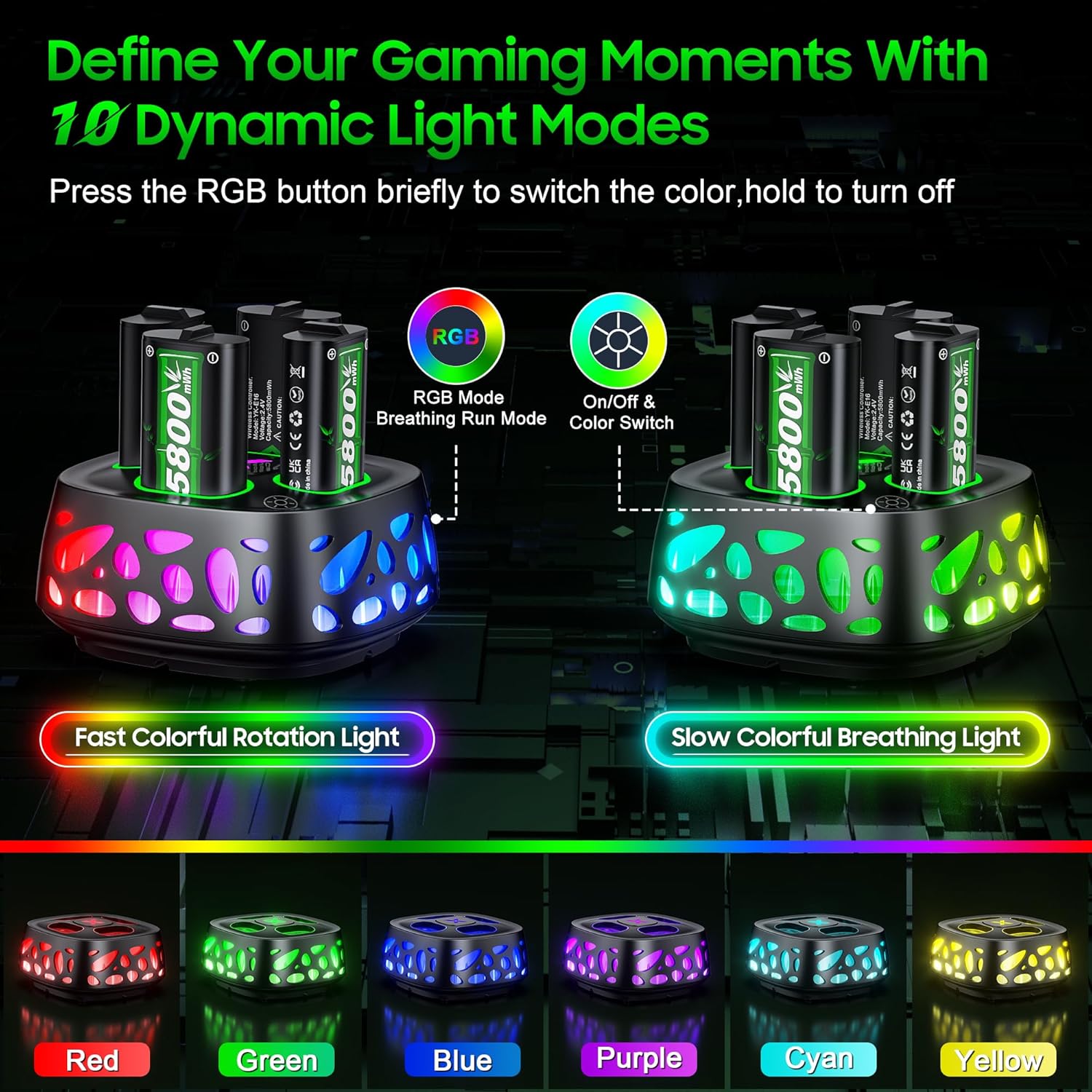
- LED Light Modes: The charging station features 10 dynamic RGB LED light modes, controllable via a touch sensor.
- Charge Status Indicators: Individual LED lights on the charging station indicate battery status: Red for charging, Green for fully charged.
- Broad Compatibility: Designed for use with Xbox Series X|S, Xbox One, Xbox One S, Xbox One X, and Xbox Elite controllers.
Package Contents
Verify that all items are present in your package:
- 4 x 5800mWh Rechargeable Battery Packs
- 1 x 4-Slot Charging Station
- 1 x USB-C Charging Cable
- 1 x User Manual (this document)

Setup Instructions
- Connect the Charging Station: Connect the provided USB-C charging cable to the Type-C port on the charging station. Plug the other end of the USB-C cable into a compatible USB power source (e.g., Xbox console, USB wall adapter, PC).
- Insert Batteries: Carefully insert the 5800mWh rechargeable battery packs into the designated slots on the charging station. Ensure the side marked "5800mWh" is facing outward for correct contact.
- Observe Charging Indicators: The LED indicators on the charging station will illuminate red to show that batteries are charging. Once fully charged, the indicators will turn green.
- Adjust LED Light Modes: Briefly press the touch control button on the charging station to cycle through the 10 available RGB light modes. Press and hold the button to turn off the ambient lighting.

Operating Instructions
Battery Installation in Controller:
- Open the battery compartment on your Xbox controller.
- Insert a fully charged Feirsh 5800mWh battery pack. Ensure the metal contacts on the battery align with the contacts in the controller, and the "5800mWh" label faces outward.
- Close the battery compartment cover securely.

Charging Batteries:
Place depleted batteries into the charging station slots. The red LED will indicate charging. Once the battery is fully charged, the LED will turn green. It is safe to leave batteries in the charger overnight as the station includes overcharge protection.
Ambient Light Control:
The charging station's ambient light can be toggled or adjusted using the touch control button. Briefly press to switch between 10 different lighting effects. Press and hold the button to turn the ambient light on or off.
Compatibility
The Feirsh YK-G16 Rechargeable Battery Pack and Charging Station is compatible with a wide range of Xbox controllers, including:
- Xbox Series X Controllers
- Xbox Series S Controllers
- Xbox One Controllers
- Xbox One S Controllers
- Xbox One X Controllers
- Xbox Elite Controllers

Maintenance
- Cleaning: Use a soft, dry cloth to clean the charging station and batteries. Do not use abrasive cleaners or immerse in water.
- Storage: Store the charging station and batteries in a cool, dry place away from direct sunlight and extreme temperatures when not in use.
- Battery Care: To prolong battery life, avoid fully discharging batteries frequently. Recharge them when the controller indicates low power.
Troubleshooting
| Problem | Possible Cause | Solution |
|---|---|---|
| Batteries not charging (LED remains off or red) | Loose cable connection, faulty power source, incorrect battery insertion. | Ensure USB-C cable is securely connected. Try a different USB port or power adapter. Re-insert batteries, ensuring correct orientation (5800mWh label facing outward). |
| Controller not powering on with battery pack | Battery not fully charged, incorrect battery installation, battery fault. | Ensure battery is fully charged (green LED). Verify correct battery installation in the controller. Try a different battery pack. |
| Ambient lights not working | Lights turned off, power issue. | Briefly press the touch control button to cycle through modes. Press and hold to turn on/off. Ensure the charging station is powered. |
Specifications
- Model Number: YK-G16
- Battery Capacity: 5800mWh per battery pack
- Battery Type: NiMH
- Charging Time: Approximately 3-4 hours
- Recharge Cycles: Over 3000 times
- Input Voltage: 5V
- Input Current: 2A
- Output: 2.8V = 400mA x 4
- Product Dimensions: 4.41 x 4.41 x 2.24 inches
- Item Weight: 12.3 ounces
Warranty and Support
For warranty information, technical support, or any product-related inquiries, please refer to the warranty card included in your original packaging or visit the official Feirsh website. Keep your purchase receipt for warranty claims.


