Introduction
Thank you for choosing the Generic Automatic Foaming Soap Dispenser, Model AS127. This device is designed to provide a hygienic and convenient handwashing experience with its touchless operation and adjustable foam output. Please read this manual carefully before use to ensure proper installation, operation, and maintenance.
Product Features
- Automatic & Touchless Operation: Equipped with an intelligent infrared sensor, dispensing foam within 0.25 seconds.
- USB Rechargeable & Long-Lasting: Features a built-in lithium-ion battery, providing approximately 5000 uses or 90 days on a single full charge.
- IPX5 Waterproof: Designed for use in humid environments, with a rubber plug protecting the USB charging port.
- 11.8oz / 350ml Large Capacity: Transparent reservoir allows for easy monitoring of soap levels, reducing refill frequency.
- Modern Design & Wall-Mount Option: Can be placed on a countertop or affixed to a wall for space-saving convenience.
- Versatile Soap Compatibility: Suitable for foam soap directly, or diluted liquid detergents (1:4-6 ratio with water).
Package Contents
Please check the package for the following items:
- Automatic Foaming Soap Dispenser Unit
- USB Charging Cable
- User Manual
- Wall-Mount Adhesive Hook (if applicable)

This image displays the items included in the product package: the automatic soap dispenser itself, a USB charging cable for recharging, and the user manual for instructions.
Setup and Installation
1. Charging the Dispenser
Before first use, fully charge the dispenser. Connect the provided USB charging cable to the Type-C port on the dispenser and to a standard USB power adapter (not included). The LED indicator will show charging status (refer to Operating Instructions for LED details).

This image focuses on the USB Type-C charging port, emphasizing the modern and convenient charging method for the dispenser's built-in rechargeable battery.
2. Filling the Soap Reservoir
- Gently twist and remove the top section of the dispenser from the reservoir.
- For foam soap, pour it directly into the reservoir.
- For liquid detergents (e.g., hand soap, dish soap), dilute with water at a ratio of 1 part soap to 4-6 parts water. Stir gently to mix, avoiding excessive bubbles.
- Do not overfill. Reattach the top section securely.
3. Placement Options
The dispenser offers flexible placement:
- Countertop Placement: Simply place the dispenser on any flat, stable surface in your bathroom, kitchen, or other desired location.
- Wall-Mount Installation: Use the provided adhesive hook (if included) to mount the dispenser on a clean, dry wall surface. Ensure the surface is suitable for adhesive mounting and allow sufficient time for the adhesive to set before hanging the dispenser.

This image demonstrates the flexible placement options for the soap dispenser, illustrating it securely mounted on a wall and also positioned on a countertop.
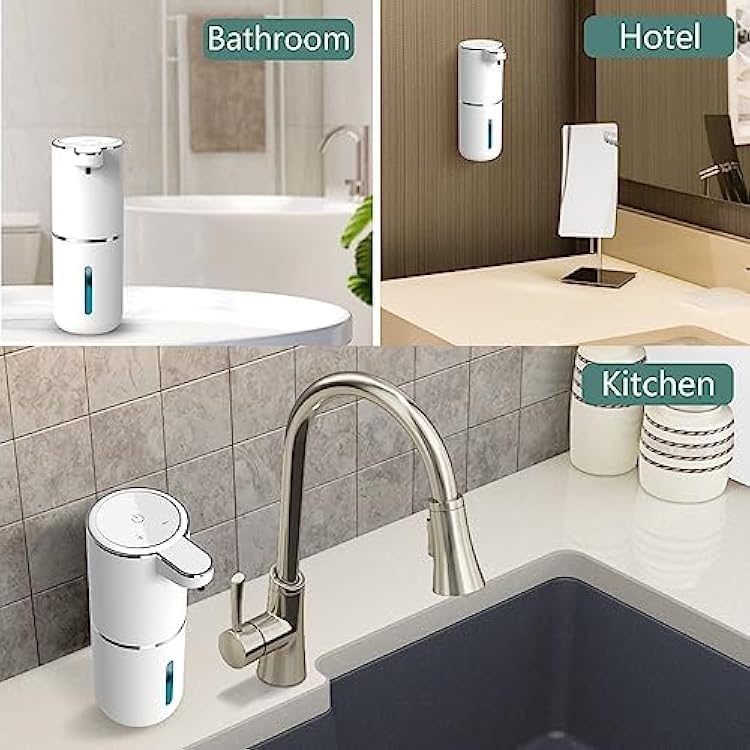
This image illustrates the versatility of the automatic foaming soap dispenser, showcasing its use in a bathroom, a hotel setting, and a kitchen.
Operating Instructions
1. Power On/Off
Locate the power button on the top of the dispenser. Press and hold the button for a few seconds to turn the device on or off. The LED indicator will confirm the status.
2. Adjusting Foam Levels
The dispenser features three adjustable foam output levels. Briefly press the power button (after turning it on) to cycle through the foam levels. The LED indicator color will change to reflect the selected level (e.g., different colors for low, medium, high output).
3. Dispensing Foam
Place your hand flat under the nozzle within the sensor's range. The infrared sensor will detect your hand and automatically dispense a measured amount of foam soap. Remove your hand to stop dispensing.

An overview image detailing the main functionalities of the dispenser, including its infrared sensor for touchless operation, the option for wall mounting, three adjustable foam output levels, quick dispensing response, and convenient USB Type-C charging.
4. LED Indicator Guide
The LED indicator provides visual feedback on the dispenser's status:
- Red Light: Device is off.
- Green Light: Device is on.
- Blue Light: Device is actively dispensing foam or charging.

A visual guide to the dispenser's LED indicators: a red light signifies the device is off, a green light indicates it is on, and a blue light shows when it is actively dispensing or charging.
Maintenance and Care
- Cleaning: Wipe the exterior of the dispenser with a soft, damp cloth. Do not submerge the unit in water.
- Waterproofing: The dispenser has an IPX5 waterproof rating, making it resistant to splashes. Ensure the rubber plug for the USB charging port is securely closed to prevent water ingress.
- Soap Residue: If the nozzle becomes clogged, gently clean it with a small brush or damp cloth. For optimal performance, periodically rinse the reservoir with clean water if switching soap types or if residue builds up.
- Storage: If storing for an extended period, ensure the dispenser is clean, dry, and fully charged. Store in a cool, dry place.
Troubleshooting
| Problem | Possible Cause | Solution |
|---|---|---|
| Dispenser does not turn on. | Battery is depleted. | Charge the dispenser using the USB cable. |
| Dispenser does not dispense foam. |
|
|
| Foam output is weak or inconsistent. |
|
|
| Battery does not charge. |
|
|
Specifications
- Model Number: AS127
- Brand: Generic
- Material: Plastic
- Color: White
- Product Dimensions: 4.4"L x 3"W x 7.7"H
- Liquid Volume: 350 Milliliters (11.8 oz)
- Waterproof Rating: IPX5
- Power Source: USB Rechargeable (Built-in Lithium-ion Battery)
- Sensor Type: Infrared
Warranty and Support
Specific warranty information for this product is not available in the provided data. For warranty claims, technical support, or any product-related inquiries, please refer to the contact information provided by your retailer or the manufacturer at the time of purchase.

