
Loniko U5-1-WK
Loniko Smart Toilet User Manual
Model: U5-1-WK
Introduction
Welcome to the Loniko Smart Toilet experience. This advanced toilet system integrates a built-in bidet, heated seat, dual auto flush, warm water and dryer functions, a foot sensor, night light, and wireless remote control for ultimate comfort and hygiene. This manual provides detailed instructions for installation, operation, maintenance, and troubleshooting to ensure optimal performance and longevity of your smart toilet.

Figure 1: Loniko Smart Toilet (Model U5-1-WK) with its wireless remote control.
Safety Information
Please read all safety warnings and instructions carefully before installation and use to prevent injury or damage.
- Ensure proper electrical grounding to prevent electric shock.
- Do not immerse the product in water or spray water directly onto electrical components.
- Keep out of reach of children and supervise during use.
- Do not use abrasive cleaners or harsh chemicals on the toilet surface or bidet nozzle.
- Disconnect power before performing any maintenance or cleaning.
- Verify water pressure and temperature settings before use to avoid discomfort or scalding.
Product Overview
The Loniko Smart Toilet is designed for enhanced hygiene and comfort. Below are its key features and components.
Flushing System
This smart toilet features a powerful and efficient flushing system utilizing advanced vortex jet technology, a large built-in water tank, and a pump. It operates effectively without specific water pressure requirements.
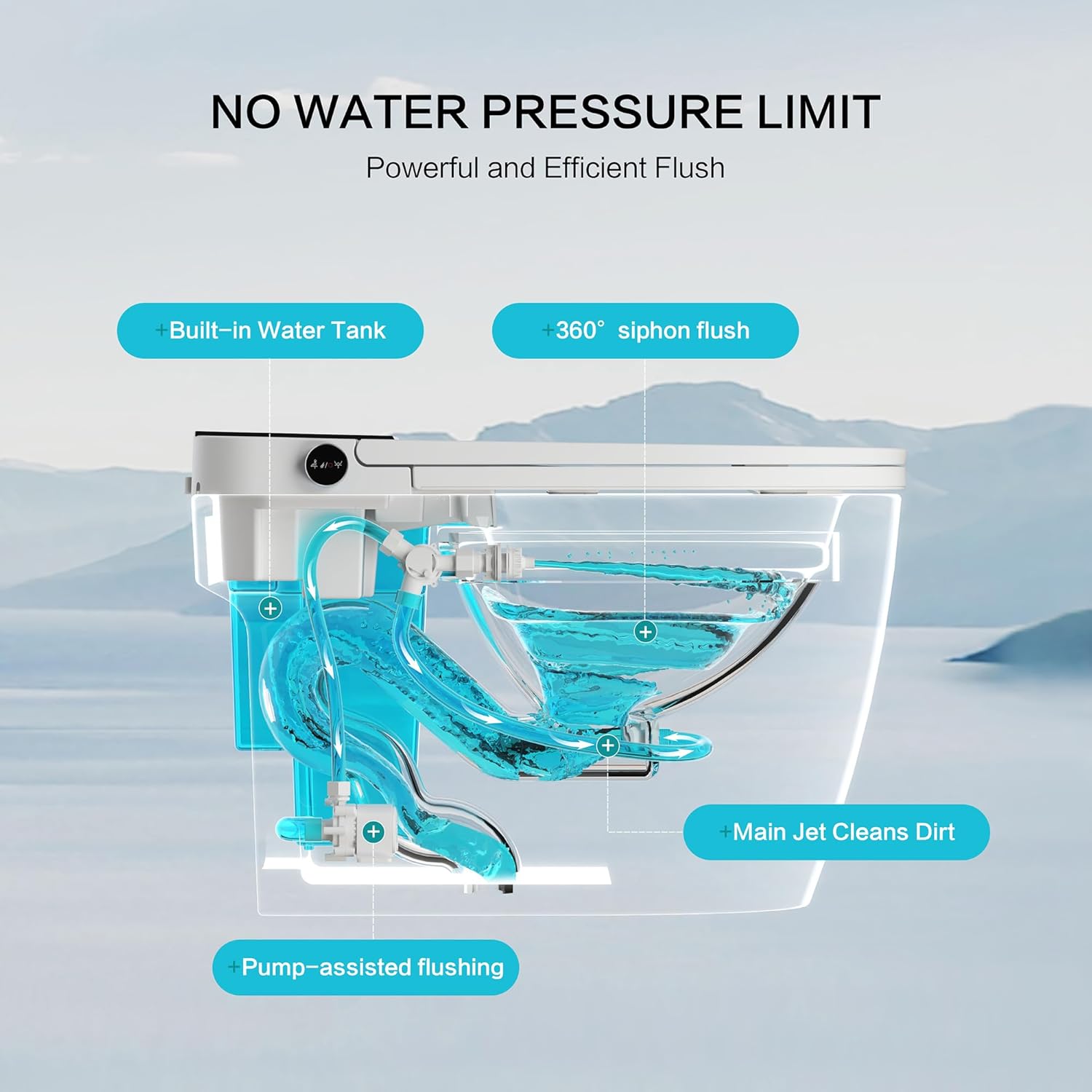
Figure 2: Internal view of the flushing system, highlighting the built-in water tank, 360° siphon flush, main jet, and pump-assisted flushing.
Smart Sensors & Automatic Functions
Experience hands-free convenience with automatic lid opening and closing. The toilet offers multiple flushing modes, including automatic flushing when you leave the seat, foot sensor flushing, and remote control flushing.

Figure 3: Automatic lid and flushing features, showing activation via approach, departure, foot sensor, and remote.
Bidet & Cleaning Modes
Tailor your cleaning experience with posterior, feminine, oscillating, and massage modes. The built-in bidet uses filtered water for optimal hygiene.

Figure 4: Various bidet wash modes and temperature settings for personalized comfort.
Comfort Features
Enjoy year-round warmth with adjustable seat, dryer, and water temperatures (Normal, 93°F, 96°F, and 99°F). A soft LED night light provides gentle illumination.

Figure 5: Illustration of the heated seat, warm air dryer, and night light features.
Controls
The toilet can be controlled via an intuitive one-touch knob on the side and a comprehensive wireless remote control.
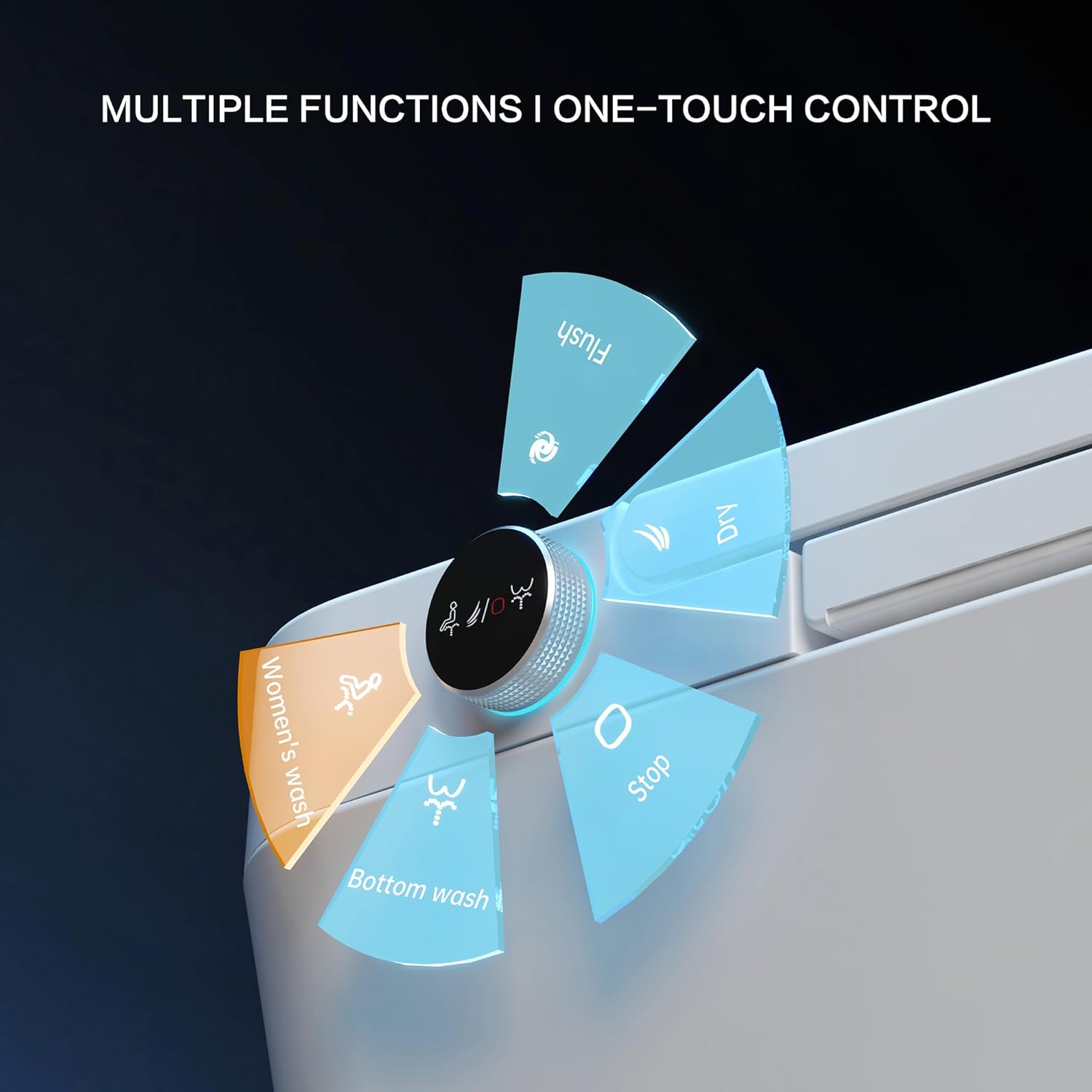
Figure 6: One-touch knob for quick access to main functions.

Figure 7: Wireless remote control with detailed function buttons and LCD display.
Safety Protections
The Loniko Smart Toilet incorporates 8 layers of safety protection for secure and stable operation.

Figure 8: Overview of the 8-layer safety protection system.
Official Product Video
Watch the official product video for a visual demonstration of the Loniko Smart Toilet's features and operation.
Video 1: Loniko 945 Luxury Comfort Smart Toilet overview. This video demonstrates the automatic lid, heated seat, bidet functions, and flushing mechanism.
Installation
The Loniko Smart Toilet is designed for hassle-free DIY setup. It fits standard 12-inch rough-in distances (measured from the wall to the drain center).
Included Components:
- Smart Toilet Unit
- Wireless Remote Control
- Mounting Brackets
- Screws
- Valve
- Wax Ring
- Screw Plate
- Installation Template
- User Manual (this document)
- Optional Battery (if applicable)
For detailed step-by-step instructions, refer to the included installation guide and video tutorials provided by Loniko.

Figure 9: Installation components and key dimensions for rough-in.
Operating Instructions
This section details how to use the various functions of your Loniko Smart Toilet.
Automatic Lid & Flushing
- Auto Open/Close: The lid will automatically open when you approach the toilet and close when you walk away.
- Auto Flush: The toilet will automatically flush after you leave the seat.
- Foot Sensor Flush: Gently tap your foot on the designated foot sensor area to activate flushing.
- Remote Control Flush: Use the "Flush" button on the wireless remote control.
Bidet Functions
- Posterior Wash: Activates the rear cleansing spray.
- Feminine Wash: Activates the front cleansing spray.
- Oscillating Wash: The nozzle moves back and forth for a wider cleaning area.
- Massage Wash: Provides a pulsating water stream for a gentle massage effect.
- Water Pressure Adjustment: Use the '+' and '-' buttons on the remote to adjust spray intensity.
- Nozzle Position Adjustment: Use the 'Forward' and 'Backward' buttons on the remote to adjust nozzle position.
Temperature Settings
- Heated Seat: Adjust seat temperature using the 'Seat Temp' button on the remote. Available settings: Normal, 93°F, 96°F, 99°F.
- Warm Water: Adjust water temperature for the bidet using the 'Water Temp' button. Available settings: Normal, 93°F, 96°F, 99°F.
- Warm Air Dryer: Activate the dryer and adjust air temperature using the 'Air Temp' button.
Additional Features
- Night Light: The soft LED night light provides illumination for nighttime use. It can be toggled using the 'Light' button on the remote.
- Self-Cleaning Nozzle: The bidet nozzle performs a self-cleaning cycle before and after each use.
- ECO Mode: Activates energy-saving mode.
Maintenance
Regular cleaning and maintenance will ensure the longevity and hygienic operation of your smart toilet.
- Exterior Cleaning: Wipe the exterior surfaces with a soft, damp cloth and mild, non-abrasive cleaner. Avoid harsh chemicals.
- Nozzle Cleaning: The bidet nozzle has a self-cleaning function. For deeper cleaning, gently pull out the nozzle and clean with a soft brush and mild soap. Ensure power is disconnected before manual cleaning.
- Filter Maintenance: Periodically check and clean the water filter to prevent blockages and maintain optimal water flow. Refer to the installation guide for filter location.
- Descaling: If hard water is an issue, periodic descaling of the bidet water path may be necessary. Consult a professional if unsure.
Troubleshooting
If you encounter any issues with your Loniko Smart Toilet, refer to the table below for common problems and their solutions.
| Problem | Possible Cause | Solution |
|---|---|---|
| No power/Unit not responding | Power cord unplugged, circuit breaker tripped, remote control batteries low. | Check power connection, reset circuit breaker, replace remote batteries. |
| Bidet spray weak or inconsistent | Water supply valve closed, water filter clogged, nozzle blocked. | Ensure water supply is fully open, clean water filter, clean bidet nozzle. |
| Heated seat not warming | Temperature setting too low, ECO mode active, internal heating element issue. | Increase seat temperature setting, disable ECO mode, contact customer support if issue persists. |
| Automatic lid not opening/closing | Sensor obstructed, sensor malfunction. | Ensure sensor area is clear, try resetting power. |
| Toilet leaking | Loose connections, damaged wax ring, internal component failure. | Check all water connections for tightness. If leak persists, contact a qualified plumber or customer support immediately. |
Specifications
| Feature | Detail |
|---|---|
| Model Number | U5-1-WK |
| Product Dimensions (D x W x H) | 26.77" x 15.94" x 17.72" |
| Item Weight | 90 Pounds |
| Material | Ceramic, Polypropylene (PP) |
| Seat Material Type | Polypropylene (PP) |
| Rough-in Distance | Standard 12 inches |
| Power Source | No batteries required (main power) |
| UPC | 768795751339 |
Warranty & Support
The Loniko Smart Toilet comes with a 12-month replacement warranty. For any inquiries, technical assistance, or warranty claims, our 24/7 customer support team is available to assist you. Please refer to the contact information provided on the product packaging or the official Loniko website.
Ask a question about this manual
Ask about setup, troubleshooting, compatibility, parts, safety, or missing instructions. Manuals+ will review the question and use this page’s manual context to help answer it.