
Yuezhongoo Yuezhongooc4zmaiv5dh-12
Yuezhongoo Outdoor Bluetooth Speaker User Manual
Model: Yuezhongooc4zmaiv5dh-12
Introduction
Thank you for purchasing the Yuezhongoo Outdoor Bluetooth Speaker. This manual provides essential information for setting up, operating, and maintaining your speaker. Please read it carefully before use to ensure optimal performance and longevity of your device.
This speaker is designed for outdoor use, featuring surround sound, high power output, and dynamic RGB light effects, making it ideal for camping and other outdoor activities.
Package Contents
- Yuezhongoo Outdoor Bluetooth Speaker (Red)
- USB Type-C Charging Cable
- User Manual

Product Overview
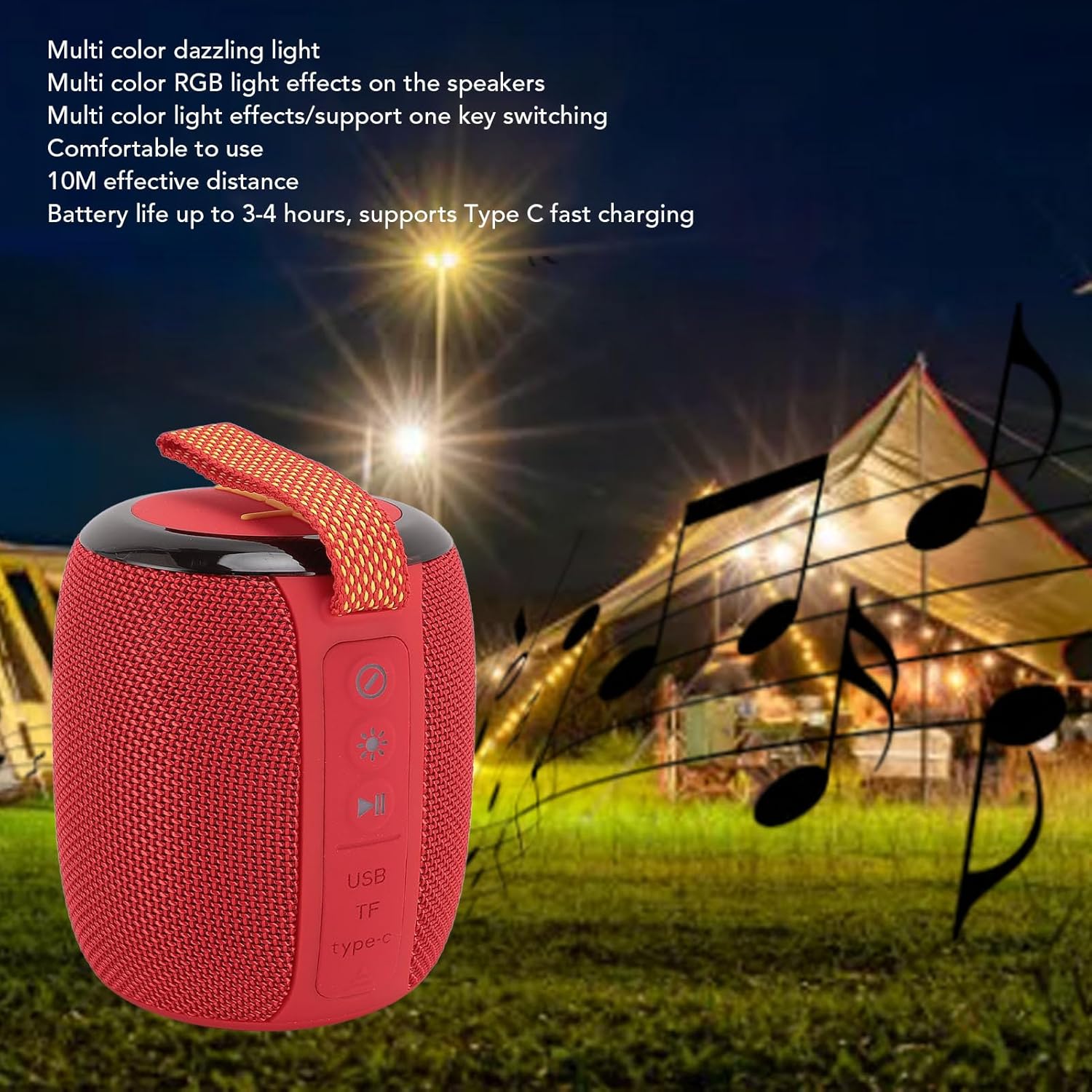
Familiarize yourself with the various parts and controls of your speaker.


- Power Button (X): Press and hold to power on/off.
- Volume Down / Previous Track (-): Short press for volume down, long press for previous track.
- Volume Up / Next Track (+): Short press for volume up, long press for next track.
- Play/Pause Button (▶︎❚❚): Press to play or pause audio.
- Light Mode Button (☀): Press to cycle through RGB light effects.
- USB Port: For USB drive playback.
- TF Card Slot: For TF (MicroSD) card playback.
- Type-C Charging Port: For charging the speaker.
Setup
Charging the Speaker
Before first use, fully charge the speaker. Connect the supplied USB Type-C cable to the speaker's Type-C port and the other end to a USB power adapter (not included) or a computer's USB port. The charging indicator light will show charging status (specific light behavior not detailed in product info, assume standard charging indicator).
A full charge provides approximately 3-4 hours of battery life.
Powering On/Off
- To Power On: Press and hold the Power Button (X) for a few seconds until you hear an audible prompt or see the indicator light illuminate.
- To Power Off: Press and hold the Power Button (X) again for a few seconds until you hear an audible prompt or the indicator light turns off.
Operating Instructions
Bluetooth Pairing
- Ensure the speaker is powered on and in Bluetooth pairing mode (usually indicated by a blinking blue light).
- On your mobile device (smartphone, tablet, etc.), enable Bluetooth.
- Search for available Bluetooth devices. The speaker will appear as "Yuezhongoo Speaker" or similar.
- Select the speaker from the list to pair. Once paired, you will hear a confirmation sound, and the indicator light will become solid.
- The effective Bluetooth distance is approximately 10 meters (33 feet).
Playing Audio
- Bluetooth: Once paired, play audio from your connected device.
- USB Drive: Insert a USB drive with audio files into the USB port. The speaker should automatically switch to USB playback mode.
- TF Card: Insert a TF (MicroSD) card with audio files into the TF card slot. The speaker should automatically switch to TF card playback mode.
Controlling Playback and Volume
- Play/Pause: Press the Play/Pause button (▶︎❚❚).
- Volume Up: Short press the '+' button.
- Volume Down: Short press the '-' button.
- Next Track: Long press the '+' button.
- Previous Track: Long press the '-' button.
RGB Light Effects
The speaker features multi-color RGB light effects. Press the Light Mode Button (☀) to cycle through different light patterns and modes. One-key switching is supported.

Maintenance
- Cleaning: Use a soft, dry cloth to clean the speaker's surface. Do not use abrasive cleaners or solvents.
- Storage: Store the speaker in a cool, dry place away from direct sunlight and extreme temperatures when not in use for extended periods.
- Battery Care: To prolong battery life, avoid fully discharging the battery frequently. Charge the speaker regularly, even if not in use.
- Water Resistance: While designed for outdoor use, avoid submerging the speaker in water. Ensure port covers are securely closed if applicable.
Troubleshooting
| Problem | Possible Cause | Solution |
|---|---|---|
| Speaker does not power on. | Low battery. | Charge the speaker fully. |
| Cannot pair via Bluetooth. | Speaker not in pairing mode; Device Bluetooth off; Too far from speaker. | Ensure speaker is in pairing mode. Turn on Bluetooth on your device. Move device closer to speaker (within 10m). |
| No sound. | Volume too low; Paused playback; Incorrect input source. | Increase volume on speaker and device. Press play. Ensure correct source (Bluetooth, USB, TF) is active. |
| RGB lights not working. | Light mode off or stuck. | Press the Light Mode Button (☀) to cycle through modes. |
Specifications
| Feature | Detail |
|---|---|
| Model Number | Yuezhongooc4zmaiv5dh-12 |
| Brand | Yuezhongoo |
| Connectivity | Bluetooth, USB, TF Card |
| Battery Life | Approx. 3-4 hours |
| Charging Port | Type-C |
| Effective Bluetooth Distance | 10 meters (33 feet) |
| RGB Light Effects | Multi-color dazzling light, one-key switching |
| Item Weight | 1.14 pounds |
| Package Dimensions | 5.12 x 4.33 x 4.33 inches |
Warranty and Support
Yuezhongoo products are manufactured with high quality standards. For warranty information or technical support, please refer to the contact details provided on the product packaging or the official Yuezhongoo website. Please retain your proof of purchase for any warranty claims.
For further assistance, you may contact customer support via:
- Email: support@yuezhongoo.com
- Website: www.yuezhongoo.com
Ask a question about this manual
Ask about setup, troubleshooting, compatibility, parts, safety, or missing instructions. Manuals+ will review the question and use this page’s manual context to help answer it.