
1. Introduction
Thank you for choosing the Jocca Digital Air Fryer. This appliance is designed to provide a healthy and convenient way to cook your favorite meals with up to 80% less oil. Its advanced features, including a digital LED touch screen and multiple automatic programs, ensure perfect results every time. Please read this manual thoroughly before first use to ensure safe and optimal operation.
2. Safety Instructions
- Always place the air fryer on a stable, heat-resistant surface.
- Do not immerse the appliance, cord, or plug in water or any other liquid.
- Keep children and pets away from the appliance during operation.
- Ensure the voltage indicated on the appliance matches your local mains voltage.
- Unplug the air fryer from the outlet when not in use and before cleaning.
- Do not block the air inlet or outlet vents.
- Do not fill the basket with oil or other liquids.
- The appliance operates at high temperatures; use oven mitts when handling hot parts.
3. Product Overview
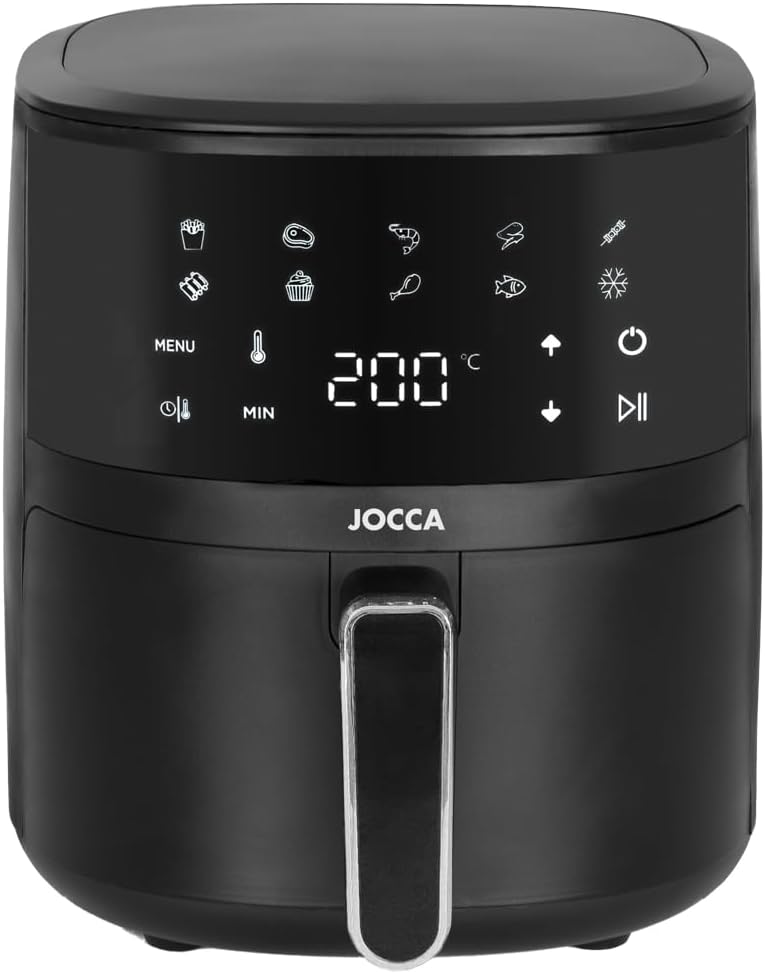
Figure 3.1: Front view of the Jocca Digital Air Fryer, showcasing its sleek black design and intuitive LED touch screen control panel. The display shows temperature and time settings, along with various cooking icons.

Figure 3.2: Angled view highlighting the digital control panel with touch-sensitive buttons for menu selection, temperature adjustment, timer settings, and power control. The current temperature is displayed as 180°C.

Figure 3.3: The air fryer with its cooking basket fully pulled out, demonstrating the easy access for loading and unloading food. The handle is ergonomically designed for comfortable grip.

Figure 3.4: A close-up view of the air fryer's interior basket, showing the removable crisper plate. This design allows for optimal air circulation and easy cleaning after use.
4. Setup and First Use
4.1 Unpacking
- Carefully remove the air fryer and all packaging materials from the box.
- Remove any stickers or labels from the appliance.
- Retain the packaging for future storage or transport.
4.2 Initial Cleaning
- Before first use, clean the basket and crisper plate with hot water, a mild dishwashing detergent, and a non-abrasive sponge.
- Wipe the inside and outside of the appliance with a damp cloth.
- Ensure all parts are completely dry before use.
4.3 Placement
- Place the air fryer on a stable, level, and heat-resistant surface.
- Ensure there is at least 10 cm (4 inches) of free space on the back and sides of the appliance, and 10 cm (4 inches) above it, to allow for proper air circulation.
- Do not place the appliance against a wall or other appliances.
5. Operating Instructions
5.1 Control Panel Overview
The Jocca Digital Air Fryer features an intuitive LED touch screen. The main controls include:
- Power Button (): Turns the appliance on/off and starts/pauses cooking.
- Menu Button (MENU): Cycles through 9 pre-set cooking programs.
- Temperature Adjustment ( / ): Increases or decreases the cooking temperature (30°C - 200°C).
- Timer Adjustment ( / ): Increases or decreases the cooking time (1 - 60 minutes).
- Defrost Function (): Activates the defrost program.
5.2 Basic Operation
- Plug the air fryer into a grounded wall outlet. The power button will illuminate.
- Pull out the basket from the air fryer. Place the crisper plate inside the basket.
- Place the ingredients into the basket. Do not exceed the MAX fill line.
- Slide the basket back into the air fryer. Ensure it clicks securely into place.
- Press the Power Button () to turn on the display.
- Manual Setting: Use the Temperature Adjustment buttons ( / ) to set the desired temperature and the Timer Adjustment buttons ( / ) to set the cooking time.
- Pre-set Programs: Press the Menu Button (MENU) repeatedly to cycle through the 9 automatic programs (e.g., fries, chicken, fish, cake, shrimp, steak, vegetables, defrost, keep warm). The corresponding icon will light up.
- Once settings are chosen, press the Power Button () again to start cooking. The fan and heating element will activate.
- During cooking, you can pull out the basket to shake or turn ingredients. The air fryer will automatically pause and resume when the basket is reinserted.
- When the cooking time is complete, the air fryer will beep and automatically shut off.
- Carefully pull out the basket and empty the cooked food onto a plate. Use tongs for larger items.
5.3 Defrost Function
The defrost function allows for gentle thawing of frozen foods. To use:
- Place frozen food in the basket.
- Press the Power Button ().
- Press the Defrost Function button (). The air fryer will set an appropriate temperature and time for defrosting.
- Press the Power Button () again to start the defrosting process.
6. Cleaning and Maintenance
6.1 Cleaning
- Always unplug the air fryer and allow it to cool completely before cleaning.
- Clean the basket and crisper plate with hot water, dish soap, and a non-abrasive sponge. These parts are also dishwasher safe.
- Wipe the exterior of the appliance with a damp cloth. Do not use abrasive cleaners or scouring pads.
- Clean the interior of the appliance with a damp cloth and mild detergent if necessary.
- Ensure all parts are thoroughly dry before storing or next use.
6.2 Storage
Store the air fryer in a cool, dry place, away from direct sunlight and moisture. Ensure the power cord is neatly wrapped and secured.
7. Troubleshooting
| Problem | Possible Cause | Solution |
|---|---|---|
| Air fryer does not turn on. | Not plugged in; power outlet issue; appliance malfunction. | Ensure the plug is securely inserted. Check the power outlet with another appliance. If problem persists, contact support. |
| Food is not cooked evenly. | Basket overloaded; ingredients not shaken/turned. | Do not overload the basket. Shake or turn ingredients halfway through cooking. |
| White smoke coming from appliance. | Grease residue from previous use; fatty ingredients. | Clean the basket and crisper plate thoroughly after each use. For fatty foods, place a piece of aluminum foil under the crisper plate. |
| Appliance smells during first use. | Normal for new appliances. | This is normal and will dissipate after a few uses. Ensure good ventilation. |
8. Specifications
| Feature | Detail |
|---|---|
| Brand | Jocca |
| Model Number | 2219P |
| Color | Total Black |
| Product Dimensions (L x W x H) | 29 x 26 x 35 cm (11.4 x 10.2 x 13.8 inches) |
| Capacity | 4 Liters |
| Power | 1400 Watts |
| Material | Polypropylene |
| Special Features | Automatic Shut-off, Temperature Control, Timer, LED Touch Screen, 9 Automatic Programs, Defrost Function |
| Item Weight | 3.93 Kilograms (8.66 lbs) |
| Temperature Range | 30°C to 200°C |
| Timer Range | 1 to 60 minutes |
9. Warranty and Support
The Jocca Digital Air Fryer is covered by a manufacturer's warranty. Please refer to your purchase documentation for specific warranty terms and conditions. For technical support, spare parts, or any inquiries not covered in this manual, please contact Jocca customer service through the retailer where the product was purchased or visit the official Jocca website.
Please retain your proof of purchase for warranty claims.

