
1. Introduction
This manual provides essential information for the safe and effective use of your Peakbatt BL-166 1700mAh Li-ion battery. This battery is specifically designed as a replacement for the Gigabyte Gsmart Maya M1. Please read these instructions carefully before installation and use to ensure optimal performance and safety.
2. Safety Information
Lithium-ion batteries require careful handling. Adhere to the following safety guidelines:
- Do not attempt to disassemble, open, or service the battery pack.
- Replace only with the battery pack designated for this product.
- Do not crush, puncture, short external contacts, or dispose of in fire or water.
- Do not store above 60°C (140°F).
- Keep the battery away from children.
- Dispose of used batteries according to local regulations.
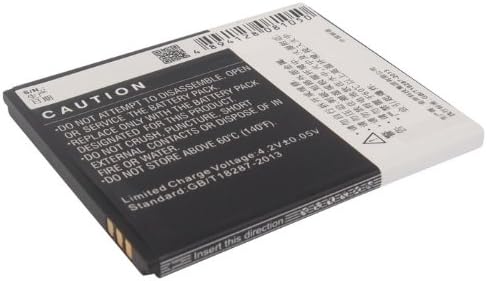
Image: Back of the Peakbatt BL-166 battery, displaying important caution and safety warnings regarding handling and disposal.
3. Setup (Installation)
Before installing the new battery, ensure your device is powered off. Refer to your Gigabyte Gsmart Maya M1's original user manual for specific battery compartment access instructions. Generally, battery replacement involves the following steps:
- Power off your Gigabyte Gsmart Maya M1 completely.
- Locate and open the battery compartment cover on your device. This is typically on the back of the phone.
- Carefully remove the old battery.
- Insert the new Peakbatt BL-166 battery, ensuring the contacts align correctly with the device's terminals. The battery is designed to fit in one orientation only.
- Securely close the battery compartment cover.
- Power on your device.

Image: Front view of the Peakbatt BL-166 battery, showing the model number CS-GSM100SL, capacity (1700mAh), and voltage (3.7VDC).
4. Operating (Usage)
Once installed, the Peakbatt BL-166 battery operates like the original battery in your Gigabyte Gsmart Maya M1.
- Initial Charge: It is recommended to fully charge the battery before its first use.
- Charging: Use only the original or certified compatible charger for your Gigabyte Gsmart Maya M1. Avoid using damaged chargers or cables.
- Discharge: While modern Li-ion batteries do not suffer from 'memory effect', it is generally good practice to allow the battery to discharge significantly before recharging, but avoid letting it drain completely to 0% frequently.
5. Maintenance
Proper maintenance can extend the lifespan of your battery:
- Temperature: Avoid exposing the battery to extreme temperatures (hot or cold), as this can degrade performance and lifespan.
- Storage: If storing the device or battery for an extended period, ensure the battery is charged to approximately 50-60% and stored in a cool, dry place.
- Cleaning: Keep the battery contacts clean and free from dust or debris.
6. Troubleshooting
If you encounter issues with your new Peakbatt BL-166 battery, consider the following:
- Device Not Powering On: Ensure the battery is correctly seated in its compartment and fully charged. Verify that the device itself is functioning correctly.
- Battery Not Charging: Check the charging cable and adapter for damage. Try charging with a different compatible charger. Ensure the charging port on your device is clean.
- Rapid Battery Drain: This could indicate high background app usage or device settings. Review your device's power management settings. If the issue persists, the battery may be faulty.
- Overheating: If the battery or device becomes excessively hot during charging or use, immediately disconnect the charger and power off the device. Do not use the battery if it shows signs of swelling or damage.
7. Specifications
Detailed specifications for the Peakbatt BL-166 battery:
| Feature | Detail |
|---|---|
| Part Number | BL-166 |
| Model Number | CS-GSM100SL |
| Type | Li-ion |
| Capacity | 1700mAh |
| Voltage | 3.7VDC |
| Rate | 6.29Wh |
| Dimensions | 66.50 x 55.82 x 4.80 mm |
| Weight | 60g |
| Certifications | ISO9001, RoHS, CE, UN38.3, MSDS |
8. Warranty and Support
Peakbatt provides the following support for this product:
- 12-month Warranty: Covers manufacturing defects and performance issues under normal use.
- 30-day Money Back Guarantee: For returns within 30 days of purchase.
- Customer Service: 7*24 hours customer service is available for assistance. Please contact your retailer or Peakbatt directly for support.